Outline ·
[ Standard ] ·
Linear+
>>> DIY Notebook Cooler Owner's Club <<<, Cost Effective + Performance
|
qdipanda
|
 Jun 15 2010, 10:20 AM Jun 15 2010, 10:20 AM
|

|
QUOTE(devilish_yin @ Jun 14 2010, 11:05 PM) Here the picture as promised ...... haven't finish though no idea where to squish another fan on it~ [attachmentid=1627157][attachmentid=1627163][attachmentid=1627192][attachmentid=1627211] Everyone are welcomed to give me idea  to mod this thing. not bad....  |
|
|
|
|
|
devilish_yin
|
Jun 15 2010, 01:05 PM
|
|
|
Hmmm thinking of adding more fan on it with a switch control >.<
the problem is clearance size ..... thinking of finding those blower fan
|
|
|
|
|
|
devilish_yin
|
Jun 15 2010, 02:51 PM
|
|
|
|
|
|
|
|
|
uDean
|
Jun 16 2010, 02:30 AM
|
New Member

|
uhu..not bad.. here's mine.. the big fan just for temporary only.. still thinking new layout.. but i love this cooler pad.. very easy to place the fan anywhere i want..huhu.. 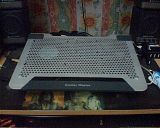 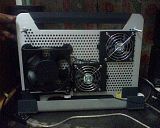 based on record, by using speedfan 4.40, i got 70++ for proc's temp.. that's before i use this cooler pad.. rite now maintain below 70..  |
|
|
|
|
|
devilish_yin
|
Jun 16 2010, 08:57 AM
|
|
|
70 over aaaaaa Crazy woooo mine barely below 60 rarely it exceed 60 without my fan with my fan lower than 50.........70 aaa seriously ....what laptop you using ? is it a Compaq?  |
|
|
|
|
|
uDean
|
Jun 16 2010, 09:27 AM
|
New Member
|
QUOTE(devilish_yin @ Jun 16 2010, 08:57 AM) 70 over aaaaaa Crazy woooo mine barely below 60 rarely it exceed 60 without my fan with my fan lower than 50.........70 aaa seriously ....what laptop you using ? is it a Compaq? acer 3680, proc t5300.. i know that.. i've used 3 software to detect the temp.. speedfan 4.40, everest ultimate and realtemp 3.40.. and all software gave me 3 different value..the difference between each value is whithin 10'C range.. which one should i choose..huhu... |
|
|
|
|
|
devilish_yin
|
Jun 16 2010, 09:51 AM
|
|
|
try this one lets compare >.< using this one cause automatic detect heat sensor..... http://www.cpuid.com/softwares/hwmonitor-p...ns-history.html |
|
|
|
|
|
uDean
|
Jun 16 2010, 12:59 PM
|
New Member
|
ahaks.. thanks..the temp show 50++..
maybe i put excessive thermal paste during last service..
gonna fix it..huhu..
|
|
|
|
|
|
devilish_yin
|
Jun 16 2010, 06:54 PM
|
|
|
LOL must be the other software go haywire >.<..... hmm are there anyone who know where and how to acquire High Powered LED ...... better light whole thing up ..... >.< and anyone got idea how to block the annoying led ray ...... I wan to spread the light out .... ~The blower fan .... so old need to service it ... making too much noise XD |
|
|
|
|
|
uDean
|
Jun 16 2010, 07:55 PM
|
New Member
|
led? ermm.. u planning to use 5v @ 12v power supply?
bout the red led.. not so clear whut u wanna do.. wanna get rid of it or want to light up whole pad with red light?
|
|
|
|
|
|
devilish_yin
|
Jun 16 2010, 08:05 PM
|
|
|
Already using 12v power adapter la .... why 5v .............. no power supply bro power adapter la I mean the red LED ray so strong that it pierce my eye kacau me animeing  So I wan to disperse the light evenly or block the strong ray .... And I found some AllanGap marvellous work in the forum and saw his mod with a High Powered LED ..... that why suddenly got interested with the LED  http://cid-1eafc7a3f088c2e8.skydrive.live....88C2E8!142/ http://cid-1eafc7a3f088c2e8.skydrive.live....88C2E8!142/ |
|
|
|
|
|
uDean
|
Jun 16 2010, 09:09 PM
|
New Member
|
ahaks.. since u already opened ur cooler pad, y dont u just bend the red led towards backside instead frontside?
|
|
|
|
|
|
devilish_yin
|
Jun 16 2010, 10:22 PM
|
|
|
cannot lerr ... the light wont disperse backward .... already tried that .....
Wondered how AllnGap managed to light up that case >.< so syok~!!!!
|
|
|
|
|
|
lee_what2004
|
Jun 18 2010, 02:46 AM
|
*stare* ji--------

|
Well, not sure if this could be called as DIY Cooler since no fancy stand or something like that. Just putting it beside the ventilation and works quite well.. Running@7.5V to keep the noise down... 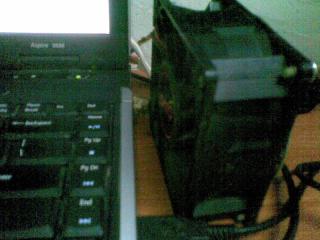

Room with only fan ceiling... Idle temp 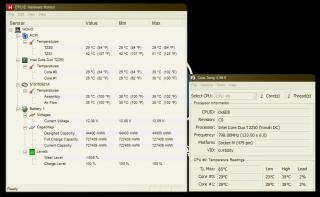
Load (Folding), Last 2 year, on load, it could reach 88C... 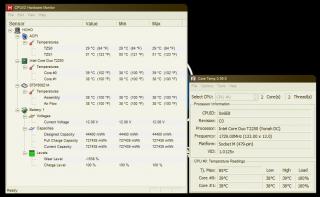
|
|
|
|
|
|
devilish_yin
|
Jun 18 2010, 09:40 AM
|
|
|
Portable Cooler >.< hahahaha can place anywhere can cool our hand if sweat during gaming XD |
|
|
|
|
|
uDean
|
Jun 18 2010, 12:43 PM
|
New Member
|
ahaks.. before this i also placed my 240v fan like dat.. very effective..  |
|
|
|
|
|
devilish_yin
|
Jun 18 2010, 04:35 PM
|
|
|
240v  seriously table fan?  |
|
|
|
|
|
uDean
|
Jun 18 2010, 06:50 PM
|
New Member
|
nop.. u can see from my previous pic.. the big black fan stick on my cooler pad..huhu
|
|
|
|
|
|
devilish_yin
|
Jun 19 2010, 09:42 AM
|
|
|
LOL  never realize that >.< How much did you get the AC Fan ? Powerful? Noisy ? ....The blower fan ...is a no no in the end too slow and big ...need to cut my pad somemore  ... Found a 4cm Fan quite powerful suck all my adapter current and all my LED are dimmer after increase the LED number to 6 ... Guess I need to upgrade my adapter  . But then 4cm ngam ngam ....can fit in my pad. Planning of making a backside vent hole using the 4cm fan..... |
|
|
|
|
|
TSwtm0325
|
Jun 19 2010, 03:16 PM
|
|
|
QUOTE(lee_what2004 @ Jun 18 2010, 02:46 AM) Well, not sure if this could be called as DIY Cooler since no fancy stand or something like that. Just putting it beside the ventilation and works quite well.. Running@7.5V to keep the noise down...
Room with only fan ceiling... Idle temp
Load (Folding), Last 2 year, on load, it could reach 88C...
bro this fan very dangerous ler, if u got hamster sure mati potong 2 i suggest u dismantle the laptop, clean the heatsink and reapply thermal paste, works much more better than u do like that  |
|
|
|
|





 Quote
Quote


 0.0215sec
 0.54
0.54
 6 queries
 GZIP Disabled