Outline ·
[ Standard ] ·
Linear+
NirSoft FolderChangesView [Free], monitors the folder or disks for changes
|
TScybpsych
|
  Jul 10 2012, 07:52 AM, updated 13y ago Jul 10 2012, 07:52 AM, updated 13y ago
|

|
FolderChangesView v1.05http://www.nirsoft.net/utils/folder_changes_view.htmlhttp://www.nirsoft.net/utils/folderchangesview.zipQUOTE FolderChangesView is a simple tool that monitors the folder or disk drive that you choose and lists every filename that is being modified, created, or deleted while the folder is being monitored.
You can use FolderChangesView with any local disk drive or with a remote network share, as long as you have read permission to the selected folder. 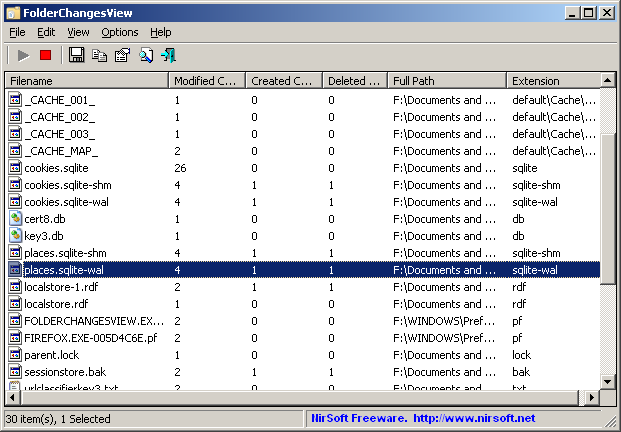
|
|
|
|
|
|
TScybpsych
|
Jul 27 2012, 04:40 AM
|
|
|
FolderChangesView v1.10http://www.nirsoft.net/utils/folderchangesview.zip- Added new command-line options: /Start , /BaseFolder , and /MonitorSubfolders - The 'Choose Folder' options are now saved in the .cfg file.
|
|
|
|
|
|
TScybpsych
|
Sep 5 2012, 12:44 AM
|
|
|
FolderChangesView v1.15http://www.nirsoft.net/utils/folderchangesview.zipAdded 'Put Icon On Tray' option.
|
|
|
|
|
|
TScybpsych
|
Sep 22 2012, 12:46 AM
|
|
|
FolderChangesView v1.16http://www.nirsoft.net/utils/folderchangesview.zipFixed issue: The properties and the 'Choose Folder' windows opened in the wrong monitor, on multi-monitors system.
|
|
|
|
|
|
TScybpsych
|
Oct 17 2012, 06:41 AM
|
|
|
FolderChangesView v1.20http://www.nirsoft.net/utils/folderchangesview.zipAdded 'File Owner' column, which displays the owner of the specified file.
|
|
|
|
|
|
TScybpsych
|
Feb 11 2013, 01:47 PM
|
|
|
FolderChangesView v1.21http://www.nirsoft.net/utils/folderchangesview.zipAdded 'Mark Odd/Even Rows' option, under the View menu. When it's turned on, the odd and even rows are displayed in different color, to make it easier to read a single line. Added 'Add Header Line To CSV/Tab-Delimited File' option. When this option is turned on, the column names are added as the first line when you export to csv or tab-delimited file.
|
|
|
|
|
|
TScybpsych
|
Apr 5 2013, 05:22 AM
|
|
|
FolderChangesView v1.22http://www.nirsoft.net/utils/folderchangesview.zipFixed the flickering problem on Windows 7.
|
|
|
|
|
|
TScybpsych
|
May 19 2013, 02:24 AM
|
|
|
FolderChangesView v1.25http://www.nirsoft.net/utils/folderchangesview.zipAdded 'Automatically Scroll Down On New Items' option.
|
|
|
|
|
|
TScybpsych
|
Jun 5 2013, 05:58 PM
|
|
|
FolderChangesView v1.26http://www.nirsoft.net/utils/folderchangesview.zipYou can now specify environment variables (For example: %appdata%) in the folder path to monitor. Fixed bug: When specifying wrong folder, FolderChangesView entered into monitor mode without allowing you to stop it.
|
|
|
|
|
|
TScybpsych
|
Jun 26 2013, 05:06 AM
|
|
|
FolderChangesView v1.30http://www.nirsoft.net/utils/folderchangesview.zipYou can now specify one or more folders (in comma-delimited list) to exclude. Wildcards are also allowed. For example: in order to exclude all files under C:\Program Files and its subfolders, you should specify: C:\Program Files*
|
|
|
|
|
|
TScybpsych
|
Jul 7 2013, 05:52 PM
|
|
|
FolderChangesView v1.35http://www.nirsoft.net/utils/folderchangesview.zipAdded option to show only files that match to the specified wildcards. (For example: *.html, *.xml)
|
|
|
|
|
|
TScybpsych
|
Aug 26 2013, 07:23 AM
|
|
|
FolderChangesView v1.40http://www.nirsoft.net/utils/folderchangesview.zipAdded option to save and load the entire configuration of FolderChangesView ('Save Configuration' and 'Load Configuration' under the File menu).
|
|
|
|
|
|
TScybpsych
|
Sep 17 2013, 02:38 PM
|
|
|
FolderChangesView v1.50http://www.nirsoft.net/utils/folderchangesview.zipAdded new columns: 'File Size', 'Modified Time', and 'Created Time', which displays the current date/time and size of the specified file. Added 'Open Recent Configuration' menuu, which allows you to easily load the last 10 configurations you previously saved. Added /cfg command-line option, which instructs FolderChangesView to use a config file in another location instead if the default config file, for example: FolderChangesView.exe /cfg "%AppData%\FolderChangesView.cfg"
|
|
|
|
|
|
TScybpsych
|
Oct 31 2013, 05:14 PM
|
|
|
FolderChangesView v1.55http://www.nirsoft.net/utils/folderchangesview.zipYou can now start monitoring folders with the last 5 configurations you saved, directly from the tray menu. Added 'Show Choose Folder Window On Start' option. You can turn it off if you don't want that the 'Choose Folder' window will appear when you start FolderChangesView.
|
|
|
|
|



 Quote
Quote
 0.0161sec
 0.75
0.75
 5 queries
 GZIP Disabled