Welcome Guest ( Log In | Register )

Bump Topic Topic Closed RSS Feed

Outline · [ Standard ] · Linear+

Maxis The Official Maxis FTTH Thread | v2, Maxis Home Fibre Internet, from RM138

views
     
jerryching
post Jul 13 2012, 12:22 AM

New Member
*
Junior Member
40 posts

Joined: May 2008


QUOTE(gogetter83 @ Jul 12 2012, 04:16 PM)
i have a friend who subscribe to the same service, who mentioned disconnection problem.
But he says, router shows internet is connected but can't browse. Then he need manually disconnect and reconnect on his router to get back the service. But he's landed with FTTH, so I wasn't too sure it's the same problem....
*
I'm at Landed with 10M FTTH ..Just install for 1 week ++ Also Facing the Disconnection Problem .. Router shows internet is connected but can't browse .. Ping to Router Gateway 192.168.1.254 ..100% O.K ..But Ping Google , Maxis + UniFi ..100% Timeout ..Need to Disconnect _ Reconnect Few Time To Restore the Internet Connection .. vmad.gif vmad.gif rclxub.gif rclxub.gif
jerryching
post Jul 14 2012, 03:16 AM

New Member
*
Junior Member
40 posts

Joined: May 2008


10/07/2012 ..Request Public IP
11/07/2012 ..Internet Down 4AM ..Restore 5PM
From 13/07/2012 7PM ..I Start Getting xDSL linestate down Problem!!
Another Thing is When Download a 140MB File for Internet ..I BEEN Try to Re...download for More then 50 TIMES..By the End What I Get is A Un Finish File ONLY !!!!
BEEN Try to use my 1Mbps Streamyx Internet Account + FULL Firewall. QOS..Every Security ON Linksys Modem to Download the 140MB File .. ONLY NEED 1 Time !!!
SO What is the Point For Using a 10Mbps Maxis Home Fibre ?? Can’t EVEN Finish Downloading a 140MB File in 50 Times VS 1Mbps Streamyx Only 1 Time Finish !!!

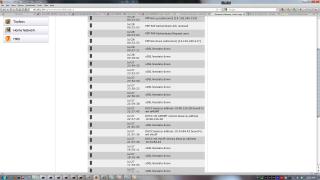
Do the xDSL linestate down Problem ..Because of Using Public IP ??


Attached thumbnail(s)
Attached Image Attached Image
jerryching
post Jul 16 2012, 10:17 PM

New Member
*
Junior Member
40 posts

Joined: May 2008


QUOTE(Aeon_Clock @ Jul 16 2012, 04:15 PM)
where to see this details?
*
Home > Thomson Gateway > Information biggrin.gif biggrin.gif
jerryching
post Jul 28 2012, 03:06 AM

New Member
*
Junior Member
40 posts

Joined: May 2008


I Receive a appointment call that Today 11.00am 27/07/2012 TM + Maxis Technical will come to check my Maxis Home Fibre.
Around 10.45am have Two TM Technical come and LOOK AT my TM Modem only... Then one of them ask me whether when the internet line Disconnect ..Did the modem light blinking ..I tell him No ..Both of the TM Modem and Maxis Router Look Normal only. Then he say ..Then That’s Not TM Problem Anymore ..Coz TM Only Support until the TM Modem only ....I got to wait for the Maxis Technical come ..Then they leaving.
About 11am something Maxis Technical come..I tell him that the TM Technical already come and leaving ... Coz they say that until TM Modem is .O.K ...So that NOT TM Problem Anymore. So he call back Office ask for the TM Technical H/P number..The TM Technical Tell him the same story also. The Maxis Technical call back Office ask for Rearrange the TM Technical to come again...but been told that will be after 2.30pm..But the Maxis Technical have another appointment at 3.00pm..so he have to leaving and he tell me that someone from Maxis will follow up about this.
About 2.42pm..There TM Technical come..One on them unplug the Fibre Cable from TM Modem and Check with the Fibre Test Equipment ...Another TM Technical see the reading and say ..That’s Why Always Disconnect !! ..Then the TM Technical which holding the Fibre Test Equipment continue to Test the Internal Socket which near the wall and get another reading..Then the TM Technical which say (That’s Why Always Disconnect) say plug back and Test. After few minute ..the internet connect again..then they say ..O.K What ..Can connect ..No Problem!!
Then they ask me that How many PC I use for that Maxis Home Fibre.. I tell them only one...But I Plug in the LAN output to my Linksys SD2008 Gigabit Switch..Coz I want to link with another network PC that using Streamyx. Then they tell me that I Can’t Doing this..Coz Streamyx and Maxis is NOT MATCH!! ..That Why I keep getting Disconnect!! I tell them ..I Been using this Since long time ago .. Streamyx + Jaring + UniFi ..All modem LAN out > To my Linksys SD2008..No Problem what!! They say Cannot ..You Need to use Direct Connection ..Can’t link to Streamyx true the Linksys SD2008 Switch..If UniFi...NO Problem..Coz Same Company. I tell them ..O.K ..I will try to use Direct Connection ..Only Use one PC for this 10M Maxis Home Fibre. They leaving after that..and ask me to call Maxis If I Still have any Disconnection Problem.
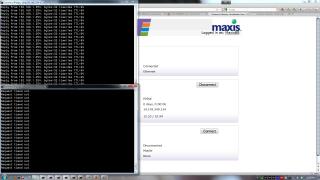
But After I’m Using Direct Connection... I STILL FACING THE DISCONNECTION PROBLEM!! Picture Maxis Error 43.jpg , Maxis Error 44.jpg , Maxis Error 45.jpg is Prove that Direct Connection also having the Disconnection Problem!! That Mean That Mather f***er TM Technical .... Talking SHIT..Streamyx Can’t link with Maxis by Switch..Ask him to go back to CHEAT his Grandma or Grandpa...What I has Facing Before is ...When UniFi have Problem ..It will make the Networking ..ALL TIME OUT!!
I FEEL that TM Technical Treat UniFi user as FIRST PRIORITY ... Other ISP user which using their port just Simply give out a STUPID REASON to close the case!! mad.gif mad.gif vmad.gif vmad.gif
Can Someone tell me that ..What Should the Reading for Get a Stable Fibre Connection??
THANKS!!


Attached thumbnail(s)
Attached Image Attached Image Attached Image Attached Image Attached Image
jerryching
post Jul 28 2012, 12:16 PM

New Member
*
Junior Member
40 posts

Joined: May 2008


QUOTE(jetwash @ Jul 28 2012, 06:31 AM)
what are the readings obtained by the tm guys?

the reading should be below 20dBM, anything above 25dBM is bad and shouldn't get installed in the first place.
*
I just Remember the Reading when my First installation is 19dBM ... Yesterday reading I'm Not So Sure is 9 or 19 rclxub.gif ..Coz I didn't stand near the TM Technical ... Just HEAR another TM Technical say .. "That's Why Always Disconnect" ONLY
May I Know the Higher is 20dBM ..ANY Lower ..Not low then How many ? rclxub.gif Thanks smile.gif smile.gif

This post has been edited by jerryching: Jul 28 2012, 12:16 PM
jerryching
post Jul 28 2012, 12:40 PM

New Member
*
Junior Member
40 posts

Joined: May 2008


QUOTE(aerobowl @ Jul 28 2012, 12:28 PM)
https://forum.maxis.com.my/forum_topic.asp?TOPIC_ID=4082

this make me believe that mylaunchpad settings are linked with account
like maxis can enable or disable from your account settings

thats explain why some people never see their browser hijacked by mylaunchpad
*
I also Facing this Stupid Problem ..Last time I Did Bookmark mylaunchpad ..Even Now Already Delete it ..It Still Replace the new page when I open Randomly rclxub.gif rclxub.gif vmad.gif vmad.gif

This post has been edited by jerryching: Jul 28 2012, 12:42 PM

Topic ClosedOptions
 

Change to:
| Lo-Fi Version
0.0407sec    0.21    7 queries    GZIP Disabled
Time is now: 2nd December 2025 - 02:41 AM