

QUOTE(Bitfenix.My @ Aug 13 2013, 08:55 AM)
Got news from HQ. A product launch is Tomorrow! can you guess what it is?

Prodigy M perhaps? 
★★★ The House Of BitFenix ★★★, ❖ Be Invincible ❖
|
|
 Aug 13 2013, 12:51 PM Aug 13 2013, 12:51 PM
|
 
Senior Member
1,301 posts Joined: Feb 2010 From: FSN9 CenTToll  
|
QUOTE(Bitfenix.My @ Aug 13 2013, 08:55 AM) Got news from HQ. A product launch is Tomorrow! can you guess what it is? Prodigy M perhaps? |
|
|
|
|
|
Aug 13 2013, 02:09 PM
|

Senior Member
8,746 posts Joined: Jul 2010 From: S.A.B.A.H
|
Shadow!! or Phenom-M!! I wanna see something different lol
 |
|
|
Aug 14 2013, 09:23 AM
|

Junior Member
164 posts Joined: Nov 2008
|
Is the new product out??
 |
|
|
Aug 14 2013, 09:37 AM
|
|
Senior Member
8,746 posts Joined: Jul 2010 From: S.A.B.A.H
|
They told me 5pm then can reveal lolz
 |
|
|
Aug 14 2013, 05:06 PM
|

Junior Member
12 posts Joined: Jun 2012
|
 BitFenix Launches Prodigy M The iconic small form factor chassis reengineered with micro-ATX compatibility (BitFenix Design Lab, August 14, 2012) – Known for its clean yet modern designs, premier PC hardware designer BitFenix unleashes the all-new version of its critically and commercially acclaimed Prodigy chassis - the Prodigy M. As newest member of the Prodigy family, Prodigy M represents the most compact and highly compatible case in the micro-ATX segment, setting new standards in terms of mobility, compatibility, and design. Featuring never-before-seen flexibility and styling in the mini-ITX segment, the original Prodigy has garnered over 100 media awards and accolades. Since then, the BitFenix Labs have been inundated with emails requesting a retooled version that accepts micro-ATX motherboards. Today, BitFenix is proud to officially release the Prodigy M - a case inspired by BitFenix fans around the world. Headlining the Prodigy M is full compatibility with micro-ATX motherboards. For the first time, users will be able to build micro-ATX systems inside the same svelte dimensions of the original Prodigy, and enjoy all of the added expandability of the micro-ATX form factor. With two variations of Prodigy now available, users can now choose the one that's right for their own builds. For storage mavens and water cooling enthusiasts, the original Prodigy is ideal for those types of users. For gamers looking for dual graphics systems with SLI or Crossfire, or for those users that need more than one expansion slot, the new Prodigy M is perfect fit for them. Either way, BitFenix fans can enjoy the signature styling and tremendous flexibility of the Prodigy. The sophisticated design of the Prodigy line has always been an expression of modern elegance. Solid construction and flexibility are among the key strengths of this model. The new Prodigy M not only offers plentiful expansion options, but also enables a new dimension of small form factor system builds. Its hallmark dual BitFenix FyberFlex™ Composite handles on the top and bottom subtly create a concave visual effect for an extremely modern yet powerful look. These handles are also strong yet incredibly flexible to absorb minor shocks during transport. The BitFenix SofTouch™ Surface Treatment adds further emphasis to the Prodigy M’s luxurious character. Integrated I/O positioned on the side panel come with dual USB 3.0 ports for easy access, and front and top removable mesh dust filters can be quickly removed for easy maintenance. Moving to the interior of the Proidgy M is where the true innovation begins. Completely retooled to accommodate both Micro-ATX and Mini-ITX motherboards, Prodigy M can handle some serious hardware including dual long graphics cards (SLI or CrossFire) with its five PCI slots. Tower CPU coolers up to 160mm in height can be installed, as can slim water cooling radiators up to 240mm in length. And to keep things cool on the inside, up to five 120mm fans can be installed in the case for superb thermal performance. Prodigy M offers an extremely flexible storage system. The removable storage rack can be outfitted with up to two 3.5" HDDs or three 2.5" SSDs. Add to that space on the bottom of the case for an additional two 3.5" drives, and the included SSD rack on the side panel for two 2.5" SSD, and you have a case with a ton of storage options. When using the bottom of the case for HDDs, Prodigy M even comes with a magnetic heat shield with a fine micro-textured surface that prevents warm air from the PSU from re-entering the case. With the rising demands of compact PCs nowadays for flexibility, compatibility, and style, Prodigy M is the perfect case for this category. Offering an astonishing amount of capacity to fit the latest hardware, the new Prodigy M is a legend reborn. Specifications Materials SofTouch™, FyberFlex™ Composite, Steel, Plastic Colors (Int/Ext) Black/Black, White/White Dimensions (WxHxD) 250 x 404 x 359mm Motherboard Sizes Micro-ATX, Mini-ITX 5.25” Drive Bays x 1 (removable) 3.5” Drive Bays x 4 (2 + 2) 2.5” Drive Bays x 5 (3 + 2) Cooling Top 120mm x 2 (optional) Cooling Bottom 120mm x 2 (1 included) or 200mm x 1(optional) or 230mm x 1 (optional) Cooling Rear 120mm x 1 (included) or 140mm x 1 (optional) PCI Slots x 5 I/O USB 3.0 x 2, HD Audio Power Supply PS2 ATX (bottom, multi direction) Extras FyberFlex™ Composite handles, SofTouch™ surface treatment, heat shield BitFenix Prodigy M will be available on store shelves in late September. For more information on Prodigy M, please visit http://www.bitfenix.com. |
|
|
Aug 14 2013, 05:08 PM
|
|
Senior Member
8,746 posts Joined: Jul 2010 From: S.A.B.A.H
|
Product link:
http://www.bitfenix.com/global/en/products/chassis/prodigy-m Video tour! http://www.youtube.com/watch?v=m4d6R7SSJoM&feature=youtu.be and now to wait for it to arrive  |
|
|
|
|
|
Aug 14 2013, 05:12 PM
|
Senior Member
998 posts Joined: May 2009 From: Bangi & Kuala Terengganu
|
too cramped out. cannot see clearly behind the mobo tray..can mount hdd there?
 |
|
|
Aug 14 2013, 05:18 PM
|
|
Senior Member
8,746 posts Joined: Jul 2010 From: S.A.B.A.H
|
QUOTE(usop8290 @ Aug 14 2013, 05:12 PM) too cramped out. cannot see clearly behind the mobo tray..can mount hdd there? 2 ways to mount HDD / SSD on the Prodigy-M-Mount at the bottom (inside) 2 HDD/SSD -HDD/SSD rack (removeable) 4 HDD or 6 SSD » Click to show Spoiler - click again to hide... « This post has been edited by Clem1982: Aug 14 2013, 05:22 PM |
|
|
Aug 14 2013, 06:47 PM
|

Junior Member
447 posts Joined: May 2013 From: Subang Jaya / Ampang
|
I see that the Prodigy M is like smaller in terms of the space inside the case... So maybe its a little bit more tight to do work with the prodigy M....
And it seems like you cant fit 2x240mm rad without modding it.. |
|
|
Aug 14 2013, 06:57 PM
|
|
Senior Member
998 posts Joined: May 2009 From: Bangi & Kuala Terengganu
|
i dont like the removable hdd rack..it will block the view of other hardware. better stay with the current prodigy layout then resizing the motherboard tray for m-atx size. something like this..just my 2cents
  » Click to show Spoiler - click again to hide... « This post has been edited by usop8290: Aug 14 2013, 06:58 PM |
|
|
Aug 14 2013, 08:40 PM
|
|
Senior Member
8,746 posts Joined: Jul 2010 From: S.A.B.A.H
|
QUOTE(abidgreen93 @ Aug 14 2013, 06:47 PM) I see that the Prodigy M is like smaller in terms of the space inside the case... So maybe its a little bit more tight to do work with the prodigy M.... Actually you could fit one at the top, but it'll block some of your expansion slotsAnd it seems like you cant fit 2x240mm rad without modding it.. » Click to show Spoiler - click again to hide... « |
|
|
Aug 14 2013, 09:05 PM
|

Senior Member
7,723 posts Joined: Jan 2005
|
QUOTE(usop8290 @ Aug 14 2013, 06:57 PM) i dont like the removable hdd rack..it will block the view of other hardware. better stay with the current prodigy layout then resizing the motherboard tray for m-atx size. something like this..just my 2cents same here, don't like the removable hdd rack. 2 hdd at bottom are fine. if the case can be slightly bigger, and then move the mb tray little bit toward inside, so the additional ssd can be mount at the back of mb. lastly, offer side windows option, for those enjoy view inside of hardware all the time. » Click to show Spoiler - click again to hide... « |
|
|
Aug 14 2013, 09:38 PM
|
|
Senior Member
8,746 posts Joined: Jul 2010 From: S.A.B.A.H
|
QUOTE(djlah @ Aug 14 2013, 09:05 PM) same here, don't like the removable hdd rack. 2 hdd at bottom are fine. if the case can be slightly bigger, and then move the mb tray little bit toward inside, so the additional ssd can be mount at the back of mb. lastly, offer side windows option, for those enjoy view inside of hardware all the time. lol maybe on the next revieion?? cause there are lotsa similar feedback in the official website and FB page |
|
|
|
|
|
Aug 16 2013, 04:30 PM
|
|
Junior Member
56 posts Joined: May 2013
|
How much would the case cost? Would it be the same as the Original Prodigy?
|
|
|
Aug 16 2013, 04:34 PM
|
|
Senior Member
8,746 posts Joined: Jul 2010 From: S.A.B.A.H
|
QUOTE(JasonJFD @ Aug 16 2013, 04:30 PM) How much would the case cost? Would it be the same as the Original Prodigy? Should be the same, best to ask APES this question on their FB page I'll try to get the MSRP of all the BitFenix products for easy reference  This post has been edited by Clem1982: Aug 16 2013, 04:39 PM |
|
|
Aug 16 2013, 04:48 PM
|
|
Junior Member
56 posts Joined: May 2013
|
OK, Thanks Clem1982.
This guy from neweggTV shows there are more spaces behind the Motherboard for 2.5" drives. Its around 6.00 mins. http://www.youtube.com/watch?v=g70YWIzazbk |
|
|
Aug 17 2013, 11:18 PM
|

Senior Member
2,906 posts Joined: Oct 2010 From: hurrr durrrrr?
|
Rubberized surface is a total disaster
 it gets sticky over time, have do make it this way 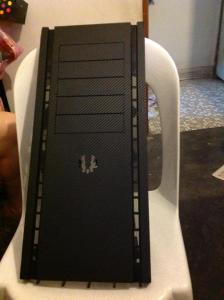
carbon fibre vinyl all the way  |
|
|
Aug 18 2013, 12:25 AM
|
|
Junior Member
56 posts Joined: May 2013
|
The rubberised surface gets sticky because the "paint" decomposes over time and exposure i think. I have other things with surfaces that has the stuff. Alcohol seems to dissolve it.
The carbon fibre looks cool  This post has been edited by JasonJFD: Aug 18 2013, 12:26 AM |
|
|
Aug 18 2013, 10:51 AM
|
|
Senior Member
8,746 posts Joined: Jul 2010 From: S.A.B.A.H
|
QUOTE(JasonJFD @ Aug 16 2013, 04:48 PM) OK, Thanks Clem1982. Aight! thanks for the ehads up This guy from neweggTV shows there are more spaces behind the Motherboard for 2.5" drives. Its around 6.00 mins. http://www.youtube.com/watch?v=g70YWIzazbk QUOTE(lucidlts @ Aug 17 2013, 11:18 PM) Rubberized surface is a total disaster it gets sticky over time, have do make it this way
carbon fibre vinyl all the way  This is nice!! did you wrap the whole chassis with the vinyl? or just the front and top? oh and I wanna post that on BitFenix Malaysia Facebook can? This is nice!! did you wrap the whole chassis with the vinyl? or just the front and top? oh and I wanna post that on BitFenix Malaysia Facebook can? QUOTE(JasonJFD @ Aug 18 2013, 12:25 AM) The rubberised surface gets sticky because the "paint" decomposes over time and exposure i think. I have other things with surfaces that has the stuff. Alcohol seems to dissolve it. dissolve it?? could you get a clean surface off from doing this though??The carbon fibre looks cool |
|
|
Aug 18 2013, 11:11 AM
|
|
Junior Member
56 posts Joined: May 2013
|
QUOTE dissolve it?? could you get a clean surface off from doing this though?? I guess so, it kinda tricky tho. I've only did it once before. I have a music stand that has the rubberised handle. Over time it became sticky and I didn't like it. I googled the product and turns out other people were having the same problem. Some of them recommended alcohol. What happened was the rubberised paint came off and revealed the hard plastic below the paint layer. i wasn't sure on the correct of applying the alcohol so i wet a rag with the alcohol and tried to wipe it off. I cant really remember what happened next, i think It became stickier and I decided the progress was too slow. i ended up going to the sink and poured the alcohol over the thing and spread it with my fingers. Then wash it off. There was a slight discolouration to the material after that. Before the alcohol it was a matte black, and now it became a slightly greyish colour with soft white accents. Almost no stickiness after that. This post has been edited by JasonJFD: Aug 18 2013, 11:15 AM |
| Change to: |  0.0326sec 0.0326sec
 0.57 0.57
 6 queries 6 queries
 GZIP Disabled GZIP Disabled
Time is now: 7th December 2025 - 10:55 PM |
 Quote
Quote


