Welcome Guest ( Log In | Register )

Bump Topic Topic Closed RSS Feed
5 Pages < 1 2 3 4 > » Bottom

Outline · [ Standard ] · Linear+

 Samsung Galaxy S III I9300 Official Thread V11, rooting and software ques --> FRONT PAGE

views
     
SUSDavid83
post Jun 28 2012, 10:17 PM

20k VIP Club
*********
All Stars
52,874 posts

Joined: Jan 2003
QUOTE(LH15 @ Jun 28 2012, 10:15 PM)
help..since i bought the phone 2 days ago, smart stay nvr work although i do tick on that option- - any solution???
*
Smart Stay only works on certain condition. Please read the condition carefully and try to simulate again.
SUSDavid83
post Jun 28 2012, 10:19 PM

20k VIP Club
*********
All Stars
52,874 posts

Joined: Jan 2003
QUOTE(LH15 @ Jun 28 2012, 10:18 PM)
where can i see those condition???
*
Disable and enable it again. You'll get an explanatory note to describe how Smart Stay works.
SUSDavid83
post Jun 28 2012, 10:21 PM

20k VIP Club
*********
All Stars
52,874 posts

Joined: Jan 2003
QUOTE(peachmonkey @ Jun 28 2012, 10:19 PM)
Got a question regarding Smart Stay. When ever the 'eye' icon appears on the top of the screen does it mean Smart Stay is active? But sometimes even when the 'eye' icon flashes, the screen dims although I'm looking at the screen.

Is it normal?
*
When the eye icons appear, it'll initiate the detection system using the front camera. Make sure you're facing the front camera in order to make sure that the detection is successful. Otherwise, when detection fails, it'll screen out.


Added on June 28, 2012, 10:24 pm
QUOTE(tsc77y @ Jun 28 2012, 10:20 PM)
Thanks for the help.

I just find out another way; from the phone Keypad, press menu->select call setting, scroll to last section on "Internet call setting" -> select use internet calling-> then select "only for internet calls".
*
That doesn't work for me. My setting is already on "Only for Internet calls" but the dialog box for dialer selection still appears.

This post has been edited by David83: Jun 28 2012, 10:24 PM
SUSDavid83
post Jun 28 2012, 10:25 PM

20k VIP Club
*********
All Stars
52,874 posts

Joined: Jan 2003
QUOTE(peachmonkey @ Jun 28 2012, 10:24 PM)
Hrmm...so basically my eye must make some eye contact with the front camera? Will the screen protector effect the detection of the camera? I'm currently using matte SP  sweat.gif
*
Some said eyes, some said face. I'm not sure. Experiment yourself.

Regarding the SP, I have no comment as well since my SP didn't cover the front camera, the two sensors next to it and the front speaker.
SUSDavid83
post Jun 28 2012, 11:27 PM

20k VIP Club
*********
All Stars
52,874 posts

Joined: Jan 2003
QUOTE(Reventon @ Jun 28 2012, 11:24 PM)
Thanks for sharing!
SUSDavid83
post Jun 29 2012, 09:41 PM

20k VIP Club
*********
All Stars
52,874 posts

Joined: Jan 2003
Missing in what sense? The right scroll bar?

This post has been edited by David83: Jun 29 2012, 09:41 PM
SUSDavid83
post Jun 30 2012, 07:40 AM

20k VIP Club
*********
All Stars
52,874 posts

Joined: Jan 2003
QUOTE(bestofel @ Jun 30 2012, 07:00 AM)
MORNING!!!

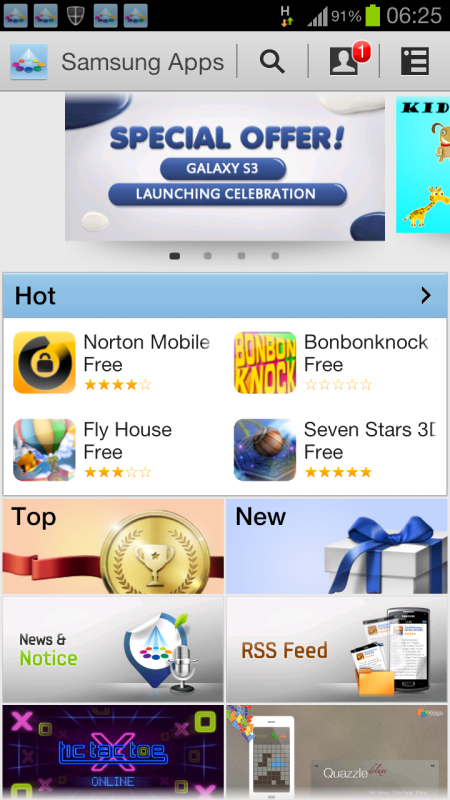
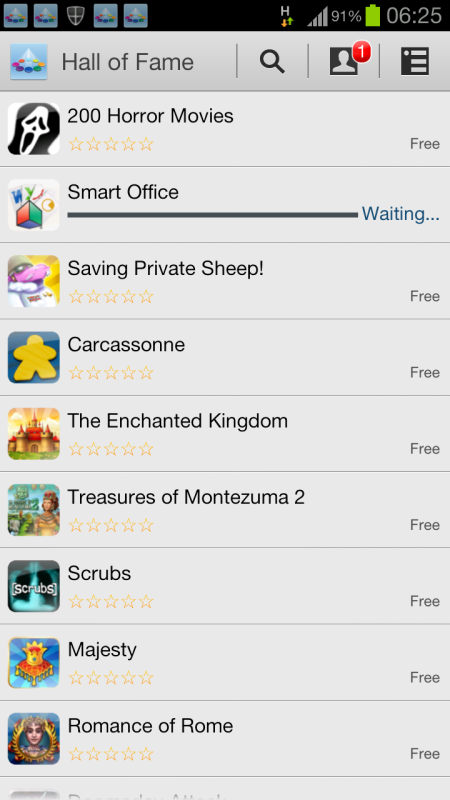
Have you all update Samsung Apps? We got promotion apps which is actually need to purchase. App must be installed is Smart Office, you now can add new and edit Microsoft Office documents. And the app can be integrated with DropBox and Google Drive.

Let's get it!

Tap on SGS3 Launching Celebration banner:

user posted image

These are the list of the free apps:
user posted image
*
Awesome. How is Smart Office compared to Kingsoft office?
SUSDavid83
post Jun 30 2012, 08:14 AM

20k VIP Club
*********
All Stars
52,874 posts

Joined: Jan 2003
QUOTE(tommyfai @ Jun 30 2012, 08:03 AM)
any news from samsung yet regarding the battery draining issue ? i having the cell standy issue draining my battery though.. ish...
*
Cell Standby is wrongly reported in the battery usage information. You can ignore it.
SUSDavid83
post Jun 30 2012, 08:23 AM

20k VIP Club
*********
All Stars
52,874 posts

Joined: Jan 2003
QUOTE(tommyfai @ Jun 30 2012, 08:20 AM)
Hmm... its not true then ?? My battery life really no good. 1 night standby can drain 8% of battery though..
*
What I meant was Cell Standby shouldn't be at the top of the list.

They're bug fix released by 3rd party at forum. You can tweak that if you want.

8% drain of battery may come from other sources not most likely not Cell Standby.
SUSDavid83
post Jun 30 2012, 10:41 AM

20k VIP Club
*********
All Stars
52,874 posts

Joined: Jan 2003
QUOTE(cloudfan93 @ Jun 30 2012, 10:38 AM)
They have changed their policy since last year that after exceeding the quota u will get no more access to internet
*
From DiGi website:
QUOTE
Q3. I sign up for the RM68 DG Smart Planâ„¢ before 15 August 2011. Is there a quota for the RM68 DG Smart Planâ„¢?
A3. There is a fair usage quota of 3GB for the DG Smart Planâ„¢. If you exceed your quota, your speed will be reduced to 128kbps. You will not be charged extra and you will still surf at no extra cost.

SUSDavid83
post Jun 30 2012, 10:59 AM

20k VIP Club
*********
All Stars
52,874 posts

Joined: Jan 2003
QUOTE(bestofel @ Jun 30 2012, 10:56 AM)
Not so much function, maybe because they already launch Smart Office 2. The second version have more function maybe.

Just give a try. Download it without any charge.
*
Smart Office 2 is free?
SUSDavid83
post Jun 30 2012, 11:04 AM

20k VIP Club
*********
All Stars
52,874 posts

Joined: Jan 2003
QUOTE(UpCar @ Jun 30 2012, 11:03 AM)
the lite version is.

same as kingsoft office
*
Smart Office turns my spreadsheet formatting into B&W like Polaris Office.
SUSDavid83
post Jun 30 2012, 03:56 PM

20k VIP Club
*********
All Stars
52,874 posts

Joined: Jan 2003
QUOTE(bestofel @ Jun 30 2012, 03:42 PM)
Yeah, just now I searched Smart Office in Google Play. Yes, there I saw Smart Office Lite and Smart Office 2. What Samsung give freely to us is the Smart Office which is now only available in Samsung Apps.
Kingsoft Office have it own pro and cons, same like Smart Office. Both are free download for us, just download and compare by yourself. Kehkeh..
*
Let me share something interesting that I discovered.

When open my complicated spreadsheet with Smart Office, it takes some time (about 10 to 15 sec) to load while with Kingsoft Office, it opens instantly.

Next, Smart Office turn my colourful formatting into B&W viewing but Kingsoft Office didn't.

Did some editing on saved using Smart Office if Smart Office corrupts the file or messed up with the formatting. Surprisingly it didn't like Polaris Office.

Open the spreadsheet using Kingsoft Office, everything is still intact!

Conclusion for me, I still prefer Kingsoft Office since it loads faster than Smart Office.

SUSDavid83
post Jun 30 2012, 04:42 PM

20k VIP Club
*********
All Stars
52,874 posts

Joined: Jan 2003
QUOTE(ccm @ Jun 30 2012, 04:41 PM)
Can anyone explains what is this icon referring to at the top left corner of my screen.. ?
*
Notification is disable.
SUSDavid83
post Jun 30 2012, 05:43 PM

20k VIP Club
*********
All Stars
52,874 posts

Joined: Jan 2003
QUOTE(syaryel @ Jun 30 2012, 05:39 PM)
Hii,

anybody experience no display?? only black with some micro dots..as if the display wont fully on???

any help on this will be much appreciated..
*
Under what condition? Exit from certain apps or games?
SUSDavid83
post Jun 30 2012, 05:50 PM

20k VIP Club
*********
All Stars
52,874 posts

Joined: Jan 2003
Or mnt/sdcard/Pictures/Screenshots
SUSDavid83
post Jun 30 2012, 05:56 PM

20k VIP Club
*********
All Stars
52,874 posts

Joined: Jan 2003
QUOTE(syaryel @ Jun 30 2012, 05:55 PM)
screen shots seems normal..though there's virtually no display on my LCD..aiyoo starts to think myb got faulty display.. u think flashing firmware will fix this thing?
*
Try to do a factory reset.
SUSDavid83
post Jun 30 2012, 06:23 PM

20k VIP Club
*********
All Stars
52,874 posts

Joined: Jan 2003
QUOTE(Perwaja @ Jun 30 2012, 06:20 PM)
guys how to change bottom dock apps ?
*
At lock or home screen?
SUSDavid83
post Jun 30 2012, 06:24 PM

20k VIP Club
*********
All Stars
52,874 posts

Joined: Jan 2003
Google+ got update
SUSDavid83
post Jun 30 2012, 06:33 PM

20k VIP Club
*********
All Stars
52,874 posts

Joined: Jan 2003
QUOTE(Perwaja @ Jun 30 2012, 06:27 PM)
currently at home. but if you can guide me for both i will be more appreciate
*
For lock screen, go to Settings>Security>Lock screen options>Shortcuts


Added on June 30, 2012, 6:37 pm
QUOTE(Perwaja @ Jun 30 2012, 06:32 PM)
drag and drop? you sure man?

i try wanna do like this
http://www.youtube.com/watch?v=XByYrvHVop8

but i cant see 5 bottom icon like that video
*
Home screen is drag and drop!

This post has been edited by David83: Jun 30 2012, 06:37 PM

5 Pages < 1 2 3 4 > » Top
Topic ClosedOptions
 

Change to:
| Lo-Fi Version
0.0443sec    0.95    7 queries    GZIP Disabled
Time is now: 15th December 2025 - 12:44 AM