

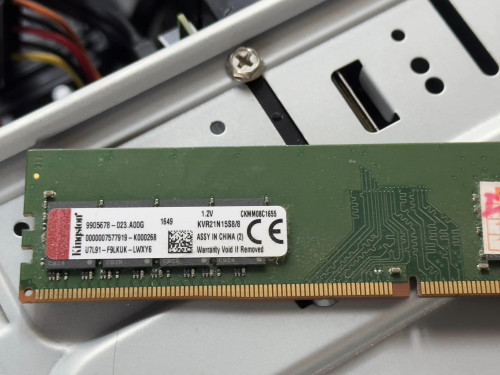
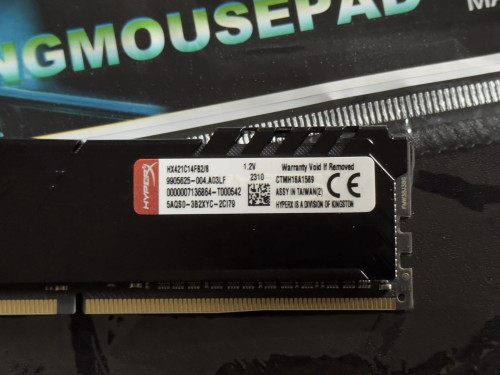
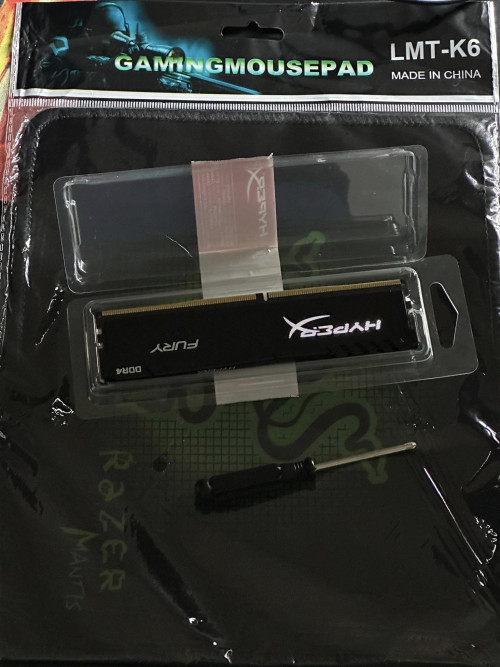
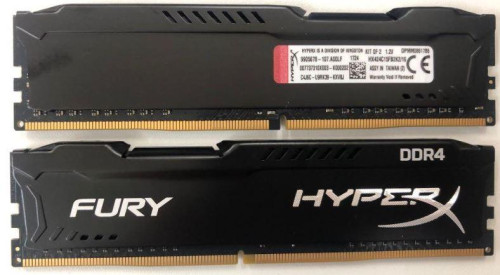
How come the ram i newly bought looks so much difference than the old one? both Kingston brand.
RAM Handbook, updating ... zlol 23/12/07
|
|
 Jun 30 2023, 01:57 AM Jun 30 2023, 01:57 AM
Return to original view | IPv6 | Post
#1
|
 
All Stars
14,248 posts Joined: Jan 2011 
|
upgraded my PC from 8GB ram to 16GB.
How come the ram i newly bought looks so much difference than the old one? both Kingston brand. |
|
|
|
|
|
Jun 30 2023, 09:00 AM
Return to original view | IPv6 | Post
#2
|
|
All Stars
14,248 posts Joined: Jan 2011
|
QUOTE(babylon52281 @ Jun 30 2023, 08:55 AM) LOL Kingston itself have different segments just for RAM Icic. I searched around on Shopee I can only find the RAM I bought and it is the cheapest DDR4 2133MHz I can find. https://www.kingston.com/en/memory What you had was office type ValueRAM and what you just bought is more gamer centric HyperX with heatsink  Is the so called office type of value ram sold anywhere that I can buy at even cheaper price? |
|
|
Jun 30 2023, 09:36 AM
Return to original view | IPv6 | Post
#3
|
|
All Stars
14,248 posts Joined: Jan 2011
|
my motherboard is H110M-K. and I am using i5-7500 processor. so technically it can support up to 2400 MHz DDR4 RAM.
My existing ram is 8GB 2133MHz. if i want to upgrade to 16GB, should I buy 2400MHz instead? I know that the maximum speed supported will be 2133MHz since the old one is 2133MHz only. However, if I buy 2400MHz, it will be better if the old 2133MHz spoiled which I can just buy another 2400MHz to have higher speed rite? do 2400MHz vs 2133MHz make noticeable difference in performance? besides, i cannot enable XMP in the BIOS although on the spec of the motherboard stated that it supports that. why is it so? 2 x DIMM, Max. 32GB, DDR4 2400/2133 MHz Non-ECC, Un-buffered Memory * Dual Channel Memory Architecture Supports Intel® Extreme Memory Profile (XMP) * Due to Intel® chipset limitation, DDR4 2400MHz memory frequency is only supported by 7th Generation Intel® processors. https://www.asus.com/my/motherboards-compon...10m-k/techspec/ This post has been edited by westlife: Jun 30 2023, 09:37 AM |
|
|
Jun 30 2023, 10:34 AM
Return to original view | IPv6 | Post
#4
|
|
All Stars
14,248 posts Joined: Jan 2011
|
QUOTE(babylon52281 @ Jun 30 2023, 09:38 AM) Yes, physical computer shops like in lowyat usually sells them. Long ago i bought such valueram from sri computer. is it cheaper by a lot? |
|
|
Jun 30 2023, 10:49 AM
Return to original view | IPv6 | Post
#5
|
|
All Stars
14,248 posts Joined: Jan 2011
|
QUOTE(babylon52281 @ Jun 30 2023, 09:49 AM) Should you buy it? Only if its a few RM more than 2133 RAM. You cant use the extra headroom anyways cuz ur old one also tops at 2133MHZ and valuerams dont have XMP which is why its not function. Oso the HyperX RAM you bought has XMP the same as its JEDEC rated speed so XMP setting is moot as well. thanks a lot for the explanation. And hoping for it to die will be a long wait as RAM are the most durable thing in a PC thats why they have lifetime warranty. If you want 2400 RAMs just get a 2pack kit (8x2) and chuck out the old one. Will the higher speed make a difference? Only slightly in benchmarks maybe a few FPS more in games. Otherwise its not like day & nite.  actually the price of the 2400MHz and 2133MHz is the same at rm71 for the shoppe shop i bought from. in fact 2133MHz, 2400MHz, 2666MHz all same price at rm71 while 3200MHz is only rm1 more at rm72. 1) that's why i am kind of regret now not to buy the higher speed one. it is stated that my motherboard can support up to 2400MHz of RAM, so my question is that if I put in a 3200MHz ram, will it even recognise but work at lower speed of 2400MHz? or it will just simply not working at all? 2) understood that 2400MHz vs 2133MHz the improvement will be minor. since my old ram does not support XMP, if i buy another 2133MHz ram now that supports XMP like the new one i bought. how much performance more i can probably get by doing so? 3) yeah, you are rite, RAM hardly fail. probably my motherboard spoiled first before it failed. in fact, my motherboard was having problem just 2 weeks back which it cannot be powered on. i brought to a computer shop to fix it at the price of rm100. luckily it can be fixed, else i may need to change a new motherboard which will certainly cost much more. so kingston RAM is actually lifetime warranty? but i suppose if kingston no longer sells my model of ram, even it has lifetime warranty, it is not going to help in this case rite? which means they will not replace a RAM for me? 4) besides, may i know if there is any other brand that is better than kingston but at similar or just slightly higher pricing also that can be considered? |
|
|
Jun 30 2023, 06:08 PM
Return to original view | IPv6 | Post
#6
|
|
All Stars
14,248 posts Joined: Jan 2011
|
QUOTE(babylon52281 @ Jun 30 2023, 04:39 PM) 1) Nope, XMP2.0 only has 1 rated profile so you have to manually tune to 2400MHZ. Otherwise it will work at its rated JEDEC speed of 2133 (or 2400 natively for some RAM kit) i bought from a shopee buyer and they said they give local warranty (1 year).2) As I said, JEDEC speed is ady at 2133/2400 so trying to get better RAMs is moot as their XMP speeds is the same as JEDEC. There are 2400MHZ RAM kits that does 2133 JEDEC so those will get a minor boost if run at XMP but again the difference is few FPS only. 3) Imo if you can run them at 2133 without stability issues, just keep them and be happy. Since ur mobo has such limited headroom, no point to spend much more just to chase that few percentage increase. And if you wanna know the terms of lifetime warranty, its in the slip of paper inc in ur HyperX RAM. 4) Better is very subjective... price i paid is RM65.90 including shipping with all the discounts (vouchers). noticed that the model is no longer selling officially as it is old. but the item i received looks brand new maybe this is the old stock. is the price above 'normal' or 'reasonable' price for the model and brand of RAM i bought? i think i will just stick to the current setup. anyway, my PC is old already. no point to spend further $$ on it. I upgrade to 16GB from the previous 8GB because I tot that it may help in performance but so far i realise my use case may not be able to utilise much on the extra 8GB. but it is noticed that the shared GPU ram now shows only 8GB. could not remember the amount before i upraded to 16GB. but i guess it means the shared GPU never increase even the RAM is 16GB now. probably this is the limitation of the graphic card that it only utilises 8GB out of the available 16GB. 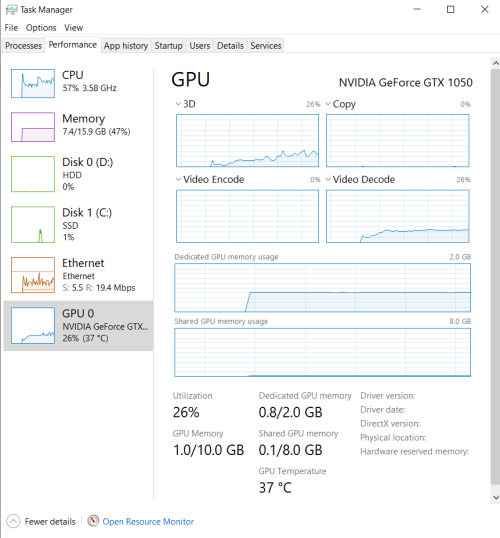 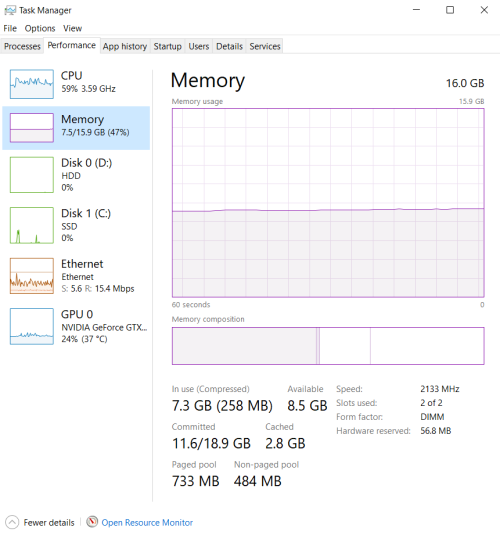 This post has been edited by westlife: Jun 30 2023, 06:13 PM |
|
|
|
|
|
Jun 30 2023, 06:35 PM
Return to original view | IPv6 | Post
#7
|
|
All Stars
14,248 posts Joined: Jan 2011
|
QUOTE(PJng @ Jun 30 2023, 06:24 PM) Auto allocate half of your total usable RAM, not installed RAM ic. so i guess it is the hardware limitation of the graphic card that it can only utilise up to 8GB from 50% of the shared RAM pool. anyway, given the price of the RAM, i think it is refurbished one. although the seller told me it is brand new.  appearance wise it looks brand new though. no scratches etc. This post has been edited by westlife: Jun 30 2023, 06:40 PM |
|
|
Jun 30 2023, 06:58 PM
Return to original view | IPv6 | Post
#8
|
|
All Stars
14,248 posts Joined: Jan 2011
|
QUOTE(PJng @ Jun 30 2023, 06:51 PM) On sticker, and cpuz will show manufatured date this one? it means it is manufactured in week 18 year 2023?1021 mean week 10 year 2021 how come there is no serial no. 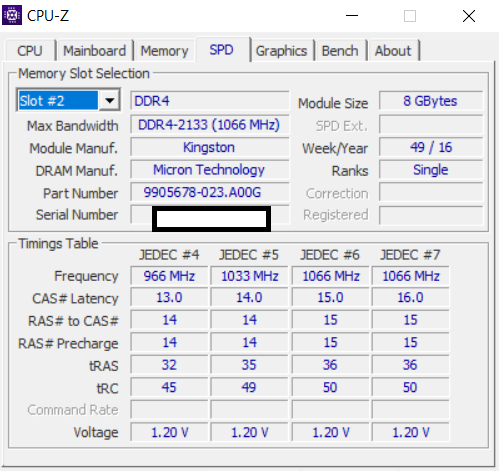 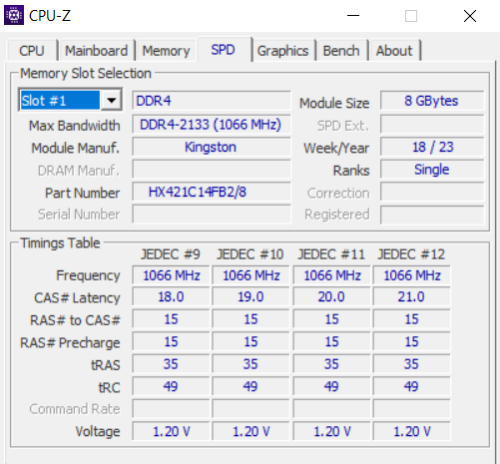 This post has been edited by westlife: Jun 30 2023, 06:59 PM |
|
|
Jun 30 2023, 07:14 PM
Return to original view | IPv6 | Post
#9
|
|
All Stars
14,248 posts Joined: Jan 2011
|
QUOTE(PJng @ Jun 30 2023, 07:07 PM) That need wait if other got answer, i dunno about serial number bought from shopee buyer. not sure. Part number look weird, maybe fake RAM? anyone can confirm? it has no serial no as well. |
|
|
Jun 30 2023, 07:24 PM
Return to original view | IPv6 | Post
#10
|
|
All Stars
14,248 posts Joined: Jan 2011
|
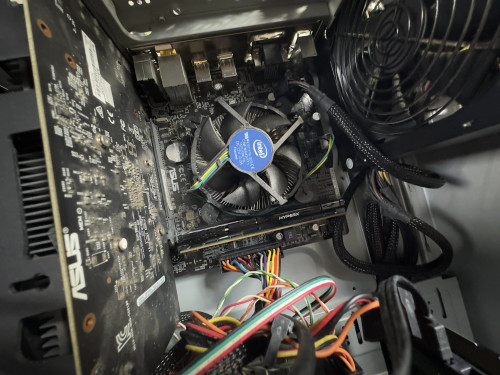
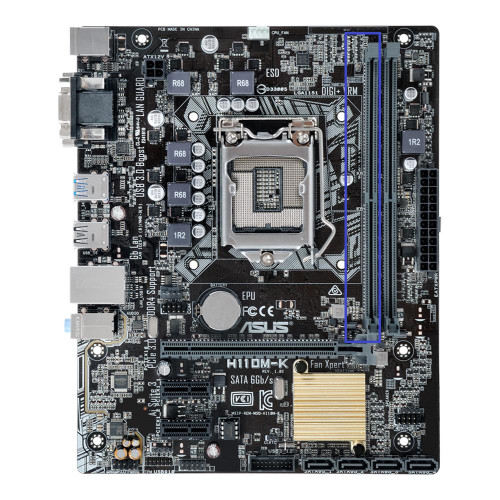
i installed the newly bought RAM from shopee on the slot shown below. is it considered slot 1 or slot 2?
 |
|
|
Jun 30 2023, 07:27 PM
Return to original view | IPv6 | Post
#11
|
|
All Stars
14,248 posts Joined: Jan 2011
|
QUOTE(PJng @ Jun 30 2023, 07:24 PM) https://forum.lowyat.net/index.php?showtopi...ost&p=101105328 at least the part no like u said looks the same as my old no?My RMA ed RAM, yes surprise 2021 still got DDR3 i am not sure if the old one is in slot 1 or slot 2. but i guess below one should be my old RAM. the new 8GB ram i bought it from a shoppe seller. seems like i kena conned? This post has been edited by westlife: Jun 30 2023, 09:02 PM |
|
|
Jul 1 2023, 12:07 AM
Return to original view | IPv6 | Post
#12
|
|
All Stars
14,248 posts Joined: Jan 2011
|
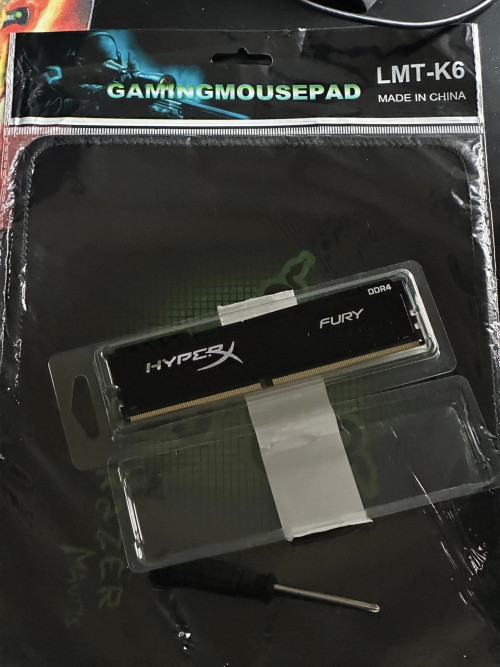
QUOTE(Wedchar2912 @ Jun 30 2023, 11:37 PM) wondering. is the ram not working? or your system is giving you problem? ur screenshots are indicating that your board is recognizing both rams and you have 16GB ram. to be fair, like u said, the new ram is working which it is recognised in windows 10 and i had used the Windows Memory Diagnostic Tool and it shows no error. you can run memtest to make sure the rams are fine. Is the black kingston ram is the new one you got from shopee rite? what other memtest i can do? yes, the black one is the new one i got from shopee. the shopee seller claimed that it is brand new and not even refurbished. my main concern now is that if it is not even genuine kingston ram but counterfeit instead. if yes, i would rather refund it. so i need to really confirm if it is genuine. if it is not genuine kingston ram but really a fake one. it may work now but sooner or later it will fail i guess. the warranty of this new ram is also not lifetime, but it is 1 year warranty by the seller. so this is also fishy. is there any other way i can really prove if this ram is genuine or not? 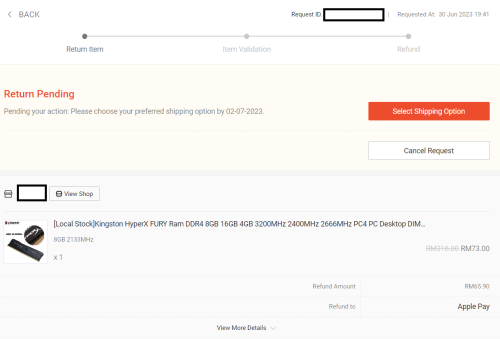 |
|
|
Jul 1 2023, 12:12 AM
Return to original view | IPv6 | Post
#13
|
|
All Stars
14,248 posts Joined: Jan 2011
|
QUOTE(babylon52281 @ Jun 30 2023, 11:33 PM) I cant tell if old hardware is reasonable prices or not, and what you shown with CPUZ ID it might even be remanufactured unit. Try use Thaiphoon to get the SPD value of that RAM and post the screenshot here this is it... how to tell if it is counterfeit or not?As RAM has very specific usage, most regular uses ie office or web, even games, don't often use up all the RAM available as Windows will also allocate pagefile memory. However with 2 RAM sticks you will able to run in dual channel mode which gives smoother and less lag when under heavy memory use ie using few heavy spreadsheets plus image editor, etc. it has no part no, no manufacturer. similar to what cpu-z shows. it supposed to support XMP, obviously it does not = counterfeit?? 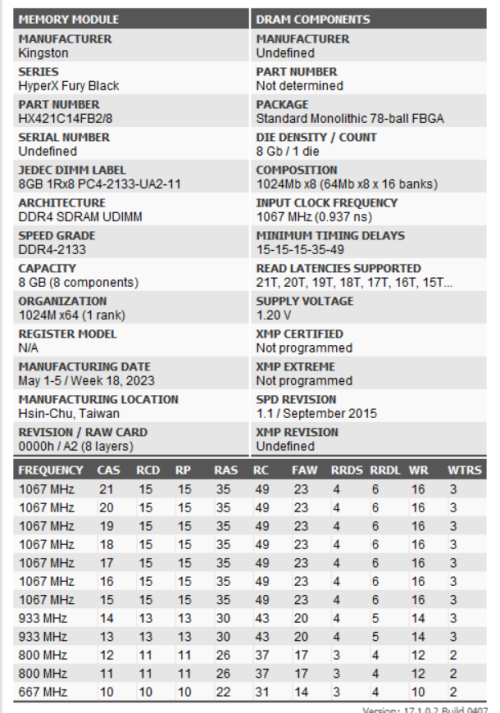 this one is my existing one. looks more genuine. 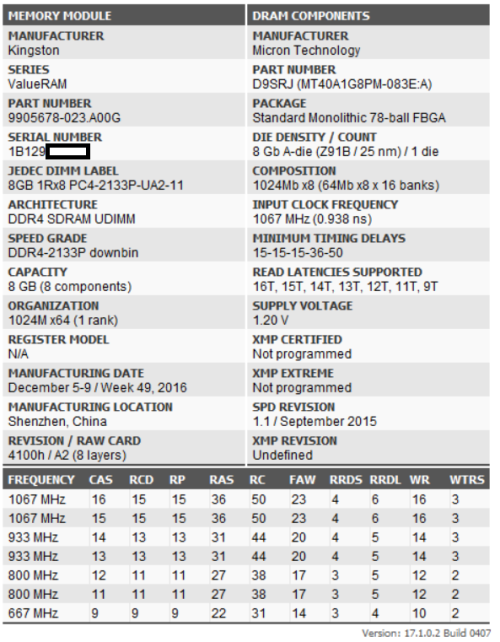 This post has been edited by westlife: Jul 1 2023, 12:17 AM |
|
|
|
|
|
Jul 1 2023, 12:22 AM
Return to original view | IPv6 | Post
#14
|
|
All Stars
14,248 posts Joined: Jan 2011
|
found this.
https://www.kingston.com/en/memory/memory-p...-number-decoder does this able to help to identify if a kingston is real or fake? is it fall under this category? 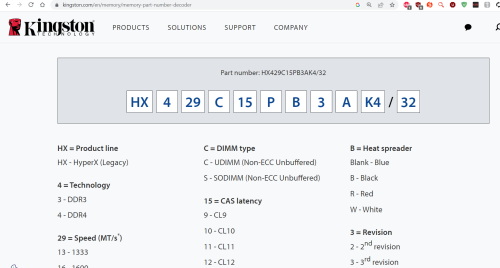 |
|
|
Jul 1 2023, 12:31 AM
Return to original view | IPv6 | Post
#15
|
|
All Stars
14,248 posts Joined: Jan 2011
|
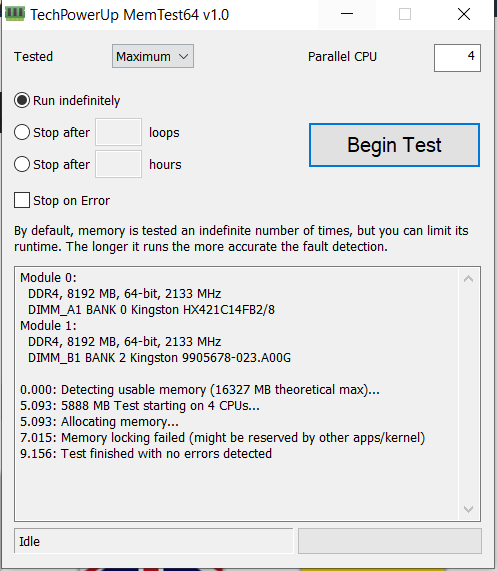
memtest64?
 |
|
|
Jul 1 2023, 07:33 AM
Return to original view | IPv6 | Post
#16
|
|
All Stars
14,248 posts Joined: Jan 2011
|
QUOTE(Wedchar2912 @ Jul 1 2023, 12:49 AM) Well, the cost is just 65rm, so it is really up to you. I would just use it as it is working fine. If it is really counterfeit, even it is cheap, I will not accept. Somemore like u said, the real one probably only cost rm100 which is just a little bit more.But if this gives you too much sleepless nights, just return the ram and go to a physical store to get a new stick for a bit more cost like 100 rm. google search the model number HX421C14FB2/8 does point to a valid Kingston ram model. |
|
|
Jul 1 2023, 08:02 AM
Return to original view | IPv6 | Post
#17
|
|
All Stars
14,248 posts Joined: Jan 2011
|
QUOTE(babylon52281 @ Jul 1 2023, 02:08 AM) As you'd seen with the existing old RAM, that has more details. Ur new one has a lot of undefined which could mean the SPD is spoofed just to give working info to the BIOS. Which is oso why it prolly doesnt have an XMP profile. Yes. Thanks for the advice. I already requested for refund. Will use the Shopee service to return the item. Hope they do not make any funny thing for my return.I guess if it works, it works. Most dealers will give 1year warranty cuz after that you have to claim direct from Kingston distro so that is not a red flag. Anyhow as what Wedchar2912 said, if ur not fine just return it, go down to lowyat and buy from the big shops. Gerenti original. Sure will be a bit more expensive than shopee but its worth ur peace of mind rite? |
|
|
Jul 3 2023, 02:42 PM
Return to original view | Post
#18
|
|
All Stars
14,248 posts Joined: Jan 2011
|
QUOTE(westlife @ Jun 30 2023, 07:27 PM) at least the part no like u said looks the same as my old no? someone posted this online. seems like the part no of the new ram i bought from shopee online is also having similar part no. i am not sure if the old one is in slot 1 or slot 2. but i guess below one should be my old RAM. the new 8GB ram i bought it from a shoppe seller. seems like i kena conned? 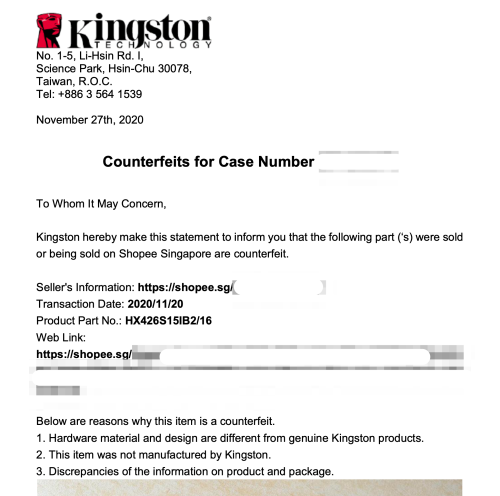 This post has been edited by westlife: Jul 3 2023, 02:43 PM |
|
|
Jul 3 2023, 02:56 PM
Return to original view | Post
#19
|
|
All Stars
14,248 posts Joined: Jan 2011
|
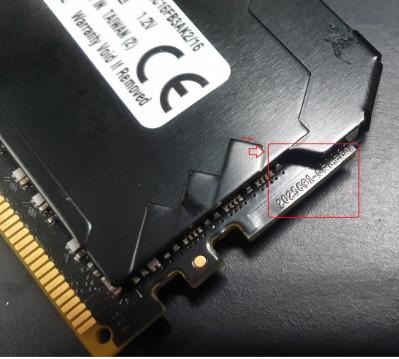
but on the kingston website i found this datasheet that matches the part no of the new ram i bought from shopee.
does it in any case shows some chance that the ram is not fake? https://www.kingston.com/dataSheets/HX421C14FB2_8.pdf |
|
|
Jul 4 2023, 11:06 PM
Return to original view | IPv6 | Post
#20
|
|
All Stars
14,248 posts Joined: Jan 2011
|
   |
| Change to: |  0.1668sec 0.1668sec
 0.61 0.61
 7 queries 7 queries
 GZIP Disabled GZIP Disabled
Time is now: 5th December 2025 - 01:54 AM |
 Quote
Quote