Welcome Guest ( Log In | Register )

Outline · [ Standard ] · Linear+

 RAM Handbook, updating ... zlol 23/12/07

views
     
babylon52281
post Dec 16 2022, 07:36 PM

Look at all my stars!!
*******
Senior Member
2,673 posts

Joined: Apr 2017
Heyyy guys,

Just built my PC recently; i7 12700F, B600M, 2x8GB DDR4 3600. https://forum.lowyat.net/topic/5339043

RAM is TeamGroup Delta RGB CL18-22-22-42 https://www.teamgroupinc.com/en/product/delta-rgb-ddr4

RAM chips are some unknown Microns (not sure what the ?? means in Thaiphoon)
Attached Image
Are these junk Microns?

Anyhow unfortunately I cannot get my RAM setup to its rated speed so here's the situation:

1. Setup XMP at Auto was okay and stable, but found out it was running at Gear 2.

2. Manually override G2 to G1 at Bios and restarted. It booted okay until about to login to Windows10 which it then crashes and restarted.

3. This happen repeatedly so I came back to Bios and manually downtune RAM speed to 3466.

4. Booted okay at G1 and stable but then found out it had downrate to CR2.

5. So then going back and manually set CR to 1T.

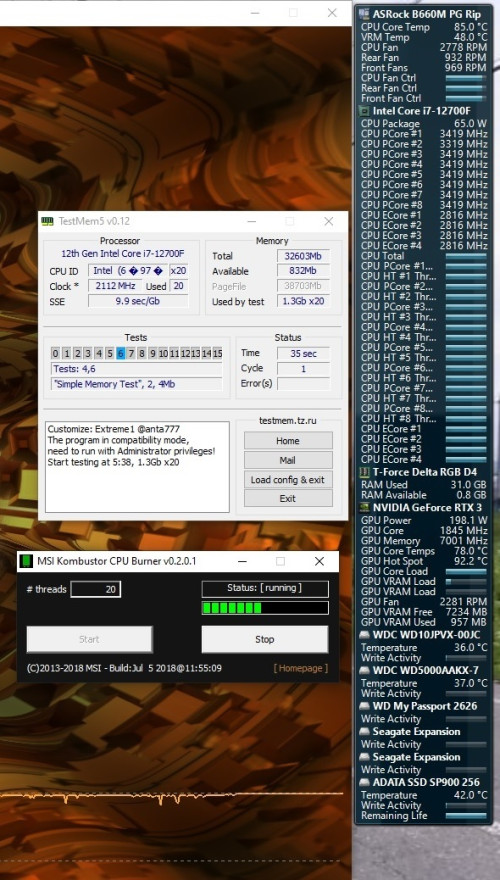
6. Right now it boots at 3466MHZ, Gear 1, CR1. Been stable running, passed Memtest5 with Extreme1@anta777, and Aida64 mem test.

But I would really want to get the full rated speed of 3600, so Im asking sifus here if any settings I could do to bump up the speed back to 3600 but stable for usage.

Aida64 results
Attached Image

Asrock timing config
Attached Image

Memtest5 Extreme1@anta777 passed
Attached Image
babylon52281
post Jan 29 2023, 11:33 PM

Look at all my stars!!
*******
Senior Member
2,673 posts

Joined: Apr 2017
QUOTE(TristanX @ Dec 24 2022, 08:20 AM)
Turn off XMP, update BIOS, then use these

VDDQ TX - 1.2 to 1.35v
VCC SA or System Agent voltage - 1.35v

Turn on XMP. Set it to Gear 1.

If you want more. Bump up DRAM voltage to 1.4-1.45v and use 16-16-16-39-55. Test with it. Please also take note this is pushing the RAM.
*
The weekend I tried it. Set VDD IMC (did not find VDDQ TX in my bios but their voltages are the same so I assumed thats it). Did not able to change VCCSA as it is nonK 12700F.

But unfortunately it bootlooped when just about to enter Windows and it the end my OS hard crashed. Orz

Now I'm trying to see how to save my OS from a reinstall. doh.gif
babylon52281
post Jan 30 2023, 08:10 AM

Look at all my stars!!
*******
Senior Member
2,673 posts

Joined: Apr 2017
QUOTE(TristanX @ Jan 29 2023, 11:44 PM)
Yeah, have to get stable RAM settings first. Try looking for System Agent voltage.
*
Unfortunately SA Voltage for Alderlake nonK CPU is locked sad.gif
https://www.intel.com/content/www/us/en/sup...processors.html
babylon52281
post Feb 19 2023, 10:33 PM

Look at all my stars!!
*******
Senior Member
2,673 posts

Joined: Apr 2017
After watching this HUB video ( https://youtu.be/OsA52DkP8WU?t=216 ) I finally given up trying to get 3600MHZ to work at Gear 1. Looks like even the pros couldnt do better than 3466MHZ.

I would move onto improving timings if I still got the stomach for it, or once I can get a scratch disk to ruin its Windows when it goes too far and doesnt work.

This post has been edited by babylon52281: Feb 19 2023, 10:34 PM
babylon52281
post Jun 30 2023, 08:55 AM

Look at all my stars!!
*******
Senior Member
2,673 posts

Joined: Apr 2017
QUOTE(westlife @ Jun 30 2023, 01:57 AM)
upgraded my PC from 8GB ram to 16GB.

How come the ram i newly bought looks so much difference than the old one? both Kingston brand.

*
LOL Kingston itself have different segments just for RAM

https://www.kingston.com/en/memory

What you had was office type ValueRAM and what you just bought is more gamer centric HyperX with heatsink
babylon52281
post Jun 30 2023, 09:38 AM

Look at all my stars!!
*******
Senior Member
2,673 posts

Joined: Apr 2017
QUOTE(westlife @ Jun 30 2023, 09:00 AM)
Icic. I searched around on Shopee I can only find the RAM I bought and it is the cheapest DDR4 2133MHz I can find.

Is the so called office type of value ram sold anywhere that I can buy at even cheaper price?
*
Yes, physical computer shops like in lowyat usually sells them. Long ago i bought such valueram from sri computer.
babylon52281
post Jun 30 2023, 09:49 AM

Look at all my stars!!
*******
Senior Member
2,673 posts

Joined: Apr 2017
QUOTE(westlife @ Jun 30 2023, 09:36 AM)
my motherboard is H110M-K. and I am using i5-7500 processor. so technically it can support up to 2400 MHz DDR4 RAM.

My existing ram is 8GB 2133MHz. if i want to upgrade to 16GB, should I buy 2400MHz instead? I know that the maximum speed supported will be 2133MHz since the old one is 2133MHz only. However, if I buy 2400MHz, it will be better if the old 2133MHz spoiled which I can just buy another 2400MHz to have higher speed rite?

do 2400MHz vs 2133MHz make noticeable difference in performance?

besides, i cannot enable XMP in the BIOS although on the spec of the motherboard stated that it supports that. why is it so?
2 x DIMM, Max. 32GB, DDR4 2400/2133 MHz Non-ECC, Un-buffered Memory *
Dual Channel Memory Architecture
Supports Intel® Extreme Memory Profile (XMP)
* Due to Intel® chipset limitation, DDR4 2400MHz memory frequency is only supported by 7th Generation Intel® processors.

https://www.asus.com/my/motherboards-compon...10m-k/techspec/

*
Should you buy it? Only if its a few RM more than 2133 RAM. You cant use the extra headroom anyways cuz ur old one also tops at 2133MHZ and valuerams dont have XMP which is why its not function. Oso the HyperX RAM you bought has XMP the same as its JEDEC rated speed so XMP setting is moot as well.

And hoping for it to die will be a long wait as RAM are the most durable thing in a PC thats why they have lifetime warranty. If you want 2400 RAMs just get a 2pack kit (8x2) and chuck out the old one.

Will the higher speed make a difference? Only slightly in benchmarks maybe a few FPS more in games. Otherwise its not like day & nite.
babylon52281
post Jun 30 2023, 02:32 PM

Look at all my stars!!
*******
Senior Member
2,673 posts

Joined: Apr 2017
QUOTE(westlife @ Jun 30 2023, 10:34 AM)
is it cheaper by a lot?
*
If its Lowyat its not like its difficult to find and compare urself ya know sweat.gif
https://www.lowyat.net/sri-hardware-pricelist/
babylon52281
post Jun 30 2023, 04:39 PM

Look at all my stars!!
*******
Senior Member
2,673 posts

Joined: Apr 2017
QUOTE(westlife @ Jun 30 2023, 10:49 AM)
thanks a lot for the explanation. smile.gif

actually the price of the 2400MHz and 2133MHz is the same at rm71 for the shoppe shop i bought from.
in fact 2133MHz, 2400MHz, 2666MHz all same price at rm71 while 3200MHz is only rm1 more at rm72.

1) that's why i am kind of regret now not to buy the higher speed one. it is stated that my motherboard can support up to 2400MHz of RAM, so my question is that if I put in a 3200MHz ram, will it even recognise but work at lower speed of 2400MHz? or it will just simply not working at all?

2) understood that 2400MHz vs 2133MHz the improvement will be minor. since my old ram does not support XMP, if i buy another 2133MHz ram now that supports XMP like the new one i bought. how much performance more i can probably get by doing so?

3) yeah, you are rite, RAM hardly fail. probably my motherboard spoiled first before it failed. in fact, my motherboard was having problem just 2 weeks back which it cannot be powered on. i brought to a computer shop to fix it at the price of rm100. luckily it can be fixed, else i may need to change a new motherboard which will certainly cost much more.
so kingston RAM is actually lifetime warranty? but i suppose if kingston no longer sells my model of ram, even it has lifetime warranty, it is not going to help in this case rite? which means they will not replace a RAM for me?

4) besides, may i know if there is any other brand that is better than kingston but at similar or just slightly higher pricing also that can be considered?
*
1) Nope, XMP2.0 only has 1 rated profile so you have to manually tune to 2400MHZ. Otherwise it will work at its rated JEDEC speed of 2133 (or 2400 natively for some RAM kit)

2) As I said, JEDEC speed is ady at 2133/2400 so trying to get better RAMs is moot as their XMP speeds is the same as JEDEC. There are 2400MHZ RAM kits that does 2133 JEDEC so those will get a minor boost if run at XMP but again the difference is few FPS only.

3) Imo if you can run them at 2133 without stability issues, just keep them and be happy. Since ur mobo has such limited headroom, no point to spend much more just to chase that few percentage increase.

And if you wanna know the terms of lifetime warranty, its in the slip of paper inc in ur HyperX RAM.

4) Better is very subjective...
babylon52281
post Jun 30 2023, 11:33 PM

Look at all my stars!!
*******
Senior Member
2,673 posts

Joined: Apr 2017
QUOTE(westlife @ Jun 30 2023, 06:08 PM)
i bought from a shopee buyer and they said they give local warranty (1 year).
price i paid is RM65.90 including shipping with all the discounts (vouchers).
noticed that the model is no longer selling officially as it is old. but the item i received looks brand new maybe this is the old stock.

is the price above 'normal' or 'reasonable' price for the model and brand of RAM i bought?

i think i will just stick to the current setup. anyway, my PC is old already. no point to spend further $$ on it.

I upgrade to 16GB from the previous 8GB because I tot that it may help in performance but so far i realise my use case may not be able to utilise much on the extra 8GB.

*
I cant tell if old hardware is reasonable prices or not, and what you shown with CPUZ ID it might even be remanufactured unit. Try use Thaiphoon to get the SPD value of that RAM and post the screenshot here

As RAM has very specific usage, most regular uses ie office or web, even games, don't often use up all the RAM available as Windows will also allocate pagefile memory. However with 2 RAM sticks you will able to run in dual channel mode which gives smoother and less lag when under heavy memory use ie using few heavy spreadsheets plus image editor, etc.
babylon52281
post Jul 1 2023, 02:08 AM

Look at all my stars!!
*******
Senior Member
2,673 posts

Joined: Apr 2017
QUOTE(westlife @ Jul 1 2023, 12:12 AM)
this is it... how to tell if it is counterfeit or not?

it has no part no, no manufacturer. similar to what cpu-z shows.
it supposed to support XMP, obviously it does not = counterfeit??

*
As you'd seen with the existing old RAM, that has more details. Ur new one has a lot of undefined which could mean the SPD is spoofed just to give working info to the BIOS. Which is oso why it prolly doesnt have an XMP profile.

I guess if it works, it works. Most dealers will give 1year warranty cuz after that you have to claim direct from Kingston distro so that is not a red flag.

Anyhow as what Wedchar2912 said, if ur not fine just return it, go down to lowyat and buy from the big shops. Gerenti original. Sure will be a bit more expensive than shopee but its worth ur peace of mind rite?
babylon52281
post Jul 3 2023, 12:27 AM

Look at all my stars!!
*******
Senior Member
2,673 posts

Joined: Apr 2017
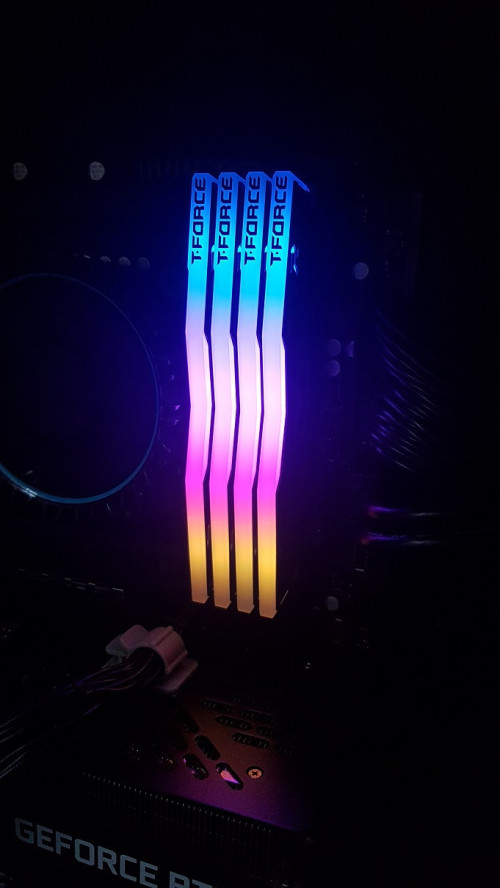
After having my PC system for 8 months, I have added another 16GB 3600MHZ RAM kit. Total now is 32GB.
user posted image

A more indepth of what I did so far...
https://forum.lowyat.net/topic/5339043/+20#

Stability is so far so good with quad matched RAM sticks and able to hold up at maximum system load for hours without hangs or crashes
user posted image

Without being able to adjust VCCSA it stays at 3466MHZ so far. I might want to look at tightening the timings to reduce latencies but I will need some guidance here.


This post has been edited by babylon52281: Jul 3 2023, 12:27 AM
babylon52281
post Feb 7 2024, 03:20 PM

Look at all my stars!!
*******
Senior Member
2,673 posts

Joined: Apr 2017
QUOTE(dante1989 @ Feb 6 2024, 09:21 PM)
Hi, just wanna ask a question about dual channel.

I’m currently using one HX432C16FB3/16. Google search shows it’s discontinued and replaced by KF432C16BB1/16. If i get the KF4 will it run dual channel perfectly with my HX4?
*
It will run fine at JEDEC speeds in dual channel mode. If you want XMP too that is another story
babylon52281
post Feb 8 2024, 08:03 AM

Look at all my stars!!
*******
Senior Member
2,673 posts

Joined: Apr 2017
QUOTE(dante1989 @ Feb 7 2024, 08:50 PM)
meaning to say they wont run as if they are identical sticks?

kind of an obvious question, but just wanna confirm
*
No. Unless you can get identical in size, timings, & RAM chips, & chip die Revision as the older stick. These are budget oriented performance RAMs so even within the same series, there can be a batch to batch difference in brand of RAM chips used ie Samsung, Hynix, Micron.

I wont say it defo wont work but chances are 50:50.
50% it will work perfectly when turning on XMP AUTO. 50% you have a list of issues from boot looping to apps & games crashing.

You could manually run a detuned XMP profile so that it might success, ie if RAM XMP is 3200MHZ try adjust down to 3000MHZ and see if it pass RAM test. But again no guarantees of success.

Best way is to buy a kit of 2x RAM sticks in a single pack. These are specifically dual channel kit.
babylon52281
post Feb 21 2024, 04:12 PM

Look at all my stars!!
*******
Senior Member
2,673 posts

Joined: Apr 2017
QUOTE(PJng @ Feb 21 2024, 12:37 AM)
suddenly pc keep restart, and beep sound, after testing few time, one more RAM is causing, is old pc (i5 2300) using DDR3 1333mhz 4GB,
yes is same pc i got post here before, when 2021 i send one stick RAM,
now second stick give problem

since is lifetime warranty, i try send warranty see what happen
yes i know lifetime not really lifetime, if already end production don think will get back
*
Being so old i guess it could be oxidation. Have you tried rubbing the pins as 'Muusyc' shared?
babylon52281
post Feb 21 2024, 04:34 PM

Look at all my stars!!
*******
Senior Member
2,673 posts

Joined: Apr 2017
QUOTE(PJng @ Feb 21 2024, 04:21 PM)
I just use fingger rubbing, did not try rubber eraser
Even put only the stick also cannot boot
If RMA failed need seek secondhand one
*
Dun use fingers the oil from it can harm electrical connectivity which is why rubber trick is to use pure rubber eraser (not the syntetic plastic ones). Good luck with the RMA.
babylon52281
post Jun 23 2024, 11:40 AM

Look at all my stars!!
*******
Senior Member
2,673 posts

Joined: Apr 2017
During last Raya weekend I wanted to fine tune my RAM timings because why not yawn.gif . This is a summary of another lengthy rabbit hole which I will post all the details in the link below:
https://forum.lowyat.net/index.php?showtopi...ost&p=109967018

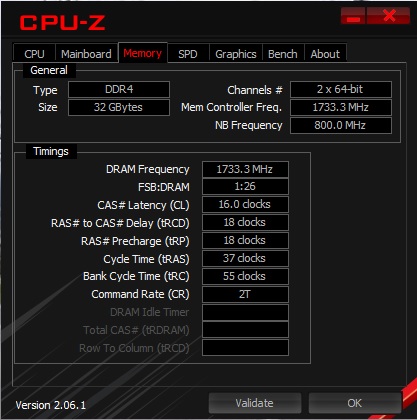
In short, by keeping speeds at 3466MHZ while maintaining Gear1 mode and voltage at XMP 1.35V, I step by step lower timings, starting with CL, then both tRCD & tRP, then tRAS, each time going thru hours of testing (Memtest86, TestMemPro, TM5 w/ Absolut).
Once tRAS passes, I rinse & repeat again by reducing CL, then the rest, again and again finally end up with
user posted image

Before it was XMP default CL18-22-22-42
The final timings that I feel comfortable to drop down is CL16-18-18-37 HECK YEAH! rclxm9.gif

Compared before & after, Aida64 showed some significant gains in Read (+1890), Write (+6962) & Copy (+6180) but the huge drop came from Latency (-17.5ns !)
user posted image user posted image

Theoretically my First Word Latency went from a poor 10.3ns down to 9.2ns which is performance DDR5 territory.

Going thru hours after hours after hours of testing, I ended up with

user posted image

biggrin.gif Okay it was basically stable thru a boatload of stress testing that I put up in my detailed post above.

This post has been edited by babylon52281: Jun 23 2024, 12:21 PM
babylon52281
post Jun 23 2024, 11:57 AM

Look at all my stars!!
*******
Senior Member
2,673 posts

Joined: Apr 2017
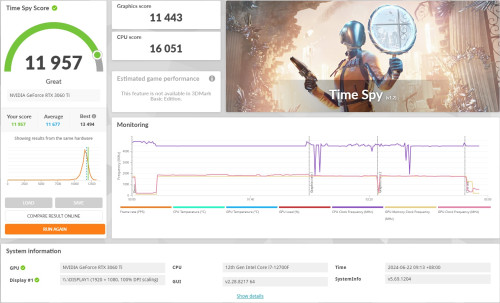
Real world testing, I did see improvements in 3D Mark scores

Timespy (+89)
user posted image

Firestrike (+373) achieved EXCELLENT!
user posted image

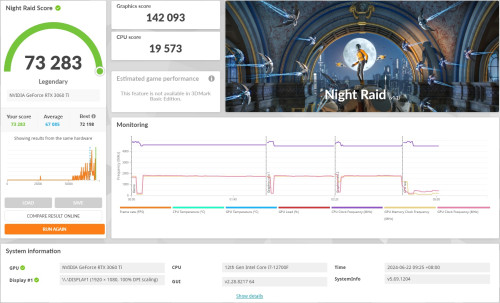
The most interesting is Night Raid (+5092) which I achieved the highest rated score LEGENDARY! drool.gif
user posted image

Too bad I cannot submit that as Im on the free version Orz doh.gif

Thanks for reading if you find it educational.

This post has been edited by babylon52281: Jun 23 2024, 12:17 PM
babylon52281
post Jun 23 2024, 12:13 PM

Look at all my stars!!
*******
Senior Member
2,673 posts

Joined: Apr 2017
Ohh I did encounter a quirky behaviour which Im not sure is it due to RAM stability, but after some usage my BIOS would default boot to my Test WinOS HDD rather than my Main WinOS SSD.

I would go into Bios, set disabled to all boots except my Main WinOS so it should boot only from that, then restart and it would stick, but after some use and a restart... what was 'Disabled' WAS 'Enabled' back again... without me touching anything, and it would default boot into my Test HDD.

If I reset to only 1 boot it will boot properly and soon after I got into Windows, I restarted and it boots properly again but few hours later this symptom reappears if I restarts. And it does this repeatedly so whatever setting I put in Bios doesnt seem to stick for long.

Curious if anybody seen this before...

This post has been edited by babylon52281: Jun 23 2024, 12:18 PM
babylon52281
post Jul 11 2024, 10:44 AM

Look at all my stars!!
*******
Senior Member
2,673 posts

Joined: Apr 2017
QUOTE(steevan1000 @ Jul 10 2024, 08:41 PM)
Laptops are typically constraint by a number of restrictions; Bios whitelist, space limitation if it only allow single sided DIMM, and the spec of your current RAM if you intend to run XMP since you mention gaming.

Your best bet is to go thru your laptop manuals and check if there are whitelist involved this will greatly reduce your option complexity, then next is to check your current RAM spec, try see if you can buy a matching unit.

Even after doing all that XMP speeds are not a guarantee nor will you not encounter thermal stability issue with 2 hot RAM sticks.

2 Pages  1 2 >Top
 

Change to:
| Lo-Fi Version
0.0209sec    0.58    7 queries    GZIP Disabled
Time is now: 2nd December 2025 - 10:33 PM