

need suggestion on laptop ram.
upgrading from 8gb 2666mhz x2 to 16 gb 3200mhz x2.
any brand is recommended?
RAM Handbook, updating ... zlol 23/12/07
RAM Handbook, updating ... zlol 23/12/07
|
|
 Mar 12 2024, 10:00 AM Mar 12 2024, 10:00 AM
|
 
Senior Member
4,539 posts Joined: Apr 2017 From: kuala lumpur, malaysia  
|
need suggestion on laptop ram.
upgrading from 8gb 2666mhz x2 to 16 gb 3200mhz x2. any brand is recommended? |
|
|
|
|
|
Apr 3 2024, 11:13 PM
Show posts by this member only | IPv6 | Post
#1242
|
|
Newbie
5 posts Joined: Jun 2010
|
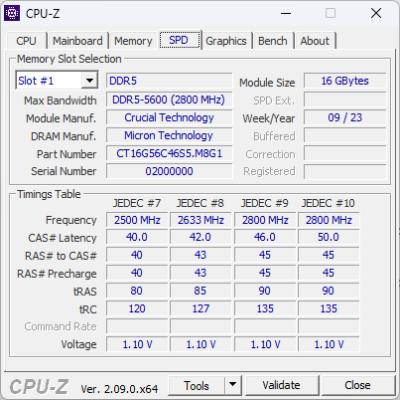
Any idea if this is original or fake ? Please explain. Thank you. |
|
|
May 10 2024, 12:20 PM
Show posts by this member only | IPv6 | Post
#1243
|

Junior Member
115 posts Joined: Oct 2008
|
MSI X670E gaming plus wifi + 7800x3d + Agesa 1.1.0.2b
out of box 2x16GB Kingston Fury Beast 6000 MT/s XMP1 40-40-40-80  MSI tryit 30-36-36-76 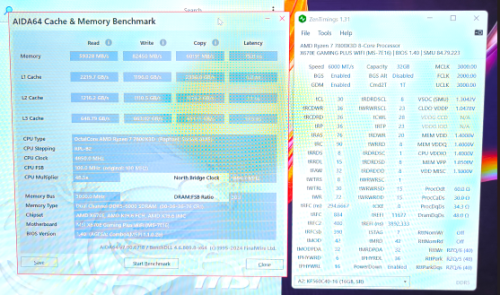 30-36-36-30 bullzoid timings 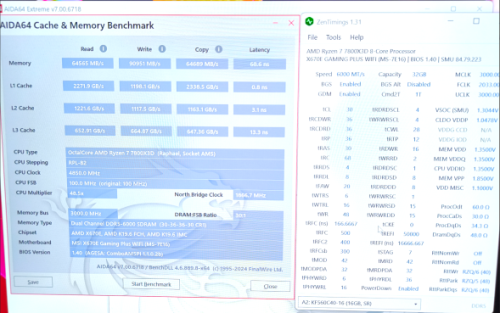 This post has been edited by lee_lnh: May 10 2024, 12:21 PM |
|
|
Jun 13 2024, 01:28 PM
|

Senior Member
2,678 posts Joined: Mar 2005
|
Kingston KVR26S19S8/8 & KVR26S19S6/8 DDR4 8GB SODIMM 2666Mhz Laptop Memory. These two ram cannot use together? Windows will not boot. But if install any of the two on its on, single stick, then Windows will boot up normally.
|
|
|
Jun 23 2024, 11:40 AM
|
|
Senior Member
2,673 posts Joined: Apr 2017
|
During last Raya weekend I wanted to fine tune my RAM timings because why not
 . This is a summary of another lengthy rabbit hole which I will post all the details in the link below: . This is a summary of another lengthy rabbit hole which I will post all the details in the link below:https://forum.lowyat.net/index.php?showtopi...ost&p=109967018 In short, by keeping speeds at 3466MHZ while maintaining Gear1 mode and voltage at XMP 1.35V, I step by step lower timings, starting with CL, then both tRCD & tRP, then tRAS, each time going thru hours of testing (Memtest86, TestMemPro, TM5 w/ Absolut). Once tRAS passes, I rinse & repeat again by reducing CL, then the rest, again and again finally end up with 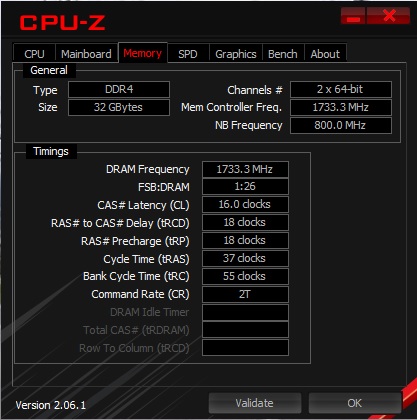 Before it was XMP default CL18-22-22-42 The final timings that I feel comfortable to drop down is CL16-18-18-37 HECK YEAH!  Compared before & after, Aida64 showed some significant gains in Read (+1890), Write (+6962) & Copy (+6180) but the huge drop came from Latency (-17.5ns !)   Theoretically my First Word Latency went from a poor 10.3ns down to 9.2ns which is performance DDR5 territory. Going thru hours after hours after hours of testing, I ended up with   Okay it was basically stable thru a boatload of stress testing that I put up in my detailed post above. Okay it was basically stable thru a boatload of stress testing that I put up in my detailed post above.This post has been edited by babylon52281: Jun 23 2024, 12:21 PM |
|
|
Jun 23 2024, 11:57 AM
|
|
Senior Member
2,673 posts Joined: Apr 2017
|
Real world testing, I did see improvements in 3D Mark scores
Timespy (+89) 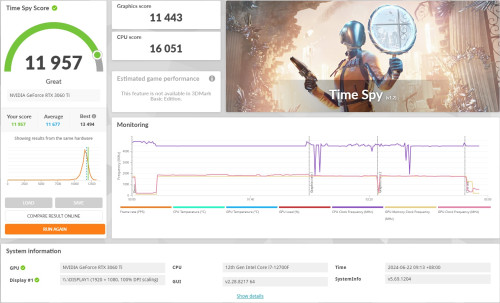 Firestrike (+373) achieved EXCELLENT!  The most interesting is Night Raid (+5092) which I achieved the highest rated score LEGENDARY!  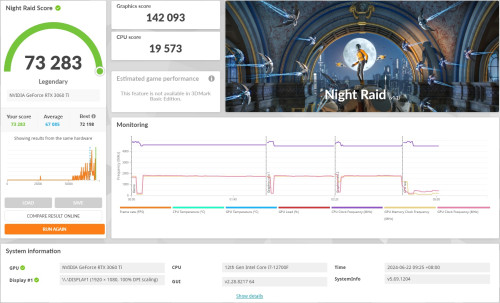 Too bad I cannot submit that as Im on the free version Orz  Thanks for reading if you find it educational. This post has been edited by babylon52281: Jun 23 2024, 12:17 PM |
|
|
|
|
|
Jun 23 2024, 12:13 PM
|
|
Senior Member
2,673 posts Joined: Apr 2017
|
Ohh I did encounter a quirky behaviour which Im not sure is it due to RAM stability, but after some usage my BIOS would default boot to my Test WinOS HDD rather than my Main WinOS SSD.
I would go into Bios, set disabled to all boots except my Main WinOS so it should boot only from that, then restart and it would stick, but after some use and a restart... what was 'Disabled' WAS 'Enabled' back again... without me touching anything, and it would default boot into my Test HDD. If I reset to only 1 boot it will boot properly and soon after I got into Windows, I restarted and it boots properly again but few hours later this symptom reappears if I restarts. And it does this repeatedly so whatever setting I put in Bios doesnt seem to stick for long. Curious if anybody seen this before... This post has been edited by babylon52281: Jun 23 2024, 12:18 PM |
|
|
Jul 10 2024, 08:41 PM
Show posts by this member only | IPv6 | Post
#1248
|
|
Senior Member
4,539 posts Joined: Apr 2017 From: kuala lumpur, malaysia
|
need advice from tech sifu here for buying laptop sodimm ram. mainly for moderate gaming.
  which one is better? which one is better?transcend ddr4 16gb 3200mhz adata ddr4 16gb 3200mhz apacer ddr4 16gb 3200mhz acer ddr4 16gb 3200mhz kingston ddr4 16gb 3200mhz exram ddr4 16gb 3200mhz kingston fury impact ddr4 16gb 3200mhz This post has been edited by steevan1000: Jul 10 2024, 08:42 PM |
|
|
Jul 11 2024, 10:44 AM
|
|
Senior Member
2,673 posts Joined: Apr 2017
|
QUOTE(steevan1000 @ Jul 10 2024, 08:41 PM) need advice from tech sifu here for buying laptop sodimm ram. mainly for moderate gaming. Laptops are typically constraint by a number of restrictions; Bios whitelist, space limitation if it only allow single sided DIMM, and the spec of your current RAM if you intend to run XMP since you mention gaming. which one is better?transcend ddr4 16gb 3200mhz adata ddr4 16gb 3200mhz apacer ddr4 16gb 3200mhz acer ddr4 16gb 3200mhz kingston ddr4 16gb 3200mhz exram ddr4 16gb 3200mhz kingston fury impact ddr4 16gb 3200mhz  Your best bet is to go thru your laptop manuals and check if there are whitelist involved this will greatly reduce your option complexity, then next is to check your current RAM spec, try see if you can buy a matching unit. Even after doing all that XMP speeds are not a guarantee nor will you not encounter thermal stability issue with 2 hot RAM sticks. |
|
|
Jul 11 2024, 02:19 PM
Show posts by this member only | IPv6 | Post
#1250
|

Senior Member
2,207 posts Joined: Jan 2003 From: stankonia
|
QUOTE(steevan1000 @ Jul 10 2024, 09:41 PM) need advice from tech sifu here for buying laptop sodimm ram. mainly for moderate gaming. get a pair of these and call it a day. can run at the advertised xmp no problem. which one is better?kingston fury impact ddr4 16gb 3200mhz edit: recommended to buy from a reputable online seller. This post has been edited by overfloe: Jul 11 2024, 02:20 PM |
|
|
Jul 15 2024, 02:50 PM
|
|
Senior Member
4,539 posts Joined: Apr 2017 From: kuala lumpur, malaysia
|
QUOTE(overfloe @ Jul 11 2024, 02:19 PM) get a pair of these and call it a day. can run at the advertised xmp no problem. you have any recommendations of online sellers you think are trustworthy?edit: recommended to buy from a reputable online seller. |
|
|
Jul 15 2024, 04:54 PM
|
|
Senior Member
2,207 posts Joined: Jan 2003 From: stankonia
|
QUOTE(steevan1000 @ Jul 15 2024, 03:50 PM) you have any recommendations of online sellers you think are trustworthy? got a few (those with physical shops). i bought from these shops before:https://shopee.com.my/-TMT-Official-Kingsto...7c-808ef9b38661 https://shopee.com.my/Kingston-Fury-IMPACT-...81-c20a3f9a9293 https://shopee.com.my/Kingston-FURY-Impact-...77-6dae833fc4ce https://shopee.com.my/Kingston-FURY-Impact-...64-b5dd806d7032 and this: https://shopee.com.my/Kingston-Fury-IMPACT-...f5-bec189427f3c steevan1000 liked this post
|
|
|
Aug 15 2024, 03:01 PM
|
|
Senior Member
2,207 posts Joined: Jan 2003 From: stankonia
|
|
|
|
|
|
|
Nov 27 2024, 12:27 AM
Show posts by this member only | IPv6 | Post
#1254
|

All Stars
12,039 posts Joined: Oct 2017
|
does any shop accept trade in RAM? as i posted on other thread, i buy a pair of cheap 2×16GB RAM price RM166
so now i got 2×8GB RAM that i buy during 2022, price around RM200 i dunno what to do |
|
|
Nov 27 2024, 04:52 AM
|
|
Senior Member
1,383 posts Joined: May 2006 From: Penang island
|
QUOTE(PJng @ Nov 27 2024, 12:27 AM) does any shop accept trade in RAM? as i posted on other thread, i buy a pair of cheap 2×16GB RAM price RM166 Donate to me..so now i got 2×8GB RAM that i buy during 2022, price around RM200 i dunno what to do |
|
|
Nov 27 2024, 05:06 AM
|
|
Senior Member
1,383 posts Joined: May 2006 From: Penang island
|
QUOTE(steevan1000 @ Jul 10 2024, 08:41 PM) need advice from tech sifu here for buying laptop sodimm ram. mainly for moderate gaming. Pny which one is better?transcend ddr4 16gb 3200mhz adata ddr4 16gb 3200mhz apacer ddr4 16gb 3200mhz acer ddr4 16gb 3200mhz kingston ddr4 16gb 3200mhz exram ddr4 16gb 3200mhz kingston fury impact ddr4 16gb 3200mhz Team group Crucial This post has been edited by adamtayy: Nov 27 2024, 05:07 AM |
|
|
Nov 27 2024, 09:05 AM
|
|
Senior Member
2,673 posts Joined: Apr 2017
|
QUOTE(PJng @ Nov 27 2024, 12:27 AM) does any shop accept trade in RAM? as i posted on other thread, i buy a pair of cheap 2×16GB RAM price RM166 RAM & storage is most depreciated hardware in local 2nd hand. You be lucky if got shop offer RM 30-50 for them. Try selling to end buyer at Carousell, FB Marketplace, etc.so now i got 2×8GB RAM that i buy during 2022, price around RM200 i dunno what to do PJng liked this post
|
|
|
Dec 6 2024, 12:33 PM
|

Senior Member
1,100 posts Joined: Jul 2008
|
Hi all need some advice, it's been awhile since my last upgrade and lost track with the specs. im looking for RAM upgrade, motherboard MSI z370 gaming plus. intel i7 8700K
my ram now: HX426C16FB2/8 KINGSTON HYPERX FURY BLACK 8GB DDR4 2666MHZ (2x, total 16 GB) It's hitting the wall for awhile now, especially opening multiple browsers and IDE, and many others app, it just can't sustain. I'm thinking to max out to 64GB so to prolong the life span for this PC until my full system upgrade. Will this cosair ram kit fit my pc? 64GB 3600mhz, i think will just go with 3600mhz since it's only RM12 difference. https://shopee.com.my/CORSAIR-Vengeance-LPX...53-df5143f5edd0 or this kingston fury, 32gb x2, but it looks like it's compatible with ryzen? will it also compatible with intel? this one seems cheaper, this one seems cheaper like RM100+ cheaper Model:KF432C16BB/32 https://shopee.com.my/KINGSTON-FURY-BEAST-B...53-97b9d6e68dc7 while i did also look at the msi website, the table is hard to filter and search is kinda buggy. https://www.msi.com/Motherboard/Z370-GAMING-PLUS/support#mem There are so many DDR4 ram on the market, which one you guys recommend that is reliable and bang for the buck? This post has been edited by Rainings: Dec 6 2024, 01:32 PM |
|
|
Dec 6 2024, 04:18 PM
|
|
Senior Member
2,673 posts Joined: Apr 2017
|
QUOTE(Rainings @ Dec 6 2024, 12:33 PM) Hi all need some advice, it's been awhile since my last upgrade and lost track with the specs. im looking for RAM upgrade, motherboard MSI z370 gaming plus. intel i7 8700K Whats ur CPU? Ur mobo unlikely to full use that 3600MHZ speed, better just go for 3200MHZ which is cheaper & plentiful. Your case, you might not (most likely) get to 3200MHZ. Use 32GB per stick (x2) if possible coz 4x16GB is slightly harder on getting faster speeds.my ram now: HX426C16FB2/8 KINGSTON HYPERX FURY BLACK 8GB DDR4 2666MHZ (2x, total 16 GB) It's hitting the wall for awhile now, especially opening multiple browsers and IDE, and many others app, it just can't sustain. I'm thinking to max out to 64GB so to prolong the life span for this PC until my full system upgrade. Will this cosair ram kit fit my pc? 64GB 3600mhz, i think will just go with 3600mhz since it's only RM12 difference. https://shopee.com.my/CORSAIR-Vengeance-LPX...53-df5143f5edd0 or this kingston fury, 32gb x2, but it looks like it's compatible with ryzen? will it also compatible with intel? this one seems cheaper, this one seems cheaper like RM100+ cheaper Model:KF432C16BB/32 https://shopee.com.my/KINGSTON-FURY-BEAST-B...53-97b9d6e68dc7 while i did also look at the msi website, the table is hard to filter and search is kinda buggy. https://www.msi.com/Motherboard/Z370-GAMING-PLUS/support#mem There are so many DDR4 ram on the market, which one you guys recommend that is reliable and bang for the buck? Corsair LPX or Kingston Beast or Teamgroup TForce |
|
|
Dec 6 2024, 04:39 PM
|
|
Senior Member
1,100 posts Joined: Jul 2008
|
QUOTE(babylon52281 @ Dec 6 2024, 04:18 PM) Whats ur CPU? Ur mobo unlikely to full use that 3600MHZ speed, better just go for 3200MHZ which is cheaper & plentiful. Your case, you might not (most likely) get to 3200MHZ. Use 32GB per stick (x2) if possible coz 4x16GB is slightly harder on getting faster speeds. It's Intel i7 8700KCorsair LPX or Kingston Beast or Teamgroup TForce Yes, I'm going for 32 (x2) Is just that Kingston Fury Beast is RM100 cheaper compare to Cosair. From MSI website Memory Compatiblity Not sure why. Kingston Fury Beast: KF432C16BB Cosair: 3200Mhz: CMK64GX4M2E3200C16 3600Mhz: CMK64GX4M2D3600C18  https://www.msi.com/Motherboard/Z370-GAMING-PLUS/support#mem |
| Change to: |  0.0249sec 0.0249sec
 0.64 0.64
 6 queries 6 queries
 GZIP Disabled GZIP Disabled
Time is now: 2nd December 2025 - 07:24 PM |
 Quote
Quote