Welcome Guest ( Log In | Register )

Bump Topic Topic Closed RSS Feed

Outline · [ Standard ] · Linear+

 Asus G-Series Notebooks Thread V6, Meet The Powerful G55 And G75(demanding)

views
     
crow23
post Jun 27 2012, 02:51 PM

New Member
*
Junior Member
31 posts

Joined: Apr 2012
QUOTE(Arvinaaaaa @ Jun 27 2012, 08:26 AM)
68c is good..did you use cooler pad while doing this test?
*
cooler pad? wat is dat? tongue.gif hahhaha~ the g55 fan is really awesome dude.. i was thinking of buying a cooler pad, annnnndddd now its gone.. laugh.gif


Added on June 27, 2012, 2:54 pm
QUOTE(androidfans @ Jun 27 2012, 09:16 AM)
rclxub.gif  shocking.gif why your palm rest there no blue sticker? you pear off it ? or not an malaysia set ?
*
peeled off along with i7,win7,nvidia sticker. semak my palm rest

This post has been edited by crow23: Jun 27 2012, 02:54 PM
crow23
post Jun 27 2012, 03:29 PM

New Member
*
Junior Member
31 posts

Joined: Apr 2012
has anyone ever seen a DUAL fan in a g55? care to share? im curious wether g55 have dual fan o not.. i only seen g75 with an actual DUAL fan..
crow23
post Jun 27 2012, 08:56 PM

New Member
*
Junior Member
31 posts

Joined: Apr 2012
QUOTE(SKY233 @ Jun 27 2012, 08:02 PM)
hmm.. i cant locate the subwoofer leh  hmm.gif
where izzit
*
Between 2 main speakers. At the middle. U can test with via audio advance setting.
crow23
post Jun 28 2012, 03:39 AM

New Member
*
Junior Member
31 posts

Joined: Apr 2012
any suggestion on video player? use mpc and its lagg.. use wmp play smooth. but i dont wan to use wmp.. is vlc any gud?
crow23
post Jun 29 2012, 04:54 PM

New Member
*
Junior Member
31 posts

Joined: Apr 2012
QUOTE(tanyz @ Jun 29 2012, 02:38 PM)
nope.. Just so all of you know..

WARRANTY IS NOT VOIDED UNLESS YOU REMOVE THE WARRANTY VOID STICKER...

where is this sticker located? its on the heatsink screw covering the cpu and vga.. other than that, you are free to dismantle the whole machine as you like..

that said, make sure you can fix it back !!. dun dismantle anything you cant put back together.. cos although you can bring it back to ASUS service centre to get it done, my guess is your machnie serial number will be flagged.. meaning if in the future if anything goes wrong, they might turn around and say you did it on purpose..

so if you really wan to maximise your ram :
1. please do so carefully ( i use a video camera to record how i dismantle so that i will know how to assemble it back )
2. go to asus service centre to get it done.

i dismantled this myself because, i used to work in a laptop service centre.. and i have always repaired all of my laptops by myself.. i juz purchase the parts outside..

You have been warned.
*
Bro, can share ur video doin surgery on g55? Might help others too i think.
crow23
post Jun 30 2012, 05:49 PM

New Member
*
Junior Member
31 posts

Joined: Apr 2012
just played bf3 with ultra setting on g55. walaoweh!!! no lag!!! the gfx is amazing!! i hav nvr played such a beautiful gfx before... the best before this was l4d.. played with a desktop with p4 and ati hd3650 setup.. low setting.. and still lag.. waaa so happy with this breast~~
crow23
post Jul 1 2012, 03:49 PM

New Member
*
Junior Member
31 posts

Joined: Apr 2012
QUOTE(cslance @ Jul 1 2012, 03:09 PM)
Hi everyone. I had go through some thread on ROG forum and i found that ASUS G55 really got a lot of issue....

1. heat issue
2. bsod
3. keyboard key tear off
4. cannot re-paste heatsink
5. Bad service after sale.

so end up should i still go with it? I worry after i pay so much but end up the time for repair is cost more than mine price. And this is my 1st time planning to get such high price of laptop, anything went wrong, i will get pawn by my parent. So any user can giv me comment? i need help here. If really ok, i plan to et it by next week.... icon_question.gif
*
1. heat issue = total BS! mybe some1 is trying to troll g55.. vmad.gif
2. dont knw yet. still ok for me.
3. same as 2.
4. y cannot? gentechpc said they can do it so y we cant?
5. dont know yet but i do heard a lot of ppl complaining about it..

i bought mine bcos it is the cheapest gaming laptop with sexy design! rclxm9.gif
crow23
post Jul 1 2012, 03:58 PM

New Member
*
Junior Member
31 posts

Joined: Apr 2012
QUOTE(crazyissac @ Jul 1 2012, 03:46 PM)
some more to add:
6. backlit keyboard sometimes not turn on after hibernate/log off
7. brightness automatically be "crazy" when play/turn off some games and need set it manually
8. long boot time
9. lack of stock because of noob ASUS Malaysia delivery
10. too amazing for gaming  brows.gif
*
bro, we collect same day rite? mybe our batch only got prob 6. for 7 i dont knw. doesnt happen to me.
crow23
post Jul 1 2012, 04:36 PM

New Member
*
Junior Member
31 posts

Joined: Apr 2012
bro, we post here based on our exp and owning the g55 itself. but it is up to u to decide whether it is a good laptop or not. u can also utube on g55 review
crow23
post Jul 1 2012, 06:51 PM

New Member
*
Junior Member
31 posts

Joined: Apr 2012
QUOTE(stupid1 @ Jul 1 2012, 06:18 PM)
oh ya.. do u all have another problem? when u switch off your computer den put in the power supply..the mouse remains open? meaning that the mouse is still running with the red ultralight open?but when i take off the power supply the mouse will switch off itself...
*
asus called it usb charge. only 1 port has it which is at the right side with the thunder icon. u can charge ur mp3 or other device while ur lapy is off/sleep/hibernate o wat ever cond. it will drain ur g55 batt if u do not plug in the power cable.


Added on July 1, 2012, 6:53 pm
QUOTE(holloway @ Jul 1 2012, 06:39 PM)
OCZ SSD VERTEX 4 SATA III 2.5"
128GB RM560, promo @ RM499 ~Limited stock~
Read: 550 MB/s(SATA 6Gb/s)
Write: 420 MB/s(SATA 6Gb/s)

INTEL SOLID STATE
Intel 520 Series, 2.5", SATA III SSD 120GB RM585
*SATA III 6Gb/s : 550 MB/s / 500 MB/s

Mushkin Enhanced: Solid State Drives
MKNSSDCR120GB-MX (DELUXE) 120GB IMFT-Sync Up to 560/520 RM550

Kingston HyperX 3K SSD Sata3 Rev3
SH103S3/120G 120GB HyperX SSD (Stand-alone) RM540
*read speeds of 555MB/s and write speeds of 510MB/s.

Kingston HyperX SSD Sata3 Rev3
SH100S3/120G 120GB HyperX SSD (Stand-alone) RM610
*read speeds of 555MB/s and write speeds of 510MB/s.

Corsair Solid State Drive

CSSD-F120GB3-BK -- RM450 *550MB/s Read510MB/s Write.

CSSD-F90GBGT-BK -- RM540 *555MB/s Read 505MB/s Write
*
wah... corsair is cheap!!

This post has been edited by crow23: Jul 1 2012, 06:53 PM
crow23
post Jul 1 2012, 07:15 PM

New Member
*
Junior Member
31 posts

Joined: Apr 2012
QUOTE(stupid1 @ Jul 1 2012, 07:06 PM)
but when i take out the power supply my mouse dont switch on anymore..does it meant that the mp3 and other device only will charge when the power supply is on?
*
it does says USB CHARGE. unless ur mouse hav a battery.
crow23
post Jul 1 2012, 07:32 PM

New Member
*
Junior Member
31 posts

Joined: Apr 2012
QUOTE(stupid1 @ Jul 1 2012, 07:27 PM)
mine is wired mouse..inside dont have a battery...when i put on the power supply when the computer has swtiched off, the light emitted from the mouse remains there.. but when i take off the power supply the light disappears @@....so i assume that the battery is not used to charge mouse/ other devices when the power supply is not plugged in? or is my com got problem  ohmy.gif
*
oho.. dont knw about that bro..
crow23
post Jul 1 2012, 07:40 PM

New Member
*
Junior Member
31 posts

Joined: Apr 2012
QUOTE(TechMaxed @ Jul 1 2012, 07:29 PM)
Sorry 4 uploading late...got high fever.. sweat.gif
» Click to show Spoiler - click again to hide... «


» Click to show Spoiler - click again to hide... «

*
fulamak!! so many bundle gift!! congratz bro! rclxms.gif
crow23
post Jul 2 2012, 06:31 PM

New Member
*
Junior Member
31 posts

Joined: Apr 2012
Guys! Any game suggestion? Already installed bf3, d3, mw3, max payne 3, fable 3. Dat is a lot of 3 there.. Huhu.. Anymore?
crow23
post Jul 2 2012, 09:23 PM

New Member
*
Junior Member
31 posts

Joined: Apr 2012
QUOTE(crazyissac @ Jul 2 2012, 06:34 PM)
crysis 2 ?
*
Argh!! How can i forgot about crysis?? doh.gif downloading now!!!!! Thx for reminding bro!!
crow23
post Jul 3 2012, 11:00 PM

New Member
*
Junior Member
31 posts

Joined: Apr 2012
QUOTE(tanyz @ Jul 3 2012, 09:29 PM)
As promised.. here is a short tutorial on how to open the g55vw case..

IF YOU ARE AFRAID OF DESTROYING YOUR MACHINE, DONT ATTEMPT THIS !!

tools needed :

1. screwdriver set (those mini screw driver that usually comes in a set of 6 different sizes.. i got mine from Daiso for RM5
2. a towel (use this as a base so you dont scratch you beloved machine)
3. Balls and some common sense
4. OPTIONAL : a small magnet
Here Goes :

1. remove the screws in yellow and blue
http://imageshack.us/photo/my-images/21/p7032620.jpg/
http://imageshack.us/photo/my-images/829/p7032622.jpg/
http://imageshack.us/photo/my-images/836/p7032624.jpg/
</a>

2. flip the laptop over and slowly remove this casing
<a href='http://imageshack.us/photo/my-images/194/p7032626.jpg/' target='_blank'>http://imageshack.us/photo/my-images/194/p7032626.jpg/


3.remove the screw highlighted in yellow
http://imageshack.us/photo/my-images/201/p7032627.jpg/
http://imageshack.us/photo/my-images/526/p7032640.jpg/

4. slowly remove the top cover. becareful on at this part.. do not pull it too hard or you risk breaking the clips.
http://imageshack.us/photo/my-images/823/p7032629.jpg/
http://imageshack.us/photo/my-images/696/p7032630.jpg/

5. take extra care when removing this area and also the other side
http://imageshack.us/photo/my-images/221/p7032637.jpg/
http://imageshack.us/photo/my-images/40/p7032633.jpg/

6. slowly remove the top case but make sure you remove this cable 1st.. IMPORTANT !!!
http://imageshack.us/photo/my-images/40/p7032633.jpg
http://imageshack.us/photo/my-images/221/p7032637.jpg
http://imageshack.us/photo/my-images/546/p7032639.jpg

7. TA DAAAAAAA...
http://imageshack.us/photo/my-images/256/p7032641.jpg/

To assemble it back.. juz read the post backwards and you should be fine.. GOOD LUCK !!
EXTRA :::
some times when you are removing the cable in pic 10.. this cable might come loose also. juz check it before you assemble the top case or you wont be able to power on the machine.
http://img507.imageshack.us/img507/8734/p7032643.jpg

if you are installing 1 SSD and 1 HDD like me, remember to set the option in bios like this
http://img845.imageshack.us/img845/6583/p7032645.jpg
If anything goes wrong.. dun flame me.. ill try to help, but if its major i guess ASUS service centre is the only option.

I summarize everything into here.. easier to see and read ..
*
wahh.. scary la to open... thx for the tutor bro!! notworthy.gif
crow23
post Jul 4 2012, 03:50 AM

New Member
*
Junior Member
31 posts

Joined: Apr 2012
QUOTE(troy29 @ Jul 3 2012, 11:31 PM)
just get from my cousin, the receipt I forget to get. will take from him later. for who buy from ITking, warranty registration the reseller name you all write what ?


Added on July 4, 2012, 12:57 amCheer from sadness  smile.gif.......no mood to gaming aslo sad.gif

[attachmentid=2928256][attachmentid=2928278]
*
i write tte technology. that is his company i tink.


Added on July 4, 2012, 4:11 amtanyz, where is the msata slot? i cant see it frm the pic..

This post has been edited by crow23: Jul 4 2012, 04:11 AM
crow23
post Jul 4 2012, 07:01 PM

New Member
*
Junior Member
31 posts

Joined: Apr 2012
QUOTE(riku2replica @ Jul 4 2012, 04:43 AM)
Derp. the msata slot is behind the board, u have to take out quite a number of screws, and there is not guarantee if u would snap anything.
*
uih... so hard la to put msata..


Added on July 4, 2012, 7:08 pmfor the audio prob, i think its still the driver problem. mine only happen 1 time then after that never hapen again. happen only with wmp 11.

This post has been edited by crow23: Jul 4 2012, 07:09 PM
crow23
post Jul 12 2012, 04:49 AM

New Member
*
Junior Member
31 posts

Joined: Apr 2012
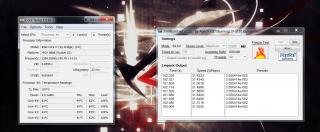
finally finish exam week!!! now can really molest this breast sum more!! btw, here is my snap on cpu stress and temp. quite cool i think..
Attached Image

This post has been edited by crow23: Jul 12 2012, 05:03 AM
crow23
post Jul 12 2012, 05:01 PM

New Member
*
Junior Member
31 posts

Joined: Apr 2012
QUOTE(holloway @ Jul 12 2012, 08:42 AM)
u are not setting the laptop to its high performance mode.. probably entertainment or something.. coz see the multiplier .. only 99.97 x 14 = 1400++ mhz... should be 30**mhz.. lol

go test again! haahaa...
*
oh? i tot that only control the brightness.. ok comencing test 2!!

3 Pages < 1 2 3 >Top
Topic ClosedOptions
 

Change to:
| Lo-Fi Version
0.0522sec    0.28    7 queries    GZIP Disabled
Time is now: 3rd December 2025 - 05:31 AM