

Just wondering how do I get the password for my maxis fibre. I know my id is 123456@home.maxis.com.my
Maxis Connect to Maxis using Custom Router!, Guidelines
Maxis Connect to Maxis using Custom Router!, Guidelines
|
|
 May 31 2016, 10:41 PM May 31 2016, 10:41 PM
|
 
Senior Member
415 posts Joined: Jan 2003 From: Petaling Jaya   
|
Just wondering how do I get the password for my maxis fibre. I know my id is 123456@home.maxis.com.my
|
|
|
|
|
|
Jun 1 2016, 08:01 AM
|

Senior Member
1,534 posts Joined: Jan 2003 From: 10110011001110 Status: Missing 
|
QUOTE(dchk @ May 31 2016, 10:41 PM) Just wondering how do I get the password for my maxis fibre. I know my id is 123456@home.maxis.com.my your passwd will be 1234561 , just add +1 add the back of ur user id |
|
|
Jun 28 2016, 02:09 PM
|

Senior Member
942 posts Joined: Jan 2003 From: KL
|
QUOTE(silveraider @ Jun 13 2012, 04:51 PM) Alcatel-lucent ONT modem using CLI command to configure, is like the dos command. hiany one have experience to access Alcatel-lucent and turn off the voip setting? |
|
|
Jun 28 2016, 07:15 PM
|

Senior Member
1,866 posts Joined: Dec 2006 From: Klang 
|
QUOTE(xortz @ May 21 2016, 02:01 AM) Hi Me too, please adviseCan suggest router below rm200 that can be used with maxis fiber? I dont need voip & iptv to be function |
|
|
Jun 30 2016, 05:22 PM
|

Junior Member
315 posts Joined: Jan 2003 From: KL
|
QUOTE(Liuism @ Jun 28 2016, 07:15 PM) Me too, please advise Look for TP Link TL-WR1043ND. It is below 200 and support Maxis. |
|
|
Jul 4 2016, 02:18 PM
|
|
Senior Member
1,866 posts Joined: Dec 2006 From: Klang
|
QUOTE(syk @ Jun 30 2016, 05:22 PM) Look for TP Link TL-WR1043ND. Setup is to replace the technicolor, or as additional WIFI but disable the Technicolor WIFI?It is below 200 and support Maxis. |
|
|
|
|
|
Jul 4 2016, 04:39 PM
|
|
Junior Member
315 posts Joined: Jan 2003 From: KL
|
QUOTE(Liuism @ Jul 4 2016, 02:18 PM) Setup is to replace the technicolor, or as additional WIFI but disable the Technicolor WIFI? Replace maxis modem, but no VOIP function. |
|
|
Jul 4 2016, 06:30 PM
|
|
Senior Member
1,866 posts Joined: Dec 2006 From: Klang
|
QUOTE(syk @ Jul 4 2016, 04:39 PM) Replace maxis modem, but no VOIP function. i need the voip, for house phone and alarm system. |
|
|
Jul 5 2016, 10:56 AM
|
|
Junior Member
315 posts Joined: Jan 2003 From: KL
|
QUOTE(Liuism @ Jul 4 2016, 06:30 PM) i need the voip, for house phone and alarm system. Depends on your TM modem model, you can transfer voip from maxis router to TM modem. |
|
|
Jul 11 2016, 02:02 PM
|
|
Senior Member
1,866 posts Joined: Dec 2006 From: Klang
|
QUOTE(syk @ Jul 5 2016, 10:56 AM) Depends on your TM modem model, you can transfer voip from maxis router to TM modem. how about another model? i heard ASUS there is a unit which is quite good(RTN-12HP)? |
|
|
Jul 11 2016, 05:09 PM
|
|
Junior Member
315 posts Joined: Jan 2003 From: KL
|
QUOTE(Liuism @ Jul 11 2016, 02:02 PM) how about another model? i heard ASUS there is a unit which is quite good(RTN-12HP)? Many router model can be used as long as it support Unifi / Maxis vlan tagging.I think Asus modeol is >rm200. |
|
|
Jul 16 2016, 02:35 PM
|

Senior Member
6,986 posts Joined: Jan 2003 From: E-Poh.../Pen-Nang.../Pee-Jay/S.Jaye
|
I tried using the default IP settings and also but can't get into the modem setup page...
I want to replace the sucky Thompson modem.... Arrgggghhh.... I think my old laptop port have problem... Sigh... Any one can help me around USJ? Or I can direct plug into port 2 as I don use the phone at all? BTW i'm using XiaoMi router.... after i configure my PPPoE also can't access to the internet... they doesn't have fixed IP only can key in DNS... This post has been edited by michael9413: Jul 16 2016, 05:45 PM |
|
|
Jul 16 2016, 07:57 PM
|

Senior Member
1,040 posts Joined: Mar 2006
|
QUOTE(syk @ Jul 5 2016, 10:56 AM) Depends on your TM modem model, you can transfer voip from maxis router to TM modem. Bro, May I know how to do it ? I want throw Thompson modem .Thank you.  |
|
|
|
|
|
Jul 17 2016, 09:48 PM
|
|
Junior Member
315 posts Joined: Jan 2003 From: KL
|
QUOTE(lwk523 @ Jul 16 2016, 07:57 PM) Bro, May I know how to do it ? I want throw Thompson modem . Refer to post#1 or Post #902Thank you. |
|
|
Jul 20 2016, 01:57 PM
|

Senior Member
2,006 posts Joined: Sep 2007 
|
anyone know the setting IP for the ZTE h268e?
|
|
|
Jul 24 2016, 06:58 PM
|

Junior Member
104 posts Joined: Mar 2010
|
Buy a Tp-link tl-WR841n lately, manage to get it to work but without Voip.
Vlan tagging already setup itself in quick setup as show in pic, when i plug the Lan4 cable to TG784n v3 Wan port, TG784n v3 does't show anything, am i doing something wrong? 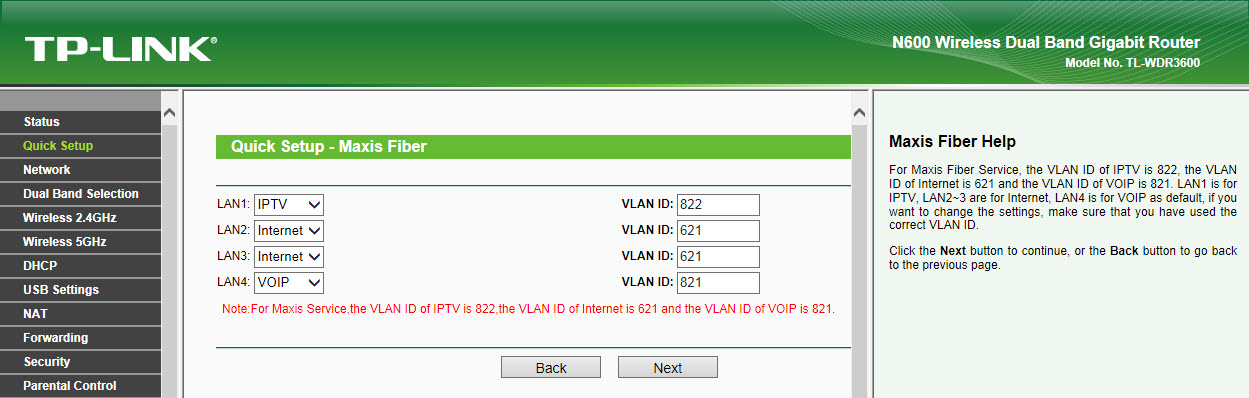 |
|
|
Jul 25 2016, 10:53 AM
|
|
Senior Member
2,006 posts Joined: Sep 2007
|
here what i did using tm modem (Zte h268e) + technicolor router (maxis).
tm modem (Zte h268e)- lan 2 connect to wan of custom router, lan 3 connect to wan technicolor router (maxis). log into Zte h268e, go to port binding, select 621 to lan2, the rest 821, 822, 823 to lan 3, then go to VLAN Tagging go to Lan2, select tagging only 621, then lan3 select tagging on 821, 822, 823. setting of custom router refer to page 1. internet and VoiP working. i dont have iptv so cant test. |
|
|
Jul 25 2016, 10:59 AM
|

Newbie
1 posts Joined: Sep 2014
|
may i know how to configure
Technicolor TG784n v3 connect to cisco router e2500 ? |
|
|
Aug 15 2016, 09:58 AM
|

Junior Member
36 posts Joined: Oct 2005 From: PJ
|
Hi All,
anybody can show the guilde how to connect the Maxis VoIP phone to Asus Router ? |
|
|
Aug 15 2016, 09:17 PM
|
|
Junior Member
25 posts Joined: Dec 2010
|
I have a TP-link tl-wr841hp router to replace technicolor TG784n v3 maxis router. Modem is ONU-HUAWEI-HG8240w. May I know is there any sifu here know how to setup the maxis voip ? I don't mind whether it is connect to maxis router or TM modem. Coz I type 192.168.1.1 not valid.
|
| Change to: |  0.0287sec 0.0287sec
 0.47 0.47
 6 queries 6 queries
 GZIP Disabled GZIP Disabled
Time is now: 2nd December 2025 - 01:27 PM |
 Quote
Quote