Welcome Guest ( Log In | Register )

Bump Topic Topic Closed RSS Feed
36 Pages « < 19 20 21 22 23 > » Bottom

Outline · [ Standard ] · Linear+

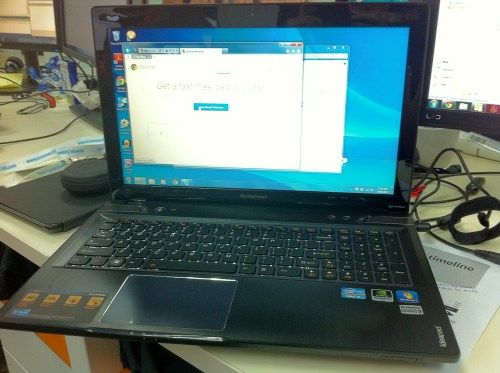
 Lenovo Y580 on hand, 9 Aug.295.93 so far the best driver Y580

views
     
TSdeepcool0922
post Jul 1 2012, 01:15 AM

Enthusiast
*****
Senior Member
705 posts

Joined: Feb 2006
From: Kuala Lumpur


QUOTE(ytlay @ Jul 1 2012, 01:08 AM)
Wow! want to stress ur baby kau-kau ah...  biggrin.gif
Nice CPU & GPU temp below 90C tho' the temperature still increasing & not yet stable. Unfortunately, no GPUz screen shot to determine any GPU throttling.
By the way, are u running with cooler or air-cond.
*
with cooler and no air-cond
tcchuin
post Jul 1 2012, 01:47 AM

On my way
****
Senior Member
511 posts

Joined: Nov 2007
with the not stable temperature, I think it has been throttled arnd 90C. similar things happened on my dell 15r se too.
TSdeepcool0922
post Jul 1 2012, 02:01 AM

Enthusiast
*****
Senior Member
705 posts

Joined: Feb 2006
From: Kuala Lumpur


QUOTE(tcchuin @ Jul 1 2012, 01:47 AM)
with the not stable temperature, I think it has been throttled arnd 90C. similar things happened on my dell 15r se too.
*
reply wrong.


Added on July 1, 2012, 2:04 am
QUOTE(tcchuin @ Jul 1 2012, 01:47 AM)
with the not stable temperature, I think it has been throttled arnd 90C. similar things happened on my dell 15r se too.
*
is me accidently touch the touchpad when i feel the temperature on left palm rest and mouse pointed on stop button. then i restress again. for 6 minutes.

This post has been edited by deepcool0922: Jul 1 2012, 02:04 AM
tcchuin
post Jul 1 2012, 03:09 AM

On my way
****
Senior Member
511 posts

Joined: Nov 2007
QUOTE(deepcool0922 @ Jul 1 2012, 02:01 AM)
reply wrong.


Added on July 1, 2012, 2:04 am
is me accidently touch the touchpad when i feel the temperature on left palm rest and mouse pointed on stop button. then i restress again. for 6 minutes.
*
I'm not talking about the period, can't you notice the temperature cruve is a little bit zigzag type?


Added on July 1, 2012, 3:11 amand idle temperature seems to be around 60C fo CPU, please try again when you're free and let the cpu rest few minutes before doing any test.

This post has been edited by tcchuin: Jul 1 2012, 03:11 AM
TSdeepcool0922
post Jul 1 2012, 05:03 AM

Enthusiast
*****
Senior Member
705 posts

Joined: Feb 2006
From: Kuala Lumpur


QUOTE(tcchuin @ Jul 1 2012, 03:09 AM)
I'm not talking about the period, can't you notice the temperature cruve is a little bit zigzag type?


Added on July 1, 2012, 3:11 amand idle temperature seems to be around 60C fo CPU, please try again when you're free and let the cpu rest few minutes before doing any test.
*
zig zag line is normal. How to maintain temperature at straight line???

Stress CPU, GPU & HDD for 45 minutes...Lazy to wait till 1 hour.

Anyone have other brand Stress Test result?

Picture Before Start.
» Click to show Spoiler - click again to hide... «


Picture After 45 minutes Stress CPU, GPU & HDD.
» Click to show Spoiler - click again to hide... «


Picture Test start at 0356. End at 0441.
» Click to show Spoiler - click again to hide... «


Picture Stress Test report from other (China Tester).
» Click to show Spoiler - click again to hide... «


CPU temperature maintain btw 82-92. Most of the time on 88-89. I recorded a video, the upload speed so slow...

After 10 mins, HDD back to 54.
SUSalaskanbunny
post Jul 1 2012, 08:04 AM

Foodie
*******
Senior Member
4,283 posts

Joined: Nov 2009
From: Vietnam

only prob is the hdd...
tcchuin
post Jul 1 2012, 12:38 PM

On my way
****
Senior Member
511 posts

Joined: Nov 2007
QUOTE(deepcool0922 @ Jul 1 2012, 05:03 AM)
zig zag line is normal. How to maintain temperature at straight line???

Stress CPU, GPU & HDD for 45 minutes...Lazy to wait till 1 hour.

Anyone have other brand Stress Test result?

Picture Before Start.
» Click to show Spoiler - click again to hide... «


Picture After 45 minutes Stress CPU, GPU & HDD.
» Click to show Spoiler - click again to hide... «


Picture Test start at 0356. End at 0441.
» Click to show Spoiler - click again to hide... «


Picture Stress Test report from other (China Tester).
» Click to show Spoiler - click again to hide... «

CPU temperature maintain btw 82-92. Most of the time on 88-89. I recorded a video, the upload speed so slow...

After 10 mins, HDD back to 54.
*
zigzag line means the processor is being throttled for some second, resulting it to be cooler and hence the lower temperature reading, and when the temperature is low enough, throttling is disabled, and temp goes up and again and again.


TSdeepcool0922
post Jul 1 2012, 01:33 PM

Enthusiast
*****
Senior Member
705 posts

Joined: Feb 2006
From: Kuala Lumpur


QUOTE(alaskanbunny @ Jul 1 2012, 08:04 AM)
only prob is the hdd...
*
Ya lor. But play game temperature wont went high like that. Only happen stress hdd. So I no worry.


Added on July 1, 2012, 1:40 pm
QUOTE(tcchuin @ Jul 1 2012, 12:38 PM)
zigzag line means the processor is being throttled for some second, resulting it to be cooler and hence the lower temperature reading, and when the temperature is low enough, throttling is disabled, and temp goes up and again and again.
*
zigzag line is the cooler working doh.gif

the temp havent reach to the critical temp yet.

If u have proof...please show us...we interesting.

i think you are right.


Added on July 1, 2012, 3:46 pmOC from 950MHz to 970MHz. Temperature increase 3 degree celsius.

user posted image

user posted image


Added on July 1, 2012, 4:40 pm


This post has been edited by deepcool0922: Jul 1 2012, 04:40 PM
ytlay
post Jul 1 2012, 06:35 PM

Regular
******
Senior Member
1,087 posts

Joined: Dec 2006
Thank u so much for taking the trouble to run the FULL stress test which pushing ur baby to its limit. notworthy.gif
During FULL stress, CPU max at 92c, GPU 75c without any throttling showing that the FULL copper heat sink is working great thumbup.gif.
The temp look quite impressive when compare to Asus G55VW stress with Furmark & Prime95, CPU max at 95c & GPU 77c tho' under different test setup/temperature.
HDD's temp. can be easily taking care off by using a suitable cooler.


Ahh.. GPU throttles to 835mhz when u OC it to 970mhz with temp 78c. Lenovo is throtting the GPU when it hit 78c. They don't allow us to oc the GPU tho' its still far below the safe limit. Sifu, any way to bypass it? brows.gif


This post has been edited by ytlay: Jul 1 2012, 07:11 PM
TSdeepcool0922
post Jul 1 2012, 08:25 PM

Enthusiast
*****
Senior Member
705 posts

Joined: Feb 2006
From: Kuala Lumpur


QUOTE(ytlay @ Jul 1 2012, 06:35 PM)
Thank u so much for taking the trouble to run the FULL stress test which pushing ur baby to its limit.  notworthy.gif
During FULL stress, CPU max at 92c, GPU 75c without any throttling showing that the FULL copper heat sink is working great  thumbup.gif.
The temp look quite impressive when compare to Asus G55VW stress with Furmark & Prime95, CPU max at 95c & GPU 77c tho' under different test setup/temperature.
HDD's temp. can be easily taking care off by using a suitable cooler.
Ahh.. GPU throttles to 835mhz when u OC it to 970mhz with temp 78c.  Lenovo is throtting the GPU when it hit 78c. They don't allow us to oc the GPU tho' its still far below the safe limit. Sifu, any way to bypass it?  brows.gif
*
The picture 835MHz already finish test. yes, it start throttling at 835.

user posted image


This post has been edited by deepcool0922: Jul 1 2012, 08:32 PM
syin16
post Jul 1 2012, 10:35 PM

On my way
****
Senior Member
665 posts

Joined: Mar 2010


seems good offer though, but sad that the gpu is not mxm standard. Seems like proprietary


Added on July 1, 2012, 10:37 pmbut good thing the gpu based on kepler though

This post has been edited by syin16: Jul 1 2012, 10:37 PM
TSdeepcool0922
post Jul 1 2012, 10:41 PM

Enthusiast
*****
Senior Member
705 posts

Joined: Feb 2006
From: Kuala Lumpur


QUOTE(syin16 @ Jul 1 2012, 10:35 PM)
seems good offer though, but sad that the gpu is not mxm standard. Seems like proprietary


Added on July 1, 2012, 10:37 pmbut good thing the gpu based on kepler though
*
with this price. no way.

sager are.
syin16
post Jul 1 2012, 10:56 PM

On my way
****
Senior Member
665 posts

Joined: Mar 2010


but luckily the ram, hdd, msata and the wifi module is easily accessible. And looks like from the pics of disassembly that the cpu can be quite easily swap with higher end model.

Comparing it with my dell vostro 3450, it's a wonder. Wondering if there are any laptop that worse than my 3450 in term of maintenance though? Just some babbling smile.gif

Gotta put this laptop in my checklist!
TSdeepcool0922
post Jul 2 2012, 01:16 AM

Enthusiast
*****
Senior Member
705 posts

Joined: Feb 2006
From: Kuala Lumpur


QUOTE(syin16 @ Jul 1 2012, 10:56 PM)
but luckily the ram, hdd, msata and the wifi module is easily accessible. And looks like from the pics of disassembly that the cpu can be quite easily swap with higher end model.

Comparing it with my dell vostro 3450, it's a wonder. Wondering if there are any laptop that worse than my 3450 in term of maintenance though? Just some babbling smile.gif

Gotta put this laptop in my checklist!
*
So far after the stress test, i didnt get a jet sound cooling fan from Y580.
derekchan2k
post Jul 4 2012, 01:39 PM

New Member
*
Junior Member
15 posts

Joined: Jul 2007
Got my Lenovo Y580 from Ajul since last Thursday night. Got to admit that this is one awesome machine. I have been using it to play Diablo 3 for the past 4 days and faced no issues like overheating/lag/etc. I thought that the HD screen (not FHD) was okay but it was incomparable to my old MacBook Pro in terms of color generation... Kinda disappointed with that. But gaming is definitely spectacular on this machine for this price drool.gif
user posted image
jammerlee711
post Jul 4 2012, 01:50 PM

Casual
***
Junior Member
395 posts

Joined: Apr 2010
congrats to another new y580 owner ! how was the cooling? HDD max temp on your machine?
TSdeepcool0922
post Jul 4 2012, 02:33 PM

Enthusiast
*****
Senior Member
705 posts

Joined: Feb 2006
From: Kuala Lumpur


Latest Beta Driver!

http://www.nvidia.com/object/notebook-win8...eta-driver.html

Installed! Haven't try yet. Going to work...
derekchan2k
post Jul 4 2012, 02:47 PM

New Member
*
Junior Member
15 posts

Joined: Jul 2007
QUOTE(jammerlee711 @ Jul 4 2012, 01:50 PM)
congrats to another new y580 owner  ! how was the cooling? HDD max temp on your machine?
*
I haven't really checked yet... Will do a test later tonight to see if the temperature goes high during my usage
jammerlee711
post Jul 4 2012, 02:56 PM

Casual
***
Junior Member
395 posts

Joined: Apr 2010
check it with HWMonitor =)
blurp2010
post Jul 4 2012, 04:57 PM

New Member
*
Junior Member
46 posts

Joined: Oct 2011


Got weird conservation between FB Lenovo M'sia and Andy Chow~ hmm.gif

Here the links FB Lenovo M'sia http://www.facebook.com/LenovoMY

Lenovo M'sia reply that malaysia will not get FHD but they reply the spec with the word standard FHD~ rclxub.gif

36 Pages « < 19 20 21 22 23 > » Top
Topic ClosedOptions
 

Change to:
| Lo-Fi Version
0.0296sec    0.29    6 queries    GZIP Disabled
Time is now: 3rd December 2025 - 07:02 AM