Welcome Guest ( Log In | Register )

Bump Topic Topic Closed RSS Feed
127 Pages « < 5 6 7 8 9 > » Bottom

Outline · [ Standard ] · Linear+

 Samsung Galaxy S III I9300 Official Thread V8, I9300BUALF1.DM OTA in 1 - 2 weeks ?

views
     
bestofel
post Jun 11 2012, 08:19 AM

On my way
****
Senior Member
528 posts

Joined: Mar 2008
From: Klang Valley


QUOTE(moon* @ Jun 11 2012, 08:14 AM)
ahh ok..

6% at 1h 23m 39s

lol.. didnt do much over the weekends.

how do u guys post the screenshot of ur screen eh?
*
Hehe.. Just 1 hour ++.

You swipe print screen, then install photobucket search in Google Play. Register photobucket account, then upload. Look at the uploaded picture, tap menu, choose view links. Tap on box for IMG: _______________ the image URL with [IMG ] code stored in the clipboard.

Come here, long tap on text field, choose Clipbard menu. Tap on [IMG ] ..... clipboard.

This post has been edited by bestofel: Jun 11 2012, 08:27 AM
RedsInHell
post Jun 11 2012, 08:21 AM

Casual
***
Junior Member
426 posts

Joined: Mar 2010


i didn't gave any attention for post counts, but for how long that post in here has been counted in postcountinfo?

could be the reason for some trolls coming here.

& sgp flex HD, anyone doing bulk?

tq

This post has been edited by RedsInHell: Jun 11 2012, 08:21 AM
moon*
post Jun 11 2012, 08:24 AM

Do you have a Honda?
********
All Stars
11,927 posts

Joined: Jan 2003
From: KL / PJ


QUOTE(bestofel @ Jun 11 2012, 08:19 AM)
Hehe.. Just 1 hour ++.

You sweep print screen, then install photobucket search in Google Play. Register photobucket account, then upload. Look at the uploaded picture, tap menu, choose view links. Tap on box for IMG: _______________ the image URL with [IMG ] code stored in the clipboard.

Come here, long tap on text field, choose Clipbard menu. Tap on [IMG ] ..... clipboard.
*
the printscreen thingy, do i need to download and instal this as well?
bestofel
post Jun 11 2012, 08:24 AM

On my way
****
Senior Member
528 posts

Joined: Mar 2008
From: Klang Valley


My previous question from previous thread still no answer/solution:

One question to macbook / imac user. How you do tethering with SGS3 by USB cable?

Before this, I use SGS 1, I managed to do tethering by USB cable.
0168257061
post Jun 11 2012, 08:24 AM

EimiFukada
********
All Stars
14,242 posts

Joined: Jul 2007
From: JAVABUS


Anyone who is using side flip cover ?
I'm using one, but not sure other brand are better.. hope to see one.
bestofel
post Jun 11 2012, 08:25 AM

On my way
****
Senior Member
528 posts

Joined: Mar 2008
From: Klang Valley


QUOTE(moon* @ Jun 11 2012, 08:24 AM)
the printscreen thingy, do i need to download and instal this as well?
*
Erk..go to youtube, search for "SGS3 screen capture".
moon*
post Jun 11 2012, 08:27 AM

Do you have a Honda?
********
All Stars
11,927 posts

Joined: Jan 2003
From: KL / PJ


QUOTE(bestofel @ Jun 11 2012, 08:25 AM)
Erk..go to youtube, search for "SGS3 screen capture".
*
thanks.

OH KOOL!! LOL!! now tats how u swipe ur screen LOL

This post has been edited by moon*: Jun 11 2012, 08:29 AM
farscope
post Jun 11 2012, 08:29 AM

Look at all my stars!!
*******
Senior Member
3,427 posts

Joined: Apr 2007
From: Gangster Paradise


QUOTE(moon* @ Jun 11 2012, 08:24 AM)
the printscreen thingy, do i need to download and instal this as well?
*
no need.. u just need to enable it in Settings > Motion > Palm actions > tick the relevant one.

or manually print screen by long hold power + home button

QUOTE(bestofel @ Jun 11 2012, 08:24 AM)
My previous question from previous thread still no answer/solution:

One question to macbook / imac user. How you do tethering with SGS3 by USB cable?

Before this, I use SGS 1, I managed to do tethering by USB cable.
*
not using any mac, so cant help u
benny888
post Jun 11 2012, 08:33 AM

Gadget Freak
Group Icon
Elite
27,801 posts

Joined: Jun 2007
From: Johor


QUOTE(bestofel @ Jun 11 2012, 08:24 AM)
My previous question from previous thread still no answer/solution:

One question to macbook / imac user. How you do tethering with SGS3 by USB cable?

Before this, I use SGS 1, I managed to do tethering by USB cable.
*
You cannot on Honeycomb and ICS on ALL android phones ; only Froyo, Gingerbread can the Mac OSX detect your phone through USB cable
I use the app WiFi File Explorer to transfer files between my S3 and iMac /MacBook Air. It is even faster than through USB cable

This post has been edited by benny888: Jun 11 2012, 08:34 AM
garytey
post Jun 11 2012, 08:35 AM

Enthusiast
*****
Senior Member
948 posts

Joined: Jan 2003


QUOTE(benny888 @ Jun 11 2012, 08:33 AM)
You cannot on Honeycomb and ICS on ALL android phones ; only Froyo, Gingerbread can the Mac OSX detect your phone through USB cable
I use the app WiFi File Explorer to transfer files between my S3 and iMac /MacBook Air. It is even faster than through USB cable
*
i think he is referrring to usb wifi tethering, sorry aint use any mac, cant help
Long88
post Jun 11 2012, 08:39 AM

On my way home
******
Senior Member
1,416 posts

Joined: Mar 2010
From: From: From: From: From: From: From: From: From:


congrats v8!
ramz
post Jun 11 2012, 08:40 AM

20k VIP Club
*********
All Stars
21,313 posts

Joined: Jan 2009
QUOTE(benny888 @ Jun 11 2012, 08:33 AM)
You cannot on Honeycomb and ICS on ALL android phones ; only Froyo, Gingerbread can the Mac OSX detect your phone through USB cable
I use the app WiFi File Explorer to transfer files between my S3 and iMac /MacBook Air. It is even faster than through USB cable
*
wifi tethering works with my s3 and ipad, so i don't see it doesn't work with imac. wifi thetering uses the wifi standards, it is not dependent on the hardware u use.

but if u use wifi tethering to manage your imac files than that's a different matter. coz the proprietary protocols for file transfer between imac and s3 is probably not compatible.

This post has been edited by ramz: Jun 11 2012, 08:45 AM
digitalz
post Jun 11 2012, 08:40 AM

The only thing we have to fear is fear itself.
*******
Senior Member
2,030 posts

Joined: Oct 2011


Wow, I stopped at 121 pages last night. Now it's V8 with 8 pages! Congrats!
bestofel
post Jun 11 2012, 08:41 AM

On my way
****
Senior Member
528 posts

Joined: Mar 2008
From: Klang Valley


QUOTE(moon* @ Jun 11 2012, 08:27 AM)
thanks.

OH KOOL!! LOL!! now tats how u swipe ur screen LOL
*
Need to learn more how to utilize our beloved smart phone.

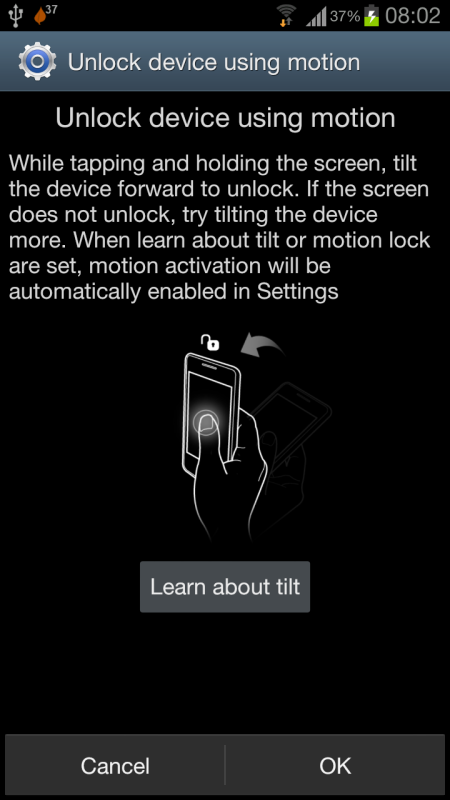
I still not yet give a try for this motion function, little bit scary to try:

user posted image

You can found it from Settings > Security > Screen Lock > Motion
digitalz
post Jun 11 2012, 08:44 AM

The only thing we have to fear is fear itself.
*******
Senior Member
2,030 posts

Joined: Oct 2011


Anyone use any apps to lock certain apps? I don't feel like locking the whole phone lol. Used to use one but I wanna try others now.
moon*
post Jun 11 2012, 08:46 AM

Do you have a Honda?
********
All Stars
11,927 posts

Joined: Jan 2003
From: KL / PJ


QUOTE(bestofel @ Jun 11 2012, 08:41 AM)
Need to learn more how to utilize our beloved smart phone.

I still not yet give a try for this motion function, little bit scary to try:

» Click to show Spoiler - click again to hide... «


You can found it from Settings > Security > Screen Lock > Motion
*
jst tried it. not too fancy. sweat.gif


i thought the black screen also can work but u still have to wake the screen, swipe is faster tongue.gif
bestofel
post Jun 11 2012, 08:46 AM

On my way
****
Senior Member
528 posts

Joined: Mar 2008
From: Klang Valley


QUOTE(benny888 @ Jun 11 2012, 08:33 AM)
You cannot on Honeycomb and ICS on ALL android phones ; only Froyo, Gingerbread can the Mac OSX detect your phone through USB cable
I use the app WiFi File Explorer to transfer files between my S3 and iMac /MacBook Air. It is even faster than through USB cable
*
Uncle, I can transfer file from/to my SGS3 by software called File Transfer. I posted about it about 3X in SGS3 thread and I have PM to TS to put this tips at 1st page, but still not there. Here I post again:

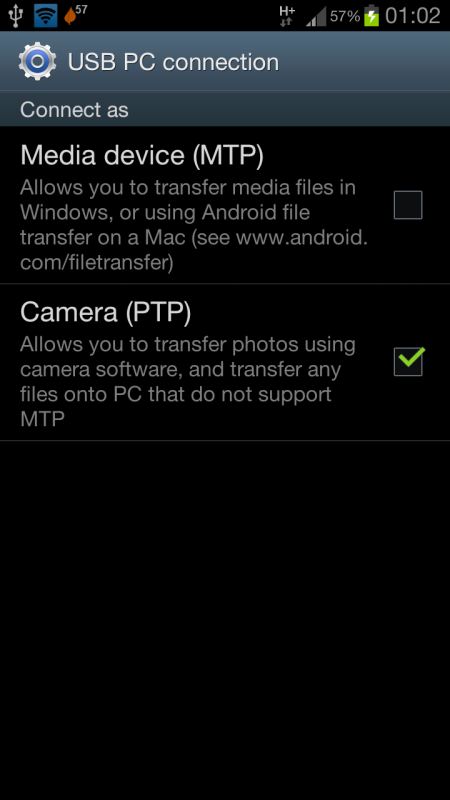
Those who want copy paste file from/to MacBook Pro/Air, download Android File Transfer from here: http://www.android.com/filetransfer/

When you done the installation, plug your SGS3 to USB. Then for USB option on your SGS3, choose Camera PTP:
user posted image

QUOTE(garytey @ Jun 11 2012, 08:35 AM)
i think he is referrring to usb wifi tethering, sorry aint use any mac, cant help
*
From MacBook, I can make my SGS as internet modem, just need to know how to configure to get connected. Just with SGS3 I still can't make it as internet modem.
Foxfire_10
post Jun 11 2012, 08:48 AM

New Member
*
Junior Member
21 posts

Joined: Dec 2004


congratz on v8...growing fast...
digitalz
post Jun 11 2012, 08:52 AM

The only thing we have to fear is fear itself.
*******
Senior Member
2,030 posts

Joined: Oct 2011


@benny888 *Edited after pressing them right now* Lol.

P.S. It'd be good for the TS or someone to make a list of apps that can be used after rooting. Lol. Just a thought though. biggrin.gif

This post has been edited by digitalz: Jun 11 2012, 08:53 AM
ramz
post Jun 11 2012, 09:00 AM

20k VIP Club
*********
All Stars
21,313 posts

Joined: Jan 2009
so far i use nearly 1 week my sgs3. reporting:

what wows me:
1. the multitasking. i can open skype, browse a few web pages, sms, whatsapp, and many more all simultaneously with no much lag. i think this is for me the most major.
2. don't seem to lag although i don't bother with task manager. just open and open programs like no tomorrow. i don't bother even long pressing the home button (to geeks - layman don't know how to kill processes, please don't bother teaching them they should kill processes. it is really a silly procedure coz isn't the system suppose to handle housekeeping for u? duh....)
3. the camera is very good - although i can't compare with iphone4s. but compared to ipad, well is like apple and oranges. ipad camera is not really a camera.
4. the baterry is very good, even under very heavy use can tahan at least 8 hours, which is my expectation.

what sucks:
1. the keyboard, they downgraded the swype, and never introduce anything better. the keyboard now sucks and looks like ios keyboard,
2. the s voice sucks big time. not practical at all. only the alarm seems like the only thing i do on svoice.

This post has been edited by ramz: Jun 11 2012, 09:02 AM

127 Pages « < 5 6 7 8 9 > » Top
Topic ClosedOptions
 

Change to:
| Lo-Fi Version
0.0266sec    0.46    6 queries    GZIP Disabled
Time is now: 2nd December 2025 - 11:41 AM