Outline ·
[ Standard ] ·
Linear+
○ Galaxy Nexus V11 ○, The Google Flagship: Now with Jelly Bean
|
FoxSeaTiger
|
 Jun 23 2012, 08:32 PM Jun 23 2012, 08:32 PM
|

|
I want to suggest go keyboard. They have improve their keyboard. Now have slide function and more language support.
And it work like a charm on galaxy nexus.
This post has been edited by FoxSeaTiger: Jun 23 2012, 08:34 PM
|
|
|
|
|
|
FoxSeaTiger
|
Jun 25 2012, 09:08 AM
|
|
|
Yeah Wifi signal is poor
Any idea to solve this?
|
|
|
|
|
|
FoxSeaTiger
|
Jun 25 2012, 10:02 AM
|
|
|
http://forum.lowyat.net/topic/1002751/+540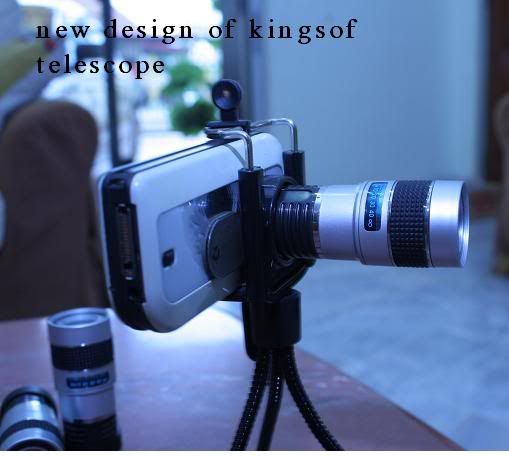 What u guys think? Can this thing fit on nexus?
|
|
|
|
|
|
FoxSeaTiger
|
Jun 25 2012, 03:08 PM
|
|
|
Hey guys where to buy GNEX battery with NFC?
|
|
|
|
|
|
FoxSeaTiger
|
Jun 26 2012, 09:19 AM
|
|
|
QUOTE(ddee181 @ Jun 26 2012, 01:22 AM) Nice apps  ... Anyone have try this? My WebpageWanabe player GS3 |
|
|
|
|
|
FoxSeaTiger
|
Jun 27 2012, 01:20 PM
|
|
|
QUOTE(bill_yap @ Jun 27 2012, 01:25 PM) now how to get back to fast boot?
Added on June 27, 2012, 12:26 pmit seems doesnt connected via usb That the tricky part You should Install the usb driver 1st the stock usb on v7toolkit not working for me I download the usb drive on xda forum and install them. U must enter fastboot once to install the driver. Don't connect your device with usb. Hold power button and vol + at the same time. When you in fastboot mode then connect usb cable. your computer should detect the phone and install the drive. This post has been edited by FoxSeaTiger: Jun 27 2012, 01:22 PM |
|
|
|
|
|
FoxSeaTiger
|
Jun 28 2012, 11:27 AM
|
|
|
At first I thought Radio is a build for nexus to get Radio enable lol
...
|
|
|
|
|
|
FoxSeaTiger
|
Jun 28 2012, 12:01 PM
|
|
|
|
|
|
|
|
|
FoxSeaTiger
|
Jun 28 2012, 12:19 PM
|
|
|
QUOTE(mousqy @ Jun 28 2012, 01:15 PM) so our phone is gonna get Jelly Bean 1st yahoooo!!! people only starting to change to ics, we ready to receive JB gyeahh. Yahoo How about google offline? |
|
|
|
|
|
FoxSeaTiger
|
Jun 28 2012, 03:30 PM
|
|
|
QUOTE(DarkSilver @ Jun 28 2012, 04:06 PM) It's as smooth as an iPhone now! I am waiting the Custom ROM version of it!
Added on June 28, 2012, 3:11 pmOfficial Steps to Jelly Bean OS ROM - STOCK:1.) Download the JB ROM, the JB Modem/Baseband and the CWM Fix here, http://forum.xda-developers.com/showthread.php?t=17378492.) Put 3 of them into your Galaxy Nexus. 3.) Boot into CWM. 4.) FULL WIPE. 5.) Select the JB ROM zip file to flash 1st, then after finish flashing(DO NOT REBOOT 1st), flash the CWM Fix zip file too. Then(DO NOT REBOOT 1st), flash the JB Modem/Baseband. 6.) Reboot. Done! I used this way and it doesn't break anything! COOL! Seems to be the FASTEST WAY and SAFEST too. Other solutions will break your CWM. SD crad wipe to? If wipe no use using back up apps. Any solution copy the back up to pc? |
|
|
|
|
|
FoxSeaTiger
|
Jun 28 2012, 03:48 PM
|
|
|
So jelly
Downloading this file
bigxie_JRN84D_rooted_busybox_deodexed
where the img?
I'm noob to understand all this lol
|
|
|
|
|
|
FoxSeaTiger
|
Jun 28 2012, 04:04 PM
|
|
|
Need help how do I Install jelly bean
Noob here
|
|
|
|
|
|
FoxSeaTiger
|
Jun 28 2012, 04:09 PM
|
|
|
QUOTE(iceman31 @ Jun 28 2012, 05:06 PM) read back few page. darksilver already post how too. dont be a lazy bump  I read that post but still not understand use cmd or boot from phone in recovery mod? |
|
|
|
|
|
FoxSeaTiger
|
Jun 28 2012, 04:15 PM
|
|
|
Okay after read the xda forum
I think, I got it....put the file in phone and flash them in recovery mode
correct me if I'm wrong
|
|
|
|
|
|
FoxSeaTiger
|
Jun 28 2012, 04:40 PM
|
|
|
28% SO SLOW +_+
|
|
|
|
|
|
FoxSeaTiger
|
Jun 28 2012, 04:42 PM
|
|
|
Can I use rom manager to flash this rom?
|
|
|
|
|
|
FoxSeaTiger
|
Jun 28 2012, 04:53 PM
|
|
|
I think I will flash later
...
Give some screenshot to make me more jelly :-B
|
|
|
|
|
|
FoxSeaTiger
|
Jun 28 2012, 05:00 PM
|
|
|
40% later later later ghezz
the speed is 34kb nice
|
|
|
|
|
|
FoxSeaTiger
|
Jun 28 2012, 05:04 PM
|
|
|
QUOTE(benny888 @ Jun 28 2012, 06:03 PM) Poisoned by you guys Just bought back a unit. SME new set now only rm 1199. Sold off mine few months back n that time AP set rm2.3k Time to taste jelly bean Only thing not happy with this phone previously was the poor audio quality Welcome back uncle benny :-) .. Volume can be fix using Volume + I'm using equalizer...It sound good This post has been edited by FoxSeaTiger: Jun 28 2012, 05:08 PM |
|
|
|
|
|
FoxSeaTiger
|
Jun 28 2012, 05:13 PM
|
|
|
QUOTE(vernon91 @ Jun 28 2012, 06:11 PM) flashed.... loading the nexus logo image Put some SC here let other droid jelly to us :-) 48% Ah GTG home ghezz |
|
|
|
|



 Quote
Quote

 0.0248sec
 0.34
0.34
 7 queries
 GZIP Disabled