

QUOTE(kuroneko0509 @ Aug 24 2012, 07:11 PM)
so many player u use..... just install k-lite and you dun need gom/vlc anymore... 

hehe i'll try... LENOVO Y480/580 feel the need for SPEED, lowest price at higher specs cpu
|
|
 Aug 24 2012, 07:29 PM Aug 24 2012, 07:29 PM
Return to original view | Post
#61
|
 
Junior Member
234 posts Joined: Apr 2010 
|
QUOTE(kuroneko0509 @ Aug 24 2012, 07:11 PM) so many player u use..... just install k-lite and you dun need gom/vlc anymore... hehe i'll try... |
|
|
|
|
|
Aug 24 2012, 07:57 PM
Return to original view | Post
#62
|
|
Junior Member
234 posts Joined: Apr 2010
|
QUOTE(exkaizen @ Aug 24 2012, 07:29 PM) I've give the ori 1600 to my cousin ok thanks anyway...Added on August 24, 2012, 7:30 pm just install the k-lite codec... you can get it from filehippo.com  |
|
|
Aug 24 2012, 11:19 PM
Return to original view | Post
#63
|
|
Junior Member
234 posts Joined: Apr 2010
|
Hi all,
I'm selling my Team Elite Notebook DDR3 4GB 1333MHz (RM50), which I bought from my seller when purchased my Y480. Link here: http://forum.lowyat.net/index.php?showtopic=2481887 Interested please PM me a.s.a.p.  (or can trade with your orig. Samsung 4GB RAM (1600 MHz) that came with your Lenovo y480/Y580 - I'll top up of course) This post has been edited by chopin: Aug 24 2012, 11:21 PM |
|
|
Aug 25 2012, 08:31 AM
Return to original view | Post
#64
|
|
Junior Member
234 posts Joined: Apr 2010
|
Hi all, attached are my 2 sticks used in my Y480.
My questions: The timing for the Samsung 1600 stick is 11-11-F3 right? and the Team Elite 1333 is 9-9-9-24. Can they work well with different speed and CL? How do optimize this pair, without changing any of them? I try not to sell and buy again if possible. This post has been edited by chopin: Aug 25 2012, 09:12 AM Attached thumbnail(s) 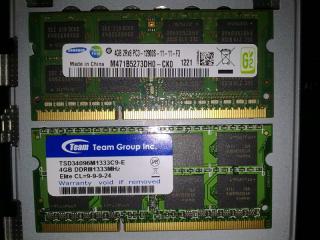
|
|
|
Aug 25 2012, 10:38 AM
Return to original view | Post
#65
|
|
Junior Member
234 posts Joined: Apr 2010
|
QUOTE(exkaizen @ Aug 25 2012, 10:15 AM) It will work just fine... but the samsung stick will be downclock as 1333 hi thx. I understand 9-9-9-24 (Team Elite 1333), but what is 11-11-F3 (this is on Samsung 1600 4gb stick)? i guess not only the 1600 MHz will dg to 1333, the Team Elite's CL will be dragged to 11 right? |
|
|
Aug 25 2012, 11:06 AM
Return to original view | Post
#66
|
|
Junior Member
234 posts Joined: Apr 2010
|
QUOTE(exkaizen @ Aug 25 2012, 11:05 AM) yup... thats y most of the brand will sell the RAM in two stick to make it fully compatible and give the best performance on dual channel... Added on August 25, 2012, 11:07 am QUOTE(davidmak @ Aug 25 2012, 10:42 AM) Yes correct. Both sticks will 'adapt' to the slowest timing and frequency of the slower stick. This is to ensure overall compatibility is achieved. That is why most would advise installing the same stick. Essentially they don't need to be of the same brand. Just same speed in terms of frequency and timings. hmm, wonder why Lenovo gives us a 1600MHz stick but with such high CL...This post has been edited by chopin: Aug 25 2012, 11:07 AM |
|
|
|
|
|
Aug 25 2012, 11:36 AM
Return to original view | Post
#67
|
|
Junior Member
234 posts Joined: Apr 2010
|
QUOTE(loon1983 @ Aug 25 2012, 11:28 AM) windows experience index: no, not normal, the first 4 items should be > 7.0, only the hdd is 5.9 (using 5400rpm), overall = 5.9.total 5.1 graphic 5.1 graphic gaming 6.7 it tat normal? ==" post your screen here and see? |
|
|
Aug 25 2012, 08:36 PM
Return to original view | Post
#68
|
|
Junior Member
234 posts Joined: Apr 2010
|
QUOTE(davidmak @ Aug 25 2012, 01:43 PM) They are standard clocks. The higher the DRAM frequency, bandwidth the higher the CL. Some manage to speed bin better grade memory chips to run lower CL, so they go into a special category of products. Thats why they are being differentiated from standard modules and thus sold at a more expensive price. hu hu... that's quite a lot to read. to give me a quick conclusion, can i say that even if i get a pair of 1600MHz 9-9-9-24, it won't gain much compared with my current sticks (1600, 11-11-F3; and 1333, CL9-9-9-24)? Also need to stress that I don't OC, and am not a gamer.To add further, its a very small gain. This article would provide more into perspective: Memory Speed vs Latency |
|
|
Aug 25 2012, 09:26 PM
Return to original view | Post
#69
|
|
Junior Member
234 posts Joined: Apr 2010
|
QUOTE(davidmak @ Aug 25 2012, 09:00 PM) LOL Wah,tqvm for a real good summary, it does save a lot of time for me... Well what it means is that CL always go higher as the speed increases from DDR to DDR2 to DDR3. It means that any gains in speed is effectively 'neutralized' as CL increases. For example, DD2-667 CL4 and DDR3-1333 CL8 produces the same amount of performance. Interesting right? Then why the fuss about going DDR3? The answer is bus speed increases. CPU buses are increasing year after year. DDR2 can only go so fast, it needs to go higher. (Read DDR2 vs DDR3) Therefore it is always a goal to keep CL as low as possible so that gains in memory speed is meaningful. Such is the case of Corsair Vengeance series and the likes, offering DDR3 1600MHz at CL9. JEDEC references DDR3 at CL11 if not mistaken so normal consumer RAM sticks will be there while performance brands will try to make chips operate at lower CL. Thats why the price is higher (lesser supply). If you would look at the benchmarks, the difference ain't much. Especially now we're at Ivy Bridge (3rd generation Intel Core) where the memory controller is on the CPU package. Also we have GPU subsystem with its own independent GDDR5. Therefore it would be safe to assume that general performance aren't affected much. Don't get me wrong. A performance RAM does provide increases in performance. The question is how much and whether that increase is where it matters most. 1-2fps increase? Few % increases in benchmark scores? What I do know performance RAM is good is where overclocking is concern.  Does anyone know if the Y480/580 can be overclocked and settings tweaked?  |
|
|
Aug 25 2012, 09:31 PM
Return to original view | Post
#70
|
|
Junior Member
234 posts Joined: Apr 2010
|
QUOTE(XionCity @ Aug 25 2012, 09:03 PM) oh?? i thought the stock mcafee came with 30 days trial only? so i uninstalled it... I think what we want is how to transfer the windows OS that was already installed, without going thru the h*ll again of intalling all the OS, drivers, programs...step by step ssd INSTALLATION?? easy 20 steps... 1st. Flip to the back of your laptop 2nd. Remove the battery 3rd. Unlock the 2 screws that access your main board 4th. Remove the cover 5th. Remove the 2 screws at your hard disk bay (1 very long, 1 very short) 6th. Unplug your HDD from the hard disk bay 7th. Unscrew the 4 chrome screws on your HDD tray 8th. Take out your HDD (remember the front and back position) 9th. Place your SSD at the tray 10th. Screw back the 4 chrome screws on your HDD tray 11th. Plug in your SSD to the HDD bay 12th. Screw back the 2 screws at the hard disk bay 13th. Put back the cover and properly inplace it 14th. Screw back the bottom 2 screws 15th. Install back your battery 16th. Flip back to the front 17th. Open the Lid 18th. Press power switch to switch it on 19th. Press F2 to enter BIOS to make sure it detects your SSD 20th. Save and Exit Walah!!! SSD Installation COMPLETE i have an idea, don't know if work or not: backup my C: drive and save it in D:. then fix the SSD, copy the backup from D: to SSD, then restore...  |
|
|
Aug 25 2012, 09:38 PM
Return to original view | Post
#71
|
|
Junior Member
234 posts Joined: Apr 2010
|
QUOTE(distributor @ Aug 25 2012, 09:12 PM) use cpu-z to check your RAM timings at diff speed . for each single ram has their own timings at certain speed e.g. 1600Mhz 9-9-9-24 1333Mhz x-x-x-x 1000Mhz x-x-x-x Just make sure the timings is same at that speed for both piece of ram if u want your system to be stable  hey, i have installed cpu-z, when run for the first few timesbut it got stuck at the gpu stage, never finish, and hogging the CPU at 14% load, causing my cpu temp to shoot to 64++. I run again, this this it does finish loading and show the main page, but at the Memory tab, it can just show Size = 8096 MB, the rest all greyed out, and the SPD page all greyed out. - what's the problem? |
|
|
Aug 25 2012, 09:41 PM
Return to original view | Post
#72
|
|
Junior Member
234 posts Joined: Apr 2010
|
QUOTE(sss2sssss @ Aug 25 2012, 09:39 PM) Click to slot 2....== on SPD, both slot #1 & #2 can't show any data...cpu-z runs on my dektop without any problem...  |
|
|
Aug 25 2012, 09:44 PM
Return to original view | Post
#73
|
|
Junior Member
234 posts Joined: Apr 2010
|
QUOTE(XionCity @ Aug 25 2012, 09:42 PM) Windows will work, Recovery partition won't neither do OKR button will appreciate if you can expand this sentence into 3 or 4 sentences...Added on August 25, 2012, 9:46 pm QUOTE(distributor @ Aug 25 2012, 09:42 PM) U may want to test each ram individually cos u are mixing ram with diff speed. Try take out one ram 1st and run again yeah that's what i guessed, but mafan la... dun want to do this unless it is confirmed to be the problem...This post has been edited by chopin: Aug 25 2012, 09:46 PM |
|
|
|
|
|
Aug 25 2012, 09:52 PM
Return to original view | Post
#74
|
|
Junior Member
234 posts Joined: Apr 2010
|
QUOTE(davidmak @ Aug 25 2012, 09:46 PM) Mine is Hyundai at 1.5V. So it appears that we should be hunting for 1.35V ones from Samsung? Better power consumption wow, i dont know before this that ram also can drink away battery juice... I agree with the forum. I upgraded from 2x2GB modules to 2x4GB modules for my Macbook Pro last time. Immediately see reduction in battery life. At least 30-45minutes shaved! |
|
|
Aug 25 2012, 10:25 PM
Return to original view | Post
#75
|
|
Junior Member
234 posts Joined: Apr 2010
|
well i have been testing cpu-z with each individual 4gb ram stick, on both occasions the cpu-z stalled at the stage of initialization (at Graphics), and hogging my cpu at 14% @ ~70C...
any suggestion? |
|
|
Aug 25 2012, 10:39 PM
Return to original view | Post
#76
|
|
Junior Member
234 posts Joined: Apr 2010
|
QUOTE(sss2sssss @ Aug 25 2012, 10:34 PM) Hmmmm, I think maybe ur graphic driver coz that things happen? my nvidia driver version is 8.17.12.9555intel HD grp 4000 version is 8.15.10.2696 this thing a=is wasting a lot of time... my LuDaShi (chinese software) can correctly recognize my both RAM even when both of them are plugged in... just that it can't show the voltage and CL those low level info... got any other alternative to CPU-Z or not? This post has been edited by chopin: Aug 25 2012, 10:43 PM |
|
|
Aug 25 2012, 11:03 PM
Return to original view | Post
#77
|
|
Junior Member
234 posts Joined: Apr 2010
|
QUOTE(distributor @ Aug 25 2012, 10:45 PM) thx, PC Wizard 2012 is very detailed.i found a good one too: HWM BlackBox 2.3, but it also cannot show the details of the two different ram sticks... Added on August 25, 2012, 11:05 pm QUOTE(sss2sssss @ Aug 25 2012, 10:53 PM) I think ur NVIDIA driver is quite old... where can i get this? is it beta or official?Mine one is 9.18.13.567(305.67) This post has been edited by chopin: Aug 25 2012, 11:05 PM |
|
|
Aug 25 2012, 11:15 PM
Return to original view | Post
#78
|
|
Junior Member
234 posts Joined: Apr 2010
|
QUOTE(distributor @ Aug 25 2012, 09:33 PM) i remember somebody mentioned about issues with 8gb piece ram hmm, PC Wizard shows that the oem Samsung stick is also 1.5v.he said the Y480 ram slot r picky with memory modules the oem ram module run at 1.35V. normal one is 1.5v . http://forums.lenovo.com/t5/IdeaPad-Y-U-V-...ade/td-p/806817 |
|
|
Aug 26 2012, 11:39 PM
Return to original view | Post
#79
|
|
Junior Member
234 posts Joined: Apr 2010
|
QUOTE(sss2sssss @ Aug 26 2012, 11:30 PM) Today just bought a Philips SHP1900 headphone for my Y480.... how much?i also own a Philips headphone the one with big big foams (SHP2000/10), very comfy and good bass - only around rm 69 if remamber correctly... This post has been edited by chopin: Aug 26 2012, 11:41 PM |
|
|
Aug 27 2012, 07:14 AM
Return to original view | Post
#80
|
|
Junior Member
234 posts Joined: Apr 2010
|
QUOTE(sss2sssss @ Aug 26 2012, 11:43 PM) Only RM34!!! good price. i can't remember the box, but the SHP2000 is bigger than your 1800, probably one of the biggest of Philips. how's 1800's sound? to me these Philips have great sound! buy at ViewNet.... Coz just now bring my friend go to itking there buy laptop, so hunt for one headphone also... Added on August 26, 2012, 11:51 pmAnd I think ViewNet sell SHP2000 at RM44(If I din see wrongly), the SHP2000 is pack with a box with half of plastic stick at front of the box right? i wonder whether those Beat headphones really worth the price or not? anyone has tried them? Also, how's the Lenovo headset (free gift from Raya promo) sound? |
| Change to: |  0.0474sec 0.0474sec
 0.35 0.35
 7 queries 7 queries
 GZIP Disabled GZIP Disabled
Time is now: 8th December 2025 - 02:36 AM |
 Quote
Quote