Welcome Guest ( Log In | Register )

4 Pages < 1 2 3 4 >Bottom

Outline · [ Standard ] · Linear+

 LENOVO Y480/580 feel the need for SPEED, lowest price at higher specs cpu

views
     
alpha001
post Aug 16 2012, 06:44 PM

On my way
****
Senior Member
686 posts

Joined: Jun 2012
From: Egypt


QUOTE(davidmak @ Aug 16 2012, 05:12 PM)
I got mine (Y580 FHD) from Mid Valley few days ago. Totally rocks and gaming out of the box is fuss free. Not sure why but the 1TB 5400RPM is a little sluggish compared to my work laptop (also spinner HDD). It takes awhile before I could even start a browser.

Am now considering of getting a mSATA ~60GB or more for use as a Windows boot drive. Don't think the new Y580 supports Intel SRT (only HM76 chipset). Any recommendation or advise (for or against)?
*
WoW, still full money in the pocket brows.gif btw congratz rclxms.gif
alpha001
post Aug 17 2012, 10:09 AM

On my way
****
Senior Member
686 posts

Joined: Jun 2012
From: Egypt


QUOTE(dirsly @ Aug 15 2012, 09:49 PM)
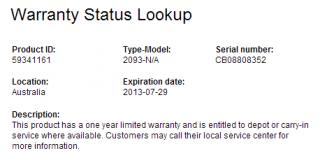
no need invoice. serial no will do. printscreen ur page stated 1 year . we want to see
*
@dirsly ermm... sorry kinda late reply...btw what do you mean by "no need invoice. serial no will do"???shall i just email the serial num??? sweat.gif

This post has been edited by alpha001: Aug 17 2012, 10:11 AM


Attached thumbnail(s)
Attached Image
alpha001
post Aug 18 2012, 09:50 AM

On my way
****
Senior Member
686 posts

Joined: Jun 2012
From: Egypt


QUOTE(dirsly @ Aug 17 2012, 09:47 PM)
here

update at 1st page too for all forumers

http://support.lenovo.com/en_MY/product-se...us/default.page?
*
errr.....where???just fill??


Attached thumbnail(s)
Attached Image
alpha001
post Aug 18 2012, 03:21 PM

On my way
****
Senior Member
686 posts

Joined: Jun 2012
From: Egypt


QUOTE(exkaizen @ Aug 18 2012, 02:13 PM)
biggrin.gif
shud be this for registration
http://support.lenovo.com/en_MY/product-se...arrantyReg.page?


Added on August 18, 2012, 1:14 pm
this the registration site
http://support.lenovo.com/en_MY/product-se...arrantyReg.page?
*
HAISH cannot la, it said ady register sweat.gif
alpha001
post Aug 18 2012, 03:29 PM

On my way
****
Senior Member
686 posts

Joined: Jun 2012
From: Egypt


QUOTE(sss2sssss @ Aug 18 2012, 04:22 PM)
U can check abt ur device warranty status?


Added on August 18, 2012, 3:24 pmNow I cannot check la, maybe they just fixing it jor...
*
YUP... doh.gif cannot sweat.gif
alpha001
post Aug 20 2012, 07:05 AM

On my way
****
Senior Member
686 posts

Joined: Jun 2012
From: Egypt


guys i'm having random BSOD twice last night sweat.gif so my question is
how to detect the root of the problem and solve it??? icon_question.gif
alpha001
post Aug 20 2012, 09:58 AM

On my way
****
Senior Member
686 posts

Joined: Jun 2012
From: Egypt


QUOTE(sss2sssss @ Aug 20 2012, 10:54 AM)
U doing what thing on ur Y480?? sweat.gif
*
didt remember shakehead.gif install few sofwares and games then beep....blue screen of death blink.gif i'm screwed rclxub.gif
alpha001
post Aug 20 2012, 10:30 AM

On my way
****
Senior Member
686 posts

Joined: Jun 2012
From: Egypt


QUOTE(sss2sssss @ Aug 20 2012, 11:02 AM)
Try to system restore back... hmm.gif
*
i did't make one sad.gif
alpha001
post Aug 20 2012, 11:39 AM

On my way
****
Senior Member
686 posts

Joined: Jun 2012
From: Egypt


QUOTE(davidmak @ Aug 20 2012, 12:12 PM)
Go to C:\Windows\Minidump and take a look at the files. These are BSOD logs and memory dumps. You will find hints of what went wrong. As per other forumers' suggestions, best that you uninstall the recent software that you installed and see if the issue persist.
*
i wish i could open the file blush.gif
alpha001
post Aug 20 2012, 01:49 PM

On my way
****
Senior Member
686 posts

Joined: Jun 2012
From: Egypt


QUOTE(davidmak @ Aug 20 2012, 02:42 PM)
Oops you mean it can't boot into Windows at all? What about safe mode?
*
nope i can access to the file but cant't open .dmp file..

This post has been edited by alpha001: Aug 20 2012, 02:41 PM
alpha001
post Aug 21 2012, 10:49 AM

On my way
****
Senior Member
686 posts

Joined: Jun 2012
From: Egypt


QUOTE(chopin @ Aug 21 2012, 11:40 AM)
hi all, any idea if y480's motherboard and the i7-3610QM can support 16 GB of RAM? and if they can, has anyone tried that?
*
no idea shakehead.gif , you try first.. laugh.gif do you need that much...i ady use 8gb and my usage never exceed 4gb even in graphic intense game...i rarely use photoshop brows.gif
alpha001
post Aug 23 2012, 09:57 AM

On my way
****
Senior Member
686 posts

Joined: Jun 2012
From: Egypt


QUOTE(zcutiecutez @ Aug 23 2012, 02:01 AM)
can any pro help me out?
All games/benchmark I have played will automatically use the integrated intel HD instead of the nvidia chip (Battlefield 3, deux ex HR, witcher 2, Furmark). I comfirmed this with the GPUz utility and the games run slow.

I have used the nvidia control panel to manage the 3D settings:
1) I set the global settings to  'high performance NVIDIA processor'.
2) Also used the nvidia program setting to select gaming .exe files to use nvidia processor.
3) Before running the program I also right clicked the mouse to select nvidia graphics processor.
But all games still not running on nvidia EXCEPT the windows experience index (even though i didn't even configure it to do so!).

Is there anyway to force the games to run off nvidia?
*
wat driver u r running??? mybe othr can help u.. icon_idea.gif
alpha001
post Aug 24 2012, 06:10 PM

On my way
****
Senior Member
686 posts

Joined: Jun 2012
From: Egypt


QUOTE(exkaizen @ Aug 24 2012, 06:59 PM)
Finally... Upgrade my ram to 8GB Corsair Vengeance rclxm9.gif  rclxms.gif

user posted image
*
ermm wanna exchange 1 by one brows.gif lolz
alpha001
post Aug 24 2012, 09:04 PM

On my way
****
Senior Member
686 posts

Joined: Jun 2012
From: Egypt


yeah me dont install one key thingy it delay my startup ;p
alpha001
post Aug 24 2012, 09:23 PM

On my way
****
Senior Member
686 posts

Joined: Jun 2012
From: Egypt


btw wat key beside the power key??

alpha001
post Aug 24 2012, 09:27 PM

On my way
****
Senior Member
686 posts

Joined: Jun 2012
From: Egypt


QUOTE(kuroneko0509 @ Aug 24 2012, 10:25 PM)
haha... kantoi x baca manual tongue.gif
*
ha2
alpha001
post Aug 24 2012, 09:52 PM

On my way
****
Senior Member
686 posts

Joined: Jun 2012
From: Egypt


my windows startup was delayed coz i use docks doh.gif well i guest i need to install one key thingy...dat why i feel lag playing bf3 and mp3 laugh.gif

» Click to show Spoiler - click again to hide... «

alpha001
post Aug 25 2012, 03:23 PM

On my way
****
Senior Member
686 posts

Joined: Jun 2012
From: Egypt


QUOTE(sss2sssss @ Aug 25 2012, 04:15 PM)
Hey guys, I want to ask some opinion about laptop backpack...
Which laptop backpack should I buy which can load my Y480+adapter+U2 cooler pad+other stuff(like external HDD, mouse, lecturer note, pencil box, ect) ?
Budget not too high, RM100+-, maximum can only go until RM120.....
*
to fit u2 in backpack will be a problem you will needed extra large backpack sweat.gif my idea is leave the cooler nicely at ur home hmm.gif
well its just my opinion

This post has been edited by alpha001: Aug 25 2012, 03:25 PM
alpha001
post Aug 25 2012, 03:29 PM

On my way
****
Senior Member
686 posts

Joined: Jun 2012
From: Egypt


QUOTE(sss2sssss @ Aug 25 2012, 04:25 PM)
But sometimes I wanna back to hometown for long time(eg: study week or sem break), so I need to bring back my U2...lol
*
ya..actually 15or above will fit tightly so need to arrange nicely...
ex: remove the cooler fan then put ur laptop in the cooler body...bla2..its complicated.. sweat.gif so need to prepare early before goin back hometown icon_idea.gif

This post has been edited by alpha001: Aug 25 2012, 03:30 PM
alpha001
post Aug 25 2012, 09:09 PM

On my way
****
Senior Member
686 posts

Joined: Jun 2012
From: Egypt


QUOTE(XionCity @ Aug 25 2012, 10:03 PM)
step by step ssd INSTALLATION?? easy 20 steps...
1st. Flip to the back of your laptop
2nd. Remove the battery
3rd. Unlock the 2 screws that access your main board
4th. Remove the cover
5th. Remove the 2 screws at your hard disk bay (1 very long, 1 very short)
6th. Unplug your HDD from the hard disk bay
7th. Unscrew the 4 chrome screws on your HDD tray
8th. Take out your HDD (remember the front and back position)
9th. Place your SSD at the tray
10th. Screw back the 4 chrome screws on your HDD tray
11th. Plug in your SSD to the HDD bay
12th. Screw back the 2 screws at the hard disk bay
13th. Put back the cover and properly inplace it
14th. Screw back the bottom 2 screws
15th. Install back your battery
16th. Flip back to the front
17th. Open the Lid
18th. Press power switch to switch it on
19th. Press F2 to enter BIOS to make sure it detects your SSD
20th. Save and Exit

Walah!!! SSD Installation COMPLETE biggrin.gif
*
O.o''' heavy typing..thx for sharing=) planning to get ssd as soon as possible brows.gif

This post has been edited by alpha001: Aug 25 2012, 09:11 PM

4 Pages < 1 2 3 4 >Top
 

Change to:
| Lo-Fi Version
0.0443sec    0.62    7 queries    GZIP Disabled
Time is now: 2nd December 2025 - 12:28 AM