

QUOTE(lee_what2004 @ Sep 20 2012, 01:40 PM)
Anyone opened the wifi card and it got two antenna or one antenna attached ?
http://www.microsoft.com/en-us/download/details.aspx?id=8109


it's two antenna ,you can find more Images at here

LENOVO Y480/580 feel the need for SPEED, lowest price at higher specs cpu
|
|
 Sep 20 2012, 03:00 PM Sep 20 2012, 03:00 PM
|
 
Junior Member
395 posts Joined: Apr 2010 
|
QUOTE(lee_what2004 @ Sep 20 2012, 01:40 PM) Anyone opened the wifi card and it got two antenna or one antenna attached ? http://www.microsoft.com/en-us/download/details.aspx?id=8109
it's two antenna ,you can find more Images at here |
|
|
|
|
|
Sep 20 2012, 03:51 PM
|

Senior Member
886 posts Joined: Dec 2004
|
QUOTE(lee_what2004 @ Sep 20 2012, 01:40 PM) Some says its an early draft-n wifi card, so might have incompatibility issues. I don't think that is the issue. Because my 4.5 years old Dell was using Intel 4965agn, and it is a Draft-N. I am still able to reach 144mbps on the same router.Anyone opened the wifi card and it got two antenna or one antenna attached ? So, 4.5 years later BCM 4313 is still on Draft-N? And the speed is lowered?  |
|
|
Sep 20 2012, 04:01 PM
|
 
Elite
14,813 posts Joined: Nov 2006 
|
Seems like BCM4313 is single stream only, hence max is 72Mbps
http://h30434.www3.hp.com/t5/Wireless-Inte...ion/td-p/401445 |
|
|
Sep 20 2012, 04:46 PM
|
|
Senior Member
886 posts Joined: Dec 2004
|
QUOTE(lee_what2004 @ Sep 20 2012, 04:01 PM) Seems like BCM4313 is single stream only, hence max is 72Mbps That is really sucks big time..... http://h30434.www3.hp.com/t5/Wireless-Inte...ion/td-p/401445  |
|
|
Sep 20 2012, 06:02 PM
|

Junior Member
171 posts Joined: Mar 2010 From: Perth, Western Australia 
|
I am ordering Intel wifi 5350AGN....hope can improve my wifi performance...
i also now ordering 8GB corsair vengence 1866MHz....hopefully to decrease my load/boot time |
|
|
 Sep 20 2012, 06:51 PM Sep 20 2012, 06:51 PM
|
|
Newbie
1 posts Joined: Oct 2011
|
QUOTE(lee_what2004 @ Sep 20 2012, 01:40 PM) Some says its an early draft-n wifi card, so might have incompatibility issues. TQ, abang lee.can play gamelohhttp://static.lowyat.net/style_images/1/folder_post_icons/icon6.gifAnyone opened the wifi card and it got two antenna or one antenna attached ? Install DirectX 9 http://www.microsoft.com/en-us/download/details.aspx?id=8109 |
|
|
|
|
|
Sep 20 2012, 07:56 PM
|
|
Senior Member
886 posts Joined: Dec 2004
|
QUOTE(XionCity @ Sep 20 2012, 06:02 PM) I am ordering Intel wifi 5350AGN....hope can improve my wifi performance... How to install an Intel 5350AGN into Y580? We can't guarantee that it works right?i also now ordering 8GB corsair vengence 1866MHz....hopefully to decrease my load/boot time |
|
|
Sep 20 2012, 08:24 PM
|

Senior Member
1,329 posts Joined: May 2008
|
QUOTE(CKKwan @ Sep 20 2012, 07:56 PM) How to install an Intel 5350AGN into Y580? We can't guarantee that it works right? I think just u plug out the wireless adapter, then plug new one, then reconnect antenna... |
|
|
Sep 20 2012, 08:55 PM
|
|
Junior Member
395 posts Joined: Apr 2010
|
QUOTE(XionCity @ Sep 20 2012, 06:02 PM) I am ordering Intel wifi 5350AGN....hope can improve my wifi performance... any good wifi card suggestions? i think i need some help i also now ordering 8GB corsair vengence 1866MHz....hopefully to decrease my load/boot time  |
|
|
Sep 20 2012, 09:08 PM
|
|
Elite
14,813 posts Joined: Nov 2006
|
^intel 6200 ?
QUOTE(sss2sssss @ Sep 20 2012, 08:24 PM) I think just u plug out the wireless adapter, then plug new one, then reconnect antenna... Unless the Lenovo BIOS got whitelist...This post has been edited by lee_what2004: Sep 20 2012, 09:09 PM |
|
|
Sep 20 2012, 09:09 PM
|

Junior Member
155 posts Joined: Apr 2012
|
actually how u all check ur wireless reach 72 mbps or 144 mbps wan?
(y480 user) |
|
|
Sep 20 2012, 09:11 PM
|
|
Elite
14,813 posts Joined: Nov 2006
|
Click the network icon and right click your wireless network, status.
|
|
|
Sep 20 2012, 09:16 PM
|
|
Junior Member
155 posts Joined: Apr 2012
|
Network Card: Atheros Communications AR9285 802.11b/g Wireless Network Adapter
Maximum Link Speed: 54 Mbps isit normal how u all can reach 72 and 144 ? This post has been edited by deadmeat2012: Sep 20 2012, 09:18 PM Attached thumbnail(s) 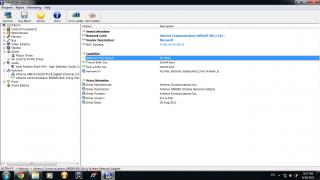
|
|
|
|
|
|
Sep 20 2012, 09:23 PM
|
|
Senior Member
1,329 posts Joined: May 2008
|
QUOTE(deadmeat2012 @ Sep 20 2012, 09:16 PM) Network Card: Atheros Communications AR9285 802.11b/g Wireless Network Adapter Check ur modem....Maximum Link Speed: 54 Mbps isit normal how u all can reach 72 and 144 ? /my hometown house modem can only reach 54mbps as the radio only 802.11b |
|
|
Sep 20 2012, 09:34 PM
|

Senior Member
1,327 posts Joined: Apr 2011
|
mine also 54mbps max,but whats the difference between 54mb and more?
my internet only 5mbps..so its well below the max speed,am i right? o.O Someone enlighten me please,im not familiar with this.. |
|
|
Sep 20 2012, 09:37 PM
|
|
Elite
14,813 posts Joined: Nov 2006
|
QUOTE(deadmeat2012 @ Sep 20 2012, 09:16 PM) Network Card: Atheros Communications AR9285 802.11b/g Wireless Network Adapter What router you are using ?Maximum Link Speed: 54 Mbps isit normal how u all can reach 72 and 144 ? and if you are using WEP authentication, change it to WPA2. Since WEP only support 54Mbps. QUOTE(ck.chunkeat @ Sep 20 2012, 09:34 PM) mine also 54mbps max,but whats the difference between 54mb and more? For internet, not much difference.my internet only 5mbps..so its well below the max speed,am i right? o.O Someone enlighten me please,im not familiar with this.. For intranet, it matters.. This post has been edited by lee_what2004: Sep 20 2012, 09:40 PM |
|
|
Sep 20 2012, 09:42 PM
|
|
Senior Member
1,327 posts Joined: Apr 2011
|
QUOTE(lee_what2004 @ Sep 20 2012, 09:37 PM) For internet, not much difference. owh,meaning it matters when you want to share files between several network?For intranet, it matters.. Does playing lan included? 54mbps enough for playing lan? Also,i notice my speed is never stable..It jumps up and down...highest i see is 52mbps while lowest is 6.5mbps. |
|
|
Sep 20 2012, 09:45 PM
|
|
Elite
14,813 posts Joined: Nov 2006
|
Yup, it matters when sharing files over network.
LAN, well wireless is still fine unless your place got alot interference.. Not stable, try install inSSIDer and scan your environment, see which channel is crowded and change your channel in the router to the less crowded one. or move your router closer to you. |
|
|
Sep 20 2012, 09:58 PM
|
|
Junior Member
155 posts Joined: Apr 2012
|
QUOTE(lee_what2004 @ Sep 20 2012, 09:37 PM) What router you are using ? linksys model (wrt54g)For internet, not much difference. For intranet, it matters.. |
|
|
Sep 20 2012, 10:07 PM
|
|
Elite
14,813 posts Joined: Nov 2006
|
QUOTE(deadmeat2012 @ Sep 20 2012, 09:58 PM) linksys model (wrt54g) Then the max speed is 54Mbps.You need Wireless-n router and Wireless-n card in order to get more than 54Mbps |
| Change to: |  0.0297sec 0.0297sec
 0.82 0.82
 6 queries 6 queries
 GZIP Disabled GZIP Disabled
Time is now: 10th December 2025 - 06:54 AM |
 Quote
Quote