
Welcome Guest ( Log In | Register )

Outline · [ Standard ] · Linear+

 iTune unable to detect the new Ipad

views
     
TStehoice
post May 29 2012, 09:49 PM, updated 14y ago

Look at all my stars!!
*******
Senior Member
5,529 posts

Joined: Oct 2007


Hello guys, I've search thru lowyat, I found a thread related to this, but it's closed, so I decided to open one instead.

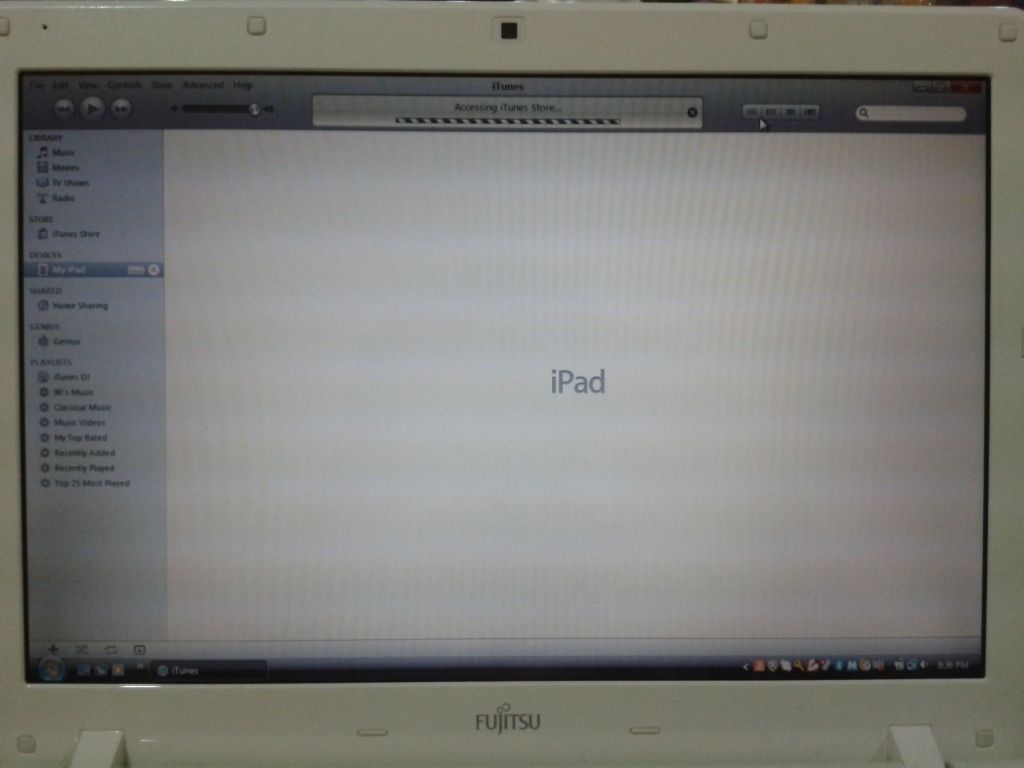
My problem is that the iTune is unable to detect my new Ipad.
I've googled and tried many ways, but it still couldn't solve my problem, can anyone shed me some lights here please?

Pic as below:
user posted image

Note: my iTune is the latest version (v10.6.1.7) just recently downloaded from official website.
My iPad is now already in version 5.1.1

Ipad bought 3 weeks back, but have not tried to connect or sync anything on itune. I know it's doh.gif
but i'm now trying to connect it to my iTune.

P/s - I've just tried connecting my Ipod, no problem with my Ipod but the new Ipad just couldn't.
and sorry for the 2mp camera phone quality.

please help. thanks.
ttan777
post May 29 2012, 09:57 PM

Casual
***
Junior Member
449 posts

Joined: Jun 2009


is "accessing itune store" always appear.seems internet problem.ipad need to validate.
TStehoice
post May 29 2012, 10:14 PM

Look at all my stars!!
*******
Senior Member
5,529 posts

Joined: Oct 2007


hmmm, if i change it to something else, it's fine. meanwhile, internet got no problem I can still do my other things with the connection on... any idea?

Maybe that's one of the causes...
Joelles
post May 29 2012, 10:18 PM

@Call me Uncle@
******
Senior Member
1,355 posts

Joined: Nov 2007


QUOTE(tehoice @ May 29 2012, 10:14 PM)
hmmm, if i change it to something else, it's fine. meanwhile, internet got no problem I can still do my other things with the connection on... any idea?

Maybe that's one of the causes...
*
Have you Authorize your iPad with iTunes yet?
TStehoice
post May 29 2012, 10:35 PM

Look at all my stars!!
*******
Senior Member
5,529 posts

Joined: Oct 2007


QUOTE(Joelles @ May 29 2012, 10:18 PM)
Have you Authorize your iPad with iTunes yet?
*
I think I did, under the general setting there right?

or do you mind to pinpoint it to me please? thanks..
Joelles
post May 29 2012, 10:40 PM

@Call me Uncle@
******
Senior Member
1,355 posts

Joined: Nov 2007


QUOTE(tehoice @ May 29 2012, 10:35 PM)
I think I did, under the general setting there right?

or do you mind to pinpoint it to me please? thanks..
*
Nope, it's on your PC's iTunes Menu Bar. Choose "Store" and select Authorize from the drop down menu.
TStehoice
post May 29 2012, 10:50 PM

Look at all my stars!!
*******
Senior Member
5,529 posts

Joined: Oct 2007


QUOTE(Joelles @ May 29 2012, 10:40 PM)
Nope, it's on your PC's iTunes Menu Bar. Choose "Store" and select Authorize from the drop down menu.
*
let me try on my lappy tomorrow... hopefully it can do the trick...


Added on May 31, 2012, 9:28 pmDear joelles, even after i clicked the authorised button and key in my password. still nothing happen after that.... any idea how?


Added on May 31, 2012, 9:42 pmI also notice that I couldn't connect to iTune store, any idea? but i'm already connected to the internet...

This post has been edited by tehoice: May 31 2012, 09:42 PM
PrinceLighT
post Jun 1 2012, 06:13 PM

New Member
*
Junior Member
18 posts

Joined: Apr 2010
try disable ur anti virus software.
ramz
post Jun 1 2012, 06:40 PM

20k VIP Club
*********
All Stars
21,398 posts

Joined: Jan 2009
I have the same problem.my ipad is fairly new too.and only recently I tried too hook up to itunes.but for some strange reason it won't work if you don't reboot your computer after you instal itunes. I just reboot my pc, run itunes then hook my ipad to the pc thru usb cable.then it worked.itunes is really a pain to work with but I dont have a choice.
Joelles
post Jun 1 2012, 07:06 PM

@Call me Uncle@
******
Senior Member
1,355 posts

Joined: Nov 2007


QUOTE(tehoice @ May 29 2012, 10:50 PM)
let me try on my lappy tomorrow... hopefully it can do the trick...


Added on May 31, 2012, 9:28 pmDear joelles, even after i clicked the authorised button and key in my password. still nothing happen after that.... any idea how?


Added on May 31, 2012, 9:42 pmI also notice that I couldn't connect to iTune store, any idea? but i'm already connected to the internet...
*
You couldn't connect to iTunes means you're yet to Authorise your iPad to the iTunes, try update to the latest iTunes and see whether it resolve your connection problem. If worst come to worst you may need to uninstall iTunes completely and reinstall with the latest version of the iTunes to your PC.
PrinceLighT
post Jun 2 2012, 12:21 AM

New Member
*
Junior Member
18 posts

Joined: Apr 2010
Some anti virus software will block the itunes connections like Trend Micro. After I uninstall the trend micro, itunes recover back to normal.
TStehoice
post Jun 2 2012, 12:23 AM

Look at all my stars!!
*******
Senior Member
5,529 posts

Joined: Oct 2007


I've tried almost every method, but it still don't work.... maybe I should bring it back to machines... hmmm...

i disabled my anti virus already also cannot work.. no idea what I can do next. re-installed my itune also cannot work...
Joelles
post Jun 2 2012, 02:26 PM

@Call me Uncle@
******
Senior Member
1,355 posts

Joined: Nov 2007


QUOTE(tehoice @ Jun 2 2012, 12:23 AM)
I've tried almost every method, but it still don't work.... maybe I should bring it back to machines... hmmm...

i disabled my anti virus already also cannot work.. no idea what I can do next. re-installed my itune also cannot work...
*
I doubt the problem is from your iPad itself, why don't you try to authorized from your friends computer who have iTunes installed, you can always unauthorized it once confirm working.
dragon9
post Jun 2 2012, 02:32 PM

Getting Started
**
Junior Member
242 posts

Joined: Apr 2012
Do fresh restore your ipad3. It shud do the trick.
bizness
post Jun 2 2012, 02:59 PM

✓ Always Closing
******
Senior Member
1,562 posts

Joined: Dec 2009
From: Planet Earth


QUOTE(tehoice @ Jun 2 2012, 12:23 AM)
I've tried almost every method, but it still don't work.... maybe I should bring it back to machines... hmmm...

i disabled my anti virus already also cannot work.. no idea what I can do next. re-installed my itune also cannot work...
*
Do you have any proxy setup on your computer for in use for your office? If yes disabled those first and it should work fine.

Thanks smile.gif

This post has been edited by bizness: Jun 2 2012, 02:59 PM
TStehoice
post Jun 3 2012, 09:17 PM

Look at all my stars!!
*******
Senior Member
5,529 posts

Joined: Oct 2007


QUOTE(Joelles @ Jun 2 2012, 02:26 PM)
I doubt the problem is from your iPad itself, why don't you try to authorized from your friends computer who have iTunes installed, you can always unauthorized it once confirm working.
*
yup, I brought it back to machines and everything seems perfect, they can do it on their itunes...
well, at first i doubt my ipad has problem because i can still access the ipad photos from my laptop.

but now, the thing is, my itune couldn't connect to the internet =.=
I tried fresh reinstalling my itune but it still couldn't work.

anyone know what else I can do?


Added on June 3, 2012, 9:18 pm
QUOTE(dragon9 @ Jun 2 2012, 02:32 PM)
Do fresh restore your ipad3. It shud do the trick.
*
well, this should be the last thing I wanna do on my ipad... because everything seems to be ok...


Added on June 3, 2012, 9:19 pm
QUOTE(bizness @ Jun 2 2012, 02:59 PM)
Do you have any proxy setup on your computer for in use for your office? If yes disabled those first and it should work fine.

Thanks smile.gif
*
Nope, at home I didnt use proxy setup, but in office yes.
maybe I should try using proxy setup as an alternative?

This post has been edited by tehoice: Jun 3 2012, 09:19 PM
Joelles
post Jun 4 2012, 04:30 PM

@Call me Uncle@
******
Senior Member
1,355 posts

Joined: Nov 2007


QUOTE(tehoice @ Jun 3 2012, 09:17 PM)
yup, I brought it back to machines and everything seems perfect, they can do it on their itunes...
well, at first i doubt my ipad has problem because i can still access the ipad photos from my laptop.

but now, the thing is, my itune couldn't connect to the internet =.=
I tried fresh reinstalling my itune but it still couldn't work.

anyone know what else I can do?


Added on June 3, 2012, 9:18 pm

well, this should  be the last thing I wanna do on my ipad... because everything seems to be ok...


Added on June 3, 2012, 9:19 pm
Nope, at home I didnt use proxy setup, but in office yes.
maybe I should try using proxy setup as an alternative?
*
Since everything works fine when plug into another computer then it's obviously not your iPad problem, I don't find that you need to restore your iPad at all as you stated for the last resort method.
You should try to check whether your home Computer have any Proxy settings and disable it instead of enable it. Anyway you can refer to this: http://support.apple.com/kb/TS1490
Hope it solve your prob


Change to:
| Lo-Fi Version
0.0164sec    0.49    5 queries    GZIP Disabled
Time is now: 24th December 2025 - 09:06 PM