Outline ·
[ Standard ] ·
Linear+
Ancient [WTS] Dual SATA/IDE HDD Caddy - with green LED |, Add 2nd HDD to your laptop |
|
DalphinuS
|
 Aug 25 2012, 11:30 PM Aug 25 2012, 11:30 PM
|
Getting Started


|
Dear seller, can u solve a few doubts of mine? I'm using VAIO VGN-FW series. I'm planning to get 1 of your chaddy, juz few things to make sure. My optical drive is SATA, so is this chaddy of urs fit my laptop nicely? Is the dimension of optical drive universal standard? Have u heard of removing the facelift of the optical ROM & plug it to the chaddy, like what the link show: http://www.newmodeus.com/pics/OBHD/OBHD-Fa...ation-Guide.pdfIs the possible on your chaddy? |
|
|
|
|
|
DalphinuS
|
Aug 27 2012, 08:07 AM
|
Getting Started
|
QUOTE(skycrawler @ Aug 26 2012, 12:01 AM) Ur laptop use 12.7mm sata caddy bay . Yes , facelift removal is possible on my product  Good to know that your facelift can be removed. How about the 'white plastic bracket' mentioned in http://www.newmodeus.com/pics/OBHD/OBHD-Fa...ation-Guide.pdf. Do u know what is that? I think is the facelift holder. Where can I get that? |
|
|
|
|
|
DalphinuS
|
Aug 27 2012, 11:03 PM
|
Getting Started
|
QUOTE(skycrawler @ Aug 27 2012, 10:01 PM) My item is diff from in ur document , it doesnt need 'white plastic bracket' So u means I can remove the facelift from my BD-ROM and fit it nicely to your caddy? If so, I'm interested in getting 2 units. |
|
|
|
|
|
DalphinuS
|
Aug 28 2012, 10:33 AM
|
Getting Started
|
Without. If want oso 1 unit for my bro only, cuz my BluRay-ROM unfortunately spoil already. And my old Dell XPS DVD-ROM is IDE port. Final cheeck with u, is ur caddy comes with screw hole to put my VAIO bracket?  |
|
|
|
|
|
DalphinuS
|
Sep 18 2012, 10:07 PM
|
Getting Started
|
Got any updates here which u asked me to refer here, TS??
Added on September 18, 2012, 10:08 pmQUOTE(skycrawler @ May 27 2012, 04:30 PM) Guide: x. name|item bought|date ordered|payment status Bulk I list:  Bulk I Status: Bulk II list: Bulk II Status: Bulk III List: Bulk III Status: Ok got this msg d  This post has been edited by DalphinuS: Sep 18 2012, 10:08 PM This post has been edited by DalphinuS: Sep 18 2012, 10:08 PM |
|
|
|
|
|
DalphinuS
|
Sep 25 2012, 04:12 PM
|
Getting Started
|
I have received the goods today around 2:45pm (25.09.2012) despite of the seller told me to dispatch it out yesterday evening. Frankly speaking I'm in such a surprise to got it today, posting from Terengganu to Penang via PosLaju. Kudos to both skycrawler & PosLaju Malaysia!
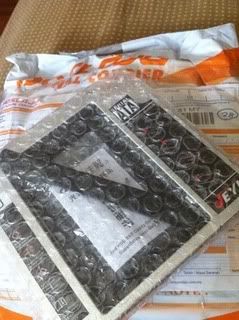
Since skycrawler is actually juz a stranger to me in the forum and I do not know him actually, yet he delivered such superb & trustworthy service to me, I decided to spend some time & do him a favour (I'm doing this on my own, not becuz of his request), by writing this testimonial for him the unbox, and the method on how to make this caddy in becoming your favourite 2'nd hard drive with a nice cover up with your laptop, without being awkward to your laptop. Here goes:
What I see after I unwrap the packing, is actually what u see on the monitor. It's like "AS SEEN ON TV"!
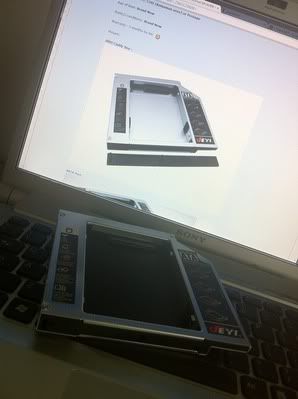
All the goods are in nice shape, all the parts mentioned by the seller are intact, eg screws, screwdrivers, cover... But if u use that cover provided in this packing, it might not be the best cover to match with your laptop.
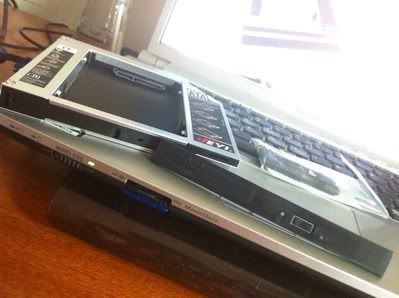
So I decided to use back the original cover on my optical drive which came along from my original VAIO unit. This is what will the caddy looks like once I plug it on.
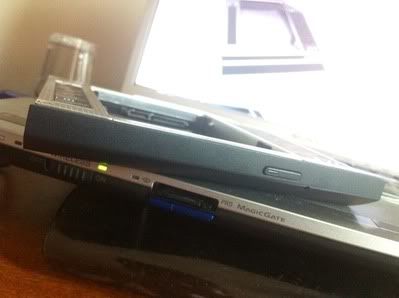
As u can see here, it's almost like the original optical drive, it fit nice & perfectly no matter in what angle.
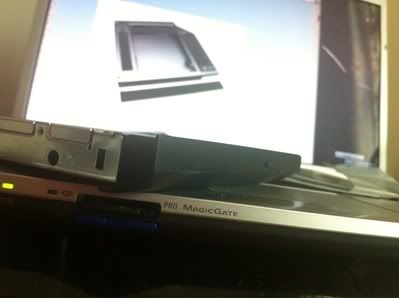
And u slowly push in the caddy with your HDD/SSD on back into your laptop, slow & steady.
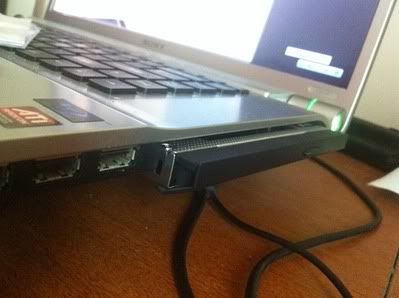 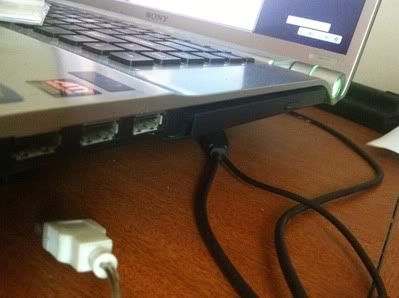
And the final result, viola! It's juz PERFECT! And when u turn on the laptop, it actually comes with green light, and blink in red to tells you your hard drive is standby/running.
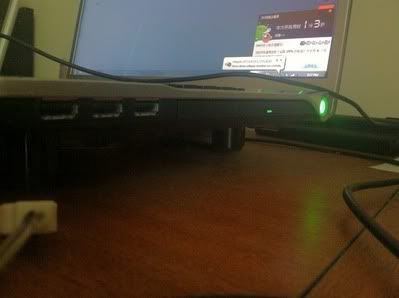
I do hope that this testimonial/write up can help the seller, or the buyers of this item to make it a perfect gadget to your laptop. For more detailed steps in replacing the caddy's cover, pls refer to this URL:HOW TO MAKE A NICE CADDY
|
|
|
|
|



 Quote
Quote

 0.0288sec
 0.42
0.42
 7 queries
 GZIP Disabled