Welcome Guest ( Log In | Register )

Outline · [ Standard ] · Linear+

 From zero to Android Developer, Finally, My 1st Android app is out! here

views
     
TSAstonCheah
post May 25 2012, 11:36 AM, updated 13y ago

Casual
***
Junior Member
383 posts

Joined: Jan 2009
From: Penang


i said this 3 months ago...
» Click to show Spoiler - click again to hide... «


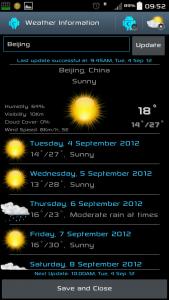
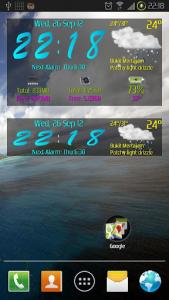
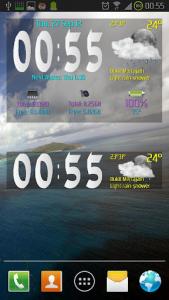
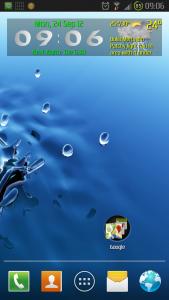
3 months ago i started this thread and wanted to develop and Android app. on 16/9/2012, after 3 months of study, coding, trials and errors Now i finally have finished my 1st Android app. which is a widget, i will post it here for free. hope you guys help test out. feedback and suggestions are gladly welcome!

Change Logs:
1.3.1v
-Add Time format to 3 selections(00:00,00:00am,0:00am)

1.3.0v
-Added 4x1 Time and Weather Info Widget
-Fixed widget size becomes 4x3 when first adding in some ics launchers
-Codes further optimised.

1.2.1v
-Date, Alarm Clock can be set to hide or show in the widget now!
-Total 8 fonts selection now!

1.2v
-Widget Display Items(Time,Weather,System Info.) can be set to show or No show!
-Added Clock Fonts, now it can be selected to graphic font or system font. (more graphic fonts to come)
-The System codes have been highly optimised, battery consumption improves 100% or more...

1.1v
-Added more colors to set widget text!!
-Ram Text, Internal Memory Text, Battery Text colors can now be customized!
-New Widget Landscape View Design.

my thread at XDA Link:
XDA
Google Play Link:
Google Play

-Bugs, Feedbacks or Suggestions for this app are welcome to post here or at my XDA thread.

Thanks to XDA, Android, Samsung, Lowyat Forum and those who have helped and inspired me to make this app possible.

if you like this app, please hit the "Thanks" button at my XDA thread, rate the apps in Google Play or make a Donation to support my work. thanks.

the app Widget information:
» Click to show Spoiler - click again to hide... «


Features:
C Widget Features

My Future TODO lists:
-Font selector(Graphic, Text), but i am weak at graphic design, anyone can help?...(suggestion by droid13579, waveweaver)
-Weather Own select time refresh (Thanks to ne0cz)...
-Show "Internet Data Usage" in the widget (but this can only be compatible in ICS and above..)
-Ram, Internal Memory - refresh interval can be manually set to every 1sc,5sc,10sc,30sc,1min...(suggestion by lookie)

Attached Image [attachmentid=3052604]Attached Image Attached Image Attached Image Attached Image

This post has been edited by AstonCheah: Oct 1 2012, 11:29 AM


Attached thumbnail(s)
Attached Image Attached Image Attached Image Attached Image
TSAstonCheah
post May 26 2012, 10:13 AM

Casual
***
Junior Member
383 posts

Joined: Jan 2009
From: Penang


QUOTE(shahz @ May 25 2012, 12:05 PM)
Hi there,

That depends on the applications that you want to build really. Not all applications have to be complicated. In fact, I would suggest try venturing HTML5 and build apps with it. Personally, I have built a number of apps mostly for corporate companies in Malaysia using HTML5. But I'm an underground developer and I code for fun. smile.gif HTML5 will have limitations, but if you know what you want to build, you will quickly identify if the limitations affect you or not.

Good luck in your adventure smile.gif
*
i am interested in android apps but i am sure ios apps structure is similar to android. both uses java codes? does HTML5 apply to android apps?

QUOTE(lingch @ May 25 2012, 12:44 PM)
I'd love to develop more android apps/games. However, will have to open a bank account in Singapore in order to transfer out the money in google merchant checkout earned from the apps/games. Malaysia banks doesn't support google merchant yet >_<
*
cannot we just use credit card to make payment? how about paypal?

QUOTE(UpCar @ May 25 2012, 12:45 PM)
i'm lazy, i will just donate.
*
i can be harkworking, i like to be donated drool.gif

QUOTE(bestofel @ May 25 2012, 04:04 PM)
Hi! I'm Android and iOS developer here.

The Android modification is different with app or games application. I didn't learn how to modify Android kernel or ROM.

If you interested do develop app or games or widget, our government have grant for it. You need to have money to join this programme, after you finish your app, they will reimburse what your pay for the training fee, android device, android developer fee and laptop.

More info: http://www.mscmalaysia.my/icon2/home.htm

For 2012, maybe they will have ICON3, so you can join it. If I hear about the program, I will tell you here.
*
i like to mod the android system just like Jkay's mod for SG2 (simply awesome, many custom roms rely on it) in XDA.(his latest deluxe setting just came out!!), but still have no idea how smali codes works.

i roughly went through the ICON2 info., is it a full time study? this is my main concern, i have my main job to focus at this time.

appreciate you info. sharing.

QUOTE(brian12988 @ May 25 2012, 04:35 PM)
i always find, its easier to learn a new language by just jumping into and start programming..
most of the things can be found on the internet..the rest is just whether u know how to be flexible..

however, i could never find an idea to develop on...
*
i am just doing like you do, haven't gone through any proper software programming training. just find everything from the internet..

QUOTE(Irishcoffee @ May 25 2012, 06:30 PM)
i wish i could join developer team one day
im currently working in games industry but im at the 3d modeling side
not the programming side
i really wish to learn it as i see nowadays ,artist getting problem communicate with programmer
if 1 ppl can do 2 task , tat will be great in develping games apps
*
i too wish i could join one day..

QUOTE(bestofel @ May 26 2012, 08:16 AM)
Here you go: http://www.itrain.com.my/android/

3 days for RM1,500.
*
shocking.gif this is the standard charges?
TSAstonCheah
post May 29 2012, 03:20 PM

Casual
***
Junior Member
383 posts

Joined: Jan 2009
From: Penang


QUOTE(bestofel @ May 27 2012, 08:19 AM)
iOS using Positive C. HTML5 + css + ajax + javascript like Secha Touch and DHTML Touch can run on Android and iOS.
Just 5 days training then you can come to scheduled clinic to help you finishing your app. The clinic is not necessary if you can finish your app without help from your guru.

Don't know.  Try google "Android training Malaysia".

This one maybe ok for you: RM900 for two days: http://www.training.my/detailfor/910/Android-Development-
*
5 days for me should be no problem. now i am doing self study online first. appreciate if you could update me if icon3 starts.
TSAstonCheah
post Sep 17 2012, 01:02 AM

Casual
***
Junior Member
383 posts

Joined: Jan 2009
From: Penang


guys, my 1st ever android app is up at Google Play, refer to 1st post for more information.

-Bugs, Feedbacks or Suggestions for this app are welcome to post here.
-More features are coming..

if you like this app, please hit the "Thanks" button at my XDA thread, rate the apps in Google Play or make a Donation to support my work. thanks.

This post has been edited by AstonCheah: Sep 17 2012, 01:04 AM
TSAstonCheah
post Sep 17 2012, 08:57 AM

Casual
***
Junior Member
383 posts

Joined: Jan 2009
From: Penang


QUOTE(waveweaver @ Sep 17 2012, 07:29 AM)
Gratz on your very first Android app  thumbup.gif
Downloading now for testing  biggrin.gif
*
thanks for using, feedbacks and suggestions are welcome!
TSAstonCheah
post Sep 17 2012, 11:52 AM

Casual
***
Junior Member
383 posts

Joined: Jan 2009
From: Penang


QUOTE(waveweaver @ Sep 17 2012, 09:58 AM)
Very nice..clean and compact. Now i can look into my phone important infos with just one glance  rclxm9.gif
Kudos to TS who own and develops this app thumbup.gif
*
thanks again, why your internal storage is 26gb+? opps, yours is 32gb...

QUOTE(VoiVod @ Sep 17 2012, 10:28 AM)
Congrats on your 1st app. Looking good.

My suggestion is that the name of the app should reflect what the app is trying to do, so that more ppl can see your app when they do a search in google play. For example, you can name your app "system info widget", instead of just C-widget. Just my suggestion. Good luck!
*
thanks for your suggestions, the name you suggested is indeed my app based project package name. but thinking of this name was too long and i wanted to give a more simple name in Google Play to easily be remembered, i changed to "C-Widget".

after that i realized that i couldn't find my app by typing the name "C Widget" (maybe it's still new or too many similar names and more popular widgets and in front of mine) in Google Play. so now i will change it to "System Info Widget" same as my project name.

QUOTE(ne0cz @ Sep 17 2012, 11:04 AM)
Why is it taking up 4x3 on my home screen? Oh and some nitpicking here: wish to be able to set the time of weather updates manually. The intervals are great though the time (12am for daily update) is kinda off.


Added on September 17, 2012, 11:11 amMore nitpicking : the transparency adjustment should be opacity. Because when you increase the percentage the opacity increases.

Overall it is a nice widget, although I have no use for such a advanced weather widget. Keep up the good work!
*
hi ne0cz, thanks for you feedback. are you using Apex Launcher?

i tried on TouchWiz and Go Launcher(My 1st choice of Launcher), all are 4x2 when i 1st add the widget. just Apex Launcher becomes 4x3 when 1st add in(should be relating to this Apex Launcher compatibility). anyway, you can always manually adjust the size to 4x2.

your nitpickings are indeed very helpful:
1.the time of weather update can be set to manually. just set the update interval to "Never" or do i miss your point?
2.the transparency is my wrong understanding. i will change from 0%-100% to 100%-0%(am i right in this way?) in my next update

This post has been edited by AstonCheah: Sep 17 2012, 11:55 AM
TSAstonCheah
post Sep 18 2012, 11:37 AM

Casual
***
Junior Member
383 posts

Joined: Jan 2009
From: Penang


QUOTE(droid13579 @ Sep 17 2012, 12:04 PM)
I suggest font change :3
*
QUOTE(waveweaver @ Sep 17 2012, 12:56 PM)
OR add fonts selector biggrin.gif
*
ya, it's in my next TODO lists:
-Font selector(Graphic, Text), but i am weak at graphic design blush.gif ...
-Weather Own select time refresh (Thanks to ne0cz)
-More Choice of Color for Time and Date Text
-Show "Internet Data Usage" in the widget (but this can only be compatible in ICS and above..)

QUOTE(ne0cz @ Sep 17 2012, 10:45 PM)
I am using nova launcher. Maybe all holo based launchers have this problem.
1. I mean the time of weather update. Not intervals. E.g: I want the time to be at 2pm, 6pm, 10pm, etc. But this is seriously nitpicking. Even sense weather won't allow this. tongue.gif
2. And yes you are right about the transparency.

Great work
*
i got what you mean..thanks. (added in my todo lists)

This post has been edited by AstonCheah: Sep 18 2012, 11:44 AM
TSAstonCheah
post Sep 18 2012, 04:42 PM

Casual
***
Junior Member
383 posts

Joined: Jan 2009
From: Penang


QUOTE(steason @ Sep 18 2012, 02:05 PM)
need better Graphic User Interface to attract us =.=
this looks not so cool to put at our home screen.

Join <Apps Malaysia> to showcase your app =)
*
thanks for your suggestion, ya, the Ui is not that impressive as i am really weak at this and it really takes time to do the ui design blush.gif .. hope i can spend more time on the Ui design..

thanks also for recommending the "Apps Malaysia Facebook", i post there when i am free.. brows.gif

QUOTE(mikeeeee @ Sep 18 2012, 03:46 PM)
nice widget !!

fitted nicely on my Nexus , would be great if you allow to change the font colors for all the wordings. Currently those in green and yellow are not changeable
*
thanks for using, added your suggestion in my todo lists biggrin.gif

QUOTE(lookie @ Sep 18 2012, 03:58 PM)
nice work for a start.

just a bit concern with the live update of ram usage. is it excessive? will it be a major battery drain? (you know la, fandroids always concern about battery life!)

maybe you can set the update interval for these stats?
*
thanks for using, the current refresh interval is at every second shocking.gif , i tested it for more than one month and so far no big drain, cos this widget is not running background service, self wake up (including weather interval refresh).. it's running only when your screen is on. when the screen is off, everything stops..

anyway i will add own interval refresh setting for user to chose..
TSAstonCheah
post Sep 19 2012, 11:10 AM

Casual
***
Junior Member
383 posts

Joined: Jan 2009
From: Penang


QUOTE(et_kt @ Sep 18 2012, 10:09 PM)
Nice work.

Just one thing, the free RAM indicated on the widget (below 100MB for my case) was different from what I saw in the applicant manager (more than 200MB of free RAM).
*
thanks for using, well, i use another widget > (System Widget) which also display system ram, the result is the same as mine widget.

so what i can say is that we (apps developers) are using the android way to calculate the ram result and samsung is using their way to calculate their ram result(since it's their own developed rom sweat.gif ) which one is more accurate? i am not sure. enlighten me if i am wrong laugh.gif

refer to attache photoAttached Image

This post has been edited by AstonCheah: Sep 24 2012, 10:34 AM
TSAstonCheah
post Sep 24 2012, 10:47 AM

Casual
***
Junior Member
383 posts

Joined: Jan 2009
From: Penang


guys, 1.2ver is up!

main feature:
-Can choose Time/Weather/SystemInfo to display on screen widget or not(need to manually adjust the size after changed)
-Fonts selectors! now only 3 fonts can be selected (idea from waveweaver) more fonts selection will come, please let me know if you wanna help me do the fonts design, i am more than happy:)..
-Widget battery consumption is 200% or more improved! try your self.
-any other s i cant remember...try your self..enjoy!

please go to the 1st post for more info, photos and the google play link!

This post has been edited by AstonCheah: Sep 24 2012, 10:48 AM
TSAstonCheah
post Sep 24 2012, 12:03 PM

Casual
***
Junior Member
383 posts

Joined: Jan 2009
From: Penang


QUOTE(un_id @ Sep 24 2012, 11:08 AM)
quite nice.. congrats

you did reverse engineering to develop this app? tongue.gif
*
thanks, which parts did i do the reverse engineering? rclxub.gif
TSAstonCheah
post Sep 27 2012, 08:32 AM

Casual
***
Junior Member
383 posts

Joined: Jan 2009
From: Penang


QUOTE(waveweaver @ Sep 25 2012, 08:27 PM)
Hi bro..
Can you make the clock show like 01:30 pm instead of 1:30 pm coz looks unbalance if use 12hours am/pm setting.
Thanks bro  biggrin.gif
*
yes, not pro. will put it in my next ver1.4. thanks for your suggestions.

now 1.3v just is available for down load biggrin.gif
-mainly added 4x1 Clock and Weather only for those who prefer not to show the system info.
-Fixed widget size becomes 4x3 when first adding in some ics launchers

enjoy!!
TSAstonCheah
post Oct 1 2012, 11:13 AM

Casual
***
Junior Member
383 posts

Joined: Jan 2009
From: Penang


QUOTE(ne0cz @ Sep 29 2012, 06:35 PM)
[attachmentid=3074980]

Looks right at home on my One X. The RAM updating in real time is cool! But won't it be a battery drainer? unsure.gif
*
it wont, at least in 1.3.1ver, when the screen is off nothing is running other than weather interval refresh which depends on how often the refresh is set. you can check it by using betterbatterystats app. (of course, if i missed something, do let me know. i will try to inprove..)

QUOTE(lingch @ Sep 29 2012, 07:37 PM)
Woah way to go bro! You talk the talk and walk the walk! Kudos to you for a great app  thumbup.gif

So sad works have been catching up on me and my game development been stalled for a long time. Hope will have more time to work on it. I just couldn't take an arrow to my hand  tongue.gif
*
keep up, this is just a beginning i am still long way to go....

QUOTE(XeactorZ @ Sep 29 2012, 10:22 PM)
drag back the widget is it ?
*
QUOTE(waveweaver @ Sep 29 2012, 11:19 PM)
Yup..dont know why the widget always stop function when i add any other widget at the homescreen. This happen only when using 3rd party launcher. On TW launcher..no problem at all  rclxub.gif
*
sometimes the widget freezes on the screen is because the 3rd party launcher restarts (happens if added new widgets, installed new apps or deleted apps or user restarts the launcher for some reasons) and my widget needs to reload the settings. To reload the settings, simply do one of the followings:

1.Off the screen and On the Screen again(That's all!). or
2.Rotate you screen to Landscape then back or vice-versa(if your launcher is rotate-able). or
3.Wait within 1 minute, the widget will reload the settings.
(if the aboves not working, then the last is delete the widget and re-add it)

feedback. bugs and suggestions are welcome, thanks for using.!

This post has been edited by AstonCheah: Oct 1 2012, 11:34 AM
TSAstonCheah
post Feb 22 2013, 10:09 AM

Casual
***
Junior Member
383 posts

Joined: Jan 2009
From: Penang


QUOTE(wajahebat @ Dec 31 2012, 01:08 PM)
any updates? ive been following this thread
*
sorry for the late(super late) reply, i was inactive for one or two months to enjoy my life and develope my new apps=C Locker rclxms.gif

it's already available in Goolgle Play:C Locker ver1.0.

yes this C widget just updated to 1.9ver. more things improved and more customization.. biggrin.gif . hope you guys like it..and feedback and opinions are welcome to help me improve my apps further..


Change to:
| Lo-Fi Version
0.0246sec    0.65    7 queries    GZIP Disabled
Time is now: 9th December 2025 - 11:53 PM