Outline ·
[ Standard ] ·
Linear+
Samsung Galaxy S II Official Thread V33, Official ICS for Non-G and G! First Post
|
limmengsi
|
 May 31 2012, 04:32 PM May 31 2012, 04:32 PM
|

|
i just update to ICS on GT-I9100G, but i have prob with the keyboard. the phone will become not responsive during the keyboard shown on the screen...especially using swype...sometime whole phone hang....
|
|
|
|
|
|
limmengsi
|
May 31 2012, 06:10 PM
|
|
|
QUOTE(WanMB @ May 31 2012, 06:07 PM) Hi S2 owners, I want to know how is S2's performance and it's camera. I heard S2 lags and the camera always trying very hard to focus and makes taking photos very hard. What do you guys say? camera UI become slow.... especially switching between front and back camera... AF a bit slow... Battery drained faster, RAM cached higher |
|
|
|
|
|
limmengsi
|
May 31 2012, 07:02 PM
|
|
|
FYI, ICS is running the processor as MAX performance and power saving is off initially, so to improve the battery life just on the power saving... but after on power saving, UI will have noticeable lag and processor less run at full 1200Mhz
|
|
|
|
|
|
limmengsi
|
May 31 2012, 08:04 PM
|
|
|
QUOTE(antt00 @ May 31 2012, 08:02 PM) Something is definitely wrong here if your phone sticks to 1200mhz. Nothing to do with ICS.
Added on May 31, 2012, 8:04 pmFor me its smoother than stock rom. But G version CM9 should still have more bugs than non-G CM9. You have to test it for your self. Like others stated, CM9 lack some samsung features which is fine if you do not use it. i dun say that it will keep on stick at 1200Mhz, but use more frequent compare with GB.... |
|
|
|
|
|
limmengsi
|
May 31 2012, 08:15 PM
|
|
|
QUOTE(TheLaptopDudeGuy @ May 31 2012, 08:13 PM) ICS does need more horsepower to run compared to GB, but is it always at 1200mhz even when doing simple stuff like scrolling between homescreens or listening to music? i not sure, coz my one is G version. But the state time is longer compare with when i using GB... but to ensure UI smoothness, is suggest not to enable power saving This post has been edited by limmengsi: May 31 2012, 08:16 PM |
|
|
|
|
|
limmengsi
|
May 31 2012, 08:27 PM
|
|
|
QUOTE(TheLaptopDudeGuy @ May 31 2012, 08:21 PM) Try manually downloading the drivers
Added on May 31, 2012, 8:22 pmOh power saving, it UC the phones, so it lags pretty bad I think on gb the same thing too under GB, is not so noticeable.... but ICS teruk....UI lag... so no choice but to close it to let the UI smooth.... But G version battery drained no so fast as compare with Non-G version. Coz yesterday my bro (non-G) updated ICS and left 85%, but today left 37% (normal usage, pickup call, sms, FB a little bit while...) |
|
|
|
|
|
limmengsi
|
Jun 1 2012, 11:04 AM
|
|
|
QUOTE(mozart.cass @ Jun 1 2012, 11:00 AM) Just update my s2 from GB 2.3.6 to ICS 4.0.3 using kies. I noticed that the total ram for my phone is decreased to 657. How about u guys? Mine is g verson. the total RAM has decrease for G version.... Attached thumbnail(s)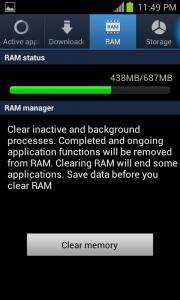
|
|
|
|
|
|
limmengsi
|
Jun 1 2012, 11:13 AM
|
|
|
QUOTE(wakenabeb1 @ Jun 1 2012, 11:08 AM) I'm on G version and just updated to ics. I loved how it was so simple to adjust the screen brightness on the fly on gingerbread by swiping the notification bar. However I can't seem to do this anymore on ICS. Can anybody confirm this for me? for G version, u cant do so... |
|
|
|
|
|
limmengsi
|
Jun 1 2012, 01:36 PM
|
|
|
QUOTE(destEX @ Jun 1 2012, 12:48 PM) go settings>running processes, there also write 600+mb ram? refer attached image..... This post has been edited by limmengsi: Jun 1 2012, 01:37 PM Attached thumbnail(s)
|
|
|
|
|
|
limmengsi
|
Jun 1 2012, 02:07 PM
|
|
|
QUOTE(destEX @ Jun 1 2012, 01:56 PM) okay, i have a theory, it is not proven nor i plan to prove it, it is just my assumption yea. for us non-g we have 829/828 mb of ram displayed. while urs, is 687, that is a difference is 141mb of ram but your ram usage is only 355, adding the 141 will give you 496mb. so you know, we non-g running ics, our ram usage (at least mine) will go from 490~550mb out of 828mb . so my theory is that it is not lost(obviously u cant just remove ram) but it is just hidden, just like we are supposed to see 1GB or ram but we only can see 828mb bcoz my phone almost no apps running on background so the usage is low, but usually it will cached around 400MB-490MB after long time of usage. so need keep clear memory to reduce the cached RAM but i can conclude (in my opinion), ICS does cached more RAM This post has been edited by limmengsi: Jun 1 2012, 02:11 PM |
|
|
|
|
|
limmengsi
|
Jun 1 2012, 02:38 PM
|
|
|
QUOTE(destEX @ Jun 1 2012, 02:21 PM) it is not advisable to clear ram, if u keep use task manager to clear ram u'll only lag ur phone. android automatically frees ram by itself. and yes ics does cache more, around double the amount last time i'm 250+ now 500+  i dun understand why they wan reduce G version total RAM.....~.~" from 900++mb reduce to 687MB |
|
|
|
|



 Quote
Quote

 0.0225sec
 0.16
0.16
 7 queries
 GZIP Disabled