Outline ·
[ Standard ] ·
Linear+
Streamyx Streamyx Q&A Thread for Upgrades/Wrongly Capped, <cleanup> Wrong Capped ? Upgrade ? Ask !
|
lilac_alex
|
 Dec 19 2013, 10:18 AM Dec 19 2013, 10:18 AM
|
Getting Started


|
i've upgraded from the 1M to 2M package this year; i understand that it's not much but i can't even load online movies compare to my celcom broadband (which i thought would be slower than streamyx). anyway, my current problem these three days is the connection with streamyx is very unstable especially from 10.30pm to 1am. the speed can go from 54.0 to 1.0 to limited access then totally disconnected. when i try to reconnect again, it said it has no access while upon troubleshooting it found no problem at all. is it the wifi connection with streamyx or my laptop problem? there are currently two laptops sharing & the usual smartphones. pls advise.. thanks  This post has been edited by lilac_alex: Dec 19 2013, 11:28 PM This post has been edited by lilac_alex: Dec 19 2013, 11:28 PM |
|
|
|
|
|
pandera999
|
Feb 13 2014, 11:50 PM
|
|
|
could not find unifi thread... i call TM cust service unifi 3 times today.. asking either there is any service interruption in my area... they said, not.. and i feel my line was spiky.. and i did tell them... they jz said... do normal troubleshooting  dont know whats wrong. they even reset my port and my line, still the same see this 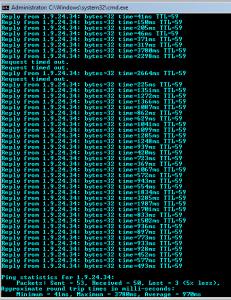
even my speedometer shows my download speed is 4.34mbps and upload is 3.12mbps.. but see the ping... and while on youtube, loading so slow.. in game so lag..  could it be related with modem? i did tell them might be somethings wrong with the modem.. but they say, its not the modem.. calling them, waste my credit still the prob the same |
|
|
|
|
|
calintztan
|
Feb 16 2014, 11:01 AM
|
|
|
QUOTE(pandera999 @ Feb 13 2014, 11:50 PM) could not find unifi thread... i call TM cust service unifi 3 times today.. asking either there is any service interruption in my area... they said, not.. and i feel my line was spiky.. and i did tell them... they jz said... do normal troubleshooting dont know whats wrong. they even reset my port and my line, still the same see this
even my speedometer shows my download speed is 4.34mbps and upload is 3.12mbps.. but see the ping... and while on youtube, loading so slow.. in game so lag.. could it be related with modem? i did tell them might be somethings wrong with the modem.. but they say, its not the modem.. calling them, waste my credit still the prob the same Having the same problem as well with random spike exceeding 3000ms. Pretty sure there's no one using the connection except me.  |
|
|
|
|
|
pandera999
|
Feb 16 2014, 02:37 PM
|
|
|
QUOTE(calintztan @ Feb 16 2014, 11:01 AM) Having the same problem as well with random spike exceeding 3000ms. Pretty sure there's no one using the connection except me. i call them again and again. still not solve. they even argue with me related with the tel no not in unifi list. dafuq.. thn let me wait for 10 min.. thn they the one that wrong type the info i gv..  wasting my credit. eat more than half of my credit to call them. normal trouble shooting..i jz follow.. but still the same. i just complain to consumer rights see this 
p/s: only i alone use the internet.. iptv off.. no extra connection.. |
|
|
|
|
|
Prissy Elf
|
Apr 11 2014, 11:56 AM
|
Getting Started
|
I upgraded my 1Mbps Streamyx to the 4Mbps package on 21/3/2014 and until now my speed is barely 2Mbps. The TM contractor they assigned me said he had already configured and later ignored my calls and SMS. I already filed a report to TM but every time I followup with them they keep telling me it's under investigation and ask me to be patient. It's been 3 weeks already! It's not fair for me to pay for something which I'm not getting. What else can I do? Attached File(s) streamyx_speedtest.pdf
 ( 323.18k )
Number of downloads: 26 |
|
|
|
|
|
devilspade
|
May 5 2014, 09:23 AM
|
Getting Started
|
I need to ask how to move the line from one place to another. The old account in segamat. now i want to move it to JB. What should i do or how does the process work? where should i go first? JB or segamat?
|
|
|
|
|
|
Kaka23
|
May 9 2014, 09:15 PM
|
|
|
Any Streamyx connection problem today in pj?
|
|
|
|
|
|
LordMuramasa
|
May 20 2014, 07:48 PM
|
Getting Started
|
just today in the morning the TM Technician come to my house to install the broadband (im upgrading from 1.0Mbps to 4.0Mbps).. later in the afternoon, evening aft back from work, and now i make a speed test via TM Speedometer, Speedtest.net... and also my modem status... it seem a very disappointed result... the speed of 4.0Mbps seem like just a 2.0 Mbps !!! aiyoooo pening la camni  Modem Status - see my SNR margin and my Attainable Rate... so bullshit   Speedometer & Speedtest    *if u saw the result on 18/05/2014 evening around 6pm till 7pm +, that speed (4.0Mbps +-)... i suspected the TM was only raise for temporary...maybe to test my area line or TM's box line. but after that and till today... the speed seem slow...slow as 2.0Mbps package...this so damn wrong... im upgrade for 4.0Mbps... anyone know what source of my problem exactly? This post has been edited by LordMuramasa: May 20 2014, 07:52 PM |
|
|
|
|
|
cjoenic
|
May 20 2014, 11:25 PM
|
|
|
QUOTE(LordMuramasa @ May 20 2014, 07:48 PM) anyone know what source of my problem exactly? you need to be sure that no one other than u i using the connection. note that, background software update (like phone update, windows update etc) will interfere with the speedtest results. since your attained rate is quite good, around 5mbits. id like to think that it is either from your side, or the speedtest server. plus, not all speedtest server have highspeed link to our tm network. so, if ever get anywhere around 3~4mbits from any nearby speedtest server. your internet connection is considered ok.  |
|
|
|
|
|
cjoenic
|
May 22 2014, 12:43 PM
|
|
|
QUOTE(sakon93 @ May 22 2014, 12:39 PM) I'm also facing the same problem and it has been 6 months. The speed suddenly went down from 4Mbps to 1Mbps. I've called TM and they said the problem was due to internal wiring. Do you guys think that's the reason?  maybe, maybe not. ive done rewiring. still same. weird that my next door friend, got no problem with same speed. ive tried her modem too, not much differ. disconnection still occur at random time, especially when the speed reach the maximum subscribed speed. possibly something is wrong at their exchange.. :/ |
|
|
|
|
|
KUROsaki23
|
Jul 14 2014, 12:24 AM
|
|
|
i don know if this a problem or not, my streamyx detect me in 3 different place, jb, kl and penang, nothings wrong rite, but the gay side is, when i log in to steam, they keep ban me from trading cuz i log in different place simultaneously, anything i can do to fix this?
|
|
|
|
|
|
delsoo
|
Dec 20 2014, 12:31 AM
|
|
|
i am currently using streamyx 384kbps , which is RM60 per month . I plan to upgrade my current plan to faster speed , preferably 1Mbps or 2Mbps . May i know what's the cheapest price for 1Mbps and 2Mbps plan ? I dont want the cordless phone bundle . Can i downgrade to streamyx 384kbps plan in the future? I havent see the plan is still available nowadays on tm website.
|
|
|
|
|
|
Hansenzx
|
Dec 28 2014, 06:19 PM
|
New Member
|
I need a bit of help. I just recently upgraded to UniFi's cheapest package and it seemed fine when the connection was stable. Now the connection keeps dropping like from 500+kbps to 50 kbps. How is this happening and why?
|
|
|
|
|
|
malakus
|
Jan 23 2015, 03:36 PM
|
Getting Started
|
Hello
I've upgraded my 1mbps streamyx to 4mbps streamyx.
My problem is, although the internet work fine but somehow I'm unable to connect with my TP Link modem. It was working fine before upgrade but only the TM provided modem works.
I mean, 5 minutes before the technician do their thing it's fine but after that the dsl and internet light won't stay on. After a few days I tried again, the TP link modem works fine for about less than 10 minutes but then the dsl light began to blink again. It won't stay on.
So.. Yeah, is the modem broken or there's something with the upgrade..
Thanks
|
|
|
|
|
|
blacktubi
|
Jan 23 2015, 06:33 PM
|
-

|
QUOTE(malakus @ Jan 23 2015, 03:36 PM) Hello I've upgraded my 1mbps streamyx to 4mbps streamyx. My problem is, although the internet work fine but somehow I'm unable to connect with my TP Link modem. It was working fine before upgrade but only the TM provided modem works. I mean, 5 minutes before the technician do their thing it's fine but after that the dsl and internet light won't stay on. After a few days I tried again, the TP link modem works fine for about less than 10 minutes but then the dsl light began to blink again. It won't stay on. So.. Yeah, is the modem broken or there's something with the upgrade.. Thanks Set your ADSL modulation to ADSL2+ and try again. |
|
|
|
|
|
malakus
|
Jan 23 2015, 06:58 PM
|
Getting Started
|
QUOTE(blacktubi @ Jan 23 2015, 06:33 PM) Set your ADSL modulation to ADSL2+ and try again. Excuse me but how do I set that? Do I need to go to the modem setup? The 198.168.1.1? |
|
|
|
|
|
blacktubi
|
Jan 23 2015, 07:18 PM
|
-
|
QUOTE(malakus @ Jan 23 2015, 06:58 PM) Excuse me but how do I set that? Do I need to go to the modem setup? The 198.168.1.1? Yes, you should be able to find that settings. If issue persist, post the ADSL stats when ADSL is up. |
|
|
|
|
|
malakus
|
Jan 24 2015, 09:30 AM
|
Getting Started
|
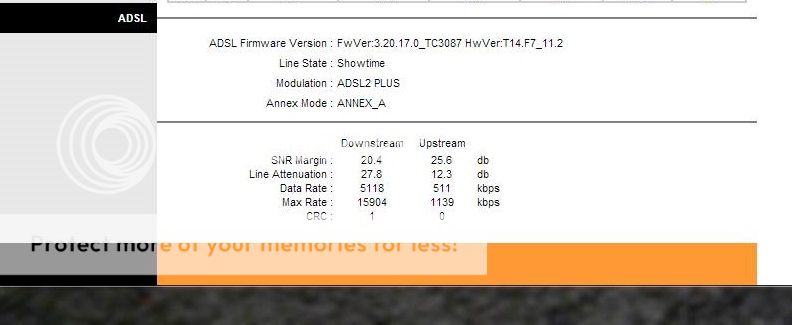
QUOTE(blacktubi @ Jan 23 2015, 07:18 PM) Yes, you should be able to find that settings. If issue persist, post the ADSL stats when ADSL is up. Works ok for about 5 minutes when I first changed to adsl2 but then it began to disconnect again. After that it only lasted for less than a minute and began to disconnect again. It just won't stay alight. This? » Click to show Spoiler - click again to hide... « |
|
|
|
|
|
blacktubi
|
Jan 24 2015, 10:01 AM
|
-
|
QUOTE(malakus @ Jan 24 2015, 09:30 AM) Works ok for about 5 minutes when I first changed to adsl2 but then it began to disconnect again. After that it only lasted for less than a minute and began to disconnect again. It just won't stay alight. This? » Click to show Spoiler - click again to hide... « The stats are alright. If the internet works well on TM's router and not on the TP-LINK, you probably need a new router. |
|
|
|
|



 Quote
Quote



 0.2249sec
 0.33
0.33
 6 queries
 GZIP Disabled