

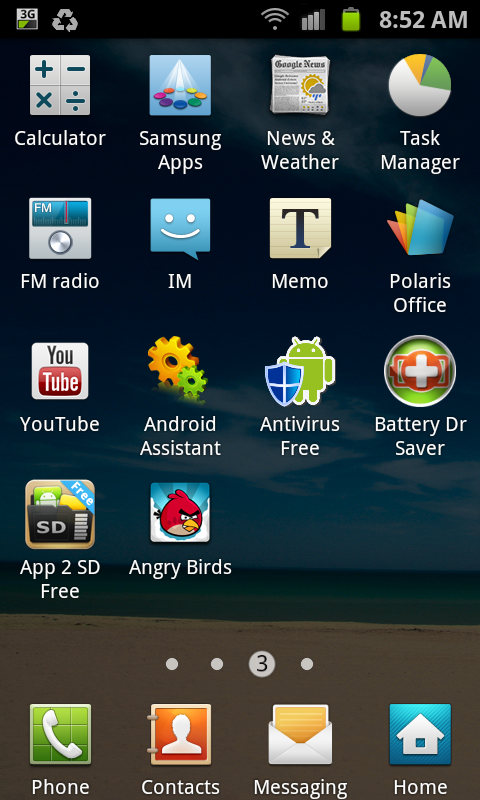
In the apps page 3, shown below, I uninstalled two apps. Now there are two empty spaces at the bottom right.
How can I move the apps from page 4 to page 3?
Samsung Galaxy S II Official Thread V32, A year on, still the perfect phone.
|
|
 May 10 2012, 09:09 AM May 10 2012, 09:09 AM
Return to original view | Post
#1
|
 
Senior Member
3,806 posts Joined: Feb 2012 
|
Newbie question...
In the apps page 3, shown below, I uninstalled two apps. Now there are two empty spaces at the bottom right. How can I move the apps from page 4 to page 3? |
|
|
May 10 2012, 09:30 AM
Return to original view | Post
#2
|
|
Senior Member
3,806 posts Joined: Feb 2012
|
QUOTE(ellimist @ May 10 2012, 09:13 AM) Two ways. eh... can't find the app. No longer available in Playstore 1. Manually arrange/move apps, by clicking menu button, then edit, then dragging apps. 2. Install appzorter lite from playstore. Has option to "compress" which will keep your existing order but fill in those blank spaces, or "sort" (alphabetically or by date I believe, and can put system apps before user as well in options). 2nd way alot easier, used to use it when I was on sammy based roms   |
|
Topic ClosedOptions
|
| Change to: |  0.0396sec 0.0396sec
 0.45 0.45
 7 queries 7 queries
 GZIP Disabled GZIP Disabled
Time is now: 7th December 2025 - 02:53 AM |
 Quote
Quote