Welcome Guest ( Log In | Register )

Bump Topic Topic Closed RSS Feed
126 Pages « < 89 90 91 92 93 > » Bottom

Outline · [ Standard ] · Linear+

 Ivy Bridge Overclocking V1 | 3770K/3570K | Z77, Torture Your CPU, Post It Here!

views
     
TSowikh84
post Jan 18 2013, 02:48 PM

i7 Clan
Group Icon
Elite
8,711 posts

Joined: Nov 2007
From: Butterworth, PG / Machang, Kelantan


QUOTE(captvizcenzo @ Jan 18 2013, 01:46 PM)
I was about to do a 5GHz run, but I need 1.48-1.50V or more to get it stable which is too high in my point of view. tongue.gif
Anyway, I'm sure I'll do it eventually.  brows.gif
*

IMO lower than 1.5v is still acceptable, provided your temp is not too high ~100C.
Pretty sure you will get lower vCore with ASRock OC Formula.
This board has better VRM quality than any ROG lineup.
tonberry_ax
post Jan 18 2013, 11:41 PM

Casual
***
Junior Member
452 posts

Joined: Sep 2008
From: Haswell
hi owikh84, today got time to do some stress test, with very disappointing result not even last for 1 min

user posted image

user posted image

please advice sad.gif
TSowikh84
post Jan 18 2013, 11:57 PM

i7 Clan
Group Icon
Elite
8,711 posts

Joined: Nov 2007
From: Butterworth, PG / Machang, Kelantan


QUOTE(tonberry_ax @ Jan 18 2013, 11:41 PM)
hi owikh84, today got time to do some stress test, with very disappointing result not even last for 1 min

please advice  sad.gif
*
Assuming that your RAM is not OCed. Try adding vCore.
tonberry_ax
post Jan 18 2013, 11:58 PM

Casual
***
Junior Member
452 posts

Joined: Sep 2008
From: Haswell
QUOTE(owikh84 @ Jan 18 2013, 11:57 PM)
Assuming that your RAM is not OCed. Try adding vCore.
*
for my case, what is ur recommended vCore value?
TSowikh84
post Jan 19 2013, 12:01 AM

i7 Clan
Group Icon
Elite
8,711 posts

Joined: Nov 2007
From: Butterworth, PG / Machang, Kelantan


QUOTE(tonberry_ax @ Jan 18 2013, 11:58 PM)
for my case, what is ur recommended vCore value?
*

Different chip different VID thus different vCore.
Try increasing notch by notch until pass.
tonberry_ax
post Jan 19 2013, 12:40 AM

Casual
***
Junior Member
452 posts

Joined: Sep 2008
From: Haswell
QUOTE(owikh84 @ Jan 19 2013, 12:01 AM)
Different chip different VID thus different vCore.
Try increasing notch by notch until pass.
*
vCore 1.45 all worker stop except worker 8.. continue run??

user posted image
captvizcenzo
post Jan 19 2013, 08:56 AM

Regular
******
Senior Member
1,484 posts

Joined: Feb 2009
From: Kuching - Samarahan, Sarawak


QUOTE(owikh84 @ Jan 18 2013, 02:48 PM)
IMO lower than 1.5v is still acceptable, provided your temp is not too high ~100C.
Pretty sure you will get lower vCore with ASRock OC Formula.
This board has better VRM quality than any ROG lineup.
*
Temps won't be a problem from now on. tongue.gif
Changing board is not what I'm thinking right now, LOL.


QUOTE(tonberry_ax @ Jan 18 2013, 11:58 PM)
for my case, what is ur recommended vCore value?
*
You might want to try increasing the VCCIO a little bit. I increased mine in most of my OC.
TSowikh84
post Jan 19 2013, 09:12 AM

i7 Clan
Group Icon
Elite
8,711 posts

Joined: Nov 2007
From: Butterworth, PG / Machang, Kelantan


QUOTE(tonberry_ax @ Jan 19 2013, 12:40 AM)
vCore 1.45 all worker stop except worker 8.. continue run??
*
4.5Ghz for 1.45v, yours must be the worst chip. shocking.gif
Should be something else which is causing the error. It could be voltage (VCCIO, vDRAM/vdimm) or RAM timing.
Suggest to run MemTest to ensure that your RAM functions & is set correctly.
You are going to figure out on how to run the test.
tonberry_ax
post Jan 19 2013, 04:49 PM

Casual
***
Junior Member
452 posts

Joined: Sep 2008
From: Haswell
QUOTE(captvizcenzo @ Jan 19 2013, 08:56 AM)
You might want to try increasing the VCCIO a little bit. I increased mine in most of my OC.
*
Mind to share a guide for that?

QUOTE(owikh84 @ Jan 19 2013, 09:12 AM)
4.5Ghz for 1.45v, yours must be the worst chip.  shocking.gif
Should be something else which is causing the error. It could be voltage (VCCIO, vDRAM/vdimm) or RAM timing.
Suggest to run MemTest to ensure that your RAM functions & is set correctly.
You are going to figure out on how to run the test.
*
i dun think is my proc problem, i try to keep low multiplier to reduce heat, IMO mostly is my RAM problem. The browser have occasionally crash. Is that any proper guide for adjusting ram voltage and stuff? BTW again my RAM is CORSAIR VG PC1600 C9 CMZ 4GB 2pcs. thank you.

updates:
after runing on the MemTest i have multiple error and got this BSOD later on, less than 10 min.
user posted image


later restart pc i connect my phone using USB3.0 got this BSOD again @@ i thought they fix it already ==

user posted image

This post has been edited by tonberry_ax: Jan 19 2013, 05:25 PM
TSowikh84
post Jan 19 2013, 06:18 PM

i7 Clan
Group Icon
Elite
8,711 posts

Joined: Nov 2007
From: Butterworth, PG / Machang, Kelantan


QUOTE(tonberry_ax @ Jan 19 2013, 04:49 PM)
Mind to share a guide for that?
i dun think is my proc problem, i try to keep low multiplier to reduce heat, IMO mostly is my RAM problem. The browser have occasionally crash. Is that any proper guide for adjusting ram voltage and stuff? BTW again my RAM is CORSAIR VG PC1600 C9 CMZ 4GB 2pcs. thank you.

updates:
after runing on the MemTest i have multiple error and got this BSOD later on, less than 10 min.

later restart pc i connect my phone using USB3.0 got this BSOD again @@ i thought they fix it already == 

*

BSOD,
0x1E = increase vcore
0x7E = Corrupted OS file, possibly from overclocking. Run sfc /scannow and chkdsk /r

Both are related to insufficient vCore.
I think your proc really love voltage or the board has horrible VRM.


nikcavalera
post Jan 20 2013, 08:17 AM

Getting Started
**
Junior Member
156 posts

Joined: Nov 2006


Hi.all any idea how to make constant at 4.5Ghz .

My idle return to 1600mhz

EIST disable
C1E disable
C3/C6 disable

Use Asrock Oc Formula
TSowikh84
post Jan 20 2013, 08:48 AM

i7 Clan
Group Icon
Elite
8,711 posts

Joined: Nov 2007
From: Butterworth, PG / Machang, Kelantan


QUOTE(nikcavalera @ Jan 20 2013, 08:17 AM)
Hi.all any idea how to make constant at 4.5Ghz .

My idle return to 1600mhz

EIST disable
C1E disable
C3/C6 disable

Use Asrock Oc Formula
*
Change power plan to High Performance
» Click to show Spoiler - click again to hide... «

tonberry_ax
post Jan 21 2013, 12:15 AM

Casual
***
Junior Member
452 posts

Joined: Sep 2008
From: Haswell
I done some stress test for few hour using prime95. Here's the screenshot

user posted image

but the torture test makes the the cpu very high temp and show warning at the taskbar, is that safe?

user posted image

i notice that when i set the RAM to 1066mhz the system is stable, but i set it to 1600mhz, it start giving all short of memory problem =\

This post has been edited by tonberry_ax: Jan 21 2013, 12:25 AM
TSowikh84
post Jan 21 2013, 06:51 AM

i7 Clan
Group Icon
Elite
8,711 posts

Joined: Nov 2007
From: Butterworth, PG / Machang, Kelantan


QUOTE(tonberry_ax @ Jan 21 2013, 12:15 AM)
I done some stress test for few hour using prime95. Here's the screenshot
but the torture test makes the the cpu very high temp and show warning at the taskbar, is that safe?
i notice that when i set the RAM to 1066mhz the system is stable, but i set it to 1600mhz, it start giving all short of memory problem =\
*

It is not safe when you have reached TJMax of 105C and the CPU frequency should be throttled down hence it is not really a successful OC.
Try lower speed like 4.1-4.2GHz to reduce the temp.
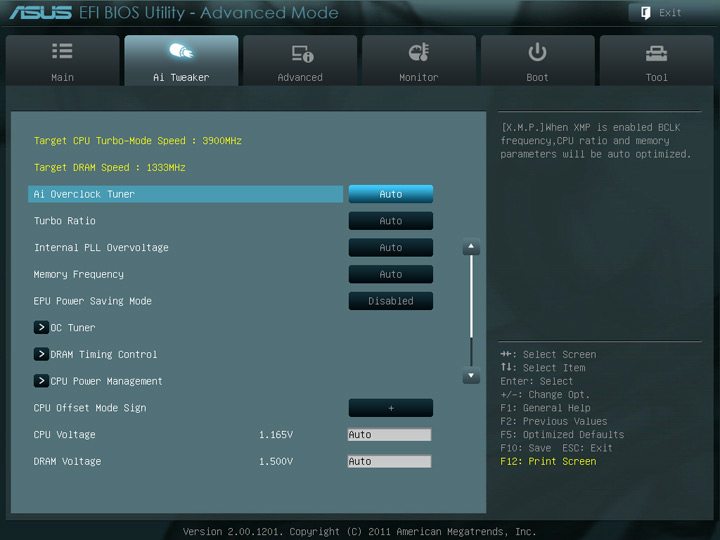
The RAM issue, you should try setting AI OC Tuner to XMP profile #1 or #2, at rated default specs.

user posted image
nikcavalera
post Jan 21 2013, 09:27 AM

Getting Started
**
Junior Member
156 posts

Joined: Nov 2006


QUOTE(owikh84 @ Jan 20 2013, 08:48 AM)
Change power plan to High Performance
» Click to show Spoiler - click again to hide... «

*
Thanks Bro notworthy.gif

About Ram setting at oc formula... your setting for dram refference clock 100mhz or 133mhz...what is the difference

and compatibility or perfomance mode


tonberry_ax
post Jan 21 2013, 09:47 AM

Casual
***
Junior Member
452 posts

Joined: Sep 2008
From: Haswell
QUOTE(owikh84 @ Jan 21 2013, 06:51 AM)
It is not safe when you have reached TJMax of 105C and the CPU frequency should be throttled down hence it is not really a successful OC.
Try lower speed like 4.1-4.2GHz to reduce the temp.
The RAM issue, you should try setting AI OC Tuner to XMP profile #1 or #2, at rated default specs.

user posted image
*
Thanks for your suggestion. nod.gif

For the RAM issue, i tried using XMP profile for it auto set default setting to 1333Mhz, its still not as stable as i manual set it to 1066Mhz. What is the best way to make it stable run at 1600Mhz?
TSowikh84
post Jan 21 2013, 10:53 AM

i7 Clan
Group Icon
Elite
8,711 posts

Joined: Nov 2007
From: Butterworth, PG / Machang, Kelantan


QUOTE(nikcavalera @ Jan 21 2013, 09:27 AM)
Thanks Bro notworthy.gif
About Ram setting at oc formula... your setting for dram refference clock 100mhz or 133mhz...what is the difference
and compatibility or perfomance mode
*

You might use either 100 or 133 strap, both are fine. It is able to support a wider range of DRAM ratios and with certain ratios you have two choices to run the base off.

Usually I'd use 100 for 2600MHz and 2800; whereas 133 for 2666 and 2933.

Compatibility mode should improve compatibility for a wider range of memory modules.
Performance mode will improve performance and overclockability especially when you have a kit of good DRAM.

QUOTE(tonberry_ax @ Jan 21 2013, 09:47 AM)
Thanks for your suggestion.  nod.gif
For the RAM issue, i tried using XMP profile for it auto set default setting to 1333Mhz, its still not as stable as i manual set it to 1066Mhz. What is the best way to make it stable run at 1600Mhz?
*

You could try to play with vdimm, VCCIO, VCCSA (if any). Increase or decrease them might help.

Other than that I'm afraid to say that probably you got a bad stick of RAM. Try other RAM on your PC or put the current RAM on another machine (friend's).
nikcavalera
post Jan 21 2013, 02:20 PM

Getting Started
**
Junior Member
156 posts

Joined: Nov 2006


QUOTE(owikh84 @ Jan 21 2013, 10:53 AM)
You might use either 100 or 133 strap, both are fine. It is able to support a wider range of DRAM ratios and with certain ratios you have two choices to run the base off.

Usually I'd use 100 for 2600MHz and 2800; whereas 133 for 2666 and 2933.

Compatibility mode should improve compatibility for a wider range of memory modules.
Performance mode will improve performance and overclockability especially when you have a kit of good DRAM.

You could try to play with vdimm, VCCIO, VCCSA (if any). Increase or decrease them might help.

Other than that I'm afraid to say that probably you got a bad stick of RAM. Try other RAM on your PC or put the current RAM on another machine (friend's).
*
Thanks

user posted image

So far ok..but if manualy put timing 1600 6 8 6 24 ..have error 0x0A

Default 9 9 9 28

http://www.gskill.com/products.php?index=352

Any sugestion bro owikh
tonberry_ax
post Jan 21 2013, 02:31 PM

Casual
***
Junior Member
452 posts

Joined: Sep 2008
From: Haswell
QUOTE(owikh84 @ Jan 21 2013, 10:53 AM)
You could try to play with vdimm, VCCIO, VCCSA (if any). Increase or decrease them might help.

Other than that I'm afraid to say that probably you got a bad stick of RAM. Try other RAM on your PC or put the current RAM on another machine (friend's).
*
I see. Any guides for adjusting vdimm, VCCIO, VCCSA?

No any warranty for bad ram stick? Later i try to remove either 1 ram to do the testing, then i will identify whats the problem. =\
TSowikh84
post Jan 21 2013, 03:30 PM

i7 Clan
Group Icon
Elite
8,711 posts

Joined: Nov 2007
From: Butterworth, PG / Machang, Kelantan


QUOTE(nikcavalera @ Jan 21 2013, 02:20 PM)
Thanks
So far ok..but if manualy put timing 1600 6 8 6 24 ..have error 0x0A
Default 9 9 9 28
http://www.gskill.com/products.php?index=352
Any sugestion bro owikh
*

This board should have no issue with CAS6.
Could be your chip's IMC cant keep up with too tighten CAS.
Try increase vdimm 1.6-1.65v, VCCIO 1.2v, VCCSA 1.2v
Try 1600 7-8-8-24 or 8-8-8-24
Try 1866 8-8-8-24 or 9-9-9-28
Try 2133 9-10-9-28 or 9-11-9-28

But you're not alone, another GUY also having issue with this RAM. But his 4 sticks.

QUOTE(tonberry_ax @ Jan 21 2013, 02:31 PM)
I see. Any guides for adjusting vdimm, VCCIO, VCCSA?

No any warranty for bad ram stick? Later i try to remove either 1 ram to do the testing, then i will identify whats the problem. =\
*

I can't tell you how much voltage to add or reduce because I don't own the RAM kit, unfortunately
All you have to do is try & error.

126 Pages « < 89 90 91 92 93 > » Top
Topic ClosedOptions
 

Change to:
| Lo-Fi Version
0.0328sec    0.53    6 queries    GZIP Disabled
Time is now: 2nd December 2025 - 08:36 AM