Outline ·
[ Standard ] ·
Linear+
Samsung Galaxy S II Official Thread V29, Welcome Ice Cream Sandwich!
|
cpc_cs
|
 Mar 15 2012, 05:47 PM Mar 15 2012, 05:47 PM
|
New Member


|
QUOTE(alienfighter @ Mar 15 2012, 04:41 PM) anyone know how to set Exchange 2010 OWA email in our SGSII?... google it around, test the solution found, but still can't connect to my company email....  if i missed the solution provided here, care to give me the link? thanks! I am using OWA to access my company e-mail. Let me know where you are stuck - may be I can help. |
|
|
|
|
|
cpc_cs
|
Mar 15 2012, 06:33 PM
|
New Member
|
QUOTE(alienfighter @ Mar 15 2012, 05:50 PM) In the email application - add account - after entering the e-mail address and password, choose manual setup - choose "Micorsoft Exchange ActiveSynch" - you will end up in the attached screen. Enter your details and if your company has a security policy - it will be prompted - accept and you should be through. Remember to do other settings (push or pull, how much to download, etc.). Hope it helps. 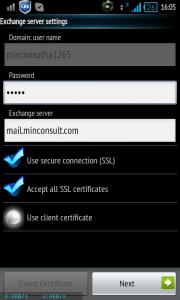 This post has been edited by cpc_cs: Mar 15 2012, 06:37 PM
 |
|
|
|
|
|
cpc_cs
|
Mar 20 2012, 09:32 AM
|
New Member
|
QUOTE(limbryan @ Mar 19 2012, 08:22 PM) i've got 1 question. if let say i need to sync my company email, how should i do? my colleague who using Iphone is able to receive email without log in to webmail. i've asked samsung dealer, who told me that can set it at "Account & sync" from "Setting. Then go to "add account" and select "Microsort Exchange ActiveSync". However, after filled in whatever details, it always show "Unable to connect server". hopefully someone can help me on this matter. thank you. see my earlier post on page 35 (post no. 688) of this thread |
|
|
|
|
|
cpc_cs
|
Mar 21 2012, 08:10 AM
|
New Member
|
Turkbey thread in xda closed for including copyright material!!!
|
|
|
|
|



 Quote
Quote
 0.0439sec
 0.90
0.90
 7 queries
 GZIP Disabled