Welcome Guest ( Log In | Register )

97 Pages « < 26 27 28 29 30 > » Bottom

Outline · [ Standard ] · Linear+

 Repraps and DIY 3D Printing!, Open source hardware~

views
     
DarkTenno
post Nov 14 2014, 09:05 AM

Casual
***
Junior Member
347 posts

Joined: Feb 2005
From: KL


QUOTE(marauderz @ Nov 13 2014, 10:36 PM)
First you need to realize we're not at the point where it's press print and something magically pops out, here's what could happen after you print something. Skip to 5 minutes for the headache time.


*
well in the video probably the guy mistake + slicing software setting problem smile.gif, I wonder why did he print it vertically for something like that for optimal strengths those gear best to be printed lay on flat and will have less support materiel and less headache smile.gif, but still I agree it not something you press print and something magically pops out as marauderz said tongue.gif rclxms.gif
marauderz
post Nov 14 2014, 05:56 PM

Windows Tablet War Veteran
*******
Senior Member
3,390 posts

Joined: Feb 2005


QUOTE(DarkTenno @ Nov 14 2014, 09:05 AM)
well in the video probably the guy mistake + slicing software setting problem smile.gif, I wonder why did he print it vertically for something like that for optimal strengths those gear best to be printed lay on flat and will have less support materiel and less headache smile.gif, but still I agree it not something you press print and something magically pops out as marauderz said tongue.gif  rclxms.gif
*
The guy is ME dude!! tongue.gif

So.. why print vertically? Like I said, my UP Mini's bed isn't hot enough easy to warp when printing big items.

But also, inexperience regarding the whole structural integrity and understanding of support material at the time.
DarkTenno
post Nov 14 2014, 06:38 PM

Casual
***
Junior Member
347 posts

Joined: Feb 2005
From: KL


OK then dude you doing wrong lol
blomker
post Nov 14 2014, 10:52 PM

New Member
*
Junior Member
17 posts

Joined: Jun 2012


QUOTE(marauderz @ Nov 7 2014, 10:04 AM)
Well, like I mentioned, I just want to get a basic kit in one go first so I can get familiar with it. Then I'll just order parts from DX, AliExpress, etc. etc. next time.

@DarkTenno how is Blomker?

Oh.. and where DO we find Kapton tape here? I have seen reference to using the 3M Blue Painter's tape which I've seen here before lar.

Anyway, my current UP! Mini's main problem is warping, seems to be because the heated bed is not hot enough, so I'm trying to mod that myself, but I suppose I can try changing the base to Glass + Painter's Tap + UHU Stick and see.

But my soldering skills suck, this is what happened last week when I tried to desolder the UP! Mini's thermostat.


*
Hi Marauderz,

Have you tried the ABS Juice or Hair Spray or Super Glue trick to prevent ABS print object from warping?
We have tried all and Super Glue is our favourite.

Cover your print surface with Kapton tape and then spread a thin layer of super glue before heating up the bed.
Painter's tape work as well but the tape will stick to your print object during removal from print bed.
And you will need to replace the painter tape everytime.
Give it a try....I am sure you will like this solution.

cha.968
post Nov 15 2014, 12:01 AM

Getting Started
**
Junior Member
117 posts

Joined: Feb 2011
From: Old Klang Road


QUOTE(blomker @ Nov 14 2014, 10:52 PM)
Hi Marauderz,

Have you tried the ABS Juice or Hair Spray or Super Glue trick to prevent ABS print object from warping?
We have tried all and Super Glue is our favourite.

Cover your print surface with Kapton tape and then spread a thin layer of super glue before heating up the bed.
Painter's tape work as well but the tape will stick to your print object during removal from print bed.
And you will need to replace the painter tape everytime.
Give it a try....I am sure you will like this solution.
*
rclxms.gif Yo, Blomker...
Welcome back to lowyat... Will call you up next week, regarding renewal of MAKE Magazine... interested?
blomker
post Nov 15 2014, 01:13 PM

New Member
*
Junior Member
17 posts

Joined: Jun 2012


QUOTE(cha.968 @ Nov 15 2014, 12:01 AM)
rclxms.gif Yo, Blomker...
Welcome back to lowyat... Will call you up next week, regarding renewal of MAKE Magazine... interested?
*
Hey Cha, thanks for the MAKE magazine subscription. Yes I am very interested to renew.
Always nice to see what are the Americans making. Do call me.


marauderz
post Nov 15 2014, 01:22 PM

Windows Tablet War Veteran
*******
Senior Member
3,390 posts

Joined: Feb 2005


QUOTE(blomker @ Nov 14 2014, 10:52 PM)
Hi Marauderz,

Have you tried the ABS Juice or Hair Spray or Super Glue trick to prevent ABS print object from warping?
We have tried all and Super Glue is our favourite.

Cover your print surface with Kapton tape and then spread a thin layer of super glue before heating up the bed.
Painter's tape work as well but the tape will stick to your print object during removal from print bed.
And you will need to replace the painter tape everytime.
Give it a try....I am sure you will like this solution.
*
I'm using a pcb board as a print base. Will need to get a glass base before I can try the other solutions right? Since i don't want it leaking down to the hot plate. The other issue is of course my hot plate is only heated to 60 degrees!

marauderz
post Nov 15 2014, 01:23 PM

Windows Tablet War Veteran
*******
Senior Member
3,390 posts

Joined: Feb 2005


QUOTE(DarkTenno @ Nov 14 2014, 06:38 PM)
OK then dude you doing wrong lol
*
Well making mistakes is just one way of getting closer to finding the right solution wink.gif
marauderz
post Nov 15 2014, 05:04 PM

Windows Tablet War Veteran
*******
Senior Member
3,390 posts

Joined: Feb 2005


Ok, so my kit arrived, the interesting part is that I don't see the back frame plans in the MANY build manuals he gave me, have you guys seen a design like this?

Attached Image
bayer
post Nov 15 2014, 08:11 PM

New Member
*
Newbie
1 posts

Joined: Jan 2003
QUOTE(marauderz @ Nov 15 2014, 01:22 PM)
I'm using a pcb board as a print base. Will need to get a glass base before I can try the other solutions right? Since i don't want it leaking down to the hot plate. The other issue is of course my hot plate is only heated to 60 degrees!
*
60C is really low. Now I understand why you are willing to risk hacking the heat bed.
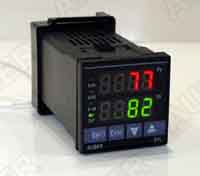
I would cut both the power and sensor line to the heat bed and hook them to a PID Temperature Controller like this one :

user posted image


Quick and dirty hack...should cost you less than RM80
And your attempt to light up your soldering iron was quite funny. I face the same problem with my butane soldering iron as well.

This post has been edited by bayer: Nov 15 2014, 08:13 PM
marauderz
post Nov 15 2014, 10:34 PM

Windows Tablet War Veteran
*******
Senior Member
3,390 posts

Joined: Feb 2005


QUOTE(bayer @ Nov 15 2014, 08:11 PM)
60C is really low.  Now I understand why you are willing to risk hacking the heat bed. 
I would cut both the power and sensor line to the heat bed and hook them to a PID Temperature Controller like this one :

user posted image
Quick and dirty hack...should cost you less than RM80
And your attempt to light up your soldering iron was quite funny.  I face the same problem with my butane soldering iron as well.
*
Hmm.. that's interesting, but the problem is that the UP's print bed moves vertically, so anything attached to it would need to move with it or risk getting tangled and stuff.

Second problem is how the Up Mini's 'sensor' works.
http://thevariableconstant.blogspot.com/20...ature-hack.html


marauderz
post Nov 16 2014, 11:35 PM

Windows Tablet War Veteran
*******
Senior Member
3,390 posts

Joined: Feb 2005


Ok, I've started working on my i3 now, managed to get half the Y axis done, but didn't get much else done because.

- As mentioned, they don't have their own build manuals yet, and them giving a whole bunch of manuals when none of them fit exactly would have confused the heck out of most people.

- They left out some screws and nuts which I needed for installation of the Z axis motor!!

- The smooth rods of the Y axis seem to be of slightly different lengths, which is probably gonna make aligning the sides a little.. interesting.

- you need to SNAP the rods into the grooves? is it a good idea to do that to 3D printed objects?

- The holes in the Y corner pieces for the side threaded rods are TIGHT, in all the build manuals I've seen they mentioned that you insert the rods through the holes, I needed to SCREW the corners into the rods to get them to move, makes me wonder if there was a misprint of the parts...

On a side note, a roll of Kapton tape was provided, which means I can use it on my UP mini along with a glass bed in order to try the various methods of holding the ABS in place while I print.

And for anyone interested, I'm actually recording my build sessions.. Remember that below is raw unedited footage for now. in this case I'm actually chatting with the 3dprinter.my people on the various queries which I have.


This post has been edited by marauderz: Nov 16 2014, 11:37 PM
marauderz
post Nov 17 2014, 12:19 AM

Windows Tablet War Veteran
*******
Senior Member
3,390 posts

Joined: Feb 2005


As I mentioned, I felt that the Y Corners that came with my kit felt a bit weird, so I decided to print a set of my own using my UP Mini.

As I expected, the base lifted because it was a long wide base containing the four pillars. so I'm pretty sure the measurements are slightly out on my piece, but check out the comparison between the two pieces.

Attached Image

You can see the bigger image here :- http://1drv.ms/1xL7uIh

The one I printed is on the left, the one I bought is on the right.

It should be pretty obvious that the one I bought doesn't look very good, the layers are jagged and uneven compared to the smoother even layers which I printed.

What my question here is that if the person could have printed his part at a better quality, why didn't he? After all, he's selling these anyway.
The other question is the obvious is this the best a RepRap can do?

There are a few answers to this. like @altan has mentioned previously, the guy could be inexperience at doing this and done this less than perfectly.

I'm posting this not to deter people from RepRaps, this is for everyone's knowledge about what's available out there.

One of the main reasons I bought the RepRap is for knowledge and experimentation, the UP! printers are very rigid and inflexible and also my UP! Mini is flawed by default. So it all depends on what exactly you want to do with it.

I will defiantly have further opinions once I actually finished and used the Reprap myself, but this is just food for thought currently. I'm sure those of you who already have RepRaps can chime in on this.

DarkTenno
post Nov 17 2014, 12:17 PM

Casual
***
Junior Member
347 posts

Joined: Feb 2005
From: KL


that one bad quality part almost look like printed on a non calibrated reprap, look like a 0.3 or 0.4 layer my printer can do much better than that, I will take a picture of some of my printed part later when I get home

This post has been edited by DarkTenno: Nov 17 2014, 12:18 PM
marauderz
post Nov 17 2014, 01:15 PM

Windows Tablet War Veteran
*******
Senior Member
3,390 posts

Joined: Feb 2005


QUOTE(DarkTenno @ Nov 17 2014, 12:17 PM)
that one bad quality part almost look like printed on a non calibrated reprap, look like a 0.3 or 0.4 layer my printer can do much better than that, I will take a picture of some of my printed part later when I get home
*
good to know, anyway I got my glass plates already. Gonna try the glue stick trick and see if I can get a better hold.

DarkTenno
post Nov 17 2014, 10:39 PM

Casual
***
Junior Member
347 posts

Joined: Feb 2005
From: KL


QUOTE(marauderz @ Nov 17 2014, 01:15 PM)
good to know, anyway I got my glass plates already. Gonna try the glue stick trick and see if I can get a better hold.
*
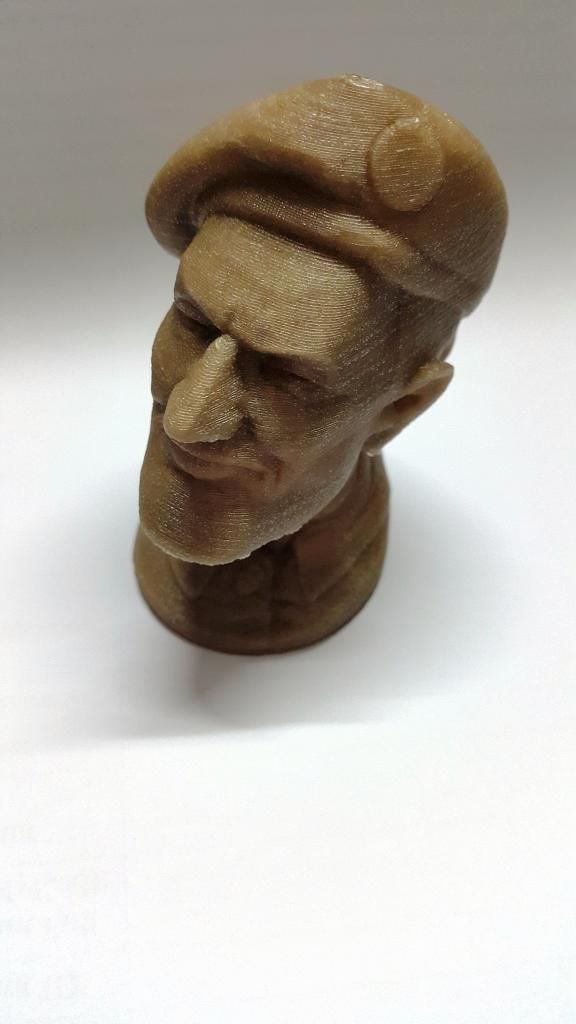
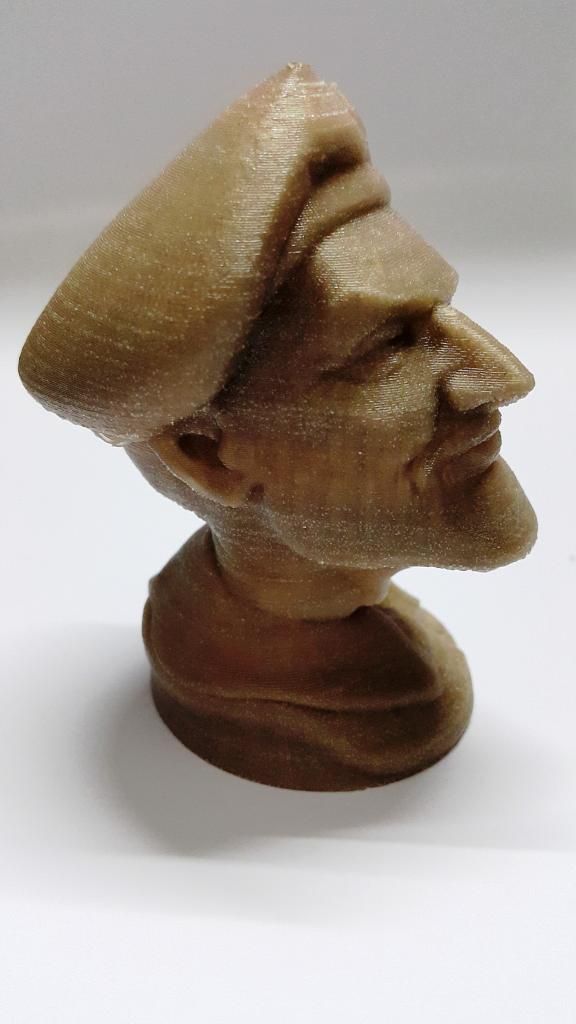
some of my early print

Attached Image

Attached Image

Attached Image

Attached Image

both printed 0.20mm with 10% infill, still having some overhang issues but still came out nice

This post has been edited by DarkTenno: Nov 17 2014, 10:39 PM
cha.968
post Nov 17 2014, 10:43 PM

Getting Started
**
Junior Member
117 posts

Joined: Feb 2011
From: Old Klang Road


QUOTE(DarkTenno @ Nov 17 2014, 10:39 PM)
some of my early print

both printed 0.20mm with 10% infill, still having some overhang issues but still came out nice
*
Nice print! rclxms.gif
blomker
post Nov 17 2014, 11:02 PM

New Member
*
Junior Member
17 posts

Joined: Jun 2012


QUOTE(DarkTenno @ Nov 17 2014, 10:39 PM)
some of my early print

Attached Image

Attached Image

Attached Image

Attached Image

both printed 0.20mm with 10% infill, still having some overhang issues but still came out nice
*
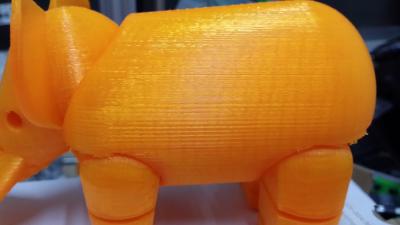
Very nice bro!! Adding a few more pics to adore the beauty of 3D Printer ....
Printed on Prusa i3 at 0.2mm layer height and 40% infill. Surface look a bit rough due to slight bubbling of the PLA filament.
Should reduce temperature by 10deg C to avoid bubbling...

And the macro shot also reveal the micro flaws...no cover up. RepRap 3D Printing is about iteration and correction till you get it perfectly right!


user posted image

user posted image

thumbup.gif

This post has been edited by blomker: Nov 17 2014, 11:05 PM
DarkTenno
post Nov 17 2014, 11:19 PM

Casual
***
Junior Member
347 posts

Joined: Feb 2005
From: KL


nice detailed print, the color make it even look nicer, have stock? tongue.gif
marauderz
post Nov 17 2014, 11:21 PM

Windows Tablet War Veteran
*******
Senior Member
3,390 posts

Joined: Feb 2005


I think ANY 3D printing is about iteration till you get it right.

Anyway... the glass plate I bought was too thick for the Mini's holder.. I guess another thinner than 5MM would be a bit dangerous to handle?

I tried just just kapton tape on one of my perf boards, then use glue stick method.. didn't work.

I'll try the super glue trick tomorrow, though I'm a bit worried about the super glue vapors in the enclosed space and what it'd do to the components...

97 Pages « < 26 27 28 29 30 > » Top
 

Change to:
| Lo-Fi Version
0.0239sec    0.76    6 queries    GZIP Disabled
Time is now: 2nd December 2025 - 08:50 PM