
Welcome Guest ( Log In | Register )

97 Pages « < 53 54 55 56 57 > » Bottom

Outline · [ Standard ] · Linear+

 Repraps and DIY 3D Printing!, Open source hardware~

views
     
eehtsitna
post Feb 23 2015, 12:59 PM

Casual
***
Junior Member
356 posts

Joined: Jun 2006


QUOTE(altan @ Feb 22 2015, 12:21 AM)
Its not possible to resume a print that fail halfway unless you know how to manipulate the gcode of the file.

I have problems like this before and it depends on a few factors.

You might want to check your power supply and the cable.connecting to the printer, I had a problem once where the power supply shorted internally and had to open the sealed laptop case to fix the problem. Another is to see if any of the power supply wire is melting. I had a power supply wire barrel plug melted a little and the wires inside was slightly burnt.

Another issue is due to the usb communication, make sure to use a cable as short as possible to avoid any data loss. USB supplies 5 volts so their voltage drop a tremendously over long distance. A 1 meter cable will have more data loss than a 10 cm cable. Also winding a long cable around a ferrite core helps in reducing noise.

Also, if you think your house have electrical issues, you might want to invest in a uninterruptable power supply, UPS unit. At least the backup battery will sort out any micro power interruptions and also keep your printed running during a black out.
*
Thanks for the insight bro altan.

Hmmm... You suggest that it might be a problem with the power supply? Guess i will need to do something about that soon. If you are right then that should also explain the mysterious problem i have with my overheating mosfet. Never knew that a long usb cable will be an issue too. Time for me to switch back to the stock short cable. tongue.gif

By the way, my lcd controller just came in today. Can i just plug it in and use it straight away?

Thanks again guys!

DarkTenno
post Feb 23 2015, 01:05 PM

Casual
***
Junior Member
347 posts

Joined: Feb 2005
From: KL


QUOTE(altan @ Feb 23 2015, 12:59 PM)
If you like I can meet up for the exchange, I currently have a brand new J-head, which I have yet use but plan on using it for ABS filament. I am currently upgrading my printer for ABS support.

The grub screw leak sounds menacing but I am up for a challenge.

If you are interested, let me know by PM.
*
I was not planning to print ABS at all actually, Just heating the hotend to get it melt my PLA smile.gif, the arrow show where some plastic leaked out, I haven't really got the chance to dissemble it yet from my printer, from the picture also you can see the thermistor location is badly placed from my point of view smile.gif

I'll sent you PM smile.gif

Attached Image

This post has been edited by DarkTenno: Feb 23 2015, 01:06 PM
KLKS
post Feb 23 2015, 01:08 PM

Getting Started
**
Junior Member
292 posts

Joined: Jan 2003


QUOTE(DarkTenno @ Feb 23 2015, 01:05 PM)
I was not planning to print ABS at all actually, Just heating the hotend to get it melt my PLA smile.gif, the arrow show where some plastic leaked out, I haven't really got the chance to dissemble it yet from my printer, from the picture also you can see the thermistor location is badly placed from my point of view smile.gif
I'll sent you PM smile.gif

Attached Image
*
Isnt that where the grub screws go in? If the grubscrew fits snugly, there shouldnt be any leakage.
DarkTenno
post Feb 23 2015, 01:11 PM

Casual
***
Junior Member
347 posts

Joined: Feb 2005
From: KL


QUOTE(KLKS @ Feb 23 2015, 01:08 PM)
Isnt that where the grub screws go in? If the grubscrew fits snugly, there shouldnt be any leakage.
*
it snug fit I did put some PTFE tape aka plumbing tape I can still see leakage
altan
post Feb 23 2015, 01:20 PM

Getting Started
**
Junior Member
188 posts

Joined: Sep 2009
From: Either PJ, JB or SG but not at your house!


QUOTE(eehtsitna @ Feb 23 2015, 12:59 PM)
Thanks for the insight bro altan.

Hmmm... You suggest that it might be a problem with the power supply? Guess i will need to do something about that soon. If you are right then that should also explain the mysterious problem i have with my overheating mosfet. Never knew that a long usb cable will be an issue too. Time for me to switch back to the stock short cable. tongue.gif

By the way, my lcd controller just came in today. Can i just plug it in and use it straight away?

Thanks again guys!
*
Depends if your firmware has been preconfigured to have LCD enabled, then its just plug and play. If not you might have to change a few variables in the firmware to get it to work.


QUOTE(DarkTenno @ Feb 23 2015, 01:05 PM)
I was not planning to print ABS at all actually, Just heating the hotend to get it melt my PLA smile.gif, the arrow show where some plastic leaked out, I haven't really got the chance to dissemble it yet from my printer, from the picture also you can see the thermistor location is badly placed from my point of view smile.gif
I'll sent you PM smile.gif

Attached Image
*
I was wondering, what is the purpose of grub screw hole?
DarkTenno
post Feb 23 2015, 02:06 PM

Casual
***
Junior Member
347 posts

Joined: Feb 2005
From: KL


QUOTE(altan @ Feb 23 2015, 01:20 PM)
Depends if your firmware has been preconfigured to have LCD enabled, then its just plug and play. If not you might have to change a few variables in the firmware to get it to work.
I was wondering, what is the purpose of grub screw hole?
*
I'm gussing to hold the nozzle and cold end tight like those Z rod coupler do smile.gif
altan
post Feb 23 2015, 03:49 PM

Getting Started
**
Junior Member
188 posts

Joined: Sep 2009
From: Either PJ, JB or SG but not at your house!


QUOTE(DarkTenno @ Feb 23 2015, 02:06 PM)
I'm gussing to hold the nozzle and cold end tight like those Z rod coupler do smile.gif
*
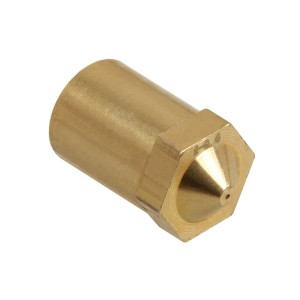
Oh, then is your nozzle the female type? Like this user posted image

or the male type like so user posted image

Anyway this seems interesting. hmm.gif
DarkTenno
post Feb 23 2015, 04:12 PM

Casual
***
Junior Member
347 posts

Joined: Feb 2005
From: KL


the second one which why having the grub screw does not make sense to me as it will damages the thread for both nozzle and heat break smile.gif
altan
post Feb 23 2015, 04:16 PM

Getting Started
**
Junior Member
188 posts

Joined: Sep 2009
From: Either PJ, JB or SG but not at your house!


QUOTE(DarkTenno @ Feb 23 2015, 04:12 PM)
the second one which why having the grub screw does not make sense to me as it will damages the thread for both nozzle and heat break smile.gif
*
That really doesn't make any sense... sweat.gif
eehtsitna
post Feb 24 2015, 07:11 AM

Casual
***
Junior Member
356 posts

Joined: Jun 2006


Morning guys!

Anyone know how i can remove this blue dial cover? Printed a casing for my led controller but i need to remove the dial in order for me to fit it in.

Thanks in advance.


Attached thumbnail(s)
Attached Image
DarkTenno
post Feb 24 2015, 09:24 AM

Casual
***
Junior Member
347 posts

Joined: Feb 2005
From: KL


QUOTE(eehtsitna @ Feb 24 2015, 07:11 AM)
Morning guys!

Anyone know how i can remove this blue dial cover? Printed a casing for my led controller but i need to remove the dial in order for me to fit it in.

Thanks in advance.
*
just pull it out, I printed mine a new knob did not use the original one biggrin.gif

QUOTE(altan @ Feb 23 2015, 04:16 PM)
That really doesn't make any sense...  sweat.gif
*
I just did a clean up with a blow torch same results I even swapped thermistor location does not make any different

This post has been edited by DarkTenno: Feb 24 2015, 09:26 AM
eehtsitna
post Feb 24 2015, 09:34 AM

Casual
***
Junior Member
356 posts

Joined: Jun 2006


QUOTE(DarkTenno @ Feb 24 2015, 10:24 AM)
just pull it out, I printed mine a new knob did not use the original one biggrin.gif
I just did a clean up with a blow torch same results I even swapped thermistor location does not make any different
*
Pull it out with brute strength? Or better still will try to pry it out gently instead. Got to try it once im back at home. Thank you. biggrin.gif
DarkTenno
post Feb 24 2015, 09:40 AM

Casual
***
Junior Member
347 posts

Joined: Feb 2005
From: KL


QUOTE(eehtsitna @ Feb 24 2015, 09:34 AM)
Pull it out with brute strength? Or better still will try to pry it out gently instead. Got to try it once im back at home. Thank you. biggrin.gif
*
be gentle brows.gif, the knob just push fitted nothing is holding it just friction, use a screw driver slide under it to center of the screw driver and slowly push your screw driver upward, be careful not to damage the pcb board
eehtsitna
post Feb 24 2015, 09:56 AM

Casual
***
Junior Member
356 posts

Joined: Jun 2006


QUOTE(DarkTenno @ Feb 24 2015, 10:40 AM)
be gentle  brows.gif, the knob just push fitted nothing is holding it just friction, use a screw driver slide under it to center of the screw driver and slowly push your screw driver upward, be careful not to damage the pcb board
*
I will definitely try to be gentle. brows.gif
DarkTenno
post Feb 24 2015, 10:32 PM

Casual
***
Junior Member
347 posts

Joined: Feb 2005
From: KL


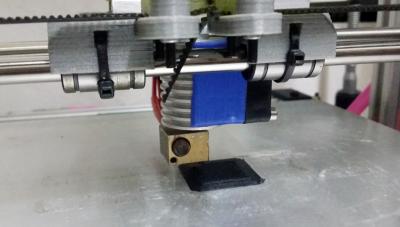
after few hours of taking the my geeetech all metal hotend and some handy work with blow torch and tapping drill bit I manage to get my hotend to print again! rclxms.gif

did a few test run I manage to get the hotend to print nylon at 280c which my goal in first place buying the hotend rclxm9.gif as it rated can go up to 300c, now time for calibration to get nicer print using default setting on slic3r seem fine but can be fine tuned
Attached Image

T-MAX (T-Mandelmax), Printing calibration cube
Attached Image

This post has been edited by DarkTenno: Feb 24 2015, 10:37 PM
eehtsitna
post Feb 25 2015, 08:22 AM

Casual
***
Junior Member
356 posts

Joined: Jun 2006


Success! Now i wont have to leave my pc on during long hours of printing session. Come to think about it, i should learn some proper way to calibrate my printer. Can someone recommend some good article on the subject?

Thanks in advance.


Attached thumbnail(s)
Attached Image
DarkTenno
post Feb 25 2015, 09:23 AM

Casual
***
Junior Member
347 posts

Joined: Feb 2005
From: KL


QUOTE(eehtsitna @ Feb 25 2015, 08:22 AM)
Success! Now i wont have to leave my pc on during long hours of printing session. Come to think about it, i should learn some proper way to calibrate my printer. Can someone recommend some good article on the subject?

Thanks in advance.
*
good place to start!, by the way remove the paper covering the buzzer tongue.gif

http://reprap.org/wiki/Calibration

This post has been edited by DarkTenno: Feb 25 2015, 09:24 AM
eehtsitna
post Feb 25 2015, 10:53 AM

Casual
***
Junior Member
356 posts

Joined: Jun 2006


QUOTE(DarkTenno @ Feb 25 2015, 10:23 AM)
good place to start!, by the way remove the paper covering the buzzer tongue.gif

http://reprap.org/wiki/Calibration
*
Found that link while googling around for the info. That is a lot of stuff to read through and i will most likely need some time to digest all those fact. tongue.gif

By the way, how do i access the firmware on my arduino? Is it through the arduino.exe which came with the printer?
DarkTenno
post Feb 25 2015, 11:00 AM

Casual
***
Junior Member
347 posts

Joined: Feb 2005
From: KL


all depend on what firmware you are running, flashed firmware can't be accessed, only thing you can do is EEPROM value that if it is enabled,

I'm using marlin & repitier firmware, I strongly suggest not to touch any of the firmware setting first use as it is unless you want to update the firmware to add more features

flashing firmware to arduino normally we use Arduino IDE which you can download from arduino.cc
KLKS
post Feb 25 2015, 11:02 AM

Getting Started
**
Junior Member
292 posts

Joined: Jan 2003


If its not broken, don't break it smile.gif

97 Pages « < 53 54 55 56 57 > » Top
 

Change to:
| Lo-Fi Version
0.0244sec    0.72    6 queries    GZIP Disabled
Time is now: 3rd December 2025 - 02:41 AM