Welcome Guest ( Log In | Register )

Bump Topic Topic Closed RSS Feed

Outline · [ Standard ] · Linear+

 * Samsung Galaxy Tab 7.7 *(GT-P6800) v1, ~the first SUPER AMOLED PLUS tablet~

views
     
gp2stroker
post Feb 27 2012, 01:10 AM

Getting Started
**
Junior Member
120 posts

Joined: Jan 2009


Just got the 7.7 a few days ago.. my 7.0 plus will be handed over to wifey

love the super amoled screen and the perfect size/thickness

still waiting for accessories (casing, SP, car charger etc..) ordered on eBay, before fully using it
gp2stroker
post Feb 28 2012, 10:02 PM

Getting Started
**
Junior Member
120 posts

Joined: Jan 2009


user posted image


I'm using this 30pin to micro usb adapter as backup charger. Advantage is you can use your normal handphone charger which has micro usb connection to charge the Tab. Somehow the adapter boosts enough current to charge the tab as well... so no need to bring so many chargers when on the go...
will confirm if it works when charging on PC usb as well
gp2stroker
post Feb 29 2012, 12:09 AM

Getting Started
**
Junior Member
120 posts

Joined: Jan 2009


QUOTE(SteadyPana @ Feb 28 2012, 10:09 PM)
How much Bro ?
*
less than RM10 from ebay
gp2stroker
post Feb 29 2012, 10:51 AM

Getting Started
**
Junior Member
120 posts

Joined: Jan 2009


QUOTE(Hico @ Feb 29 2012, 12:56 AM)
for the micro usb charger, is it 1A type also can be used? or must be 2A too?
*
I've used it with samsung charger 0.7A... no problems charging to 100%


Added on February 29, 2012, 10:58 am
QUOTE(benny888 @ Feb 29 2012, 10:11 AM)
You need at least 2A to charge the Tab . Anything lower you will see battery charging crossed out and extremely slow , which is as good as not charging it
*
uncle benny, I've used it with chargers less than 1A (0.7A & 0.8A) and the battery charging is NOT crossed out... it indicates battery is charging

without the micro usb charger, it will not charge 100% even after leaving overnight

don't know why the adapter works, but it does biggrin.gif

This post has been edited by gp2stroker: Feb 29 2012, 10:58 AM
gp2stroker
post Feb 29 2012, 11:34 AM

Getting Started
**
Junior Member
120 posts

Joined: Jan 2009


QUOTE(benny888 @ Feb 29 2012, 11:30 AM)
I am confused now. I think I have mistaken the issue here. What is this micro USB charger ?
*
it's not a charger but a 30pin to micro usb adapter...

use any regular charger with micro usb connection to charge your tab
gp2stroker
post Feb 29 2012, 12:27 PM

Getting Started
**
Junior Member
120 posts

Joined: Jan 2009


QUOTE(benny888 @ Feb 29 2012, 12:04 PM)
Please point to me a link to purchase this. thanks
*
http://www.ebay.com.my/itm/30pin-Galaxy-Ta...9f#ht_710wt_932

just tried to charge on PC USB port... also working biggrin.gif but cannot do data transfer
gp2stroker
post Mar 18 2012, 03:39 AM

Getting Started
**
Junior Member
120 posts

Joined: Jan 2009


looking for BT Keyboard for landscape mode... i think the samsung dock is only for potrait mode (correct me if I'm wrong)

and don't like the cheap looking leather case + keyboard widely available

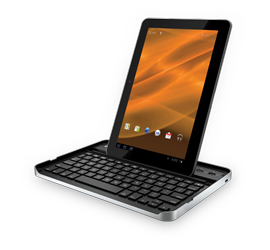
What do guys think of this keyboard (Zagg Folio) ? It's for the 10.1, the BT Keyboard shud be compatible with 7.7

Don't really need the case, the tab can slip & stand in the keyboard groove on landscape or potrait mode without back support (as shown in youtube review)

Do recommend other BT keyboard if available.

user posted image

user posted image

Found another one by Logitech

user posted image

This post has been edited by gp2stroker: Mar 18 2012, 04:07 AM
gp2stroker
post Mar 20 2012, 11:26 AM

Getting Started
**
Junior Member
120 posts

Joined: Jan 2009


QUOTE(billy_overheat @ Mar 19 2012, 07:44 PM)
it's about 30cm x 13cm. very thin, not exceeding 1.5cm and the thinnest part is only 5mm.  biggrin.gif
*
nice size, fits well in my laptop bag. saw a review in youtube...

will consider this one too after the zagg folio keyboard

thanks for the info smile.gif
gp2stroker
post Apr 18 2012, 10:48 PM

Getting Started
**
Junior Member
120 posts

Joined: Jan 2009


QUOTE(gp2stroker @ Mar 18 2012, 03:39 AM)
looking for BT Keyboard for landscape mode... i think the samsung dock is only for potrait mode (correct me if I'm wrong)

and don't like the cheap looking leather case + keyboard widely available

What do guys think of this keyboard (Zagg Folio) ? It's for the 10.1, the BT Keyboard shud be compatible with 7.7

Don't really need the case, the tab can slip & stand in the keyboard groove on landscape or potrait mode without back support (as shown in youtube review)

Do recommend other BT keyboard if available.
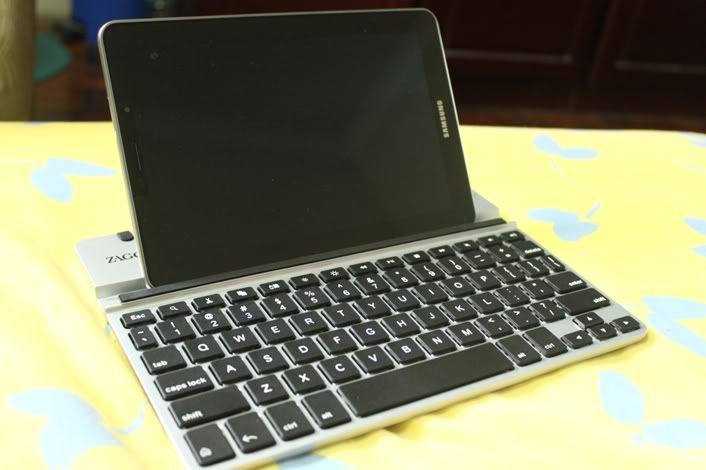
Finally got one........now can use the galaxy tab for real work biggrin.gif ...

now I can leave home my notebook for short outstation trips
user posted image

Designed for the 10.1... works nicely with the 7.7
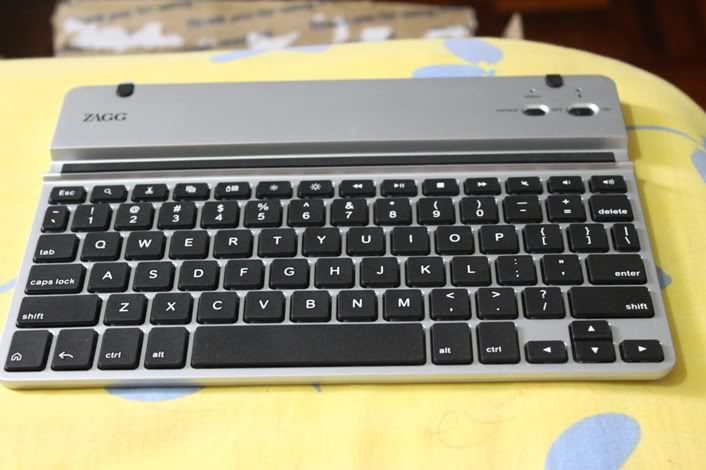

user posted image
Like the feel of the keypad, slim and light body, silver body matches the tab 7.7, battery lasts for months rclxms.gif
has some useful shortcuts as well (home, return, screen brightness, sound volume, copy/cut/paste)

also comes with sleeve for keyboard + tab 10.1 but not shown in photos

This post has been edited by gp2stroker: Apr 18 2012, 11:50 PM

gp2stroker
post Apr 18 2012, 11:48 PM

Getting Started
**
Junior Member
120 posts

Joined: Jan 2009


QUOTE(un_id @ Apr 18 2012, 11:39 PM)
Nice. Where u bought and price?
*
from what i've searched not selling locally

got from ebay.. around RM200 after delivery charges...it's an open box unit

brand new is US$99

Topic ClosedOptions
 

Change to:
| Lo-Fi Version
0.0220sec    0.84    7 queries    GZIP Disabled
Time is now: 16th December 2025 - 07:21 PM