


Anything I should report to them about? (Using 512k Package)
This post has been edited by ahpek26: Jun 12 2007, 09:00 PM
Streamyx Streamyx SNR Margin, --Read here if you face disconnections--
|
|
 Jun 12 2007, 08:59 PM Jun 12 2007, 08:59 PM
Return to original view | Post
#1
|
 
Junior Member
475 posts Joined: Apr 2007  
|
Is this good?
Anything I should report to them about? (Using 512k Package) This post has been edited by ahpek26: Jun 12 2007, 09:00 PM |
|
|
|
|
|
Jun 12 2007, 09:33 PM
Return to original view | Post
#2
|
|
Junior Member
475 posts Joined: Apr 2007
|
QUOTE(scorps @ Jun 12 2007, 09:26 PM) your snr margin look like problem, Nope, 24/7 online no dc, ever =\ (unless intentional)do you face disconnection problem when using streamyx?  Though when I ping yahoo.com usually its around 404-418ms and google.com is around 309-311ms (If your interested, but I don't think it's relative to the problem.. no?). And page loading is fast (google 1s,yahoo 4-5s, with or without proxy). Oh 1 more thing, not using VPN (any service). This post has been edited by ahpek26: Jun 12 2007, 09:50 PM |
|
|
Jun 13 2007, 03:12 AM
Return to original view | Post
#3
|
|
Junior Member
475 posts Joined: Apr 2007
|
QUOTE(scorps @ Jun 13 2007, 01:35 AM) your upload speed is ok or not?? Veli good hahaha.Max 25kpbs LoL! (Yes, i'm teh uber l33c3r hahaha) --6dB or below is bad and will experience no synch or intermittent synch problems-- I already read that thread. However I don't get what it means LoL. What does "intermittent synch" means? Edit: Pronunciation[in-ter-mit-nt] Pronunciation Key - Show IPA Pronunciation -adjective 1. stopping or ceasing for a time; alternately ceasing and beginning again: an intermittent pain. 2. alternately functioning and not functioning or alternately functioning properly and improperly. 3. (of streams, lakes, or springs) recurrent; showing water only part of the time. Ok.. but what does intermittent synch means in simple terms and broadband relation (anyone anyone??). This post has been edited by ahpek26: Jun 13 2007, 03:16 AM |
|
|
Jun 17 2007, 02:35 AM
Return to original view | Post
#4
|
|
Junior Member
475 posts Joined: Apr 2007
|
QUOTE(Viewer @ Jun 14 2007, 01:35 PM) Hi guys, here's my Linksys WAG200G (all-in-one) reading: Downstream Margin: 23db Upstream Margin: 23db Downstream Line Attenuation: 41db Upstream Line Attenuation: 19db Is my dsl gateway ok? I wonder why it keeps disconnecting me just after 10 ~ 30 minutes. When it disconnect my PC, I can even log into the dsl gateway... need to turn off and on then it'll be back online... Could it be that I didn't use the hard reboot in the linksys menu when I first configure it? QUOTE(manfisto @ Jun 16 2007, 11:06 PM) ADSL Status Are you using the splitter with the free router/modem? That thing can mess up your connection (based on personal experince yesterday morning ADSL status shows the ADSL physical layer status. ADSL Firmware Version: 4.03.03.00 - 3.02.00.03 - 4.02.01.00 Annex A - 01.07.02 - 0.49 ADSL Software Version: V2.01B02T02.MA.20060728 Line State Connected Modulation Multi-mode Annex Mode ANNEX_A Max Tx Power -38 dBm/Hz Item Downstream Upstream Unit SNR Margin 4 6 dB Line Attenuation 41 19 dB Data Rate 8064 704 kbps Is this normal? i'm having a lot of disconnection. can it be fix thru my side or i have to call streamyx and "F" them up side down?  ). ).The connection all slow and just plain bad. Remove that crap and the speed turned to normal (a day b4 it works just fine, weird). QUOTE(adriankhoo153 @ Jun 17 2007, 01:13 AM) Loading a picture from imageshak take ages man. I wonder if their server something wrong it's just our streamyx. I feel like all imageshack is damn slow! Same as me. Not sure it's streamyx coz I noticed this long time ago =\This post has been edited by ahpek26: Jun 17 2007, 02:37 AM |
|
|
Jun 18 2007, 09:22 PM
Return to original view | Post
#5
|
|
Junior Member
475 posts Joined: Apr 2007
|
QUOTE(Xybirium @ Jun 18 2007, 06:18 PM) I just changed my telephone wiring from the cheap flat type to the twisted pair type and it increased my DS/US SNR Margin by about 4-5db! Who did it for you, how much you pay for it and how to apply? |
|
|
Jun 25 2007, 01:11 AM
Return to original view | Post
#6
|
|
Junior Member
475 posts Joined: Apr 2007
|
QUOTE(mysh @ Jun 24 2007, 12:17 AM) I've been facing a problem for my connection..... I really frustrated toward this problem Your 2nd margins are low, that's why always dc.My connection is stable when afternoon, but it must get disconnect after 6pm everyday till around 10-11 something.. then will get disconnect again at the midnight.. around 1am..till next day morning..here is my status when the connection is normal..  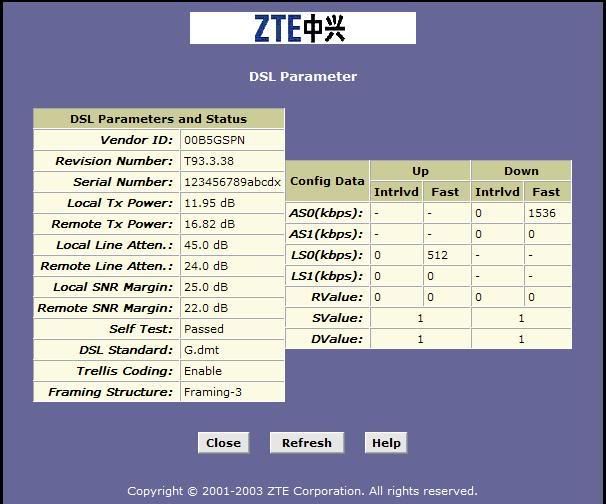 as what i said.. when 6pm, the status will suddenly become like this and get disconnect.. and i noticed the SNR margin keep changing at all time in this disconnection period.. 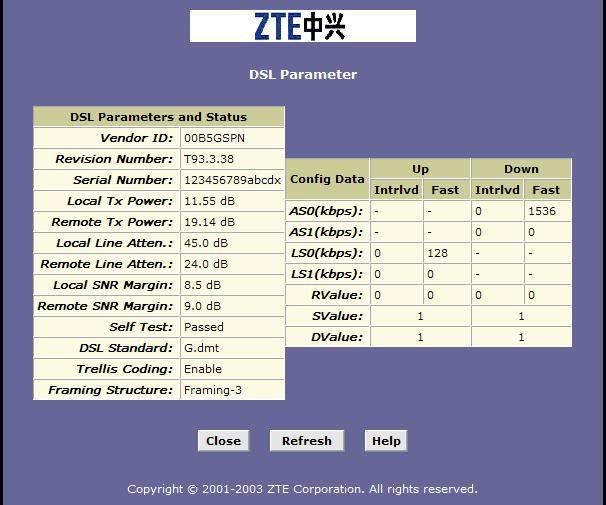 whats the problem actually... hope u can understand what i say... kindly help... QUOTE(xenogears86 @ Jun 24 2007, 08:48 PM) my disconnection problems getting worse every day.. dam tulan edi.. is there a way to fix this?? Both of you:-Line Attenuation is high. It needs to be <20 in order to get a stable connection. QUOTE(NecrosavaNt @ Jun 25 2007, 12:36 AM) getting frequent disconnection lately, these are my modem(aztech 600ew) stats : Again, your Line Attenuation quiet high (<20 stable). Also you DS margin is quiet low too (Slow download). Also, if you don't want the noisy sound, use a splitter (the ones given if you buy a modem or router).Connection Status Connected Us Rate (Kbps) 512 Ds Rate (Kbps) 1536 US Margin 20 DS Margin 4 Trained Modulation ADSL_G.dmt LOS Errors 0 DS Line Attenuation 48 US Line Attenuation 22 Peak Cell Rate 1207 cells per sec CRC Rx Fast 0 CRC Tx Fast 0 CRC Rx Interleaved 573 CRC Tx Interleaved 16 Path Mode Interleaved DSL Statistics Near End F4 Loop Back Count 0 Near End F5 Loop Back Count 0 can anyone please explain to me what it means, what is wrong with it and how to fix the problem ? thanks. also, whenever i pick up my housephone my dsl led will stop blinking for some time but will start blinking again after a couple of minutes(sometimes longer, sometimes shorter). Or the other alternative is to use a separate line for house phone and internet. As for the cure for the Line Attenuation, I think you need to call them to ask about it. "Sometimes" it can be caused by the splitter (happened to me, plug it off, runs faster). But again, maybe it's something else. So.. call them I guess (since I have no idea how to fix it, heh). Anyone got any remedy for them? This post has been edited by ahpek26: Jun 25 2007, 01:12 AM |
|
|
|
|
|
Jun 26 2007, 04:53 PM
Return to original view | Post
#7
|
|
Junior Member
475 posts Joined: Apr 2007
|
QUOTE(mysh @ Jun 25 2007, 10:30 PM) Your 2nd margins are low, that's why always dc. donnu, splitter maybe?Emm.. I mean why the SNR margin suddenly drop so much.. Not my area of expertise hehe^_^ |
|
|
Sep 8 2007, 09:12 PM
Return to original view | Post
#8
|
|
Junior Member
475 posts Joined: Apr 2007
|
QUOTE(doshka @ Aug 22 2007, 10:51 PM) LOL look at mine modem upload ....only 64???? The download is capped at 1536. It doesn't mean you can download that fast, it's just that your connection is set that way. Whats the purpose? Maybe if you are thinking of using streamyx 1.5 mpbs, then you can.is this a modem problem or streamyx line....any ideas...it is slow, but download stated as 1536 and i'm on package RM 44 /60hrs..... [attachmentid=282936] Example mine is caped at 3072 but i'm using 512k only. So yeah, thats super cap but sadly, I get 512k only =P (not even full speed, maybe 85%) . Here's how mine looked like: 
Good times =P QUOTE(silverchain @ Aug 27 2007, 07:02 PM) i forgot my router login and password. how am i gonna do port forward. Goto here for a full list of router's username and password.can someone help me. QUOTE(nakata101 @ Sep 8 2007, 09:40 AM) See what i got again....my 88 package.... Looks like a misscaped o.O. Your Ds Rate should be 1024 or more because your using 1mbit. COMPLAINT time hehe! Don't give face, kasi cukup2.Modem Status Connection Status Connected Us Rate (Kbps) 512 Ds Rate (Kbps) 928 US Margin 16 DS Margin 7 Modulation MMODE LOS Errors 0 DS Line Attenuation 60 US Line Attenuation 63 Path Mode Interleaved DSL Statistics Near End F4 Loop Back Count 0 Near End F5 Loop Back Count 0 QUOTE(stormaker @ Aug 23 2007, 01:18 PM) Hi to all the expert, I need help. According to the modem status for my Aztech DSL605EW, is everything ok ??? Why during day time I can get connected for 1 hour and after that the connection become unstable. At night - 7pm onward even worst, it will disconnect every 10 seconds. Please help and thousands thanks ! Everything looks superb. Maybe it's your telephone line? Worth a try to ask them to check if it's all good right?This post has been edited by ahpek26: Sep 8 2007, 09:22 PM |
|
|
Oct 5 2007, 03:08 AM
Return to original view | Post
#9
|
|
Junior Member
475 posts Joined: Apr 2007
|
QUOTE(Hwoarang45 @ Oct 5 2007, 01:28 AM)   i'm shock, my bt speed everage from 5kps to 20kps, if got local seed, max can get is 60-70kps. was using Rm66 package, with the same speed once upgraded to RM88, i got 150kps on BT, was soo happy but tat lasted for a week then back to old speed, am i being mis -cap? i tried call them and request for port change ,even email them, all i get is stupid noob response and no help....   |
|
|
Nov 30 2007, 04:21 PM
Return to original view | Post
#10
|
|
Junior Member
475 posts Joined: Apr 2007
|
QUOTE(cornelius_young @ Nov 26 2007, 11:40 AM) Is this one OK? Why the Remote Line Atten. is 0DB? The lower the Line Atten. value the better your connection. In your case, it's EXTREMELY AWESOME because it's ZERO. Zo0omg~~Mine is 19/11 (Down/Up) sob sob =.=; |
|
|
Nov 30 2007, 07:26 PM
Return to original view | Post
#11
|
|
Junior Member
475 posts Joined: Apr 2007
|
QUOTE(hao @ Nov 30 2007, 05:17 PM) Yeap, if lucky, slightly better than dial-up. So now I need to ask TM to change the phone cable from my house to the pole? Not really. It could be their end too. Meaning something to do with software (or their hardware etc). Last time I also face the same problem. My solution is to call them and make a report. A couple hours later the line bounce back to it's awesome condition. Could give a try though. If that doesn't work, then yeah, changing the hardware might do the trick. Last time my connection got so wanked up that I can't even make any calls from the fixed line, the phone is noisy as hell (can't even hear what people are talking) and of course, modem always out of sync/internet disconnected. This post has been edited by ahpek26: Nov 30 2007, 07:28 PM |
|
|
Apr 12 2008, 08:49 PM
Return to original view | Post
#12
|
|
Junior Member
475 posts Joined: Apr 2007
|
QUOTE(Alvinix @ Apr 10 2008, 10:31 PM) » Click to show Spoiler - click again to hide... « Surprise nobody replied to you. Good luck mate.  PS: Do remember to test your line once the recabbling is finish, you know just in case.  This post has been edited by ahpek26: Apr 12 2008, 08:50 PM |
|
|
Nov 20 2008, 12:44 PM
Return to original view | Post
#13
|
|
Junior Member
475 posts Joined: Apr 2007
|
Connection status:
Us Rate (Kbps) 1024 Ds Rate (Kbps) 3072 US Margin 13 DS Margin 31 Trained Modulation ADSL_G.dmt LOS Errors 0 DS Line Attenuation 16 US Line Attenuation 9 Peak Cell Rate 2415 cells per sec CRC Rx Fast 185 CRC Tx Fast 1 CRC Rx Interleaved 0 CRC Tx Interleaved 0 Path Mode Fast Path DSL Statistics Near End F4 Loop Back Count 0 Near End F5 Loop Back Count 0 Subscribing 1 mbps TMnet Streamyx and currently facing "regular" disconnection. I want to know why because as far as I can tell, my connection status is good (hell I get 3x Ds rate, COME ON?!?!?!?) so what gives here? Anyone can enlighten me as to why my connection is so shitty right now? |
|
|
|
|
|
Jan 15 2010, 12:06 AM
Return to original view | Post
#14
|
|
Junior Member
475 posts Joined: Apr 2007
|
Line quality is not the only factor to consider for internet performance. There is a matter of bad routing, traffic shaping, good/bad ip, peak/non-peak hours and many more.
The advantage of having good line quality is that you can upgrade your line (some people can't upgrade to 4 Mbps because of bad line quality, instead can only get 2 Mbps) and of course you don't disconnect randomly and all the time. This post has been edited by ahpek26: Jan 15 2010, 12:07 AM |
|
|
Mar 8 2010, 10:54 AM
Return to original view | Post
#15
|
|
Junior Member
475 posts Joined: Apr 2007
|
Time to change the external wiring, lol.
|
|
|
Mar 10 2010, 08:58 PM
Return to original view | Post
#16
|
|
Junior Member
475 posts Joined: Apr 2007
|
QUOTE(K1d0 @ Mar 8 2010, 10:58 AM) external?, you mean from splitter to modem? lol pole outside to your house wireQUOTE(archive @ Mar 9 2010, 08:54 PM) This is my modem yesterday for about half an hour. Usually (but not exclusively) its bad wiring either internal (inside your house) or external (outside pole to your house). Occasionally it could be old wall socket (like me, change it then line become a bit more stable) or some kinda fakap at the exchange (old/dusty/rusty hardware).I've had ongoing problems with my phone line for about 2 months now and I think finally I've managed to explain the problem in simple enough terms that a tech is being sent out to check my line tomorrow. That line attenuation is a constant, it's always 44. SNR sometimes goes up to 11 but it is usually 6, and I've seen it hit 17 once in the last 2 months, and I've been keeping a pretty steady eye on it (checking every half hour or so through the day). This is a good example of what your numbers should not look like, for the record. [attachmentid=1475105] Just see first what the tech gonna say, if he say no problem then log in into your modem/router and show him the line status page. If he still insists something nothing is wrong, then you better complaint to either CFM or SKMM as their so called "Call Support" is no longer sufficient to handle the problem and most likely will talk crap and say its your fault this that. BTW, your using 4Mbps, how did you manage to upgrade? Usually it requires quite a competent line status in order to pass for an upgrade to 4Mbps. This post has been edited by ahpek26: Mar 10 2010, 09:12 PM |
|
|
Apr 6 2010, 03:04 PM
Return to original view | Post
#17
|
|
Junior Member
475 posts Joined: Apr 2007
|
QUOTE(achik2109 @ Apr 5 2010, 09:58 PM) US Margin 21 DS Margin 29 Trained Modulation ADSL_G.dmt LOS Errors 0 DS Line Attenuation 47 US Line Attenuation 20 Peak Cell Rate 1207 cells per sec CRC Rx Fast 0 CRC Tx Fast 0 CRC Rx Interleaved 16 CRC Tx Interleaved 338 how about mine?? QUOTE SN Margin (AKA Signal to Noise Margin or Signal to Noise Ratio) > 20dB-28dB is excellent Line Attenuation > 20dB and below is outstanding > 20dB-30dB is excellent > 30dB-40dB is very good > 40dB-50dB is good Seems ok but a bit high on the DS Line Attenuation (Downstream) but still within the "good" category so its ok. Overall your line should be nice and stable. |
| Change to: |  0.0469sec 0.0469sec
 0.57 0.57
 7 queries 7 queries
 GZIP Disabled GZIP Disabled
Time is now: 11th December 2025 - 06:41 PM |
 Quote
Quote