

and the new port that they changed which caused me to get 60 IPs, are still disconnecting, but less frequent only...overnite sure dc
Streamyx Streamyx SNR Margin, --Read here if you face disconnections--
Streamyx Streamyx SNR Margin, --Read here if you face disconnections--
|
|
 Jun 21 2007, 09:50 PM Jun 21 2007, 09:50 PM
|
 
Senior Member
1,367 posts Joined: Jan 2006 From: Kuala Lumpur   
|
and the new port that they changed which caused me to get 60 IPs, are still disconnecting, but less frequent only...overnite sure dc
|
|
|
|
|
|
Jun 21 2007, 11:35 PM
|

Junior Member
288 posts Joined: Jan 2003
|
Hey guys! If you can, try to get an IP start with 218.xx.xx.xx, the connection is far far far far far better than IP start with 60.xx.xx.xx or 124.xx.xx.xx Try as many times as you could to get the IP start with 218. My problem was solved after gotten an IP start with 218.
Mean while I had recently called up streamyx anf gave the support manager and staffs a "good" one! You will be suprise to hear how many discrepencies the support staffs told me and what the manager said....Check out my blog and download these clips... http://ericlihaechong.com/?p=78 the clips is quite big.... i advise you guys to listen to the last audio file on my conversation with the manager... This post has been edited by KOE: Jun 22 2007, 01:07 AM |
|
|
Jun 22 2007, 02:25 AM
|

Junior Member
53 posts Joined: Jan 2003 From: KL
|
so u mean we should keep turning on and off the modem till we get 218 ?
|
|
|
Jun 22 2007, 05:35 AM
|

Senior Member
9,572 posts Joined: Jun 2005 From: Terengganu Darul Iman 
|
ok,please don't off topic yaa..
 now in this thread discussing about snr margin, not about change the ip address or what ever.. please mention that...  |
|
|
Jun 22 2007, 09:09 AM
|
|
Senior Member
1,367 posts Joined: Jan 2006 From: Kuala Lumpur
|
QUOTE(BlueWind @ Jun 21 2007, 09:49 PM) It happens right after you purchased your new modem? Or the old one also the same thing? it happened even bfor i chg my modem |
|
|
Jun 23 2007, 03:47 AM
|

Junior Member
44 posts Joined: Mar 2005
|
I've just give streamyx tech support a call friday evening to asked them about the my high line attenuation which is 63.5 dB...From a wbsite i read it says that for 1Mbps connection..the ideal length between the originated port and the location of the other own should be around 6km to get a line attenuation of 20dB..i called them and asked..they told me that from the main port/server to my place..the distance is only 4 km..and i asked them back..how come the line attenuation high..It seems that he got no idea and tell me to restart my modem instead coz i've been using it for 16 hours without reset it. The guy was preety polite thou compared to previous one i have called before..huhu..
So do you guys have any other opinion on how to get the line attenuation lower than my current 63.5 dB? I'm currently staying in melaka..ayer keroh..MMU here..Does changing to a new modem then th current bilion modem would help or i need to change the telephone cable here? My house phone, when called outside it felt like talking so far..like suara kelam-kelam..does that play any part in this? |
|
|
|
|
|
Jun 24 2007, 12:17 AM
|

Junior Member
93 posts Joined: Oct 2004
|
I've been facing a problem for my connection..... I really frustrated toward this problem
My connection is stable when afternoon, but it must get disconnect after 6pm everyday till around 10-11 something.. then will get disconnect again at the midnight.. around 1am..till next day morning..here is my status when the connection is normal..  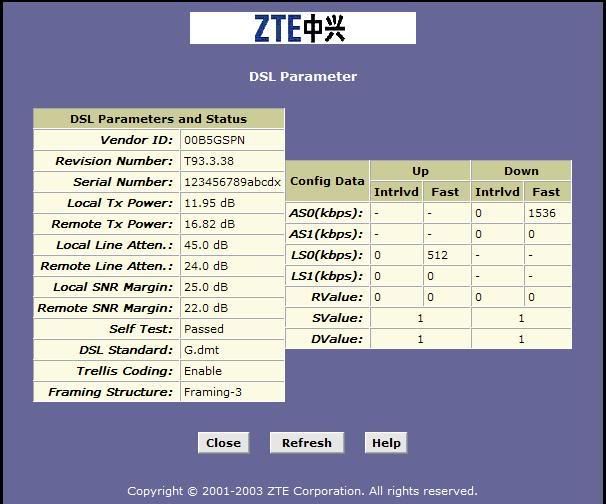 as what i said.. when 6pm, the status will suddenly become like this and get disconnect.. and i noticed the SNR margin keep changing at all time in this disconnection period.. 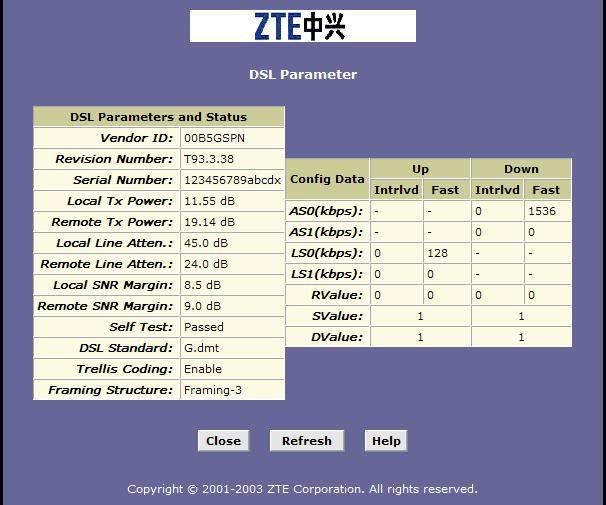 whats the problem actually... hope u can understand what i say... kindly help... |
|
|
Jun 24 2007, 08:48 PM
|

Junior Member
70 posts Joined: May 2006
|
my disconnection problems getting worse every day.. dam tulan edi.. is there a way to fix this??
Attached thumbnail(s) 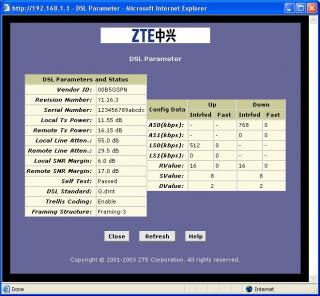
|
|
|
Jun 25 2007, 12:36 AM
|

Junior Member
29 posts Joined: Apr 2005
|
getting frequent disconnection lately, these are my modem(aztech 600ew) stats :
Connection Status Connected Us Rate (Kbps) 512 Ds Rate (Kbps) 1536 US Margin 20 DS Margin 4 Trained Modulation ADSL_G.dmt LOS Errors 0 DS Line Attenuation 48 US Line Attenuation 22 Peak Cell Rate 1207 cells per sec CRC Rx Fast 0 CRC Tx Fast 0 CRC Rx Interleaved 573 CRC Tx Interleaved 16 Path Mode Interleaved DSL Statistics Near End F4 Loop Back Count 0 Near End F5 Loop Back Count 0 can anyone please explain to me what it means, what is wrong with it and how to fix the problem ? thanks. also, whenever i pick up my housephone my dsl led will stop blinking for some time but will start blinking again after a couple of minutes(sometimes longer, sometimes shorter). This post has been edited by NecrosavaNt: Jun 25 2007, 12:42 AM |
|
|
Jun 25 2007, 01:11 AM
|

Junior Member
475 posts Joined: Apr 2007
|
QUOTE(mysh @ Jun 24 2007, 12:17 AM) I've been facing a problem for my connection..... I really frustrated toward this problem Your 2nd margins are low, that's why always dc.My connection is stable when afternoon, but it must get disconnect after 6pm everyday till around 10-11 something.. then will get disconnect again at the midnight.. around 1am..till next day morning..here is my status when the connection is normal.. as what i said.. when 6pm, the status will suddenly become like this and get disconnect.. and i noticed the SNR margin keep changing at all time in this disconnection period.. whats the problem actually... hope u can understand what i say... kindly help... QUOTE(xenogears86 @ Jun 24 2007, 08:48 PM) my disconnection problems getting worse every day.. dam tulan edi.. is there a way to fix this?? Both of you:-Line Attenuation is high. It needs to be <20 in order to get a stable connection. QUOTE(NecrosavaNt @ Jun 25 2007, 12:36 AM) getting frequent disconnection lately, these are my modem(aztech 600ew) stats : Again, your Line Attenuation quiet high (<20 stable). Also you DS margin is quiet low too (Slow download). Also, if you don't want the noisy sound, use a splitter (the ones given if you buy a modem or router).Connection Status Connected Us Rate (Kbps) 512 Ds Rate (Kbps) 1536 US Margin 20 DS Margin 4 Trained Modulation ADSL_G.dmt LOS Errors 0 DS Line Attenuation 48 US Line Attenuation 22 Peak Cell Rate 1207 cells per sec CRC Rx Fast 0 CRC Tx Fast 0 CRC Rx Interleaved 573 CRC Tx Interleaved 16 Path Mode Interleaved DSL Statistics Near End F4 Loop Back Count 0 Near End F5 Loop Back Count 0 can anyone please explain to me what it means, what is wrong with it and how to fix the problem ? thanks. also, whenever i pick up my housephone my dsl led will stop blinking for some time but will start blinking again after a couple of minutes(sometimes longer, sometimes shorter). Or the other alternative is to use a separate line for house phone and internet. As for the cure for the Line Attenuation, I think you need to call them to ask about it. "Sometimes" it can be caused by the splitter (happened to me, plug it off, runs faster). But again, maybe it's something else. So.. call them I guess (since I have no idea how to fix it, heh). Anyone got any remedy for them? This post has been edited by ahpek26: Jun 25 2007, 01:12 AM |
|
|
Jun 25 2007, 10:30 PM
|
|
Junior Member
93 posts Joined: Oct 2004
|
[quote=ahpek26,Jun 25 2007, 01:11 AM]
Your 2nd margins are low, that's why always dc. Emm.. I mean why the SNR margin suddenly drop so much.. |
|
|
Jun 26 2007, 04:00 PM
|

Senior Member
2,471 posts Joined: Jan 2003
|
what about mine?
 
|
|
|
Jun 26 2007, 04:53 PM
|
|
Junior Member
475 posts Joined: Apr 2007
|
QUOTE(mysh @ Jun 25 2007, 10:30 PM) Your 2nd margins are low, that's why always dc. donnu, splitter maybe?Emm.. I mean why the SNR margin suddenly drop so much.. Not my area of expertise hehe^_^ |
|
|
|
|
|
Jun 28 2007, 09:58 PM
|
|
Junior Member
24 posts Joined: Jun 2007
|
QUOTE(FrozenPrince @ Jun 23 2007, 03:47 AM) I've just give streamyx tech support a call friday evening to asked them about the my high line attenuation which is 63.5 dB...From a wbsite i read it says that for 1Mbps connection..the ideal length between the originated port and the location of the other own should be around 6km to get a line attenuation of 20dB..i called them and asked..they told me that from the main port/server to my place..the distance is only 4 km..and i asked them back..how come the line attenuation high..It seems that he got no idea and tell me to restart my modem instead coz i've been using it for 16 hours without reset it. The guy was preety polite thou compared to previous one i have called before..huhu.. Wah... ur attenuation veli veli high man!!! mine at d same area just aroung 8dB onli! so izzit ur line got alot of noice? n mayb ur line 2 old oledi... need rewiring! using any spliltter?So do you guys have any other opinion on how to get the line attenuation lower than my current 63.5 dB? I'm currently staying in melaka..ayer keroh..MMU here..Does changing to a new modem then th current bilion modem would help or i need to change the telephone cable here? My house phone, when called outside it felt like talking so far..like suara kelam-kelam..does that play any part in this? |
|
|
Jul 8 2007, 03:46 PM
|

Junior Member
351 posts Joined: Dec 2006 From: Selangor
|
hmm mine are like this
Remote line attenuation: 25.0dB Local line attenuation: 50.5dB...very high right? Local Snr margin:26.0dB Remote Snr margin:22.0dB so i think my snr is quite good, but line attenuation is bleh.. how to fix it? is it splitter problem? and what's the difference between local and remote? |
|
|
Jul 10 2007, 01:37 PM
|
|
Junior Member
44 posts Joined: Mar 2005
|
QUOTE(rontgen @ Jun 28 2007, 09:58 PM) Wah... ur attenuation veli veli high man!!! mine at d same area just aroung 8dB onli! so izzit ur line got alot of noice? n mayb ur line 2 old oledi... need rewiring! using any spliltter? I am using splitter. I tried to connect it direct without splitter. Still the same line attenuation i get. The phone got no noise but when i called felt like talking to people very2 far..can't really hear properly. the voice not clear. I seems to think that the problem here is the line it self. If wanna rewiring mean..start rewiring from where? From the phone poll to the house or inside the house one only? |
|
|
Jul 10 2007, 08:50 PM
|
|
Senior Member
1,991 posts Joined: Apr 2006 From: Kuching
|
If the sound is like talking to people very very far away, then that is one sympton of a bad line. Is it like that whenever you call people or people call you?
Tell TM technician that when you call people, they sound very very very far away and cannot hear properly. If you tell them that your line attenuation is very high and your noise margin very low, they might not understand. |
|
|
Jul 10 2007, 08:57 PM
|
|
Junior Member
44 posts Joined: Mar 2005
|
yup..it is always like that...i should try and give them a call by this week if possible..thanks
|
|
|
Jul 13 2007, 05:16 PM
|

Junior Member
144 posts Joined: Sep 2006
|
omg.. I really confused...
can any1 share wit me how to check our snr margin...? my modem is 'BILLION' BIPAC 5112s |
|
|
Jul 15 2007, 05:42 PM
|

Senior Member
2,901 posts Joined: Jan 2007
|
Did you try to read the first page of this thread? If didn't please do so
|
| Change to: |  0.0292sec 0.0292sec
 0.44 0.44
 6 queries 6 queries
 GZIP Disabled GZIP Disabled
Time is now: 9th December 2025 - 07:18 PM |
 Quote
Quote