

QUOTE(Foxngn @ Jun 24 2006, 09:52 AM)
makes no difference ler..the whole application just hang at there, nothing happen

Well, u cannot use the program... Better email to aztech and ask for help 
Streamyx Streamyx SNR Margin, --Read here if you face disconnections--
|
|
 Jun 27 2006, 02:54 PM Jun 27 2006, 02:54 PM
|
 
Senior Member
761 posts Joined: Jan 2003 
|
QUOTE(Foxngn @ Jun 24 2006, 09:52 AM) makes no difference ler..the whole application just hang at there, nothing happen Well, u cannot use the program... Better email to aztech and ask for help |
|
|
|
|
|
Jun 27 2006, 07:17 PM
|

Senior Member
774 posts Joined: Jan 2003 From: Prontera's Inn 
|
QUOTE(zombie24 @ Jun 27 2006, 01:24 PM) just a question here.is ur telefon line going into ur modem close to monitor if u got CRT that is.last time i notice when i changed 2 new modem i forget n let the telephone cable go over my crt monitor n i get problem. already far from monitor. still sucks. |
|
|
Jun 27 2006, 07:31 PM
|

Senior Member
4,630 posts Joined: Jul 2005 From: PJ somewhere~
|
Downstream Upstream
SNR Margin 42.8 18.0 dB Line Attenuation 2.9 2.0 dB Errored Seconds 0 1 Loss of Signal 0 0 Loss of Frame 0 0 CRC Errors 0 1 Data Rate 1024 512 kbps Latency INTERLEAVED INTERLEAVED is my line ok?...feel like the download is not so good  |
|
|
Jun 27 2006, 09:45 PM
|

Senior Member
913 posts Joined: Jun 2006
|
your snr is damn good. the attenuation also good. just make sure you download from great server. for bt, pick files with good seeders.
|
|
|
Jun 28 2006, 11:37 AM
|
|
Senior Member
4,630 posts Joined: Jul 2005 From: PJ somewhere~
|
erm...how come the article at page 1 say snr margin shd be lower the best?...am i read the wrong thing?..ha
edit: aiya..my bad..my poor eye make me read the wrong thing...erm...shd download network optimizer to optimize it see see..... This post has been edited by dokidoki: Jun 28 2006, 11:44 AM |
|
|
Jun 28 2006, 07:01 PM
|

Junior Member
28 posts Joined: Jan 2006
|
Hii..
ermm how is my connection ? Ok or bad .. Please evaluate  |
|
|
|
|
|
Jun 28 2006, 11:17 PM
|
|
Senior Member
774 posts Joined: Jan 2003 From: Prontera's Inn
|
all damn good, mine only sucks.....
|
|
|
Jul 8 2006, 11:40 AM
|

Senior Member
2,627 posts Joined: Jan 2003 From: Sepang,Cheras,Jupiter 
|
my snr margin is only 5db.but dint dc at all........so weird huh
|
|
|
Jul 10 2006, 05:26 PM
|

Senior Member
1,165 posts Joined: Jan 2003
|
guys.how about this.??
  |
|
|
Jul 11 2006, 04:29 PM
|

Senior Member
5,366 posts Joined: Aug 2005 
|
how about mine??
 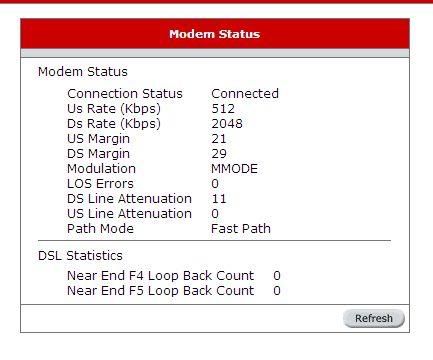 strange though, my package is only 512k, but it shows 2048, but the speed only around 480k (maximum) This post has been edited by dattebayo: Jul 11 2006, 04:30 PM |
|
|
Jul 11 2006, 05:02 PM
|
 
Staff
10,459 posts Joined: Sep 2005 From: Puchong
|
aBs- and dattebayo,
you're going good! dattebayo, The 2048 is because your streamyx speed is capped remotely(not at DSLAM) according to usernames. It is normal. And you have 0 attenuation for upstream, just like me!  |
|
|
Jul 11 2006, 05:17 PM
|
|
Senior Member
913 posts Joined: Jun 2006
|
today, all of a sudden my dl speed thru a great site drops down to 20< kbps. damn it. when i close all dl/ul, and test the speedometer, the dl speed only 23kbps but the upload speed 55kbps. what the hell. im using 1mb.
|
|
|
Jul 15 2006, 12:21 AM
|
|
Senior Member
790 posts Joined: Jan 2006
|
how do i check it from my linksys WRT54G router ?
although i seldom face disconnection problem,but i still want know what is SNR margin all about |
|
|
|
|
|
Jul 19 2006, 10:44 AM
|
 
Elite
2,396 posts Joined: Jan 2003 From: Pandan Perdana, Cheras, KL
|
Hey guys, seems like my connection here is darn bad...

Man, the SNR, Attenuation was pretty bad... DC happens randomly... Don't care about BT, turning on another PC connected to the switch would cause the modem DC... Previously used the Aztech 300EU... I must say that the modem had been quite good despite its age but then it lacked those SNR and Atten infos... Just by the end of May this year, the line had been so bad. The connection to Streamyx had been so shitty that I had to call those lard to rectify this. They sent a technician, checking the phone a bit and heard some noise crackle and he straightaway make a hasty conclusion of I lacked DSL filter in the connection and my modem is aging. He even want to sell me the BILLION ADSL modem for RM150. Whatever, I take it with a pinch of salt. Since they aren't doing much like checking the last mile connection, DSLAM or the Exchange, I went and bought a DLINK DSL-500T and so my connection had been 'resurrected'. But the problem actually still there, it's just a matter of the equipment robustness at handling such bad Atten and SNR and still able to cope with it and provide me with a 'discounted' connection, better than nothing. Now, after reading the DIY part of diagnosing the problem, and checking on the phone cable, it seems like there's nothing else I can do to improve the SNR and decrease the Attenuation. Care for some help/suggestion sifu? This post has been edited by Kagaya: Jul 19 2006, 10:54 AM |
|
|
Jul 20 2006, 09:10 AM
|

Senior Member
3,169 posts Joined: Jan 2003
|
QUOTE(Kagaya @ Jul 19 2006, 10:44 AM) Now, after reading the DIY part of diagnosing the problem, and checking on the phone cable, it seems like there's nothing else I can do to improve the SNR and decrease the Attenuation. Care for some help/suggestion sifu? i am shocked by what the tech told you, that you lack DSL filter in the connection and your modem is aging, that's the biggest horseshit i ever heard, my aztech USB turbo 100 is near 4 yr old, used to dc like hell, now ok already, it took them 2 yr to fix it, now snr has increased to 16 and no more dc, can have stable connection for months if no heavy rain. i too suspected that it was the USB modem vs ethernet, the brand aztech or other more stable brand, etc.... finally it all came down to the line quality, they changed the line somewhere and the problem was fixed instantly. Attached thumbnail(s) 
|
|
|
Jul 20 2006, 09:17 AM
|
|
Senior Member
761 posts Joined: Jan 2003
|
Regarding your SNR, there is nothing u can do... just call tmnut technician...file more report on your cases...
Normally the technician will refer this SNR as high capacitance... |
|
|
 Jul 20 2006, 11:17 PM Jul 20 2006, 11:17 PM
|
|
Junior Member
17 posts Joined: Jun 2005
|
Every time I download no matter ftp, http or bt only get less than 10k, some time can't download at all.
 Attached thumbnail(s) 
|
|
|
Jul 28 2006, 12:33 AM
|
|
Senior Member
623 posts Joined: Jan 2003
|
For those whose having low SNR problem might have a test or try another modem with your line.
This is my scenario: Few weeks agos, My modem have pretty low SNR for 6-7 after its strike by lightning and lot of CRC errors. And this cuase some weird downstream/upstream speed and often having line diconnected. I thought it was the line problem but when I try with my friend's modem, I'm getting SNR 20 - 22 and when I plug back my modem,it getting SNR 6-7 again. The funny thing is I test my modem in my friend place it getting high SNR 22-24 and my friend's modem getting SNR 30 above. My modem working fine and normal over there because the line there was damn good. Since my old modem only can work normally in high SRN line, I have to get another modem and now my new modem having SNR 17-20 and working fine.  This post has been edited by nameless: Jul 28 2006, 12:34 AM |
|
|
Jul 30 2006, 01:32 PM
|

Junior Member
59 posts Joined: Sep 2004
|
anybody can check my connection plz? having high ping during cs (100+)
call tm net n asked me to email them the detail n now im getting pissed off coz no reply for them... Microsoft Windows XP [Version 5.1.2600] © Copyright 1985-2001 Microsoft Corp. E:\Documents and Settings\Administrator>ping www.tm.net.my Pinging www.tm.net.my [202.71.97.48] with 32 bytes of data: Reply from 202.71.97.48: bytes=32 time=94ms TTL=115 Reply from 202.71.97.48: bytes=32 time=91ms TTL=116 Reply from 202.71.97.48: bytes=32 time=92ms TTL=116 Reply from 202.71.97.48: bytes=32 time=94ms TTL=115 Ping statistics for 202.71.97.48: Packets: Sent = 4, Received = 4, Lost = 0 (0% loss), Approximate round trip times in milli-seconds: Minimum = 91ms, Maximum = 94ms, Average = 92ms SNR Margin = ds-31 us-26 Line Attenuation= ds-42 us-21 |
|
|
Aug 17 2006, 01:31 AM
|

Senior Member
2,775 posts Joined: Jan 2003
|
im a real n00b when it comes to this..can someone comment on my line's rate?
what's weird is that im on a 512 package..but as you can see..my up and downstreams are in the weird numbers.. its supposedly better right?but as far as i know..my SNR is in a really bad shape.. |
| Change to: |  0.0190sec 0.0190sec
 1.27 1.27
 6 queries 6 queries
 GZIP Disabled GZIP Disabled
Time is now: 2nd December 2025 - 03:17 PM |
 Quote
Quote