Welcome Guest ( Log In | Register )

87 Pages « < 75 76 77 78 79 > » Bottom

Outline · [ Standard ] · Linear+

Streamyx Streamyx SNR Margin, --Read here if you face disconnections--

views
     
dvinez
post Feb 5 2010, 09:02 AM

Limited Edition
******
Senior Member
1,475 posts

Joined: Dec 2006
From: Paradise


hi, yesterday i go home i saw streamyx ppl install fibre optic cable at a tiang outside my house (my phone cable connect there).

after install my line keep dc and slow;

snr = 6-7 line attenuation = 58-60.

im using streamyx 1mb combo package, usually i get 1.5mb dl and 512mb ul.
i checked this morning and it become 1mb dl and 256mb ul.


any idea to fix ? call them ?


and i connect phone, the phone have no tone and power/light.

This post has been edited by dvinez: Feb 5 2010, 09:03 AM
Gh-x
post Feb 13 2010, 02:28 AM

Casual
***
Junior Member
475 posts

Joined: Nov 2006
From: Kuala Lumpur


QUOTE
Mode: ADSL2+
Line Coding: Trellis On
Status: Connected
Link Power State: L0

  Downstream Upstream
SNR Margin (dB): 30.1  14.2
Attenuation (dB): 10.0  6.1
Output Power (dBm): 12.4  -4.5
Attainable Rate (Kbps): 15034  1301
Rate (Kbps): 2047  508
MSGc (number of bytes in overhead channel message): 65  16
B (number of bytes in Mux Data Frame): 54  14
M (number of Mux Data Frames in FEC Data Frame): 1  1
T (Mux Data Frames over sync bytes): 1  3
R (number of check bytes in FEC Data Frame): 0  16
S (ratio of FEC over PMD Data Frame length): 0.9129  1.0000
L (number of bits in PMD Data Frame): 482  248
D (interleaver depth): 1  2
Delay (msec): 0  0

Super Frames: 2521223  456162
Super Frame Errors: 0  0
RS Words: 0  203362
RS Correctable Errors: 0  40
RS Uncorrectable Errors: 0  N/A

HEC Errors: 0  0
OCD Errors: 0  0
LCD Errors: 0  0
Total Cells: 197232628  2358828346
Data Cells: 43098769  192499780
Bit Errors: 0  139084

Total ES: 0  372
Total SES: 0  286
Total UAS: 16  70166
How is my line, does Attainable Rate mean i can get 15mb connection on this line? so can upgrade to 4mb line right?

This post has been edited by Gh-x: Feb 13 2010, 02:29 AM
dreamsquall
post Feb 23 2010, 02:44 AM

Getting Started
**
Junior Member
87 posts

Joined: Apr 2006


Downstream Rate: 1024 kbps
Upstream Rate: 512 kbps
Downstream Margin: 9 db
Upstream Margin: 23 db
Downstream Line Attenuation: 50 db
Upstream Line Attenuation: 14.5 db
Downstream Transmit Power: 12 db
Upstream Transmit Power: 3 db


i'd called tmnut about my low downstream margin and will have disconnection after 5-8 hours of connection
adter disconnection my linksys wag200g auto connect back and will get this

Downstream Rate: 32 kbps
Upstream Rate: 144 kbps
Downstream Margin: 3 db
Upstream Margin: 20 db
Downstream Line Attenuation: 55 db
Upstream Line Attenuation: 14.5 db
Downstream Transmit Power: 12 db
Upstream Transmit Power: -5 db

to get my connection normal back, i need to unplug my modem line for 10s n plug it back

tmnut reply me with"your place is far from exchange point"
i asked how far, he answered from setapak
i was WTF!
i;m staying at kepong and my exchange point at setapak?
means my data have to travel 30km ++????
anyone got idea about change my exchange point to nearer my place? as i know kepong do have their own exchange point coz previously my exchange point from kepong but suddenly they telling me tht my port spoiled and change a new port but at setapak exchange=.=
i asked them i wan my port back to kepong they say they cannot do anything


victor.c
post Feb 24 2010, 09:51 PM

New Member
*
Junior Member
44 posts

Joined: Jul 2008
From: Desa Setapak


2 YEars already... My steamyx keep dc also...
Dunno how many time i call streamyx...

after technician come fix... ok.. 2 day ago.. dc again...

last time my SNR MARGIN can up to 25+ now 6~15.
line 2 pc... if 2 pc play a online game together... the line will DC...

now i typing also will dc few time... need wait connected just i can post a reply...

Should I change my Modem or change a better Wall phone line cable?
and i pick up the phone.. my phone is noisy... SAH sa sha~ many sand in my phone !! vmad.gif

i have no choice.. if not i will change another internet provider !!

This post has been edited by victor.c: Feb 24 2010, 09:53 PM
dreamsquall
post Feb 25 2010, 01:59 AM

Getting Started
**
Junior Member
87 posts

Joined: Apr 2006


seems like phone line cable problem
ask the streamyx technician test ur phone cable
ywkwy
post Mar 7 2010, 03:53 PM

Enthusiast
*****
Senior Member
868 posts

Joined: Dec 2005
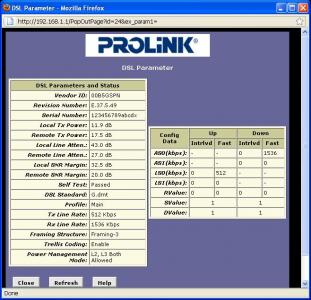
Im using prolink H9200
in the attachment below, may i know which 1 is downstream which 1 is upstream? local or remote?
how is the quality?


This post has been edited by ywkwy: Mar 7 2010, 03:53 PM


Attached thumbnail(s)
Attached Image
K1d0
post Mar 8 2010, 09:53 AM

starrrrr
******
Senior Member
1,386 posts

Joined: Aug 2007


Guys, i just change my internal wiring around a month to two ago, and it work like charm for around a month, but last few week start problem back and i just check my SNR margin and those and found that it is so...bad, here it is.. May i know whats the problem? Cause i just change the internal wiring not even more than 3 month.

additional info = using ZTE ZXDSL831 modem, for around 6 year lol...

Local Tx Power: 12.13 dB
Remote Tx Power: 16.70 dB
Local Line Atten.: 52.5 dB
Remote Line Atten.: 31.5 dB
Local SNR Margin: 6.5 dB
Remote SNR Margin: 19.0 dB

ahpek26
post Mar 8 2010, 10:54 AM

Casual
***
Junior Member
475 posts

Joined: Apr 2007


Time to change the external wiring, lol.
K1d0
post Mar 8 2010, 10:58 AM

starrrrr
******
Senior Member
1,386 posts

Joined: Aug 2007


QUOTE(ahpek26 @ Mar 8 2010, 10:54 AM)
Time to change the external wiring, lol.
*
external?, you mean from splitter to modem? lol
archive
post Mar 9 2010, 08:54 PM

Getting Started
**
Junior Member
65 posts

Joined: Feb 2009
This is my modem yesterday for about half an hour.

I've had ongoing problems with my phone line for about 2 months now and I think finally I've managed to explain the problem in simple enough terms that a tech is being sent out to check my line tomorrow.

That line attenuation is a constant, it's always 44. SNR sometimes goes up to 11 but it is usually 6, and I've seen it hit 17 once in the last 2 months, and I've been keeping a pretty steady eye on it (checking every half hour or so through the day).

This is a good example of what your numbers should not look like, for the record.

Attached Image
ninety9nite
post Mar 10 2010, 08:02 PM

New Member
*
Junior Member
8 posts

Joined: Mar 2010
Downstream Upstream
SNR Margin (dB) 8.5 19.0
Attenuation (dB) 53.0 31.5
Output Power (dBm) 17.5 12.0
Attainable Rate (Kbps) 4684 992
Rate (Kbps) 4064 512
K (number of bytes in DMT frame) 0 17
R (number of check bytes in RS code word) 0 0
S (RS code word size in DMT frame) 655.35 1.00
D (interleaver depth) 1 1
Delay (msec) 655.35 0.25
FEC 0 0
CRC 5289 1
Total ES 834 1
Total SES 71 0
Total UAS 52 0

is this normal ???
i using 4mbps package
when i call many time = =
at the end they tell me, cant use up to 4mbps
ask me to downgrade.
but they not even come to my house check anything it is hard to let me believe they cgot some thing

This post has been edited by ninety9nite: Mar 10 2010, 08:07 PM
ahpek26
post Mar 10 2010, 08:58 PM

Casual
***
Junior Member
475 posts

Joined: Apr 2007


QUOTE(K1d0 @ Mar 8 2010, 10:58 AM)
external?, you mean from splitter to modem? lol
*
pole outside to your house wire

QUOTE(archive @ Mar 9 2010, 08:54 PM)
This is my modem yesterday for about half an hour.

I've had ongoing problems with my phone line for about 2 months now and I think finally I've managed to explain the problem in simple enough terms that a tech is being sent out to check my line tomorrow.

That line attenuation is a constant, it's always 44. SNR sometimes goes up to 11 but it is usually 6, and I've seen it hit 17 once in the last 2 months, and I've been keeping a pretty steady eye on it (checking every half hour or so through the day).

This is a good example of what your numbers should not look like, for the record.

Attached Image
*
Usually (but not exclusively) its bad wiring either internal (inside your house) or external (outside pole to your house). Occasionally it could be old wall socket (like me, change it then line become a bit more stable) or some kinda fakap at the exchange (old/dusty/rusty hardware).

Just see first what the tech gonna say, if he say no problem then log in into your modem/router and show him the line status page. If he still insists something nothing is wrong, then you better complaint to either CFM or SKMM as their so called "Call Support" is no longer sufficient to handle the problem and most likely will talk crap and say its your fault this that.

BTW, your using 4Mbps, how did you manage to upgrade? Usually it requires quite a competent line status in order to pass for an upgrade to 4Mbps.

This post has been edited by ahpek26: Mar 10 2010, 09:12 PM

ninety9nite
post Mar 10 2010, 09:34 PM

New Member
*
Junior Member
8 posts

Joined: Mar 2010
QUOTE(ahpek26 @ Mar 10 2010, 08:58 PM)
pole outside to your house wire
Usually (but not exclusively) its bad wiring either internal (inside your house) or external (outside pole to your house). Occasionally it could be old wall socket (like me, change it then line become a bit more stable) or some kinda fakap at the exchange (old/dusty/rusty hardware).

Just see first what the tech gonna say, if he say no problem then log in into your modem/router and show him the line status page. If he still insists something nothing is wrong, then you better complaint to either CFM or SKMM as their so called "Call Support" is no longer sufficient to handle the problem and most likely will talk crap and say its your fault this that.

BTW, your using 4Mbps, how did you manage to upgrade? Usually it requires quite a competent line status in order to pass for an upgrade to 4Mbps.
*
when the they come to my home activate my connection all the line status is pass 25 down snr and 40 attenution.
but after 1 day my reading is remain like tat
archive
post Mar 10 2010, 10:16 PM

Getting Started
**
Junior Member
65 posts

Joined: Feb 2009
QUOTE(ahpek26 @ Mar 10 2010, 08:58 PM)
Usually (but not exclusively) its bad wiring either internal (inside your house) or external (outside pole to your house). Occasionally it could be old wall socket (like me, change it then line become a bit more stable) or some kinda fakap at the exchange (old/dusty/rusty hardware).

Just see first what the tech gonna say, if he say no problem then log in into your modem/router and show him the line status page. If he still insists something nothing is wrong, then you better complaint to either CFM or SKMM as their so called "Call Support" is no longer sufficient to handle the problem and most likely will talk crap and say its your fault this that.

BTW, your using 4Mbps, how did you manage to upgrade? Usually it requires quite a competent line status in order to pass for an upgrade to 4Mbps.
*
Yeah I had a tech look at the wiring going into the building today and he did 'something', without being specific. Said to keep using and see if the problem persists, which it has - and I'll be calling again tomorrow to get them to figure it out some more.

The condo I'm in is no more than 5 years old (new when purchased), and neither wall socket makes a difference to the stability of my 'net.

As for how I got the upgrade - it was excellent line quality at the time, but about 2 months ago the bottom just fell out of it and it's been dropping out like this with frequency every since.
winsonwhy
post Mar 19 2010, 12:00 AM

Casual
***
Junior Member
330 posts

Joined: Jul 2009
hey guys... my streamyx just keep on disconnect. email tm and they call me back and say may be is my splitter problem and ask me to buy another new splitter. I have try not to use splitter (not using phone) and just plug the modem to the socket and it is still disconnect. i'm broadband newbie.

so what is the potential problem?
anybody can help to figure it out?

Thanks a lot. cry.gif
aidilsyar
post Mar 22 2010, 03:37 PM

New Member
*
Junior Member
29 posts

Joined: Jan 2003
From: Perak


can help me explain this....
left no spliter and right with spliter....which 1 better???


This post has been edited by aidilsyar: Mar 22 2010, 03:59 PM


Attached thumbnail(s)
Attached Image
ahcheap
post Mar 22 2010, 05:14 PM

TM UniFi/Streamyx Reseller
******
Senior Member
1,466 posts

Joined: Jul 2008
From: Wherever you're


QUOTE(aidilsyar @ Mar 22 2010, 03:37 PM)
can help me explain this....
left no spliter and right with spliter....which 1 better???
*
If we look at the difference of Remote SNR margin for both condition, with spliter better.
lowyard
post Mar 28 2010, 07:21 PM

Nexus 4, 4 Nexers.
*******
Senior Member
2,056 posts

Joined: Apr 2008


Guys, help me out with this reading I got from my wireless modem router.

This is when the connection is alright and functioning well.

user posted image


And this is when my internet become dumb and unresponsive. Which I then reboot it to solve the prob.

user posted image


So, what is good and what is bad? My exchange point is I don't know where. Never knew it matters. Oh and sometimes, my LED showed red when the internet is disconnected and couldn't connect by itself. I have to reboot.

This post has been edited by lowyard: Mar 28 2010, 07:50 PM
Suk
post Mar 29 2010, 12:19 AM

Look at all my stars!!
*******
Senior Member
2,330 posts

Joined: Jan 2003
From: 192.168.1.2


QUOTE(aidilsyar @ Mar 22 2010, 03:37 PM)
can help me explain this....
left no spliter and right with spliter....which 1 better???
*
right is better
lowyard
post Mar 29 2010, 08:24 PM

Nexus 4, 4 Nexers.
*******
Senior Member
2,056 posts

Joined: Apr 2008


What about mine?

87 Pages « < 75 76 77 78 79 > » Top
 

Change to:
| Lo-Fi Version
0.0192sec    0.69    6 queries    GZIP Disabled
Time is now: 2nd December 2025 - 03:19 PM