Welcome Guest ( Log In | Register )

Outline · [ Standard ] · Linear+

 Enable USB audio on any Android 4.X device

views
     
TSDanBa
post Feb 11 2012, 08:50 PM, updated 12y ago

Getting Started
**
Junior Member
51 posts

Joined: Feb 2012
If you want the USB audio enabled on any Android 4.X device via official firmware/kernel, please vote (aka star) here:
http://code.google.com/p/android/issues/de...Summary%20Stars

Star: Vote by clicking on the star


According to Android specifications, Android 4.X devices could support the USB audio feature, i.e. Android 4.X devices and USB_CLASS_AUDIO compliant devices like standard USB DAC could interoperate:
http://developer.android.com/guide/topics/usb/index.html
http://developer.android.com/reference/and...bConstants.html

USB_CLASS_AUDIO compliant devices like standard USB DAC don’t need a special USB device driver. Instead, they use an operating system standard driver.
The Android standard USB audio driver is the generic USB Audio Driver for ALSA (Advanced Linux Sound Architecture).
And the latest Android 4.X includes “card.c“, the USB Audio Driver for ALSA which should be compliant with USB audio class 2 devices allowing for 24 bits / 192 kHz.
https://bitbucket.org/paulobrien/android_ke...ound/usb/card.c

user posted image

Android relies on Linux version 2.6 for core system services such as security, memory management, process management, network stack, and driver model. The Linux kernel also acts as an abstraction layer between the hardware and the rest of the software stack.
Thus Android handles all the things that Linux is really good at such as a vast array of device drivers, which take the pain out of interfacing to peripheral hardware.


Most USB DAC work without special USB device driver on PC, Mac and hopefully Android 4.X devices with USB audio enabled.

Some USB DAC:

. Portable FiiO USB DAC/amp:
http://www.fiio.com.cn/product/

. Portable iBasso USB DAC/amp:
http://www.ibasso.com/en/products/

. Portable RSA USB DAC/amp:
http://www.raysamuelsaudio.com/products/predator

. Portable HeadAmp USB DAC/amp:
http://www.headamp.com/pico/pico_dac_amp/index.htm

. Portable GoVibe USB DAC/amp:
http://jaben.net/shopping2/Porta-Tube_Plus.html

. Desktop CEntrance USB DAC/amp:
http://centrance.com/products/

. Desktop USB DAC MSB DAC IV:
http://www.msbtech.com/products/platinumHome.php

....


About external USB DAC/Amp

A digital audio system is composed of:

user posted image

. A storage module: Music is stored in file as a series of bits 0 & 1 with different encoding formats (MP3, WAV, FLAC…).
. A player: The player decodes the bits 0 & 1 to PCM digital audio signals.
. A DAC (Digital to Analog Converter): The DAC converts the PCM digital audio signals to the original analog audio signals.
. An amplifier: The amplifier amplifies the analog audio signals.
. A speaker: The speaker restitutes the music.


Like a PC or a Mac, an Android phone is a digital audio system.

user posted image


Hopefully, the Android phone, running on a kernel with a USB audio driver, can output the PCM digital audio stream to an external standard USB DAC & amplifier & headphone, much more efficient than the internal DAC & amplifier & speakerphone.

user posted image


A list of stock Android-powered devices reportedly interworking with standard USB DAC:

stock Android device > digital USB audio out >> standard USB DAC >> amp >> headphones

. Acer Iconia Tab A200 using USB Audio Recorder PRO (tablet):
http://www.engadget.com/2012/03/15/acer-ic...ab-a200-review/
http://www.extreamsd.com/USBAudioRecorderPRO/

. Acer Iconia Tab A500 using USB Audio Recorder PRO (tablet):
http://www.engadget.com/2011/04/26/acer-ic...ab-a500-review/
http://www.extreamsd.com/USBAudioRecorderPRO/

. Archos G9 (tablet):
http://www.anandtech.com/show/5802/the-arc...ews-fast-enough
http://forum.xda-developers.com/showthread.php?t=1539576

. Asus TF101 using USB Audio Recorder PRO (tablet):
http://www.engadget.com/2011/04/18/asus-ee...edition-review/
http://www.extreamsd.com/USBAudioRecorderPRO/

. Asus TF201 using USB Audio Recorder PRO (tablet):
http://www.tomshardware.com/reviews/transf...eview,3175.html
http://www.extreamsd.com/USBAudioRecorderPRO/

. Asus TF300 using USB Audio Recorder PRO (tablet):
http://www.engadget.com/2012/04/22/asus-tr...d-tf300-review/
http://www.extreamsd.com/USBAudioRecorderPRO/

. Asus TF700 using USB Audio Recorder PRO (tablet):
http://www.engadget.com/2012/06/25/asus-tr...y-tf700-review/
http://www.extreamsd.com/USBAudioRecorderPRO/

. Asus Transformer Prime using USB Audio Recorder PRO (tablet):
http://www.engadget.com/2011/12/01/asus-ee...r-prime-review/
http://www.extreamsd.com/USBAudioRecorderPRO/

. Google Galaxy Nexus using USB Audio Recorder PRO (smartphone):
http://www.theverge.com/products/galaxy-nexus-gsm/2946
http://forum.xda-developers.com/showpost.p...69&postcount=52

. Google Nexus 7 using USB Audio Recorder PRO (tablet):
http://www.engadget.com/2012/06/28/nexus-7-review/
http://www.extreamsd.com/USBAudioRecorderPRO/

. Google Nexus 10 using USB Audio Recorder PRO (tablet):
http://www.engadget.com/2012/11/02/nexus-10-review/
http://www.head-fi.org/t/595071/android-ph...10#post_8973836

. HTC Butterfly / HTC Droid DNA / HTC J Butterfly (smartphone):
http://www.htc.com/www/smartphones/htc-butterfly/
http://www.head-fi.org/t/595071/android-ph...25#post_9082851

. HTC One X (smartphone):
http://www.engadget.com/2012/04/02/htc-one-x-review/
http://forum.lowyat.net/index.php?showtopi...&#entry57944246

. Huawei Ascend D1 Quad XL using USB Audio Recorder PRO (smartphone):
http://www.engadget.com/2012/10/20/huawei-...quad-xl-review/
http://www.head-fi.org/t/628254/fiio-e18/15#post_8988466

. Huawei MediaPad using USB Audio Recorder PRO (tablet):
http://www.androidnz.net/2012/09/rapid-rev...adt-mobile.html
http://www.extreamsd.com/USBAudioRecorderPRO/

. iMito MX1 (mini PC):
http://www.squidoo.com/imito-mx1-android-mini-pc-bluetooth
http://www.armtvtech.com/armtvtechforum/vi...&t=669&start=10

. MK808 / MK808B (mini PC):
http://www.squidoo.com/mk808-dual-core-and...-mini-pc-review
http://tabletrepublic.com/forum/android-mi...ongle-3092.html

. Meizu MX Quad-Core using USB Audio Recorder PRO (smartphone):
http://www.xda-developers.com/android/meiz...ad-core-review/
http://www.extreamsd.com/USBAudioRecorderPRO/

. Minix Neo G4 (mini PC):
http://www.squidoo.com/minix-neo-g4-review
http://www.facebook.com/minixtech/posts/466648763397297

. Minix Neo X5 (mini PC):
http://tabletrepublic.com/forum/android-mi...eview-3241.html
http://forum.audiogon.com/cgi-bin/fr.pl?dd...20&openflup&5&4

. Motorola Razr Maxx HD using USB Audio Recorder PRO (smartphone):
http://www.engadget.com/2012/10/19/droid-r...maxx-hd-review/
http://www.extreamsd.com/USBAudioRecorderPRO/

. Motorola Xoom using USB Audio Recorder PRO (tablet):
http://www.engadget.com/2011/02/23/motorola-xoom-review/
http://www.extreamsd.com/USBAudioRecorderPRO/

. Samsung Galaxy Camera (camera):
http://www.digitaltrends.com/digital-camer...k-gc100-review/
http://www.sogi.com.tw/android/article_lis...opic_ID=6205384

. Samsung Galaxy Note II (smartphone):
http://www.engadget.com/2012/10/08/samsung...note-ii-review/
http://www.head-fi.org/t/595071/android-phones-and-usb-dacs

. Samsung Galaxy Note 10.1 (tablet):
http://phandroid.com/samsung-galaxy-note-10-1/
http://www.head-fi.org/t/595071/android-ph...45#post_8814831

. Samsung Galaxy R using USB Audio Recorder PRO (smartphone):
http://www.engadget.com/2011/08/10/samsung...and-asia-nobod/
http://www.extreamsd.com/USBAudioRecorderPRO/

. Samsung Galaxy S III (smartphone):
http://www.theverge.com/2012/5/25/3042640/...xy-s-iii-review
http://www.head-fi.org/t/595071/android-phones-and-usb-dacs

. Samsung Galaxy Tab 2 7.0 using USB Audio Recorder PRO (tablet):
http://www.engadget.com/2012/04/11/samsung...b-2-7-0-review/
http://www.extreamsd.com/USBAudioRecorderPRO/

. Samsung Galaxy Tab 7.7 using USB Audio Recorder PRO (tablet):
http://www.engadget.com/2012/02/07/samsung...tional-edition/
http://www.extreamsd.com/USBAudioRecorderPRO/

. Samsung Galaxy Tab 10.1 using USB Audio Recorder PRO (tablet):
http://www.engadget.com/2012/05/15/samsung...-2-10-1-review/
http://www.extreamsd.com/USBAudioRecorderPRO/

. Sony Tablet S / S1 using USB Audio Recorder PRO (tablet):
http://en.wikipedia.org/wiki/Sony_Tablet_S1
http://www.head-fi.org/t/595071/android-ph...25#post_9176002

. Sony Xperia P using USB Audio Recorder PRO (smartphone):
http://www.engadget.com/2012/06/03/sony-xperia-p-review/
http://www.head-fi.org/t/595071/android-ph...35#post_9131701

. Sony Xperia S using USB Audio Recorder PRO (smartphone):
http://www.engadget.com/2012/03/08/sony-xperia-s-review/
http://www.extreamsd.com/USBAudioRecorderPRO/

. Sony Xperia Sola using USB Audio Recorder PRO (smartphone):
http://www.androidcentral.com/device/sony-xperia-sola
http://www.extreamsd.com/USBAudioRecorderPRO/

. Sony Xperia Z (smartphone):
http://www.engadget.com/2013/02/20/sony-xperia-z-review/
http://www.youtube.com/watch?v=kgNkOs9o1dU

. Toshiba Thrive using USB Audio Recorder PRO (tablet):
http://www.engadget.com/2011/07/22/toshiba-thrive-review/
http://www.extreamsd.com/USBAudioRecorderPRO/

. Wiko Cink King using USB Audio Recorder PRO (smartphone):
http://www.wikomobile.com/telephone-portable-Cink-king.php
http://www.extreamsd.com/USBAudioRecorderPRO/


user posted image


The compatibility list of Android devices / USB DAC is regularly updated at the following topic:
Android phones and USB DACs

We should put pressure on Google, and therefore on the Android device manufacturers.

USB audio is included in Android 3.1 or newer platforms.
http://developer.android.com/guide/topics/usb/index.html

It is up to Google for its reference Nexus and the other Android device manufacturers to support or enable the USB audio feature on their devices.

An example:
Interworking between Archos G9 tablet and USB DAC FiiO E17:
http://www.jbmm.fr/2012/01/utiliser-le-dac...vec-son-archos/


user posted image


The Archos G9 tablet is powered by Android 3.2 Honeycomb.
http://www.archos.com/products/gen9/archos...ntry=us&lang=en
http://update.archos.com/9/gen9/changes_fi...ndroid_gen9.htm

Version 3.2.22 - September 2nd, 2011: USB audio not supported
Initial Honeycomb 3.2 firmware release

Version 3.2.77 - December 6th, 2011
Accessories: external USB audio cards (DAC) support has been added

Version 3.2.78 - December 19th, 2011
Audio accessory: fix USB DAC not supporting 44.1kHz


Added on February 11, 2012, 11:01 pmThe official Android with USB audio enabled should be used by most people, who don’t want to mod their devices.

A die-hard audiophile minority should likely use audio-optimized Android kernels modded by some kernel modders.

"An interesting example is the HRT music streamer II, it IS asynchronous USB, but it is still very sensitive to what happens in the computer. On the SAME COMPUTER I can make simple changes to OS scheduling parameters and get a huge difference in the sound. At one end of the scale it’s dull, lifeless, no depth at all, at the other end of the scale it is wonderfully alive, dynamic, huge depth etc. And all this by just changing a few numbers, NO change in hardware at all."
http://www.audioasylum.com/cgi/m.pl?forum=pcaudio&n=101397

For example, an underclocked kernel should be better than a normal kernel to provide a lesser jittered digital audio stream to a USB DAC, because the USB transmission clock is less polluted by electric and electromagnetic interferences generated by different processors.

Anyway, Android kernel modders have already enabled the USB audio feature on Nook Color tablets which are powered by Android 2.3 Gingerbread.
http://forum.xda-developers.com/showpost.p...3&postcount=587


Added on February 13, 2012, 11:25 pmThank you for your votes!

The USB audio request is currently ranked 50, and there are 17550 requests.
http://code.google.com/p/android/issues/de...Summary%20Stars

In fact, it is ranked in top 10 of less than one year old requests.

An Android kernel developer is trying to enable the USB audio feature (i.e. to allow interoperability between Samsung Galaxy S2 and USB DAC).
He is looking for testers.

"Anyone have a dmesg log when connecting a DAC device? I don't use one so I can't test and get logs. If you need DAC support you'll need to help out here. If not, I can simply remove support for it in 1.4 since it doesn't work right and I can't test it."
http://forum.xda-developers.com/showpost.p...postcount=10082

Red Pill Kernel
RedPill_Rev1.3
Experimental: USB Audio support for DAC devices
http://forum.xda-developers.com/showthread.php?t=1288850


The official USB audio request is currently ranked 33 of 17817.
http://code.google.com/p/android/issues/de...Summary%20Stars

In fact, it is ranked in top 4 of less than one year old requests.

Vote: Click on the star

Thank you for your votes!

Why not a battery-powered USB hub?

This post has been edited by DanBa: Mar 2 2013, 06:58 PM
TSDanBa
post Feb 26 2012, 04:38 PM

Getting Started
**
Junior Member
51 posts

Joined: Feb 2012
Instructions for enabling USB audio on Android 4.0 powered Ainol Novo 7 Advanced Allwinner tablet:
http://www.slatedroid.com/topic/29289-usb-...ivers-and-libs/


The official USB audio request is currently ranked 22 of 18,464.
http://code.google.com/p/android/issues/de...Summary%20Stars

It is ranked in top 3 of less than one-year-old requests.

Vote: Click on the star, which appears after signing in

Thank you for your votes!

QUOTE(wkkm007 @ Mar 18 2012, 05:25 AM)
cool will android have LOD dgital in-out and dock speaker?
*
Hopefully, we will have soon (USB) digital audio Android docks.

The 1st out-of-the-box (i.e. without modding) Android device able to output a USB digital audio stream is the Android 4.0 ICS powered Archos G9 tablet:
http://www.engadget.com/2012/03/15/archos-...t-now-shipping/
http://update.archos.com/9/gen9/changes_fi...oid_gen9it4.htm
http://forum.xda-developers.com/showthread.php?t=1539576

Archos G9 > USB digital audio > Logitech USB speaker

user posted image


For the time being, the standard USB devices for USB host-capable Android devices are only USB hubs, USB mass storage devices and USB class for human interface devices (for example, mice and keyboards).

We have to lobby for imposing USB DAC as a standard Android USB device, like a standard USB device for every Mac or PC (i.e. we don’t have to request each individual PC manufacturer to add the USB audio capability).

Google should include USB host (and USB audio) on every new Google "Nexus" device, which is supposed to be a reference Android device for others.

The Google issue "Enable USB audio", requesting Google to standardize USB audio on Android smartphones/tablets, is currently ranked 19 of 19,006.
http://code.google.com/p/android/issues/de...Summary%20Stars

It is ranked in top 3 of less than one-year-old requests.

Vote: Click on the star (it appears after signing in)


Added on May 4, 2012, 5:40 pm"[64GB + 64GB] #GalaxySIII includes an USB driver named "snd-usb-audio" [ALSA USB audio driver]. Only testing will tell if it means USB DAC are supported out of the box." [Supercurio]
https://twitter.com/#!/supercurio/statu...218860128780289


The Google issue "Enable USB audio", requesting Google to standardize USB audio on Android smartphones/tablets, is currently ranked 12 of 21,436.
http://code.google.com/p/android/issues/de...Summary%20Stars

It is ranked in top 2 of less than one-year-old requests.

Vote: Click on the star (it appears after signing in)


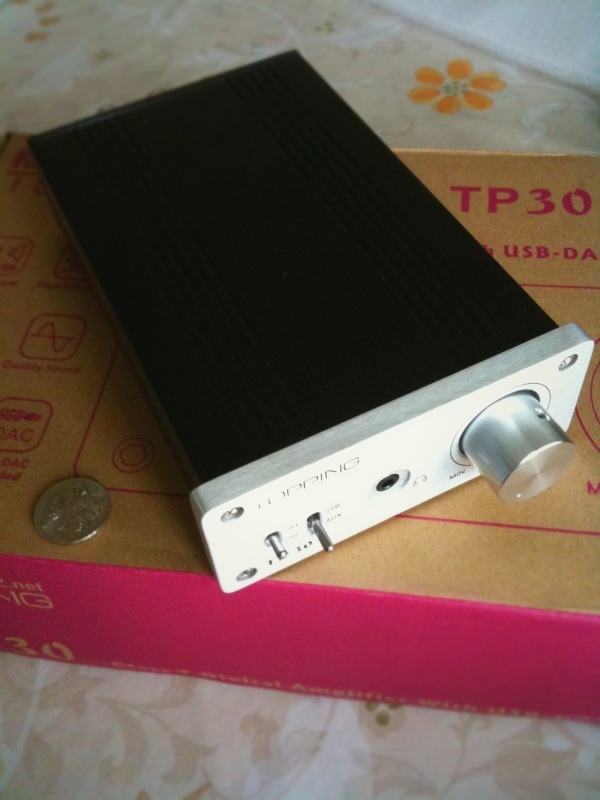
Added on June 2, 2012, 5:35 pmApparently, the USB audio feature is enabled on factory Samsung Galaxy S III:
http://forum.xda-developers.com/showpost.p...6&postcount=133

"I got my sgs3 a few hours ago and just plugged it into my Topping tp30 USB DAC/amp and it's playing audio through it to my speakers!!!"


Affordable hi-fi rig:
http://news.cnet.com/8301-13645_3-20058833...l?tag=txt;title

music stored on SGS3 > SGS3 player > digital audio stream >> USB cable >> USB DAC/amp Topping TP30 >> speakers


user posted image

user posted image

user posted image


Keep lobbying for the Android USB audio standardisation (i.e. USB DAC as a standard USB device, like a USB mass storage device, for Android smartphone/tablet).
http://code.google.com/p/android/issues/de...20Summary%20Sta rs

Vote: Click on the star (it appears after signing in)

Samsung Galaxy S III interworks with USB DAC/amp FiiO E7:
http://www.androidnz.net/2012/06/galaxy-s-...-it-really.html

music stored on SGS3 > SGS3 player > digital audio stream >> USB OTG cable >> USB DAC/amp FiiO E7 >> headphones


Samsung Galaxy S III triggers a new era of Hi-Fi for the masses with affordable rig:

. affordable (subsidized) smartphone

. affordable common USB DAC/amp compliant with PC or Mac, like FiiO E7 (us$80)
http://www.amazon.com/FiiO-Portable-Headph...39194973&sr=8-4
NwAvGuy geek’s verdict: "The biggest compliment I can pay the E7 is I can’t find much I would change for a portable product in this price category."
http://nwavguy.blogspot.fr/2011/05/fiio-e7-usb-dac-amp.html
"Clearly, the E7 is priced very competitively, and I consider it a good product — not some cheap Chinese stuff. Not only is the E7 packed with features, it also comes with a solid build quality, and a solid sound quality as well."
http://www.headfonia.com/fiio-e7-portable-dac/

. affordable headphones, like Digitech Pro Monitor Headphones (us$50), clone of Fischer Audio FA-003, Brainwavz HM5 or Lindy Premium Hi-Fi headphones
http://www.jaycar.us/productView.asp?ID=AA2065
"Now that I've had these for a good month I can honestly say they are my 'New' daily headphones!
I simple love the music that comes from these headphones.
They are beautifully balanced with sparkly highs that are not offensive to the ears, mid's that introduces a 'fun' factor to the music for all genres and lastly lows that are firm, bassy and goes amazingly deep with out distorting or overpowering the rest of the music.
The clarity is excellent with a very nice sound stage and for a 'closed' headphone they do sound quite open and spacious!
Isolation is fantastic especially listening to music or playing games at night.
Comfort is excellent and the 'killer' clamp grip slowly eases after regular use! I've listened to these all night and in to the early morning without wanting to take them off!"
http://www.head-fi.org/products/digitech-p...es/reviews/6900


user posted image


Keep lobbying for the Android USB audio standardisation (i.e.USB DAC as a standard USB device, like a USB mass storage device, for Android smartphone/tablet).
http://code.google.com/p/android/issues/de...Summary%20Stars

Vote: Click on the star (it appears after signing in)

Samsung Galaxy S III interworks with Microsoft Digital Sound System 80:
http://forum.xda-developers.com/showthread.php?t=1703218

music stored on SGS3 > SGS3 player > digital audio stream >> USB OTG cable >> USB DAC/amp/speakers Digital Sound System 80

user posted image


Samsung Galaxy S III interworks with Corsair HS1 Gaming headset:
http://forum.xda-developers.com/showthread...17#post27238117

music stored on SGS3 > SGS3 player > digital audio stream >> USB OTG cable >> USB DAC/amp/headphone Corsair HS1 Gaming headset

user posted image

This post has been edited by DanBa: Mar 12 2012, 12:09 AM
TSDanBa
post Jun 15 2012, 08:49 PM

Getting Started
**
Junior Member
51 posts

Joined: Feb 2012
QUOTE(wildwestgoh @ Jun 11 2012, 12:23 PM)
Only SGS3, not for older galaxy models... :sad: saw the blog Galaxy Note is not supported.
Hoping Android 4.0 later version has it.
*
We have to push manufacturers to enable USB audio on Galaxy Note and on any other Android device.
And we have to attract modders/developers to provide audiophile Android kernels with true 44.1/96/192 kHz bit perfect audio, automatic sample rate switching, underclocking in order to get less EMI/RFI, high priority audio thread, optimized audio kernel parameter settings, asynchronous USB …

We can use the somewhat official "Google issue Enable USB audio" web page as a means of the promotion of Android USB audio.
http://code.google.com/p/android/issues/de...Summary%20Stars
Vote: Click on the star (it appears after signing in)

By the way, some modders are trying to enable USB audio on Galaxy Note:
http://forum.xda-developers.com/showthread.php?t=1700924


A digital audio rig:
http://www.androidnz.net/2012/06/samsung-g...ivity-demo.html

music stored on Samsung Galaxy S III > Samsung Galaxy S III player > digital audio stream >> USB OTG cable >> USB DAC/amp FiiO E7 >> Logitech speaker


Added on June 23, 2012, 4:06 amThe Samsung Galaxy S III interworks with the USB DAC "ODAC"
http://forum.lowyat.net/index.php?showtopi...post&p=52442942


Added on June 28, 2012, 5:29 pm"Android 4.1 for Developers
New Media Capabilities
USB Audio
USB audio output support allows hardware vendors to build hardware such as audio docks that interface with Android devices."
http://developer.android.com/about/version...bean.html#media


Added on June 29, 2012, 9:03 amThe USB DAC recommended by Google is a new type of device. It is not compatible with PC or Mac.
http://developer.android.com/tools/adk/aoa...l#audio-support
http://developer.android.com/tools/adk/adk2.html#play-audio

user posted image

A legacy USB DAC compatible with PC / Mac acts as a USB device, and a PC / Mac acts as a USB host.
A USB DAC recommended by Google acts as a USB host, and a Android smartphone / tablet acts as a USB device.

Personally, I prefer the legacy USB audio feature implemented by Samsung on Galaxy S III, which can interwork with a legacy USB DAC like FiiO E7 or ODAC.

The legacy USB audio feature is still specified in the Android specs:
http://developer.android.com/guide/topics/.../usb/index.html
http://developer.android.com/guide/topics/...y/usb/host.html
http://developer.android.com/reference/and...bConstants.html
"USB_CLASS_AUDIO USB class for audio devices"

An Android 4.1 Jelly Bean-powered device can have both USB audio out modes: standard USB audio out and Android-specific USB audio out.
These features are at the Android kernel level.
http://developer.android.com/tools/adk/aoa...l#audio-support

"Android Open Accessory Protocol 2.0 includes optional support for audio output from an Android device to an accessory. This version of the protocol supports a standard USB audio class interface that is capable of 2 channel 16-bit PCM audio with a bit rate of 44100 Khz. AOA 2.0 is currently limited to this output mode, but additional audio modes may be added in the future.
To enable the audio support, the accessory must send a new USB control request: SET_AUDIO_MODE"

user posted image

user posted image

user posted image

It should be easy to enable standard USB audio out and Android-specific USB audio out on an Android 4.1 Jelly Bean-powered device with USB host capability.

Let's keep up the pressure on Google and the Android device manufacturers for the standard USB audio out:
http://code.google.com/p/android/issues/de...Summary%20Stars

Snapdragon-powered Samsung Galaxy S III & HeadAmp Pico:
http://www.head-fi.org/t/552014/pictures-o...00#post_8636759

Galaxy S III > digital audio stream >> HeadAmp Pico >> Beyerdynamic T5p

user posted image


Added on September 8, 2012, 7:20 pmSamsung Galaxy S III & asynchronous USB DAC HRT Streamer II:
http://www.head-fi.org/t/608535/wolfson-da...65#post_8534856

Galaxy S III > digital audio stream >> HRT Streamer II >> cMoyBB headphone amplifier

user posted image


Added on September 9, 2012, 6:53 pmSamsung Galaxy S III & iBasso D2 Boa:
http://www.head-fi.org/t/552014/pictures-o...35#post_8509186

Samsung Galaxy S III > digital audio stream >> iBasso D2 Boa >> Sennheiser HD 518

user posted image


Added on September 9, 2012, 7:03 pmSamsung Galaxy S III & RSA Predator:
http://www.head-fi.org/t/595071/android-ph...50#post_8538933

Samsung Galaxy S III >> USB OTG cable >> USB DAC/amp RSA Predator >> IEM

user posted image


Added on September 9, 2012, 7:15 pmSamsung Galaxy S III with Snapdragon SoC & HeadAmp Pico & Thunderpants TP1:
http://www.head-fi.org/t/552014/pictures-o...30#post_8639661

Galaxy S III > digital audio stream >> USB OTG cable >> Pico >> Thunderpants TP1

user posted image


Added on September 9, 2012, 7:17 pmSamsung Galaxy S III with Snapdragon SoC & HeadAmp Pico & Audez'e LCD-2:
http://www.head-fi.org/t/552014/pictures-o...30#post_8639661

Galaxy S III > digital audio stream >> USB OTG cable >> Pico >> Audez'e LCD-2

user posted image


Added on September 9, 2012, 7:24 pmSamsung Galaxy S III & Epiphany Acoustics E-DAC (i.e. ODAC):
http://www.avsforum.com/t/1393599/enable-u...0#post_22349652

Galaxy S III >> 4-in-1 connection kit substituting a USB OTG cable >> ODAC >> Headstage Arrow G3 amp

user posted image


Added on September 9, 2012, 7:36 pmSamsung Galaxy S III & & Objective DAC:
http://www.head-fi.org/t/595071/android-ph...15#post_8707637

stock Galaxy S III > digital audio stream >> ODAC (i.e. Epiphany Acoustics E-DAC) >> Neco V3

user posted image


Added on September 9, 2012, 7:40 pmSamsung Galaxy S III & Epiphany Acoustics EHP-O2D:
http://www.totallydubbed.net/2012/09/17/un...2-interconnect/

Galaxy S III >> EHP-O2D (i.e. ODAC + O2 combo) >> Denon AH-D2000

user posted image


Added on September 23, 2012, 8:06 pmSamsung Galaxy S III & affordable tiny Stoner Acoustics UD100:
http://forums.hardwarezone.com.sg/70075257-post210.html

stock Galaxy S III > digital USB audio out >> UD100 >> Sennheiser IE80

user posted image

This post has been edited by DanBa: Sep 23 2012, 07:59 PM
TSDanBa
post Oct 7 2012, 12:57 AM

Getting Started
**
Junior Member
51 posts

Joined: Feb 2012
QUOTE(JonSpark @ Oct 6 2012, 01:05 AM)
You mean this?

[attachmentid=3086016]
*
This is a Samsung-proprietary analog line out.

Samsung Galaxy S III line out bypassing the internal amp:
S III player > digital audio stream > S III internal DAC > analog audio stream > micro USB connector >> Samsung audio dock >> amp >> headphones

Samsung Galaxy S3 USB out bypassing the internal DAC:
Samsung Galaxy S III > digital audio stream > micro USB connector >> USB OTG cable >> standard USB DAC >> amp >> headphones

Samsung Galaxy S III headphone out:
S III player > digital audio stream > S III internal DAC > analog audio stream > S III internal amp > 3.5mm 4-pole connector >> headphones


user posted image

user posted image

user posted image

user posted image


Added on October 7, 2012, 1:00 am
QUOTE(wkkm007 @ Oct 6 2012, 08:16 PM)
any Galaxy Note 10.1 user use the USB OTG like this?
*
A list of standard USB DAC reportedly interworking with an Android-powered tablet Samsung Galaxy Note 10.1:

stock Samsung Galaxy Note 10.1 > digital USB audio out >> USB OTG cable (micro-A plug inserted in the Note 10.1) >> standard USB DAC >> amp >> headphones


. HeadAmp Pico: (via a powered USB hub)
http://www.headamp.com/pico/pico_dac_amp/index.htm
http://www.head-fi.org/t/595071/android-ph...55#post_8658440

. HeadAmp Pico DAC: (via a powered USB hub)
http://www.headamp.com/pico/pico_usb_dac/index.htm
http://www.head-fi.org/t/595071/android-ph...55#post_8658440

. HifiMan HM-601:
http://hifiman.us/Products/?pid=98
http://www.head-fi.org/t/624284/using-the-...nes-and-tablets

. HifiMan HM-801:
http://www.soundandvisionmag.com/blog/2011...c-player-review
http://www.head-fi.org/t/624284/using-the-...nes-and-tablets


Added on October 7, 2012, 1:03 amThe standard USB audio is also enabled on stock Samsung Galaxy Note II:
http://www.eprice.com.tw/mobile/talk/4523/4815783/1/1/

stock Galaxy Note II > digital USB audio out >> iBasso D12 Hj >> Westone UM3X


user posted image

user posted image

In fact, there are three types of USB audio.

user posted image

An Android 4.1 Jelly Bean device can have:
. a standard USB audio capability (or USB audio host capability), or/and
. an Android-specific USB audio capability (or USB audio accessory capability).

An Android device that has the standard USB audio capability can interwork with standard/conventional USB DAC.
A standard/conventional USB DAC can be a self-powered device, or a bus-powered device.
Some bus-powered USB DAC like the Objective DAC (ODAC) can be powered by some Android smartphone like the Samsung Galaxy S III.
If a bus-powered USB DAC requires too much power, it should connect to an Android device via a self-powered USB hub.

An Android device that has the Android-specific USB audio capability should interwork with a USB DAC of a new type.
Such a USB DAC must theoretically provide power to an attached Android device.

A prototype of an Android-specific USB DAC / amp, FiiO E18, will be shown next week.

user posted image

This post has been edited by DanBa: Oct 7 2012, 01:03 AM
TSDanBa
post Oct 7 2012, 05:50 PM

Getting Started
**
Junior Member
51 posts

Joined: Feb 2012
QUOTE(wildwestgoh @ Oct 7 2012, 08:28 AM)
Standard USB Audio, does this able to works with any external DAC?
Yes.

user posted image

user posted image

user posted image

QUOTE(wildwestgoh @ Oct 7 2012, 08:28 AM)
It seems like S3 can't works with Hippo Cri Cri+ from its stock 4.0 ICS.
Android USB audio is young.

It seems Samsung USB driver is very intolerant with USB DAC which is not quite compliant with the USB spec.
http://www.head-fi.org/t/627459/use-a-stan...de#post_8707621

If a USB DAC can’t work with the S3, a dmesg log output should be published so that Samsung engineers could be aware of the issue and fix it.

QUOTE(wildwestgoh @ Oct 7 2012, 08:28 AM)
Does this also require hardware support?
It just requires a right USB cable, and Plug & Play.

A standard USB DAC operates only as a USB peripheral. It only interworks with a USB host.

The S3 is a USB On-The-Go device.
A USB OTG device can act as a USB host or as a USB peripheral.

Simply put, a USB OTG device, like the S3, acts as
. a USB peripheral when a Micro-B plug is inserted [regular cable]
. a USB host when a Micro-A plug is inserted ["OTG cable"]

user posted image

user posted image

S3 as USB peripheral:
. S3 – regular cable – PC / Mac as USB host
. S3 – regular cable – upcoming specific Android Jelly Bean-compliant USB DAC as USB host

S3 as USB host:
. S3 – "OTG cable" – USB mouse as USB peripheral
. S3 – "OTG cable" – standard USB DAC as USB peripheral

QUOTE(wildwestgoh @ Oct 7 2012, 08:28 AM)
Would like to see this support in some older dual-core siblings (Galaxy S2 and Galaxy Note v1), otherwise I might need to spend another for external DAC that can actually support it doh.gif
Hopefully, Google and Android device manufacturers will enable the standard USB audio on any Android device. It should be available to everyone, and not only for a few ones hacking their Android device.

One of the ways to let them know that is to vote for the Google issue "Enable (standard) USB audio":
http://code.google.com/p/android/issues/de...Summary%20Stars
Vote: Click on the star (it appears after signing in)

And please ask around.
TSDanBa
post Oct 11 2012, 06:59 PM

Getting Started
**
Junior Member
51 posts

Joined: Feb 2012
The Galaxy Note II can work with the FiiO E7. It can't operate with the CEntrance DACport LX:
http://www.head-fi.org/t/595071/android-ph...00#post_8804406

stock Galaxy Note II > digital USB audio out >> USB OTG cable >> FiiO E7 USB DAC/amp >> Sennheiser HD598 headphones


user posted image

user posted image


Added on October 29, 2012, 2:10 amSamsung Galaxy S III & Apex Glacier:
http://www.ttvjaudio.com/Apex_High_Fi_Audi.../aaa0000010.htm
http://www.head-fi.org/t/632019/apex-glaci...75#post_8814974

Galaxy S III > digital USB audio out >> USB OTG cable >> Apex Glacier USB DAC/amp


user posted image

user posted image

user posted image

user posted image

Galaxy S III : 13,6 cm * 7 cm * 0,8 cm
Apex Glacier : 11,4 cm * 6,5 cm * 0,9 cm


Added on November 10, 2012, 7:54 pmGalaxy Note II & Headstage Lyrix Pro USB total:
http://www.head-fi.org/t/595071/android-ph...95#post_8854850

stock Galaxy Note II > digital USB audio out >> USB OTG cable (micro-A plug inserted in the Note II) >> Headstage Lyrix Pro USB total USB DAC/amp >> Beyerdynamic DT-770 Premium


user posted image


Added on November 21, 2012, 1:02 amSamsung Galaxy S III & planar magnetic Audeze LCD-2:
http://www.head-fi.org/t/595071/android-ph...55#post_8873554

stock Galaxy S III > digital USB audio out >> USB OTG cable (micro-A plug inserted in the Note II) >> RSA Intruder >> Audeze LCD-2 headphones


user posted image

"The LCD-2's sound phenomenal in balanced mode off the Intruder... Yum."

This post has been edited by DanBa: Dec 7 2012, 10:13 PM
TSDanBa
post Dec 7 2012, 02:43 AM

Getting Started
**
Junior Member
51 posts

Joined: Feb 2012
QUOTE(wkkm007 @ Dec 4 2012, 10:14 PM)
beside galaxy lineup s3, note 2, 10.1
Can Galaxy Nexus on 4.1.1 Jellybean use DAC?

Stock Galaxy Nexus on 4.1.1 Jelly Bean can't interwork with standard USB DAC.

QUOTE(wkkm007 @ Dec 4 2012, 10:14 PM)
beside galaxy lineup s3, note 2, 10.1
How about brand?
Sony HTC Moto LG?

As far as I know, their devices can't interwork with standard USB DAC for the time being.
TSDanBa
post Dec 7 2012, 10:05 PM

Getting Started
**
Junior Member
51 posts

Joined: Feb 2012
QUOTE(wkkm007 @ Dec 7 2012, 03:48 AM)
U mean now galaxy lineup s3, note 2, 10.1 running on standard USB DAC? rclxms.gif
Some can some can't like the Galaxy Note II can work with the FiiO E7. It can't operate with the CEntrance DACport LX.
*
Based on some dmesg log outputs, I think the Samsung USB software / firmware (Exynos SoC) is intolerant with USB DACs which are not quite conform to the USB specification.
http://www.head-fi.org/t/595071/android-ph...15#post_8807747
http://www.head-fi.org/t/608535/wolfson-da...20#post_8638606

Samsung engineers / developers should improve their USB software / firmware.
We should help them by publishing dmesg log outputs.

On the other side, USB DAC manufacturers should test their (upcoming) USB DAC with the Galaxy S3 / Note2. After all, these Android phones are best selling devices.
VentureCraft has subsequently modified the firmware and hardware of its pre mass-production Go-Dap X, which won't interwork with the Galaxy S3.
http://www.head-fi.org/t/595071/android-ph...20#post_8753554

QUOTE(wkkm007 @ Dec 7 2012, 03:48 AM)
I like Sony phone, Samsung design look alike only.
*
user posted image

No Android 4.1 Jelly Bean-specific USB DAC is available for the time being.

About Android-specific USB audio:
"As of now, the standard Android releases do not include USB host support. Samsung decided to add this feature on their own. The Android folks are working on a funky USB dock protocol that works over USB (sort of like what Apple does) that, frankly, most of us developers think is stupid. There is certainly a push to put USB host support for standard devices (like audio, keyboards, etc.) into the normal Android releases."
[Pete Millett, design engineer from Apex Hi-Fi]
http://www.head-fi.org/t/632019/apex-glaci...75#post_8812425

The lobbying for standard USB audio should go on.
It's on a right track thanks to Samsung.

If you want the USB audio enabled on any Android 4.X device via official firmware/kernel, please vote (aka star) here:
http://code.google.com/p/android/issues/de...Summary%20Stars

Vote: Click on the star (it appears after signing in)

The us$43 Samsung Galaxy S3 + Car Stereo Upgrade for WAaaY better sound quality!
http://www.head-fi.org/t/639883/the-43-gal...r-sound-quality

Galaxy S3 > digital USB audio out >> "USB OTG" cable >> Behringer UCA202 USB DAC >> car stereo amp >> car stereo speakers

"...
And so what are the results you ask?

HOLY MOLY!
Not only is the audio quality MUCH improved, but the sound is so CLEAN now. No clicks, burps, or any other weird background noises. Just straight CD quality background silence.
Even my GPS voice sounds prettier. hahah
Bass is tighter and deeper. Highs are more revealing. Everything is so much better that a novice could tell it sounds better.

And yes, GPS navigation works perfectly. If I'm listening to Pandora or an MP3 and my GPS needs to talk, then my music will go several db quieter and GPS will speak up, then afterwards the music will automatically go back to full volume.

Also, one thing I hated about Bluetooth was everytime I turned my car off for just a minute, when I would power it back on the Bluetooth would not consistently reconnect. Well, this USB-OTG has been very consistent for me so far. Music just picks back up where it left off at and is fairly quick to do so.

Cons? Well, I haven't tested hands free calling yet. But I'm told it doesn't work with this USB-OTG to DAC configuration. Maybe there is a bluetooth solution for that. I dunno? And AOSP does not yet support DACs.

Pros? Freakin everything.

Pics are below.


Here is the DAC and the USB-OTG cable:
user posted image

This is how you configure the DAC.
You can probably also use the headphones output instead of the stereo RCA, but I didn't try it.
user posted image

I wired up my USB-OTG cable to my iBOLT dock. It comes up through my dash defrost vents.
user posted image

This is what the three connectors on the USB-OTG cable look like:
user posted image

Here is the DAC being wired up. I taped up the non-used RCA's to prevent anything bugging with them.
user posted image

I wrapped up the DAC with DUCT tape.
Not sure how or why the pic is sideways. It looks normal on my desktop.
user posted image

Hid it behind my dash.
user posted image

Here is the USB-OTG cable with my iBOLT dock.
user posted image

The car stereo w/audio cable attached. Some car stereos have the 3.5mm connector in the back. Or a dual-RCA input. I'd prefer one of those to have a cleaner install. Maybe someday I'll upgrade my car stereo.
user posted image

And here is the finished product. My S3 docked, charging and outputing beautiful digital music!
user posted image

.." [CZ Eddie]

The heat problem of the Behringer UCA202?

I don't think there is a heat problem because the Behringer UCA202 is a DAC and not a power-hungry amplifier.

You should ask CZ Eddie. He should use his digital USB audio car stereo every day.
http://www.head-fi.org/t/639883/the-43-gal...r-sound-quality


Added on December 15, 2012, 7:24 pmUSB Audio Recorder PRO: "USB audio recording and playback now finally possible on Android devices!"
"Supported are mono and stereo streams, 16-bit and 24-bit and any sample rate (up to 192kHz) that the device provides."
https://play.google.com/store/apps/details?...udiorecorderpro
Android phones and USB DACs
http://www.extreamsd.com/USBAudioRecorderPRO/

Some USB DACs, like the FiiO E17, not working with stock USB audio software, can interwork with the Samsung Galaxy S3 and other Android devices using USB Audio Recorder PRO:

music stored on Galaxy S3 > USB Audio Recorder PRO player > digital USB audio out >> "USB OTG" cable >> FiiO E17 >> headphones


user posted image

This post has been edited by DanBa: Dec 7 2012, 10:10 PM
TSDanBa
post Dec 21 2012, 01:40 AM

Getting Started
**
Junior Member
51 posts

Joined: Feb 2012
QUOTE(wkkm007 @ Dec 19 2012, 02:46 AM)

Added on December 19, 2012, 2:01 amUSB audio recording and playback need Android 3.1 above,
if my SEX10 run on ISC custom ROM does workout??
Stuck on android 2.3.3 GB
*
If your phone has a functional USB host implemented, I think it should work with the USB Audio Recorder PRO application.
This media player application including the USB audio module communicates with the kernel USB driver thru the standard interface libusb.
http://libusb.sourceforge.net/doc/index.html

Anyway, you should ask its developer. He is active on the following forum:
http://www.head-fi.org/t/595071/android-ph...80#post_8968882


TSDanBa
post Dec 23 2012, 09:08 AM

Getting Started
**
Junior Member
51 posts

Joined: Feb 2012
USB is an asymmetric protocol in that one participant acts as a USB host and the other as a USB peripheral.

As the standard USB DAC is always a USB peripheral, the smartphone / tablet has to act as a USB host.

The Samsung Galaxy S3, for instance, is a USB On-The-Go device. A USB OTG device can act as a USB host or as a USB peripheral.

Simply put, a USB OTG device like a Galaxy S3 can act acts as
. a USB peripheral when a Micro-B plug is inserted in the Micro-AB receptacle of the Galaxy S3 [regular cable]
. a USB host when a Micro-A plug is inserted in the Micro-AB receptacle of the Galaxy S3 [so-called "OTG cable"]

Micro-A plug, Micro-B plug:

user posted image

user posted image


Added on December 24, 2012, 4:05 am
Unique Melody Platform Pure 6 & Samsung Galaxy S3 using USB Audio Recorder PRO:
http://www.head-fi.org/t/613417/unique-mel...60#post_8965862

music stored on stock Galaxy S3 > USB Audio Recorder PRO player > digital USB audio out >> "USB OTG" cable >> Unique Melody PP6 > custom IEM

"You have no idea how happy I am right now."


user posted image

user posted image

user posted image

user posted image


Added on December 25, 2012, 8:54 pm24-bit / 96kHz lossless music and USB Audio Recoder PRO:
https://play.google.com/store/apps/details?...WNvcmRlcnBybyJd
http://www.linnrecords.com/recording-highwire.aspx


user posted image


music stored on Samsung Galaxy S3 > USB Audio Recorder PRO player >> ODAC >> amp >> headphones


Added on December 25, 2012, 8:57 pmUSB audio at the Android Linux kernel space, USB audio at the Android Linux user space


user posted image

user posted image

A USB audio source code:
http://www.alsa-project.org/main/index.php/Main_Page
https://github.com/sgs3/GT-I9300_Kernel/blo...d/usb/card.c#L2
https://github.com/sgs3/GT-I9300_Kernel/tre...aster/sound/usb

This post has been edited by DanBa: Dec 25 2012, 08:57 PM
TSDanBa
post Dec 29 2012, 05:41 PM

Getting Started
**
Junior Member
51 posts

Joined: Feb 2012
It’s an issue of this new app.

Workaround:
. select a wrong sample rate: for instance 48000 when playing a 44100 encoded music file
. play it some few seconds
. switch back to the right sample rate; everything should be OK from now on
http://www.head-fi.org/t/595071/android-ph...00#post_8998731

TSDanBa
post Jan 6 2013, 11:00 PM

Getting Started
**
Junior Member
51 posts

Joined: Feb 2012
QUOTE(noobandroid @ Jan 5 2013, 12:11 AM)
i wonder why the 24bit cricri+ could not work with the s3 otg, is it cause of the fact that it is a 24 bit device or something?
*
The Galaxy S3 can work with the 24bit ODAC.
I think the USB audio driver of the Galaxy S3 is intolerant with USB DACs which are not quite conform to the USB specification.
http://www.head-fi.org/t/595071/android-ph...30#post_8910009

You should test the interworking S3 - 24bit cricri+ with the USB Audio Recorder PRO app.
https://play.google.com/store/search?q=usb+...io+recorder+pro

The USB Audio Recorder PRO app includes its own USB audio function.
The eXtream Software Development solution does audio over the USB without using the USB audio implemented in the Linux kernel (i.e. no need to request Google / Android device manufacturers to implement standard USB audio on USB host-capable Android devices).

user posted image
user posted image

USB audio & Android

USB standard (audio, mass storage, etc.) driver supported on stock Galaxy S3 / Note2
"As long as the kernel on the Android device supported the USB standard driver of the hardware (mass storage, input, etc.), Android would be able to use it and therefore open up a new range of extra devices compatible with the system."

USB standard (audio, mass storage, etc.) driver not supported:
* Developing your USB standard (audio, etc.) driver at the kernel space
"However, there are many devices that have not been "compatible" from the beginning. For instance, let's say your common RFID reader. It most likely uses a USB-serial port and probably comes with a Linux or Windows driver as well as some software. Most Android tablets will come without the USB-serial driver for your RFID reader however.
Therefore, if you want to load your driver you will need to root your tablet, determine the version of your current kernel, find the kernel sources online, hope that everything compiles to have your driver ready and then load it onto your tablet. In the end, when you finally have your kernel driver running, you will be required to write C code as well as some JNI glue to communicate with your Activity or Service in Android.
All in all, this approach is not very straightforward.

* Writing your own USB "soft driver" at the user space
There is a very elegant solution to aforementioned problem.
It requires far less skills in hacking and porting than the mentioned approach. However, you will require some advanced knowledge in Android programming as well as some USB know-how.
You can write your own "soft driver" in Android. Since the USB Host API has been released, it is now possible to communicate with any USB device using the most commonly seen USB transfers (control, interrupt, bulk).
In the end, your result will be portable across all Android devices that have USB host enabled and have Android version 3.1+. Moreover, this solution does NOT require root access to the tablet or phone. It is currently the only viable solution that does not require the user to have any know-how of rooting/hacking the device and risk losing warranty in the process."
http://android.serverbox.ch/?p=549


Added on January 6, 2013, 11:19 pm
QUOTE(wkkm007 @ Jan 5 2013, 12:50 AM)
How about the Nexus 7 by Asus? 899 16gb now
*
. Stock Google Nexus 7 & USB audio at the user space:
http://www.extreamsd.com/USBAudioRecorderPRO/

music stored on stock Nexus 7 > USB Audio Recorder PRO music player > digital USB audio out >> USB OTG cable >> USB DAC >> amp >> headphones


. Custom Google Nexus 7 & USB audio at the kernel space:
http://www.head-fi.org/t/627459/use-a-stan...p-by-step-guide

music stored on custom Nexus 7 > legacy music player > digital USB audio out >> USB OTG cable >> iBasso D10 USB DAC/amp >> headphones


user posted image

user posted image

Samsung Galaxy Note II & Ray Samuels Audio The Intruder, fully balanced amp / USB DAC:
http://www.raysamuelsaudio.com/products/intruder
http://www.head-fi.org/t/640209/modified-b...eyerdynamic-t5p
http://www.6moons.com/audioreviews/balance...phones/one.html
http://www.head-fi.org/t/445591/how-balanc...ed#post_6016338
http://www.head-fi.org/t/633511/pictures-o...20#post_9018661

Galaxy Note II > digital USB audio out >> balanced RSA Intruder USB DAC / amp >> balanced Beyerdynamic T5p


user posted image

user posted image

user posted image

user posted image

user posted image

user posted image

user posted image

user posted image
Balanced mode

user posted image
Normal mode

A list of stock Android-powered devices reportedly interworking with standard USB DAC and a list of standard USB DAC reportedly interworking with the stock Samsung Galaxy Note II / S III are updated at the 1st post:
http://forum.lowyat.net/topic/2222840

This post has been edited by DanBa: Jan 7 2013, 12:27 AM
TSDanBa
post Jan 15 2013, 07:50 AM

Getting Started
**
Junior Member
51 posts

Joined: Feb 2012
I am living in France.

Samsung Galaxy Note II & Apex Glacier USB DAC/amp:
http://www.ttvjaudio.com/Apex_High_Fi_Audi.../aaa0000010.htm
http://www.jhaudio.com/product/jh16-pro-custom-ear-monitor
http://www.head-fi.org/t/632019/apex-glaci...65#post_8924724

Galaxy Note II > digital USB audio out >> Apex Glacier USB DAC/amp >> JH Audio JH16 Pro IEM

"Even with my DX100 , I did not get such clarity and sound-stage.
I am happier with this setup, than the DX100, alas, no 96/24 capability (android limitation...for now)
Neutron with the Glacier, are giving me the chills............................ "


user posted image

user posted image

user posted image

user posted image

user posted image

user posted image

user posted image

HTC Butterfly (aka HTC Droid DNA, HTC J Butterfly): 5", 1920*1080, 2GB RAM, quad-core S4
http://www.htc.com/www/smartphones/htc-butterfly/
http://www.eprice.com.tw/mobile/talk/4542/...84/2/m/4843526/

stock HTC Butterfly > digital USB audio out >> USB OTG cable >> iBasso D12 Hj USB DAC/amp >> Westone UM-3X IEM


user posted image

USB audio & us$99 Minix Neo X5 Android mini PC (Android 4.1 Jelly Bean, ARM Cortex A9 dual-core CPU at 1.4GHz, quad-core Mali 400 GPU, 1GB RAM, 16GB ROM, SD card slot, USB 2.0 port x 3, micro USB OTG port, optical SPDIF port, HDMI port, Ethernet port, Wi-Fi, Bluetooth, IR receiver, microphone jack, headphone jack)
http://www.minix.us/products/NEO-X5.html
http://www.squidoo.com/android-mini-pc-buying-guide
http://forum.audiogon.com/cgi-bin/fr.pl?dd...20&openflup&5&4

Minix Neo X5 > digital USB audio out >> regular USB cable (i.e. standard-A plug to standard-B plug USB cable) >> Valab DAC

"SB Touch...buh bye. Hello Android Media Box…

Plug and play USB audio support - no drivers, no snap crackle pop, no dropouts. Wow. The sound was absolutely fantastic. What a great way to consolidate my favorite streaming apps and have my ripped collection just a click away as well. All controlled remotely from the comfort of my easy chair and viewed on my big screen TV. I AM Slothman!

In summary, this was all an exercise in music listening convenience for me and obviously NOT an audiophile quest. However, I do believe that devices such as these and the applications being developed are on the verge of further revolutionizing this hobby in a big way soon. After my initial experience with this (basic) media box, I can certainly see why Logitech decided to kick the SB Touch to the curb. I hope this thread may spark a little more discussion and interest in these Android media boxes/ mini PC's. I haven't seen much mentioned about them here or on computeraudiophile."


user posted image

user posted image

user posted image


With Android phone, Android tablet and Android mini PC, Android is definitely a New Kid in Town for the USB DAC market sector.

Sony Xperia Z & USB audio:
http://www.engadget.com/2013/01/07/sony-xp...ds-on-ces-2013/

Xperia Z > digital USB audio out >> FiiO E17 USB DAC/amp >> headphones


TSDanBa
post Feb 22 2013, 07:10 AM

Getting Started
**
Junior Member
51 posts

Joined: Feb 2012
A transportable rig:
http://www.headfonia.com/cheaper-better-th...nce-dacport-lx/
http://www.headfonia.com/nwavguys-objectiv...hany-acoustics/
http://www.avguide.com/review/beyerdynamic...one-playback-34
http://androidspin.com/2012/12/06/review-a...thats-under-50/
http://www.head-fi.org/t/595071/android-ph...55#post_9188208

Samsung Galaxy S3 > digital USB audio out >> CEntrance DACport LX USB DAC >> O2 amp >> Beyerdynamic DT 990 headphones

The Samsung Galaxy S3 and the CEntrance DACport LX are powered by an Anker Astro3E USB battery.


user posted image

A portable rig:
http://www.head-fi.org/t/633511/pictures-o...10#post_9188815

Samsung Galaxy Note 2 > digital USB audio out >> HiFimeDIY Sabre >> Grado SR80 headphones


user posted image

user posted image


HiFimeDIY Sabre:
http://www.head-fi.org/t/626632/tiny-dac-b...35#post_8837442
"Volume Level is controlled by the normal volume control keys on your computer" / smartphone
http://hifimediy.com/index.php?route=produ...2&product_id=83
"ESS SABRE: Premier Stereo DAC with 2Vrms Driver:
. Feature: Adjustable output level
. Benefit: Allow designer to customize output level (up to 2Vrms) based on application requirements via an external resistor"
http://www.esstech.com/PDF/ES9023%20PB%20R...PB%20110117.pdf

Grado SR80 headphones:
http://reviews.cnet.com/headphones/grado-s...7-30618184.html

The USB audio of the Galaxy S3 is intolerant with USB DACs, like the FiiO E10 or the FiiO E17, which are not quite conform to the USB specification.
http://forum.lowyat.net/topic/2222840/+60
http://dl.dropbox.com/u/11992935/dmesg.txt

Like the FiiO E17, the FiiO E10 should work with the Galaxy S3 using the USB Audio Recorder PRO app available on Google Play store.
https://play.google.com/store/search?q=+USB...io+Recorder+PRO
There is a trial version.


user posted image

user posted image

Android & Practical Devices XM6 USB DAC/amp:
http://www.head-fi.org/t/510543/new-practi...complete-review
http://www.head-fi.org/t/547276/practical-...-tv-episode-002
http://nwavguy.blogspot.fr/2011/06/sennheiser-hd-650.html
http://www.head-fi.org/t/633511/pictures-o...90#post_9215369

Samsung Galaxy S3 > digital USB audio out >> Practical Devices XM6 >> Sennheiser HD 650 headphones


user posted image

QUOTE(wkkm007 @ Apr 5 2013, 08:57 PM)
Hi DanBa,
Do u know about the INTEL android smartphone. About
IntelAtomSoCAndroid-IA(X86)smartphone,INTEL inside, The NEW- Lenovo K900
http://forum.lowyat.net/index.php?showtopic=2752934&hl=
Thread by me

Can support external USB DAC?
*
The Lenovo K900 doesn’t have the USB host feature according to the following site:
http://www.phonearena.com/phones/compare/L...hones/7663,7100

If it’s true, the Lenovo K900 can’t work with USB DAC always operating as USB peripheral, because the Lenovo K900 can’t operate as a USB host.

USB is a master-slave communication bus: USB communication can only take place between a master device (i.e. USB host) and a slave device (i.e. USB peripheral)

QUOTE(siles1991 @ Apr 6 2013, 01:24 AM)
im using the galaxy s3 with 4.1.2 E10 only works with USB audio recorder pro. Currently looking for a ROM which supports usbaudio
*
There are two ways to implement USB audio for Android:
1. USB audio driver, like the free open source ALSA USB audio driver, in the Android Linux kernel (S3 native solution)
2. USB audio service at the user space, using the USB host driver
http://www.head-fi.org/t/595071/android-ph...60#post_9020197

user posted image

A USB audio service is included in the USB Audio Recorder PRO music player.

The Galaxy S3, using USB Audio Recorder PRO can work with the FiiO E10, and the same Galaxy S3 using native USB audio can’t.
=>
Apparently FiiO engineers and Samsung engineers don’t have the same interpretation of some USB specification part.
Put in other words, the implementation of USB audio by Samsung developers is not enough tolerant to the FiiO implementation of the USB audio specification than the one by USB Audio Recorder PRO developers.

Apparently, the Galaxy S3 has a perfectible native USB enumeration that stops interacting with the FiiO E10 / E17 when receiving a buggy USB interface descriptor.
http://forum.xda-developers.com/showpost.p...2&postcount=458
http://www.head-fi.org/t/595071/android-ph...15#post_8807747

According to the USB specification, “interfaces are numbered from zero to one less than the number of concurrent interfaces supported by the configuration”.

The three interface descriptors of the E17 are the following:
. interface descriptor number 0: Human Interface Device
. interface descriptor number 1: Audio Control
. interface descriptor number 3: Audio Streaming

This latter should have the number 2.

The USB enumeration of USB Audio Recorder PRO is more tolerant; and the Galaxy S3 using USB Audio Recorder PRO can work with the FiiO E10 / E17.

As modify the software of the Galaxy S3 is much easier than modify the firmware of existing USB DAC, I asked Samsung to improve the USB enumeration of the Galaxy S3.
http://developer.samsung.com/forum/board/t...&startId=zzzzz~

That Samsung thread is somewhat a petition to improve USB audio.
The more people post in that Samsung thread, the better Android USB audio could be improved.

And what is good for Samsung is also good for others (HTC, Sony,…) which seem to follow Samsung in USB audio.

This post has been edited by DanBa: Feb 22 2013, 07:30 AM
TSDanBa
post Apr 6 2013, 06:08 PM

Getting Started
**
Junior Member
51 posts

Joined: Feb 2012
The ODAC uses a Tenor TE7022L USB chip.

The ODAC can work with a stock Galaxy S3 using a native ALSA USB audio driver, as well as with a stock Galaxy S3 using USB Audio Recorder PRO.

QUOTE(wkkm007 @ Apr 6 2013, 02:07 PM)
Intel produce their new atom line up into SoC system on a chip, there are USB controller. But I read the Lenovo K900 don`t support USB OTG.
*
If the Lenovo K900 doesn’t have USB OTG software/hardware, the Lenovo K900 can’t be switched to USB host mode in order to connect to a standard USB DAC always operating as USB peripheral.
TSDanBa
post Apr 6 2013, 07:14 PM

Getting Started
**
Junior Member
51 posts

Joined: Feb 2012
QUOTE(blacklizard90 @ Apr 6 2013, 07:15 PM)
Are you saying that ODAC works with stock S3 with alsa usbaudio module?
*
Yes, I am.

user posted image

user posted image

For the time being, as far as I know only USB Audio Recorder PRO music player goes the way of USB audio soft driver (i.e. USB audio service at the user space interfacing with the USB host driver at the kernel space).

For the time being, all other music players like stock Galaxy S3 music player, Neutron or Poweramp go the way of native ALSA USB audio driver (i.e. these music players interact with the Android media player framework interfacing with the ALSA USB audio driver when connecting to external USB DAC).

QUOTE(siles1991 @ Apr 6 2013, 07:29 PM)
how do you even get the stock s3 alsa usbaudio? mine didnt have alsa i think...
*
Every stock Galaxy S3 should have ALSA USB Audio driver:
https://github.com/sgs3/GT-I9300_Kernel/blo...d/usb/card.c#L2

Is your 4.2.2 a custom ROM?

This post has been edited by DanBa: Apr 6 2013, 07:41 PM
TSDanBa
post Apr 6 2013, 08:23 PM

Getting Started
**
Junior Member
51 posts

Joined: Feb 2012
That was a bad news for me.
http://www.head-fi.org/t/595071/android-ph...90#post_8492288

At the announcement of Android 4.1 Jelly Bean in June 2012, Google introduced a new type of USB DAC behaving as USB host, that can’t interwork with PC or Mac also behaving as USB host.

According to Google, this gives Android devices that do not have host capabilities the ability to interact with USB hardware.

These brand new USB hardware or peripherals have to act as USB host.
These possible new peripherals incompatible with PC or Mac divide the Android peripheral ecosystem. Divide and delay!
No Jelly Bean-announced USB DAC is available for the time being.
It feeds and justifies the attacks of Android foes for their favourite target: Android Fragmentation!

"A plain "Shut up!" from Google on top starred Android issues" [a rather severe judgment]
http://showlabor.blogspot.fr/2013/05/a-pla...gle-on-top.html

"Issue trackers are a great facility for getting feedback from the customer base. And they are a great facility for the customers to actually give feedback. But what if there are lots of customers who give feedback and nobody cares? Well, even in those cases issue trackers are great: You, as a customer, can clearly see how responsive the team behind the product is.

Let's take a look at two of Android's most starred issues:
Issue 24614: Add support for USB Audio
Issue 3434: Add APIs for low-latency audio
They are starred by 4904 and 2442 people and rank at place 4 and 7 on the list of Android's most starred issues:

user posted image

Not only do both issues have been starred by many people but there have also been lots of comments made in the issue tracker. But neither of both got even a single comment or response from the Android developers - until today!

An answer - finally

So great news: Google has responded! Yeah, finally, after 1332 comments on issue 24614 and 485 comments on 4855. And here's the long awaited answer from Google: Shut up!

Yes, that's it. No further comment. They haven't responded on issue 4855 for almost 4 years now and all they say is: Shut up! Is this really how they care for feedback?

OK, to be fair, they haven't literally said "Shut up!" they have just closed both issues for comments. But that isn't very different from "Shut up!".

user posted image

To make it clear, most of the comments at least in #24614 are useless 'me too' comments. Nobody want to see them, that's what starring is for. But actually Google could have stopped this kind of comments by just answering even once. Just once! That would have been enough. Closing the "discussion" wihtout any further remarks is what makes it feel like a 'Shut up!' "

https://code.google.com/p/android/issues/de...Summary%20Stars


"Well, the USB Audio issue feels like it could've belonged at LG, or Asus or whoever the maker of each specific device happens to be.
It's the OEMs and platform vendors that actually implement the USB Audio support (I happened to be involved in this when I was at Sony Mobile).
Google (as of Android 4.1) essentially just provides some of the higher-level mechanisms for detection of USB Audio accessories, while the OEM / platform vendor fills in the blanks. Those blanks can either be very small if you only want audio output at a fixed sample rate, or they can grow quite big if you want more features like recording, voice calls, etc.

You could argue that Google should provide a complete basic solution for USB Audio, but that's not the setup today."
http://music.columbia.edu/pipermail/andrau...May/000833.html

Rather good news!
The Google issue 24614 "Add support for USB Audio" has been switched from "Reviewed" to "Assigned".
https://code.google.com/p/android/issues/de...Summary%20Stars


user posted image

user posted image


"Assigned (someone is on it, possibly behind closed doors, possibly anonymously, possibly on a closed-source component relevant for AOSP)."
https://groups.google.com/forum/#!msg/a...U4/L91az8Rr9jIJ

"The expected issue life-cycle for most projects is something like this:

1. A user reports an issue and it has status New.
2. The issue is triaged by a project member, if it was not originally entered and triaged at the same time. It may be rejected by setting its status to Invalid, WontFix, or Duplicate. Or, it may be Accepted. It it is accepted, it is may be labeled with a milestone and a priority within that milestone, and it may also be labeled to identify the part of the product affected or the nature of the cause of the problem.
3. The project owner may ask for more information and the initial reporter may add comments to provide that information. The issue owner may set the status to Started.
4. Other users may provide additional comments that can help resolve the issue, or express their interest in having the issue resolved in a timely milestone.
5…
…"
https://code.google.com/p/support/wiki/IssueTracker
http://www.head-fi.org/t/595071/android-ph...25#post_9614980

Android device & upcoming small 32-bit/384KHz Light Harmonic GEEK USB DAC/amp:
http://www.kickstarter.com/projects/gavn8r...593283#comments

"Android compatibility anyone? No need for external power! Larry estimates 12 hours of high resolution music enjoyment on a single battery charge. Wouldn't it be great if Apple would let us do the same thing with iDevices? smile.gif"

Galaxy S3 > USB audio out >> USB OTG cable adapter >> Light Harmonic GEEK USB DAC/amp >> headphones


user posted image

user posted image

user posted image


TSDanBa
post Dec 7 2013, 09:00 PM

Getting Started
**
Junior Member
51 posts

Joined: Feb 2012
A list of stock Android-powered devices reportedly interworking with standard USB DAC:
http://www.head-fi.org/t/595071/android-ph...5#post_10034039


Change to:
| Lo-Fi Version
0.0307sec    0.54    7 queries    GZIP Disabled
Time is now: 6th December 2025 - 07:15 PM