Outline ·
[ Standard ] ·
Linear+
SAMSUNG GALAXY NOTE™ | V7, Phone? Tablet? It's Note!!!
|
MrKrahoz
|
 Feb 13 2012, 03:45 PM Feb 13 2012, 03:45 PM
|
Getting Started


|
QUOTE(shinzan @ Feb 13 2012, 03:26 PM) Bro, just follow this guide: 1) You need a JIG.
2) Download attached zip archive and extract it to some folder.
3) Reboot you device in download mode - turn it off, than hold volume down + center button + power button. Wait for the warning message and press volume up.
4) Plug it to you PC.
5) Start Odin from extracted folder and choose 1.tar file for PDA flash.
6) Press Start and wait for the completion of the flashing.
7) After reboot you should get black screen. Long press power button (15-20 seconds). Remove battery for 5 seconds, plug in JIG, put battery back. Wait for 40 seconds, press power button for 5 seconds, remove JIG, long press power button (15-20 seconds), remove battery.
8) Put battery back, hold volume down + center button + power button for 10-15 seconds, press volume up.
9) Start Odin from extracted folder and choose 2.tar file for PDA flash.
10) Press Start and wait for the completion of the flashing.
At points 7-10 the screen will not work!
After these steps you will get:
- No yellow triangle
- Custom binary download value will set to 'NO'
- Current binary value will set to 'SAMSUNG OFFICIAL' I've successfully removed the SAT without Jig with a simple way and yet my GNote back to warranty  QUOTE(AMDunFreak @ Feb 13 2012, 03:27 PM) The link that I give, users are resetting their note binary counter with the jig. And yes, it works on all firmware according to the link. I've seen a video showing the jig flashed out the counter and removes the SAT with only plugged it in while the GNote off, automatically goes to download screen and restart the GNote. Everything back to normal after that. I should try it myself to confirm using that little Jig. Waiting for the seller to reply my pm  |
|
|
|
|
|
MrKrahoz
|
Feb 13 2012, 04:07 PM
|
Getting Started
|
QUOTE(AMDunFreak @ Feb 13 2012, 03:50 PM) You already removed the triangle? Which method? Downloaded the latest updated stock in a forum (googled, forgot the forum's name) and I removed it through Odin3. QUOTE(SPuNx @ Feb 13 2012, 03:51 PM) Whenever I use custom themes or Live Wallpapers it tends to decrease the wallpaper size rather than have it fill the screen, any fix for this? Check the attachment.. It should works fine with both Live Wallpapers / Wallpapers Attached thumbnail(s)
|
|
|
|
|
|
MrKrahoz
|
Feb 13 2012, 04:13 PM
|
Getting Started
|
QUOTE(Duckies @ Feb 13 2012, 04:07 PM) How much is this 1?U order online or from direct seller? I've found similar with this 1 at lowyatt plaza and price was rm130 if I'm not mistaken. Yes, Its originally from Samsung (not really sure though  ) QUOTE(shinzan @ Feb 13 2012, 04:09 PM) Dont forget to check binary counter in Download mode. My GNote binary counter is 4 so far. I need that jig to reset it back to "NO"  |
|
|
|
|
|
MrKrahoz
|
Feb 13 2012, 04:18 PM
|
Getting Started
|
QUOTE(ahrapture @ Feb 13 2012, 04:14 PM) Here to all of you. Red line whenever there's a text. http://www.flickr.com/photos/71173558@N08/6764362199/The font style? Am I right? |
|
|
|
|
|
MrKrahoz
|
Feb 13 2012, 05:09 PM
|
Getting Started
|
QUOTE(benny888 @ Feb 13 2012, 05:05 PM) The usb jig cannot rewrite counter to zero. Works only in sgs II. The usb jig only allow you to boot phone into download mode only This is so confusing about this jig.. Some users say it works perfectly on GNote and some say not... So bro Benny, is there any way or method to reset the counter back to zero? |
|
|
|
|
|
MrKrahoz
|
Feb 13 2012, 05:25 PM
|
Getting Started
|
This is Step by Step Guide
1 Power off your phone.
2 Plug in Micro USB Jig to Samsung Galaxy S II.
3 Odin download mode will be loaded.
4 Reboot your phone then.
5 That’s all.
This guide using jig to reset the counter.. It should works with GNote since the kernel, baseband version exactly the same and of course goes to android version.. What is your advice Bro Benny?
|
|
|
|
|
|
MrKrahoz
|
Feb 13 2012, 05:57 PM
|
Getting Started
|
I require a jig to start over the process. Will tell later after acquiring a jig.. As for now, I've successfully removed the SAT  . Next, will reset the counter back to zero Thx big bro Benny |
|
|
|
|
|
MrKrahoz
|
Feb 13 2012, 10:10 PM
|
Getting Started
|
#1 -This 1 is Serbia Carrier [GT-N7000 | N7000XXLA6 | N7000OXXLA1]
and
#2 -This 1 is Malaysia [GT-N7000 | N7000DXLA1 | N7000OXKLA2]..
How if I use the #2 into my GNote? What is the different between of this two?
|
|
|
|
|
|
MrKrahoz
|
Feb 13 2012, 11:06 PM
|
Getting Started
|
QUOTE(shinzan @ Feb 13 2012, 10:18 PM) frm my oppinion, the latest one is LA6. Yah, it should be like that. What I mean in my last post, the differences between GT-N7000 N7000 XXLA6 N7000O XXLA1 and GT-N7000 N7000 DXLA6 N7000O XKLA2 |
|
|
|
|
|
MrKrahoz
|
Feb 13 2012, 11:18 PM
|
Getting Started
|
QUOTE(benny888 @ Feb 13 2012, 11:11 PM)
Added on February 13, 2012, 11:12 pmLA6 is the latest - install this. It is faster smoother than LA1 Why you want to use a older rom version My current rom is LA1 and will change it shortly, everything is ready. Just wanna know about the DX and XX differences after I put it into my GNote. As I know DX is for Asia like Malaysia, Singapore, Manila and XX is for Serbia. If I install XX into my GNote, what actually will happen? |
|
|
|
|
|
MrKrahoz
|
Feb 13 2012, 11:26 PM
|
Getting Started
|
Alright.. Thanks for the replies . Ima do it now...! Lets roll LA6! |
|
|
|
|
|
MrKrahoz
|
Feb 14 2012, 08:14 PM
|
Getting Started
|
If I bough that case, do I look like a girl? >_>
|
|
|
|
|
|
MrKrahoz
|
Feb 15 2012, 12:21 PM
|
Getting Started
|
Yeehaaa.. Fully understand now about flashing, rooting, giving back my GNote to warranty while it is rooted now .. Btw, Im using franco kernel... its really perfect! |
|
|
|
|
|
MrKrahoz
|
Feb 15 2012, 12:49 PM
|
Getting Started
|
For all pros, Am I doing right with this? All those 'circled' info are the latest, are they? Attached thumbnail(s)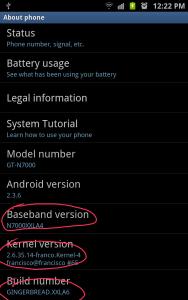
|
|
|
|
|
|
MrKrahoz
|
Feb 15 2012, 06:07 PM
|
Getting Started
|
I bet too much applications are running..
|
|
|
|
|
|
MrKrahoz
|
Feb 16 2012, 09:56 AM
|
Getting Started
|
Guys, I just want to make sure that I'm not only the one who cannot install this application. Can you guys check it? It says, "this application is not compatible in your country".. Google Maps |
|
|
|
|
|
MrKrahoz
|
Feb 16 2012, 10:14 AM
|
Getting Started
|
QUOTE(AMDunFreak @ Feb 16 2012, 10:03 AM) yeah.. you are the only one that cannot install... LOL!! joking... i know your note is rooted... refer to this site: http://forum.xda-developers.com/showthread.php?t=1007132aaaa... too much steps and I'm really lazy to read it right now +_+! I just want 1 click installation and then use it... Maybe, I'll try this step later.. really2 lazy right now... QUOTE(benny888 @ Feb 16 2012, 10:07 AM) Just select update in market if you wish to installed it - no need to have a fresh installed If you have problems - try use Market Enabler to fake telco first There are 2 market enabler.. which 1? the 1st or the 2nd? Results |
|
|
|
|
|
MrKrahoz
|
Feb 16 2012, 11:19 AM
|
Getting Started
|
QUOTE(KTCY @ Feb 16 2012, 11:15 AM) any wallpaper web to download exactly 800 x 1280 size ? lazy to resize and i saw many web is 1280 x 800   |
|
|
|
|
|
MrKrahoz
|
Feb 16 2012, 01:46 PM
|
Getting Started
|
QUOTE(AMDunFreak @ Feb 16 2012, 10:03 AM) yeah.. you are the only one that cannot install... LOL!! joking... i know your note is rooted... refer to this site: http://forum.xda-developers.com/showthread.php?t=1007132QUOTE(benny888 @ Feb 16 2012, 10:07 AM) Just select update in market if you wish to installed it - no need to have a fresh installed If you have problems - try use Market Enabler to fake telco first Is Google Maps really not supported stock rom, which is before I rooted my GNote? I'm using N7000XXLA4 & GINGERBREAD.XXLA6 which is not Malaysia rom. AND if I restore back my GNote to original rom, will I still cannot use Google Maps?  |
|
|
|
|



 Quote
Quote
 0.0227sec
 0.89
0.89
 7 queries
 GZIP Disabled