Welcome Guest ( Log In | Register )

134 Pages « < 111 112 113 114 115 > » Bottom

Outline · [ Standard ] · Linear+

 All About Harddisk Thread V4

views
     
mrbob
post Aug 15 2014, 05:17 PM

Casual
***
Junior Member
318 posts

Joined: May 2010
Wrote this a couple weeks ago during some free time with a thought of helping others understand the 3 main focus - heat, shock/vibration and power. Taking care of these can help determine the useful lifespan of your hard drives.

Now in case you are wondering why I have left out water as an obvious hard drive killer, I am making the assumption that you KNOW that operating ANY electrical equipment in the presence water will fry the equipment and possibly you along with it too. So let's get on with the first part.

A) HEAT

If you have started with a healthy hard drive free from manufacturing defect etc, high temperature is the No 1 killer for your hard drive.

Google's "Failure Trends in a Large Disk Drive Population" http://research.google.com/archive/disk_failures.pdf is a good study on general trends of hard disks in data centers. Although other studies such as Backblaze does not find any co-relations between failure rates and temperatures (Backblaze's study covers up to 30°C), Google's study tracked temperatures from 15°C to 50°C.

user posted image

Google's findings showed higher failure rates for:

- Hard disk temperatures above 45°C

- Temperatures below 25°C

- Aging hard disk drives (3 years and older) with average temperatures 40°C and above

According to a similar study "Datacenter Scale Evaluation of the Impact of Temperature on Hard Disk Drive Failures" http://www.cs.virginia.edu/~gurumurthi/papers/acmtos13.pdf released by Microsoft and the University of Virginia, when temperatures reached 50°C, average failure rate increased 79% when compared to hard disks operating in 40°C environment.

QUOTE
Temperature Management in Data Centers: Why Some (Might) Like It Hot" http://www.cs.toronto.edu/~bianca/papers/temperature_cam.pdf concluded that there is a co-relation between hard drive temperature and Latent Sector Errors (bad sectors). Exponential increase for temperatures above 50C.

Latent sector errors (LSEs) are a common failure mode, where individual sectors on a disk become inaccessible, and the data stored on them is lost... increase in error rates tends to be linear, rather than exponential, except for very high temperatures (above 50C).


From the studies above, we can conclude that temperature above 50°C can kill your hard drive and create a lot of bad sectors in the process. Also the ideal target temperature for hard drive operation seems to be around 30°C - 45°C.

So what you can do to keep your hard disks running in the target temperature?

1) Ensure good airflow in chassis. A cramped up chassis that impedes airflow will only trap heat. If you have dust-filters installed on your PC, remember to clean them regularly.

2) Make sure that you have good airflow in the room that you are running the PC. The airflow in your PC can only run as cool as the room that it is operating in so it is a great idea to turn on the air-conditioning.

3) Monitor your PC's temperature especially the harddisks more so if you tend to overclock your PC. There are plenty of software available in Windows platform - Hard Disk Sentinel, HD Tune, Speedfan, HWmonitor, CrystalDiskInfo etc. For Linux - hddtemp, lm-sensors, smartctl or the basic smartd etc. Ubuntu and Mint comes with built-in sensors app that you can turn on.

4) Hard disks spinning at 7200rpm tend to run hotter than 5k drives, so you may want to increase the rate of airflow if you have upgraded from a 5k drive to higher spin rate.

5) Use "Green" hard drives. They generally have power saving features that allows them to sip power compares to the always-on enterprise HDDs. The idea is less power being used = less heat being dissipated into the chassis.

6) Idle your hard disks when not in use. Idle drives will dissipate less heat.

7) Lastly, run an energy efficient PSU. An Inefficient PSUs will introduce heat to your chassis through dissipation as it converts electrical power. More about this later.


mrbob
post Aug 15 2014, 05:41 PM

Casual
***
Junior Member
318 posts

Joined: May 2010
Now for the second part.

B) Shock/Vibration

We will look at the next cause of hard drive failure - shock (cause by external factors) and vibration (cause by internal factors).

Hard drive is a delicate piece of equipment and are particularly sensitive to external physical impacts, even if the impact is on the PC. This include any 2D or 3D-type of movement such as knocking, bumping, jarring, dropping etc can shock the read/write heads while it hovers just microns (millionths of an inch) above the spinning platter causing the head to crash on the surface of the platter destroying any data that is stored on the damaged area.

user posted image

This initial crash could often create countless numbers of fine particles from the crashed area that can land onto other areas causing even more head crashes as the heads move over these particles. As the effects of these head crashes snowballs you will start experiencing significant damage and data loss, and very possibly ending up with a useless drive down the road.

Nowadays most notebooks comes with built-in active hard drive protection which can be useful to some extend. However it is strongly advisable to avoid moving your notebook around while it is in operation.

While external impacts can be easily controlled, the harder one to control are vibrations caused by the hard drive's internal spindle motor and platters, rotational movement of the actuator (read/write head arm) etc and when they are installed in the same drive cage with other drives in close proximity, the resulting rotational momentum (Rotational Vibration or RV) can sometimes creating harmonics that create sharply higher vibration forces that can easily knock a read/write head off track.

"Performance Impact of External Vibration on Consumer-grade and Enterprise-class Disk Drives" https://www.dtc.umn.edu/publications/reports/2005_08.pdf published by Thomas Ruwart and Lu Yingping concludes that

QUOTE
vibration transmission through physical coupling can be mitigated by the correct choice of packaging.


Hard drive manufacturers have built-in RV sensors and active protection system to minimize the impact of the vibration in their enterprise range hard drives. Some higher end consumer hard drives features their own built-in vibration reduction system.

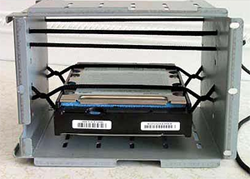
Some IT enthusiasts have come up with creative ways to mitigate vibrations. Here are some examples:

user posted image
http://img703.imageshack.us/img703/4194/hddsusp1.jpg
http://www2.picturepush.com/photo/a/115534...mg/11553400.jpg
http://img128.imageshack.us/img128/9121/img12504tn.jpg

So what can you do about this?

1) Make sure that you don't move, bump, kick, tilt, jar, drop or even press the top-shell of the hard drive especially while it is in operation. Always treat it with love and respect.

2) It is worth buying hard drive that have built-in vibration control mechanism. If you are running an array, you will still benefit from getting an enterprise range hard drive as it will have build-in RV sensors plus more advanced anti-vibration mechanism.

3) Invest in a chassis that comes with hard drive rubber/silicon dampeners. You can also search Amazon or Newegg to get off-the-shelf anti-vibration kit.

4) Or if you're a builder, you can make yourself an anti-vibration system and post a picture back on this thread for all to admire.

5) Get external drives that have active/passive protection eg Transcend external hard drives. http://www.transcend-info.com/Products/No-284

This post has been edited by mrbob: Aug 16 2014, 04:30 PM
NightFelix
post Aug 15 2014, 06:49 PM

Samsung Exynos
********
All Stars
17,467 posts

Joined: May 2008
From: Lazada


Guys. Got one question here.

I got some old HDD like year 2008-2010. Which like around 40GB or 80GB.. What can do with them? hmm.gif


mrbob
post Aug 15 2014, 07:08 PM

Casual
***
Junior Member
318 posts

Joined: May 2010
QUOTE(NightFelix @ Aug 15 2014, 06:49 PM)
Guys. Got one question here.

I got some old HDD like year 2008-2010. Which like around 40GB or 80GB.. What can do with them? hmm.gif
*
Errr... use them in your test machines ie Linux, FreeBSD etc
mrbob
post Aug 15 2014, 07:25 PM

Casual
***
Junior Member
318 posts

Joined: May 2010
Here's the third and final part.

C) Power

We will look at electrical power as a factor in determining how long hard drives could last.

Power surge can be caused by lightning strikes, interference with power lines/mains, failure of PSUs, or by any event which causes the flow of electricity to be interrupted and then restarted. Power surges can result in data loss when the read/write heads fail to function properly, and in the worst case, a complete computer crash. Investing in an Uninterruptible Power Supply (UPS) helps to mitigate the quality of the AC power coming into your PC. Even the minimal investment of a surge protector can help filter out the noise, ripples, spikes and power surges from the mains. However getting UPS and surge protector would mean nothing if the PC's power supply unit (PSU) is problematic and unable to regulate steady power to the various components in your PC.

The PSU is the single point of failure for PCs as it is connected to all components in the PC. Its main function is to convert AC power to usable 5VDC and 12VDC power. Usable in the sense of clean and stable supply. Most PSU available in the market convert VDC power with some fluctuations and/or ripples. To see this, you just have to login to the BIOS/UEFI to monitor the power utilised by the PC components. While it is not as accurate as using the oscilloscope, you will still be able to see the fluctuation of the VDC supplied to the processor. This is the same with the 5VDC which supplies power to your hard drives. While the hard drives have some tolerance to voltage fluctuation, high and/or frequent fluctuation can cut short the lifespan of any connected hard drive.

Look at the design of the PSU and quality of the components used in manufacturing the PSU as it can greatly determine the quality of the power you can get out of it. Good quality components like Japanese-made capacitors will go a long way ensuring they will last (typically 5 - 7 years) hopefully until you replace your PC.

user posted image

You should also look up the efficiency curve of the PSU and use it to plan your PC build. The higher the efficiency rate means less power is lost as heat during conversion.

Consider also the power consumption of the PC components as an indirect way of generating unwanted heat in the chassis. You can read the following 2 articles that shows a co-relation between power consumption and heat dissipation (W) of hard drives.

http://ixbtlabs.com/articles2/storage/hddpower.html
http://ixbtlabs.com/articles2/storage/hddpower-pro.html

So choosing "green" hard drives can often lead to less heat generated in your PC chassis. The less heat that is generated, the less you would have to worry about to get rid off.

So what can you do about this?
1) Visit sites like Silentpcreview, Hardocp, Kitguru etc that looks at the PSU's design, build quality, voltage regulation quality and even the heat exhaust reading. Know more about the characteristics of the PSU before you commit to put it into your PC.

2) Add up the power consumption of your PC components so that you can use it to pick the best PSU that would generate the least amount of heat and still fit your requirement. Plan to reduce all the risks and loop holes which can cause problems later on. Remember that risks can be managed so that incidents don't have to happen.

3) Invest in SATA power connectors that have built-in capacitors which will provide an additional layer of protection from VDC ripples/fluctuations.

This post has been edited by mrbob: Aug 16 2014, 04:29 PM
NightFelix
post Aug 16 2014, 11:24 AM

Samsung Exynos
********
All Stars
17,467 posts

Joined: May 2008
From: Lazada


mrbob
Hi bro, do you know about the WD Caviar Black noise problem? I Google-ed found some user complaining about the noise spinning on Tomshardware. But those are old review (late 2013) was like saying have noise spinning sound even newly purchased of WD Caviar Black.

So I'm not sure current 2014 model have the same things or not OR it was supposed to be have such spinning sound that designed for. sweat.gif
mrbob
post Aug 16 2014, 04:28 PM

Casual
***
Junior Member
318 posts

Joined: May 2010
QUOTE(NightFelix @ Aug 16 2014, 11:24 AM)
mrbob
Hi bro, do you know about the WD Caviar Black noise problem? I Google-ed found some user complaining about the noise spinning on Tomshardware. But those are old review (late 2013) was like saying have noise spinning sound even newly purchased of WD Caviar Black.

So I'm not sure current 2014 model have the same things or not OR it was supposed to be have such spinning sound that designed for. sweat.gif
*
Noise on WD Black? Other than the usual writing and reading sound I haven't noticed anything weird about mine. WD Black is the fastest 7k consumer HDD you can get your hands on. And I guess the noise just comes with the speed. What I do know is that they have tweaked the FW and the current model is blazing fast! Head over to Storagereview for the detailed writeup.

https://www.youtube.com/watch?v=AtpMr8wrGRQ

Here's a YouTube video showing the noise. Notice that it is sitting on a HDD toaster and should explain why it is loud. My WD Black is in Silverstone GD05 about 3 feet from my ears and the r/w noise is barely audible.
SUSmenj
post Aug 16 2014, 08:49 PM

Casual
***
Junior Member
314 posts

Joined: Jan 2003
From: BTHO


QUOTE(ZeneticX @ Aug 5 2014, 05:57 PM)
any recommendation for good 1TB ext hdd ? gonna use it with my MBP
*
I would recommend WD or Buffalo.
nasiayam
post Aug 18 2014, 11:38 AM

On my way
****
Senior Member
668 posts

Joined: Jan 2006
My 2TB WD My Book Essential 3.5" external drive, model no. WDBACW0020HBK-01 suddenly failed to power up, it just sit at a corner and i rarely move it

i check the adapter and usb cable, both working fine

my warranty finished d, called wd support to try my luck, they say need to send in for RMA and the files inside need data recovery, ridiculous

Google a lot and apparently the control board is the culprit, the hdd is still ok 1, i pry open the casing and found the control board part number 4061-705094-001 Rev 13R

the data in the hdd is encrypted by the controller board, thus putting the hdd into a generic casing to access the data wouldn't work

the solution is to replace the controller board, found a seller online but just buying the controller board would cost over 200 whereas a new 2tb drive is just 350++ sad.gif


anyone here experience the same problem and manage to fix it? or if you know where to get the controller board locally?

any help is very much appreciated, thanks.

» Click to show Spoiler - click again to hide... «


This post has been edited by nasiayam: Aug 18 2014, 11:44 AM
wee395
post Aug 18 2014, 01:16 PM

Casual
***
Junior Member
495 posts

Joined: Oct 2004


hey guy , want to ask how to format WD 1TB external HDD ? Model is WD10TPVT-00U4RT1 .
Before this i hv try using window to format using low farmat and quick format also not working.
pls advise.thanks !
mrbob
post Aug 18 2014, 07:27 PM

Casual
***
Junior Member
318 posts

Joined: May 2010
QUOTE(nasiayam @ Aug 18 2014, 11:38 AM)
My 2TB WD My Book Essential 3.5" external drive, model no. WDBACW0020HBK-01 suddenly failed to power up, it just sit at a corner and i rarely move it

i check the adapter and usb cable, both working fine

my warranty finished d, called wd support to try my luck, they say need to send in for RMA and the files inside need data recovery, ridiculous

Google a lot and apparently the control board is the culprit, the hdd is still ok 1, i pry open the casing and found the control board part number 4061-705094-001 Rev 13R

the data in the hdd is encrypted by the controller board, thus putting the hdd into a generic casing to access the data wouldn't work

the solution is to replace the controller board, found a seller online but just buying the controller board would cost over 200 whereas a new 2tb drive is just 350++  sad.gif


anyone here experience the same problem and manage to fix it? or if you know where to get the controller board locally?

any help is very much appreciated, thanks.

» Click to show Spoiler - click again to hide... «

*
[edited]

This post has been edited by mrbob: Aug 19 2014, 11:02 AM
mrbob
post Aug 18 2014, 07:34 PM

Casual
***
Junior Member
318 posts

Joined: May 2010
QUOTE(wee395 @ Aug 18 2014, 01:16 PM)
hey guy , want to ask how to format WD 1TB external HDD ? Model is WD10TPVT-00U4RT1 .
Before this i hv try using window to format using low farmat and quick format also not working.
pls advise.thanks !
*
Use HDTune to see the SMART status and bad sectors layout.

Alternatively if the HDD is still under warranty, you can download the WD Data Lifeguard Diagnostic for Windows software and run a full diagnostics. Use the screenshot results to RMA your HDD.
wee395
post Aug 19 2014, 02:34 PM

Casual
***
Junior Member
495 posts

Joined: Oct 2004


QUOTE(mrbob @ Aug 18 2014, 07:34 PM)
Use HDTune to see the SMART status and bad sectors layout.

Alternatively if the HDD is still under warranty, you can download the WD Data Lifeguard Diagnostic for Windows software and run a full diagnostics. Use the screenshot results to RMA your HDD.
*
thanks for help ! rclxms.gif
super macgyver
post Aug 23 2014, 04:04 PM

★~13k Spam Club~★
********
All Stars
19,322 posts

Joined: Jan 2003


QUOTE(menj @ Aug 16 2014, 08:49 PM)
I would recommend WD or Buffalo.
*
sony ext usb one is also not bad thumbup.gif
mrbob
post Aug 27 2014, 12:10 PM

Casual
***
Junior Member
318 posts

Joined: May 2010
user posted image

Seagate Ships World’s First 8TB Hard Drives

You heard it right. The 8TB drives are shipping now for Q4 availability! No technical details available yet in Seagate's anouncement however it is rumoured to be one of the first Shingled Magnetic Recording (SMR) product being rolled out. If this 8TB giant is based out of 800GB platters (current standard), I can't imagine how much more capacity Seagate would be able to squeeze out of 1.2TB platters when they become more widespread next year.

http://www.networkworld.com/article/259841...hard-drive.html

http://www.seagate.com/about/newsroom/pres...ives-pr-master/


wildwestgoh
post Aug 27 2014, 01:08 PM

Look at all my stars!!
*******
Senior Member
2,215 posts

Joined: Jul 2005


QUOTE(mrbob @ Aug 27 2014, 12:10 PM)
user posted image

Seagate Ships World’s First 8TB Hard Drives

You heard it right. The 8TB drives are shipping now for Q4 availability! No technical details available yet in Seagate's anouncement however it is rumoured to be one of the first Shingled Magnetic Recording (SMR) product being rolled out. If this 8TB giant is based out of 800GB platters (current standard), I can't imagine how much more capacity Seagate would be able to squeeze out of 1.2TB platters when they become more widespread next year.

http://www.networkworld.com/article/259841...hard-drive.html

http://www.seagate.com/about/newsroom/pres...ives-pr-master/
*
shocking.gif Wow... 10 platters, talk about helium, now wait for review to do the talking.

hmm.gif Wonder how the price will affect current HDD.
marfccy
post Aug 27 2014, 01:41 PM

Le Ponyland!!!
*******
Senior Member
4,254 posts

Joined: Nov 2011


QUOTE(wildwestgoh @ Aug 27 2014, 01:08 PM)
shocking.gif Wow... 10 platters, talk about helium, now wait for review to do the talking.
hmm.gif Wonder how the price will affect current HDD.
*
please drop rclxms.gif

im planning to buy a 4TB WD Red for my NAS soon
mrbob
post Aug 27 2014, 06:56 PM

Casual
***
Junior Member
318 posts

Joined: May 2010
QUOTE(wildwestgoh @ Aug 27 2014, 01:08 PM)
shocking.gif Wow... 10 platters, talk about helium, now wait for review to do the talking.
hmm.gif Wonder how the price will affect current HDD.
*
Not 10 plats, still using only 5 plats. SMR technology promises to squeeze more bytes by stacking the data tracks closely together. Read the NetworkWorld article on my post. With the data tracks packed so closely together, really should wait and see how it performs in real life. This should be similar to upgrading from DVD to BR!

Now why can't WD come up with some simple ideas like SG and give us bigger drives without the fancy gas?


QUOTE(marfccy @ Aug 27 2014, 01:41 PM)
please drop rclxms.gif

im planning to buy a 4TB WD Red for my NAS soon
*
Rumours have it that SG is getting ready for a price war. Come Q2-3 next year, when SG get their act together and start using 1.2TB platters, there will be blood.

This post has been edited by mrbob: Aug 27 2014, 07:56 PM
amxpayne67
post Sep 6 2014, 11:01 AM

The Coon
*****
Senior Member
718 posts

Joined: Mar 2010
From: Puchong Extreme


May i know if there any reviews or discussions about the performance difference between SSHD (Seagate etc. ) and Western Digital Caviar Black. I know how SSHD works, but for comparison sake lets say both device have been used multiple times, not first time boot.
marfccy
post Sep 6 2014, 12:42 PM

Le Ponyland!!!
*******
Senior Member
4,254 posts

Joined: Nov 2011


QUOTE(amxpayne67 @ Sep 6 2014, 11:01 AM)
May i know if there any reviews or discussions about the performance difference between SSHD (Seagate etc. ) and Western Digital Caviar Black. I know how SSHD works, but for comparison sake lets say both device have been used multiple times, not first time boot.
*
SSHD would still be faster than Caviar Black afaik

the SSD caching in SSHD helps to speed alot

not to mention the Caviar Black, like all HDDs, gets bottlenecked by the mechanical parts as usual

134 Pages « < 111 112 113 114 115 > » Top
 

Change to:
| Lo-Fi Version
0.0277sec    0.39    6 queries    GZIP Disabled
Time is now: 2nd December 2025 - 05:47 PM