

QUOTE(Motorbaby @ Aug 8 2012, 04:07 PM)
» Click to show Spoiler - click again to hide... «


Back in few years ago it was remarkable reliable and cheap, but no more for now.
All About Harddisk Thread V4
|
|
 Aug 8 2012, 06:46 PM Aug 8 2012, 06:46 PM
Return to original view | Post
#21
|
 
Senior Member
1,597 posts Joined: Aug 2010 From: Taufu Kingdom  
|
QUOTE(Motorbaby @ Aug 8 2012, 04:07 PM) » Click to show Spoiler - click again to hide... « Back in few years ago it was remarkable reliable and cheap, but no more for now. |
|
|
|
|
|
Aug 11 2012, 11:59 AM
Return to original view | Post
#22
|
|
Senior Member
1,597 posts Joined: Aug 2010 From: Taufu Kingdom
|
QUOTE(Gen-X- @ Aug 10 2012, 10:17 PM) Guys, a quick question. WD black if go for performances. I'll be getting 1TB Internal HDD 2molo. (Storage) Any recommendation? The best that available in the market.  |
|
|
Aug 14 2012, 02:19 PM
Return to original view | Post
#23
|
|
Senior Member
1,597 posts Joined: Aug 2010 From: Taufu Kingdom
|
QUOTE(turion64 @ Aug 14 2012, 01:58 PM) hi sifus, Still WD black may i know what are the current reliable hard disk model now? i am looking to backup about 8-10TB of data and store it away for long term safe keeping. i hear alot of people say all hdd is the same is just depends on luck, but do u know which brand have a reputation of reliability compare to others? thanks!  Its design make it last longer and always outperform current blue and green model. If few years ago we might recommend samsung, but............ QUOTE(Motorbaby @ Aug 8 2012, 04:07 PM) » Click to show Spoiler - click again to hide... « |
|
|
Aug 25 2012, 03:40 PM
Return to original view | Post
#24
|
|
Senior Member
1,597 posts Joined: Aug 2010 From: Taufu Kingdom
|
QUOTE(fiqz4ce @ Aug 25 2012, 10:43 AM) hellooo.. i want to ask something. Just buy a enclosure with USB 3.0 port will do.i have a 1TB 3.0 external hard drive (toshiba canvio) but the chip is broken somehow.. what I did is I took out the drive and thinking to replace the enclosure. However the price for 3.0 enclosure is RM95. Then I'm planning to just put the drive into the laptop.. but I'm afraid it will act as normal hard disk. So my question is, the 3.0 external hdd is just a normal 2.5 hdd? they just put 3.0 interface to make the transfer faster or what? is it worth to buy the 3.0 enclosure? But makesure your Laptop has native USB 3.0 port. |
|
|
Sep 10 2012, 11:18 AM
Return to original view | Post
#25
|
|
Senior Member
1,597 posts Joined: Aug 2010 From: Taufu Kingdom
|
it seems the legendary WD Velociraptor HDD is nowhere to be seen in this forum since this year onward.
Too bad its just cant match the performance of SSD, and their price gap is getting closer as time flies. |
|
|
Sep 11 2012, 09:39 PM
Return to original view | Post
#26
|
|
Senior Member
1,597 posts Joined: Aug 2010 From: Taufu Kingdom
|
QUOTE(jchue73 @ Sep 11 2012, 09:29 PM) Yeah, that's why I say it's beautiful what Hitachi has done. Taking something that is still "old" and adapting it to make things work for them. More reasonable for backup by HDD than multiple DVDs in term of space and storage management.Thanks for the info. From the prices, to back up 2TB worth of data, you would need close to 425 pieces of DVDs which translates to about RM 400 thereabouts. Writing speed of the DVD at 8x is about 11MB/s but on average should be slightly slower but we take it to be 11MB/s for simple calculations. That takes about a little over 7 minutes per disc. Counting on that alone without the time you need to swap out the disc and put in a new one (oh, you need to label it too but you can do this while you're waiting for the other disc to be burned), you would require more than 49 hours straight ! Has anybody given thought about this? A decent 2TB drive which would be RM 100 less than the DVD solution, faster to backup and best part is you can do full backup or even run incremental backup while you're sleeping. Anyway, I mentioned this before and for small amounts of data, backing up to DVD has it's place but in this age and time where hardisk size and data is in huge proportions, DVD backup is a little cumbersome. Hundreds of DVDs are very easy to be mess up.  |
|
|
|
|
|
Sep 12 2012, 04:10 PM
Return to original view | Post
#27
|
|
Senior Member
1,597 posts Joined: Aug 2010 From: Taufu Kingdom
|
QUOTE(Vcys86 @ Sep 12 2012, 11:39 AM) Sorry lex, more Q here. i attempt a bit.....1. So I should get some casing with eSATA connection available right? 2, Those casing still able to connect through USB 2.0 or USB 3.0 right? 3. If my current Mobo do not have USB 3.0, can I buy a USB 3.0 interface card to slot in? May I know around how much? 4. Ya, too much of casing choices, have no idea which one to go for. I think i dont need NAS or RAID at this moment yet. Any good brand for casing to recommend a?  1) you need to confirm your mobo support e-sata connection 1st. 2) It depends on your MOBO if there are ports for front panel USB 3.0. Even though you had plug in the USB 2.0 cable on USB 3.0 port or vice versa, the port still usable but the connection speed will be limited to USB 2.0 maximum speed. 3) Gigabyte and Asus already have them in market. » Click to show Spoiler - click again to hide... « 4) Do state the budget for your new casing 1st. Corsair 300/400R; Cooler master Elite series, HAF series; depends which you prefer the most: cable management, design, budget, air flow, size etc etc This post has been edited by sI Taufu: Sep 12 2012, 04:17 PM |
|
|
Sep 12 2012, 04:38 PM
Return to original view | Post
#28
|
|
Senior Member
1,597 posts Joined: Aug 2010 From: Taufu Kingdom
|
QUOTE(Vcys86 @ Sep 12 2012, 04:33 PM) thanks for your reply. opps this is my current mobo http://my.msi.com/product/mb/P55-GD65.html I think there is no USB 3.0 support for this mobo. So i need to get those cards as shown above and plug into normal pci slot right? (like old time network card) My casing current one Cooler master 690 II Advanced. for my question above, I am actually asking for the casing of HDD, sorry for the confusing question.  Yup you need those card for USB 3.0 function.  I think Viewnet have the TOASTER HDD bay This post has been edited by sI Taufu: Sep 12 2012, 04:39 PM |
|
|
Sep 12 2012, 04:59 PM
Return to original view | Post
#29
|
|
Senior Member
1,597 posts Joined: Aug 2010 From: Taufu Kingdom
|
QUOTE(Vcys86 @ Sep 12 2012, 04:56 PM) Thanks for the recommendation! that 1 i am not sure, sorry.this kind of HDD bay do support WD Blue 3TB right? I use to avoid 3TB HDD coz i am still sceptical on 3TB HDD reliability as long as 3TB WD black havent come out. |
|
|
Sep 13 2012, 12:36 PM
Return to original view | Post
#30
|
|
Senior Member
1,597 posts Joined: Aug 2010 From: Taufu Kingdom
|
QUOTE(soitsuagain @ Sep 13 2012, 01:02 AM) It's already half a year since the HDD factories are back to normal production but HDD prices are still pretty steady. I can't believe it. I am thinking of getting 3TB Seagate drives or I could wait for the 3TB Caviar Black. Gonna make me mad if I buy say 2TB Caviar Black now and three months down the road there will be the 3TB version for the same price or lower by a couple of tens even. that is the worst part where the industries only have very few competitors;like intel vs amd in CPU; WD vs Seagate in HDD; that CPU and HDD price wont went down significantly anytime soon. This post has been edited by sI Taufu: Sep 13 2012, 12:37 PM |
|
|
Sep 18 2012, 12:48 AM
Return to original view | Post
#31
|
|
Senior Member
1,597 posts Joined: Aug 2010 From: Taufu Kingdom
|
QUOTE(k!nex @ Sep 17 2012, 07:12 PM) Nice stuffs there. Should be single platter. However, the spindle rotation speed is a big question. The HDD so slim, motor also must be slim, so how much RPM can it produce ??? I think it will be very slow like those 1.8inch HDD in many of those 12 inch laptops few years back (eg: HP Compaq 2510). IMO more sensitive to shocks.....Long time ago WD also attempt to develop a microdrive similar to this: HP Kittyhawk 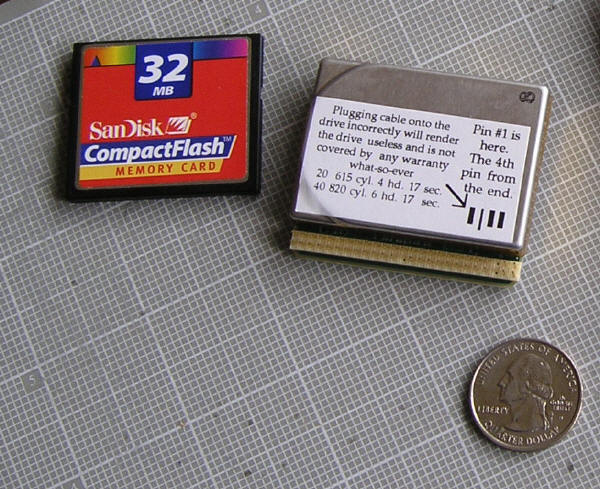 |
|
|
Sep 21 2012, 10:13 PM
Return to original view | Post
#32
|
|
Senior Member
1,597 posts Joined: Aug 2010 From: Taufu Kingdom
|
QUOTE(nethelp @ Sep 21 2012, 10:46 AM) Any idea when the price is going back to the level b4 the flood? RM160 for 1TB? Damn, last year news predict price to back to normal on Sept 2012, it's now Sept but not much changes...Haiz... Still need at least 1 year or until WD/Seagate feel they had generate enough profits. |
|
|
Oct 13 2012, 05:46 PM
Return to original view | Post
#33
|
|
Senior Member
1,597 posts Joined: Aug 2010 From: Taufu Kingdom
|
QUOTE(super macgyver @ Oct 13 2012, 04:12 PM) wd finally released 4TB WD RE SAS and WD RE SATA in asia region, got WD RE SAS for Nearline SAS : 1TB, 2TB, 3TB, 4TB ; WD RE SATA have 2TB, 3TB, 4TB. yeay Will wait for them to release WD Black 3TB. |
|
|
|
|
|
Nov 7 2012, 06:56 PM
Return to original view | Post
#34
|
|
Senior Member
1,597 posts Joined: Aug 2010 From: Taufu Kingdom
|
QUOTE(knight @ Nov 6 2012, 11:51 PM) Seriously?? So bad??So far my Bufalo Desktop external HDD still living. It's like 2years from now..but I seldom use it unless I need some files in there. seriously 2 years is........meh. Wait if you still use the same HDD for more than 7 years.I heard the HDD are more sensitive nowadays bcuz of the distance between the bits are very near..but good thing is the manufacturer can create nearly 0% particals for the HDD. That's what I heard from my friend who works in this sector. 0% particle also no use if there are many premature bad sectors on the disk surface. |
|
|
Nov 12 2012, 12:36 AM
Return to original view | Post
#35
|
|
Senior Member
1,597 posts Joined: Aug 2010 From: Taufu Kingdom
|
QUOTE(darkskies @ Nov 12 2012, 12:19 AM) It's a subsidiary of WD now. At first Hitachi eat IBM's HDD business. Then now WD eat Hitachi. errrrr buffalo also got supply from WD and maybe Seagate.Seagate eat samsung.  wonder who will be the last one standing. O ya.. still have buffalo. wonder who will be the last one standing. O ya.. still have buffalo.Anyway i still prefer HDD over SSD. How fast to load my application or boot up windows doesnt make a diff . I'm too poor to afford this kind of riches. At least my current setup could store 4tb loads of "ahem" stuff  Same goes to trendscend and other external HDD manufacturer except toshiba which still producing 2.5" HDD. there are no room for new competitor to enter HDD sector already. Even got, the initial cost for develop and manufacture new HDD from scratch is just too high and the current profit margin is not justifiable for that initial cost. This post has been edited by sI Taufu: Nov 12 2012, 01:13 AM |
|
|
Nov 12 2012, 03:50 PM
Return to original view | Post
#36
|
|
Senior Member
1,597 posts Joined: Aug 2010 From: Taufu Kingdom
|
QUOTE(wildwestgoh @ Nov 12 2012, 03:41 PM) From the SMART attributes, you should keep a look out for the CRC errors, it has the exclamation mark there so that's the attribute that you should look out for. and maybe the GC driver doesn't match the game.I see that it has 1 CRC error, means either the controller, interface (cable, plug, socket) having issue, either way if you didn't see this increase over time then it might just be coincident so not much to worry about your HDD. Perhaps you can open another thread at Technical Support or Q&A, list your HiJackThis result and see if any guru can help you identify the cause of your Diablo FPS issue. HiJackThis can be downloaded here... www.filehippo.com/download_hijackthis/ Slower FPS in gaming does not necessary to be in 1 area, it could be anything. The diablo 3 really gave me lots of headache due to its NON-STOP UPDATES & PATCHES. Somehow after update the GC driver it can gave me GSOD when playing D3, while previous driver just make it black screen for few seconds at its worst. |
|
|
Nov 12 2012, 03:59 PM
Return to original view | Post
#37
|
|
Senior Member
1,597 posts Joined: Aug 2010 From: Taufu Kingdom
|
QUOTE(milky @ Nov 12 2012, 03:55 PM) HD7770 also not enof? shud be enof right? Dun know much about AMD GC as i am using GTX 460 =.=My fren using 8800GTS also can get smooth FPS. |
|
|
Nov 13 2012, 10:44 AM
Return to original view | Post
#38
|
|
Senior Member
1,597 posts Joined: Aug 2010 From: Taufu Kingdom
|
QUOTE(Boldnut @ Nov 13 2012, 08:55 AM) get more ram to reduce the read/write of ur SSD. I absolutely see no reason not to get enough RAM to totally turn off pagefile. want to ask something about page file:RAMdisk is useful for people who never turn off their PC.  If my ram always more than enough to use (using 4GB+- on 8gb ram), will the page files become zero GB? |
|
|
Nov 13 2012, 11:37 AM
Return to original view | Post
#39
|
|
Senior Member
1,597 posts Joined: Aug 2010 From: Taufu Kingdom
|
QUOTE(wildwestgoh @ Nov 13 2012, 11:31 AM) Pagefile will always be there, it'll keep itself to minimum if the RAM is sufficient, or you can set the pagefile size to your liking and it's not recommended to turn it off unless you know what you're doing. i just as well let it be since my C drive still got lots of space to spare.If you have plenty of RAM then you can set to the minimum pagefile size, i.e. 512MB maximum, this should help keep most of the data at RAM. This should reduce the swapping between HDD and RAM so the overall performance is increase, this is when you have sufficient RAM, but if RAM is small, and Windows hit the maximum RAM limit, it may just crash.  thx for enlighten me. |
|
|
Dec 3 2012, 09:09 PM
Return to original view | Post
#40
|
|
Senior Member
1,597 posts Joined: Aug 2010 From: Taufu Kingdom
|
QUOTE(soitsuagain @ Dec 3 2012, 06:52 PM) 4TB caviar black is already available in Malaysia but not yet in Newegg. We are faster lol, I guess this drive must be made in Malaysia. IINM malaysia produce better quality HDD than thailand counterparts. Waiting for black 3TB 1st. |
| Change to: |  0.0431sec 0.0431sec
 0.62 0.62
 7 queries 7 queries
 GZIP Disabled GZIP Disabled
Time is now: 2nd December 2025 - 05:48 PM |
 Quote
Quote

