


SΛMSUNG Galaxy W (I8150) Official Thread V4, Be intelligent; read thoroughly.
SΛMSUNG Galaxy W (I8150) Official Thread V4, Be intelligent; read thoroughly.
|
|
 Feb 5 2012, 04:20 PM Feb 5 2012, 04:20 PM
|
 
Senior Member
668 posts Joined: Nov 2011 From: Malaysia  
|
Anyone here knows or thinks it's possible to expand the RAM size? I really need more RAM space. Any how to expand it, possibly to 600 or 700MB?
|
|
|
|
|
|
Feb 5 2012, 04:23 PM
|

Senior Member
5,322 posts Joined: Oct 2009
|
QUOTE(Besanth @ Feb 5 2012, 04:20 PM) Anyone here knows or thinks it's possible to expand the RAM size? I really need more RAM space. Any how to expand it, possibly to 600 or 700MB? nope.. not possible.. |
|
|
Feb 5 2012, 04:24 PM
|
|
Senior Member
668 posts Joined: Nov 2011 From: Malaysia
|
QUOTE(botakbin @ Feb 5 2012, 04:23 PM) nope.. not possible.. Ahh, damn! |
|
|
Feb 5 2012, 04:33 PM
|

Senior Member
1,618 posts Joined: Jun 2008
|
QUOTE(Besanth @ Feb 5 2012, 04:24 PM) Ahh, damn! ram size just like storage size... it is hardware... you cant expand it like clocking processor speed.for me charging from 0% to 100% required 2.5 hours. I use my previous phone (Wave) charger. Since Wave has the same battery capacity and use the same charger as W. Is it good to charge from 0% everytime to prolong battery life? |
|
|
Feb 5 2012, 04:34 PM
|

Senior Member
2,248 posts Joined: Sep 2010
|
i spent some time thinking about that expanding the available ram too. although we have 512mb, only 351mb available.
after some attempt, managed to squeeze additional 2mb to be used. so if u use my kernel, you should have 353mb available ram. may be it's possible to get additional 20mb more if we disable 720p recording.... but i just duno if the effort is worth it. i always like to keep all the functionality of my phone. alternatively, i duno if this is gonna work, may be it's possible to reduce the radio image that occupied part of the unavailable memory or look at the bootloader. the bootloader is extremely 'delegate'... if u miss anything, you will get a hard brick! not even ClockWorkMod will work! only by sending back to samsung or if u have some nice piece of JTAG hardware... This post has been edited by cowithgun: Feb 5 2012, 04:35 PM |
|
|
Feb 5 2012, 04:34 PM
|
|
Senior Member
5,322 posts Joined: Oct 2009
|
QUOTE(kevintth @ Feb 5 2012, 04:33 PM) ram size just like storage size... it is hardware... you cant expand it like clocking processor speed. no. in fact it is bad for modern phone batteries if u discharge them completely too often. permanent damage to the battery. just recharge it when it is around 10 to 20%.for me charging from 0% to 100% required 2.5 hours. I use my previous phone (Wave) charger. Since Wave has the same battery capacity and use the same charger as W. Is it good to charge from 0% everytime to prolong battery life? |
|
|
|
|
|
Feb 5 2012, 05:04 PM
|

Junior Member
297 posts Joined: Jul 2010
|
Some questions to all W users here who has successfully flash their phone.
1.Which recovery mod did you used? 2.How did you flash the recovery, via ADB or Odin? |
|
|
Feb 5 2012, 05:14 PM
|
|
Senior Member
668 posts Joined: Nov 2011 From: Malaysia
|
QUOTE(xchaosdragon @ Feb 5 2012, 05:04 PM) Some questions to all W users here who has successfully flash their phone. Odin.1.Which recovery mod did you used? 2.How did you flash the recovery, via ADB or Odin? |
|
|
Feb 5 2012, 06:04 PM
|

Junior Member
281 posts Joined: May 2009 From: EXA_PICO 
|
I used ADB cuz damn Odin did not work. lol. install ADB and manually do it..
|
|
|
Feb 5 2012, 07:29 PM
|

Junior Member
498 posts Joined: Apr 2009
|
Wow guys. My battery was used for 4 h 17 MIN . Most of the time it is in idle state . I used like 10 mins to download apps and it dropped from 99% to 97 % . that was alright. Then it went idle for 3 hours straight and it drained 4% ! Last night it went idle for 8 hrs an it only drained 1%. Is this normal?
Plus, everytime i use advance task killer, I would minimize it and go back to the app to check if there are any other apps running. And it shows that i'm running gallery, whatsapp, google search, market,email, maps, and social hub . Any idea why? :confused: This post has been edited by ~@Sharks@~: Feb 5 2012, 07:30 PM |
|
|
Feb 5 2012, 07:45 PM
|

Senior Member
1,943 posts Joined: Nov 2008
|
QUOTE(~@Sharks@~ @ Feb 5 2012, 07:29 PM) Wow guys. My battery was used for 4 h 17 MIN . Most of the time it is in idle state . I used like 10 mins to download apps and it dropped from 99% to 97 % . that was alright. Then it went idle for 3 hours straight and it drained 4% ! Last night it went idle for 8 hrs an it only drained 1%. Is this normal? 8 hours drain 1% is normal and task killer is not necessary. android will handle the memoryPlus, everytime i use advance task killer, I would minimize it and go back to the app to check if there are any other apps running. And it shows that i'm running gallery, whatsapp, google search, market,email, maps, and social hub . Any idea why? :confused: the default task manager is enough, clear the ram if you want to do heavy task such as gaming. |
|
|
Feb 5 2012, 07:50 PM
|
|
Junior Member
498 posts Joined: Apr 2009
|
QUOTE(game4life @ Feb 5 2012, 07:45 PM) 8 hours drain 1% is normal and task killer is not necessary. android will handle the memory Hi bro. Thanks for replying. I think i did not explain properly. Ps. Last night idle for 8 hours drain 1%. Today i idle only for 3 hrs but drain 4%. Is this normal when battery percentage is high?the default task manager is enough, clear the ram if you want to do heavy task such as gaming. |
|
|
Feb 5 2012, 07:57 PM
|

Senior Member
736 posts Joined: Nov 2009 From: Shah Alam - Damansara Perdana - Bukit Beruntung
|
QUOTE(game4life @ Feb 5 2012, 07:45 PM) 8 hours drain 1% is normal and task killer is not necessary. android will handle the memory yupe ... got default task manager .. but it is not quite good..the default task manager is enough, clear the ram if you want to do heavy task such as gaming. example .. from my point of view .. my RAM already up until 320MB / 350MB but default task manager didnt clear it for almost 15 minutes... for me its very inconvenient .. if using 3rd party task killer .. we can set when is it ram can be cleared .. correct me if im wrong please  |
|
|
|
|
|
Feb 5 2012, 08:00 PM
|
|
Senior Member
1,943 posts Joined: Nov 2008
|
QUOTE(~@Sharks@~ @ Feb 5 2012, 07:50 PM) Hi bro. Thanks for replying. I think i did not explain properly. Ps. Last night idle for 8 hours drain 1%. Today i idle only for 3 hrs but drain 4%. Is this normal when battery percentage is high? wifi on?download better battery stats. http://forum.xda-developers.com/showthread.php?t=1179809 post the picture of wakelocks here |
|
|
Feb 5 2012, 08:06 PM
|
|
Junior Member
297 posts Joined: Jul 2010
|
QUOTE(Besanth @ Feb 5 2012, 05:14 PM) Odin. I kept getting "Please Connect Phones" message, connected under "Download Mode", Debug check or uncheck the result is still the same. I was getting unable to install driver message too, guess the drivers' are missing. But then I am so sure I've already installed em. |
|
|
Feb 5 2012, 08:16 PM
|
|
Junior Member
297 posts Joined: Jul 2010
|
QUOTE(shiki_arc @ Feb 5 2012, 06:04 PM) I used ADB cuz damn Odin did not work. lol. install ADB and manually do it.. Tried ADB too, were you using Android Commander or the ADB from SDK Manager?I got this when I try using the code. 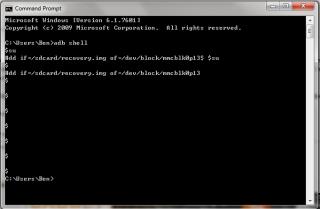
|
|
|
Feb 5 2012, 08:19 PM
|
|
Senior Member
1,943 posts Joined: Nov 2008
|
QUOTE(ekudz @ Feb 5 2012, 07:57 PM) yupe ... got default task manager .. but it is not quite good.. you are right but killing apps is a bad idea. http://lifehacker.com/5650894/android-task...ouldnt-use-themexample .. from my point of view .. my RAM already up until 320MB / 350MB but default task manager didnt clear it for almost 15 minutes... for me its very inconvenient .. if using 3rd party task killer .. we can set when is it ram can be cleared .. correct me if im wrong please for me, i only kill the app if the app is not responding Added on February 5, 2012, 8:22 pm QUOTE(xchaosdragon @ Feb 5 2012, 08:06 PM) I kept getting "Please Connect Phones" message, connected under "Download Mode", Debug check or uncheck the result is still the same. I was getting unable to install driver message too, guess the drivers' are missing. But then I am so sure I've already installed em. reinstall the usb driver http://forum.xda-developers.com/showthread.php?t=961956This post has been edited by game4life: Feb 5 2012, 08:22 PM |
|
|
Feb 5 2012, 08:23 PM
|
|
Junior Member
498 posts Joined: Apr 2009
|
QUOTE(game4life @ Feb 5 2012, 08:00 PM) wifi on? Do i post both kernel and partial? Wifi offdownload better battery stats. http://forum.xda-developers.com/showthread.php?t=1179809 post the picture of wakelocks here |
|
|
Feb 5 2012, 08:26 PM
|

Senior Member
9,590 posts Joined: Jan 2008 From: S'wak||KL||SG
|
QUOTE(game4life @ Feb 5 2012, 08:19 PM) you are right but killing apps is a bad idea. http://lifehacker.com/5650894/android-task...ouldnt-use-them I kill active apps and use android default Clear Memory only.for me, i only kill the app if the app is not responding Added on February 5, 2012, 8:22 pm reinstall the usb driver http://forum.xda-developers.com/showthread.php?t=961956 8 hours 1% full idle is very normal. Actually when you just unplug. 8 hours probably drop to 98% like that. I'm now 18hours on battery since 2am, 56% left. Did on GPS and data for quite some time. But later noon i keep sleeping and watching movie on laptop. No time touch phone. Now still got 56%   |
|
|
Feb 5 2012, 08:34 PM
|
|
Senior Member
736 posts Joined: Nov 2009 From: Shah Alam - Damansara Perdana - Bukit Beruntung
|
QUOTE(game4life @ Feb 5 2012, 08:19 PM) you are right but killing apps is a bad idea. http://lifehacker.com/5650894/android-task...ouldnt-use-them erm.. will try uninstall the task killer and test default task manager .. see the diff...for me, i only kill the app if the app is not responding |
|
Topic ClosedOptions
|
| Change to: |  0.0173sec 0.0173sec
 0.61 0.61
 6 queries 6 queries
 GZIP Disabled GZIP Disabled
Time is now: 9th December 2025 - 08:16 PM |
 Quote
Quote