Outline ·
[ Standard ] ·
Linear+
Sony Ericsson Xperia™ Pro and Neo Official Thread, :)
|
Snoe II
|
 Jun 10 2012, 07:56 PM Jun 10 2012, 07:56 PM
|

|
QUOTE(SiuYi @ Jun 10 2012, 07:51 PM) say....nope. i just backup the 1st time i got ICS...lalalal~ u guys can help me copy a file from ur PRO? located in /system/app/SystemUI.apk. copy and give to me can or not? i wan see if there is any cure if i replace it back. i did backup my copy before replacing it with the new 1, but it did not cure the problem at all..so wanna try urs.~  wait .. |
|
|
|
|
|
SiuYi
|
Jun 10 2012, 07:57 PM
|
|
|
QUOTE(rexstor @ Jun 10 2012, 07:54 PM) sorry,i cant,my usb use for upgrade xperia mini pro to ics.. heeee not be solved? by replace it? what da? i replaced the stock systemUI.apk with a custom 1..then my statusbar went gone...then now i need to replace the custom 1 back to the stock 1. i did make a backup copy before i paste the custom 1 in, yet now even if i pasted the stock copy, it wont turn back to original...deng...  |
|
|
|
|
|
Snoe II
|
Jun 10 2012, 08:00 PM
|
|
|
QUOTE(SiuYi @ Jun 10 2012, 07:57 PM) i replaced the stock systemUI.apk with a custom 1..then my statusbar went gone...then now i need to replace the custom 1 back to the stock 1. i did make a backup copy before i paste the custom 1 in, yet now even if i pasted the stock copy, it wont turn back to original...deng... try flashing with this ? http://www.slingfile.com/file/ViF9K0apN8 |
|
|
|
|
|
SiuYi
|
Jun 10 2012, 08:01 PM
|
|
|
QUOTE(Snoe II @ Jun 10 2012, 08:00 PM) ah!!! noneed liaw~~ i got it back liaw. i just replace back the stock copy to its place, then install the apk just like normal apps. then after restart, everything back to normal..im such a smart guy~ 
Added on June 10, 2012, 8:02 pmil try on this now: http://forum.xda-developers.com/showthread.php?t=1534903wish me luck~ This post has been edited by SiuYi: Jun 10 2012, 08:02 PM |
|
|
|
|
|
Snoe II
|
Jun 10 2012, 08:05 PM
|
|
|
QUOTE(SiuYi @ Jun 10 2012, 08:01 PM) ah!!! noneed liaw~~ i got it back liaw. i just replace back the stock copy to its place, then install the apk just like normal apps. then after restart, everything back to normal..im such a smart guy~
Added on June 10, 2012, 8:02 pmil try on this now: http://forum.xda-developers.com/showthread.php?t=1534903wish me luck~ i already gave u the file lorh .. it same with the file u want to try .. |
|
|
|
|
|
rexstor
|
Jun 10 2012, 08:06 PM
|
|
|
QUOTE(SiuYi @ Jun 10 2012, 08:01 PM) ah!!! noneed liaw~~ i got it back liaw. i just replace back the stock copy to its place, then install the apk just like normal apps. then after restart, everything back to normal..im such a smart guy~
Added on June 10, 2012, 8:02 pmil try on this now: http://forum.xda-developers.com/showthread.php?t=1534903wish me luck~ i like the 2. StatusBar Widget + Battery Mod + Black Keyboard + LockScreen Rotation Fix + Status Bar Recent Task: Download wonder it for mdpi,dunno how it look if on hdpi |
|
|
|
|
|
SiuYi
|
Jun 10 2012, 08:08 PM
|
|
|
QUOTE(rexstor @ Jun 10 2012, 08:06 PM) i like the 2. StatusBar Widget + Battery Mod + Black Keyboard + LockScreen Rotation Fix + Status Bar Recent Task: Download wonder it for mdpi,dunno how it look if on hdpi dun install wrong thing..we are using 4.0.4 ICS official, if im not wrong. the (2) u select was a beta from GB conversion. |
|
|
|
|
|
SiuYi
|
Jun 10 2012, 09:07 PM
|
|
|
reporting back from this link: http://forum.xda-developers.com/showthread.php?t=15349034.0.4 official ICS download, part C, status bar widget is not working in my PRO. but other than SBW, everything is changed..including black keyboards..auto-rotate i din check (not important for me).  will try beta download for SBW.. add-on: the changes for above part C, my main page the 5 pages punya tiny square become tiny circles.. This post has been edited by SiuYi: Jun 10 2012, 09:09 PM |
|
|
|
|
|
Snoe II
|
Jun 10 2012, 09:12 PM
|
|
|
QUOTE(SiuYi @ Jun 10 2012, 09:07 PM) reporting back from this link: http://forum.xda-developers.com/showthread.php?t=15349034.0.4 official ICS download, part C, status bar widget is not working in my PRO. but other than SBW, everything is changed..including black keyboards..auto-rotate i din check (not important for me). will try beta download for SBW.. add-on: the changes for above part C, my main page the 5 pages punya tiny square become tiny circles.. tiny circles is xperia s home launcher . already installed that . |
|
|
|
|
|
SiuYi
|
Jun 10 2012, 09:19 PM
|
|
|
QUOTE(SiuYi @ Jun 10 2012, 09:07 PM) reporting back from this link: http://forum.xda-developers.com/showthread.php?t=15349034.0.4 official ICS download, part C, status bar widget is not working in my PRO. but other than SBW, everything is changed..including black keyboards..auto-rotate i din check (not important for me). will try beta download for SBW.. add-on: the changes for above part C, my main page the 5 pages punya tiny square become tiny circles.. just to inform, beta apk's cannot be installed in our PRO. my PRO bootlooped.now recovering back previous recovery point before i do any editing just now.  |
|
|
|
|
|
SiuYi
|
Jun 10 2012, 09:34 PM
|
|
|
PHUCKING AWESOME!!! 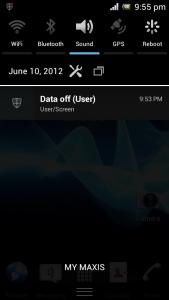
want tutorials? actually i prefer the one snoeII showed us previously..that 1 looks more ICS. if only they got the systemUI.apk for such design for Xperia, converting it into our PRO isnt an issue for me now..  Installation guide » Click to show Spoiler - click again to hide... « 1. Rooting required. best with CWM for a backup point saved before u install this wicked thing~ 2. go to the link : http://forum.xda-developers.com/showthread.php?t=1534903 ,under ICS 4.0.4 Official download, download PART C. 3. save the .zip file in ur sdcard and install the .zip file via CWM 'install .zip file in sdcard'. 4. open 'root explorer' or equivalent app which can open and alter root settings. locate /system/app/SystemUI.apk, select 'mount RW', long press systemui.apk, select 'permissions', re-edit the permissions as below: 
5. reboot ur unit. enjoy~ 6. settings of the statusbar can be edited via 'Quickpanel settings' application in ur program list. Credits to hansip87 xda. |
|
|
|
|
|
Snoe II
|
Jun 10 2012, 10:35 PM
|
|
|
look at my free RAM . cool isn't ? xD 
|
|
|
|
|
|
rexstor
|
Jun 10 2012, 10:47 PM
|
|
|
QUOTE(SiuYi @ Jun 10 2012, 09:34 PM) PHUCKING AWESOME!!!
want tutorials? actually i prefer the one snoeII showed us previously..that 1 looks more ICS. if only they got the systemUI.apk for such design for Xperia, converting it into our PRO isnt an issue for me now.. Installation guide » Click to show Spoiler - click again to hide... « 1. Rooting required. best with CWM for a backup point saved before u install this wicked thing~ 2. go to the link : http://forum.xda-developers.com/showthread.php?t=1534903 ,under ICS 4.0.4 Official download, download PART C. 3. save the .zip file in ur sdcard and install the .zip file via CWM 'install .zip file in sdcard'. 4. open 'root explorer' or equivalent app which can open and alter root settings. locate /system/app/SystemUI.apk, select 'mount RW', long press systemui.apk, select 'permissions', re-edit the permissions as below:
5. reboot ur unit. enjoy~ 6. settings of the statusbar can be edited via 'Quickpanel settings' application in ur program list. Credits to hansip87 xda. I think,the setting layout oso changed rite? Because it related to the status bar? QUOTE(Snoe II @ Jun 10 2012, 10:35 PM) look at my free RAM . cool isn't ? xD
Lol,damn little! What cha doin? Hahahaa. Still smooth? |
|
|
|
|
|
Snoe II
|
Jun 10 2012, 10:57 PM
|
|
|
nope . the setting layout still same . QUOTE(rexstor @ Jun 10 2012, 10:47 PM) I think,the setting layout oso changed rite? Because it related to the status bar? Lol,damn little! What cha doin? Hahahaa. Still smooth? dunno la . haha . btw , i'm set the v6 to multitasking . still smooth btw . haha . |
|
|
|
|
|
nate_nightroad
|
Jun 10 2012, 11:26 PM
|
|
|
QUOTE(Snoe II @ Jun 10 2012, 10:57 PM) nope . the setting layout still same . dunno la . haha . btw , i'm set the v6 to multitasking . still smooth btw . haha . dun mind the ram thingie..i abuse the shit out of my 100% supercharged...no launcher redraw,,, i just use the default setting |
|
|
|
|
|
rexstor
|
Jun 11 2012, 12:30 AM
|
|
|
Yeah,that y im asking. Hehee. Whenever ram left a little free,but system still smooth. Hehee
|
|
|
|
|
|
SiuYi
|
Jun 11 2012, 01:45 AM
|
|
|
QUOTE(rexstor @ Jun 10 2012, 10:47 PM) I think,the setting layout oso changed rite? Because it related to the status bar? Lol,damn little! What cha doin? Hahahaa. Still smooth? still same.i dislike the xperia S home.apk..so i try to just install the statusbar only..yet it is entangled with the % battery icon..so now i dled the kosong version for the battery meter..besides the status bar, im installing as well the black keypad layout apk. later i give u guys a look then u know what i mean.  |
|
|
|
|
|
rexstor
|
Jun 11 2012, 01:59 AM
|
|
|
QUOTE(SiuYi @ Jun 11 2012, 01:45 AM) still same.i dislike the xperia S home.apk..so i try to just install the statusbar only..yet it is entangled with the % battery icon..so now i dled the kosong version for the battery meter..besides the status bar, im installing as well the black keypad layout apk. later i give u guys a look then u know what i mean. dem! my phone cant log on,stuck at Android is upgrading... gonna restore back... woooo. so far lol... no backup... dem |
|
|
|
|
|
Snoe II
|
Jun 11 2012, 02:02 AM
|
|
|
guys .. got problm here ..  whenever i try to charged my phone while it off .. it just show the sony logo .. and then turn off .. like it got bootloops .. over and over ..  i'm just worried if someday my phone completely dead and i can't charge it .. anyone know why ?? |
|
|
|
|
|
rexstor
|
Jun 11 2012, 02:04 AM
|
|
|
QUOTE(Snoe II @ Jun 11 2012, 02:02 AM) guys .. got problm here .. whenever i try to charged my phone while it off .. it just show the sony logo .. and then turn off .. like it got bootloops .. over and over .. i'm just worried if someday my phone completely dead and i can't charge it .. anyone know why ?? what mod u do on ur phone. i think for the v6,not related... |
|
|
|
|



 Quote
Quote


 0.0306sec
 0.93
0.93
 6 queries
 GZIP Disabled