Outline ·
[ Standard ] ·
Linear+
Overclocking AMD Radeon R9-200 & HD7xxx, Share your OC and bencmark Scores here
|
wongtheboy92
|
 Mar 11 2013, 07:54 PM Mar 11 2013, 07:54 PM
|

|
QUOTE(Dreamworks @ Mar 8 2013, 09:54 PM) My CPU is overclocked at 4.6GHz and RAMs at 1866MHz 9-10-9-28@1T  Is it possible that my card somehow reached 82 degrees like another forumer here and got throttled? 82 seems to be quite a low threshold number compared to CPUs at 105 degrees  Yup, now running Catalyst 13.2 beta 7. Maybe I'll rerun Valley at stock and post back  [EDIT] At stock clocks... FPS: 33.8 Score: 1416 Min FPS: 17.0 Max FPS: 64.6 Did you increase the voltage of gpu? An overclocked card with stock volt wont go that high during max-temp test like using furmark. |
|
|
|
|
|
wongtheboy92
|
Mar 11 2013, 09:31 PM
|
|
|
QUOTE(Dreamworks @ Mar 11 2013, 09:29 PM) I tried upping GPU volts all the way to 1.3V (default 1.187V), but improvements in max clock speed wasn't much... So I just settled with stock volts and pushed as far as possible without artifacts. Did u monitor ur temp using gpu z log file? I guess stock volt + max OC is safe. So u wont reach tat 8x C i guess...Have fun overclocking. |
|
|
|
|
|
wongtheboy92
|
Mar 14 2013, 01:56 PM
|
|
|
QUOTE(siles1991 @ Mar 14 2013, 04:32 AM) ok guys now i have a new problem...im currently at 1100/1400 (1075mV & +15 PowerLi)on my sapphire 7950 OC 950mhz it was working fine these few days and than something happened. My screen went blank only 1 of them, I had to close my game through task manager and than after all my google chrome tabs were black and needed to be restarted cant be refreshed. In-game background sound playing only and black screen no sound made when pressing the movement or shooting buttons so i assume it hanged. This happened after I turned the game on after a few hours of idle and happened within the first few minutes of the game. reduce the clock solve it? Reduce the power limit too. At stock speed, it will not happen like this right? |
|
|
|
|
|
wongtheboy92
|
Mar 15 2013, 01:36 PM
|
|
|
QUOTE(siles1991 @ Mar 14 2013, 02:14 PM) So how is it now? Your graphics card running cool and great? |
|
|
|
|
|
wongtheboy92
|
Apr 11 2013, 08:00 PM
|
|
|
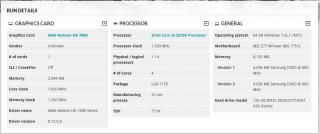
Here is my mild oc on the graphics card scoring. Sapphire HD7850 OC 2GB Attached thumbnail(s)
|
|
|
|
|
|
wongtheboy92
|
Apr 20 2013, 07:43 PM
|
|
|
QUOTE(huzzLEE_82 @ Apr 18 2013, 03:16 PM) » Click to show Spoiler - click again to hide... «
it's a try and error process... increase the core/mem clock with small increment likesay 10Mhz each time then followed by stress test (gpu stress test like msi combustor and any others) keep on increasing core/mem clock untill u pass the test without any bsod,freeze,artifact... more on tat hoping sifu shepard will guide..also if i'm wrong,do correct me...tqvm I prefer increasing the core clock first, after achieving the max core clock, then go to memory clock...Or just max the slider and then decreasing the core/memory clock if unstable, it's a trial and error process. |
|
|
|
|
|
wongtheboy92
|
May 17 2013, 10:15 AM
|
|
|
QUOTE(noobianz @ May 14 2013, 06:40 PM) i ran furmark for 4 hours and didnt notice any artifact on screen, probably can push more if using AB.. Increase some voltage and up your clocks...Run it with heavy games like crysis 3 to test for artifacts or stability running it for like 2 hours is good...i personally dont like furmark.. |
|
|
|
|
|
wongtheboy92
|
Jul 1 2013, 04:55 PM
|
|
|
QUOTE(ego3nity @ Jun 30 2013, 11:35 AM) Try overclock your cpu a bit? Is that the max OC of ur graphics card? |
|
|
|
|
|
wongtheboy92
|
Jul 2 2013, 12:45 AM
|
|
|
QUOTE(ego3nity @ Jul 1 2013, 08:52 PM) i've try max out my GC and when i run unigine again it gave me strip line on my screen. lower the memory clock perhaps...OC your cpu to release some more fps |
|
|
|
|
|
wongtheboy92
|
Jul 2 2013, 12:58 AM
|
|
|
QUOTE(ectt @ Jul 2 2013, 12:52 AM) will that make the picture more sharp or better?  if u seeing soem weird lines or images appearing during stress-testing, most probably your gpu oc isnt fully stable. U need to lower either core/memory clock.  |
|
|
|
|
|
wongtheboy92
|
Jul 2 2013, 11:31 AM
|
|
|
QUOTE(ectt @ Jul 2 2013, 02:54 AM) how often this oc will lead to gpu failure or need to reflow the gpu? becos ur card is not capable to be overclocked that high, it really depends on the card, chip and the silicon themselves...like a cpu lottery if u get a golden chip u can use lower vcore for higher overclock...same concept applied...hope that helps... |
|
|
|
|
|
wongtheboy92
|
Jul 2 2013, 04:05 PM
|
|
|
QUOTE(ectt @ Jul 2 2013, 02:28 PM) will it be the same gc, same model gpu, test under the same pc, will it be the same oc results? u mean same gpu card tested under different pcs? I guess more or less u will get the about same clock..nt so sure thou |
|
|
|
|
|
wongtheboy92
|
Jul 2 2013, 07:03 PM
|
|
|
QUOTE(ectt @ Jul 2 2013, 05:19 PM) no. meant same configuration PCs, but put the same model gc to oc, same results come out? it will vary? one graphics card or two u mean? |
|
|
|
|
|
wongtheboy92
|
Jul 3 2013, 10:41 AM
|
|
|
QUOTE(ectt @ Jul 2 2013, 09:18 PM) individualistic that's the charm to oc, same item but come out different results  My conclusion is that as long as they are both different cards meaning they have different chips and have different oc capabilities even though they are same model. Can u get my simpler explanation?  |
|
|
|
|



 Quote
Quote


 0.0207sec
 0.20
0.20
 7 queries
 GZIP Disabled