

Used Cinebench benchmark to test. opengl test around 110fps.
Folding@home my best result is 130000ppd
Overclocking AMD Radeon R9-200 & HD7xxx, Share your OC and bencmark Scores here
Overclocking AMD Radeon R9-200 & HD7xxx, Share your OC and bencmark Scores here
|
|
 May 29 2013, 08:53 PM May 29 2013, 08:53 PM
|
 
Senior Member
545 posts Joined: May 2013   
|
Used Cinebench benchmark to test. opengl test around 110fps.
Folding@home my best result is 130000ppd |
|
|
|
|
|
Jun 8 2013, 02:16 AM
|

Senior Member
1,049 posts Joined: Apr 2012 
|
QUOTE(shepard @ Jan 10 2012, 06:49 PM) Hi Guys, that's a good beauty!Anyone here tend to share their experience while overclocking this beast from AMD? Maybe we can use this thread as main platform for HD7xxx's owner to share and discuss on how great and awesome this card was  . .Anyone to share? Benchmark, Overclock, Gaming experience, FPS etc...we can share everything in this thread  . .A Sapphire Radeon HD7970 - the new KING of RED  Overclocking Tools(Use at your own risk): 1. MSI Afterburner 3.0.0 Beta 9(Latest) Download Link 2. Sapphire Trixx 4.6.0 (Latest) Download Link 3. Asus GPU Tweak 2.3.7.3 (Latest) Download Link AMD Radeon HD7970 Driver: Catalyst 13.4 WHQL, Catalyst 13.5 Beta & 13.4 CAP1 Application Profile AMD Radeon HD7970's Driver page Monitoring Utilities: GPU-Z 0.7.0 (Latest) HWiNFO64 v4.16-1900 (Latest) OC stability checking utilities (Use this at your own risk): 1. OCCT 4.4.0 Download Link 2. Furmark 1.10.6 Download Link 3. MSI Kombustor 2.5.2 Download Link My OC Results: gpu-z (1300/1685): 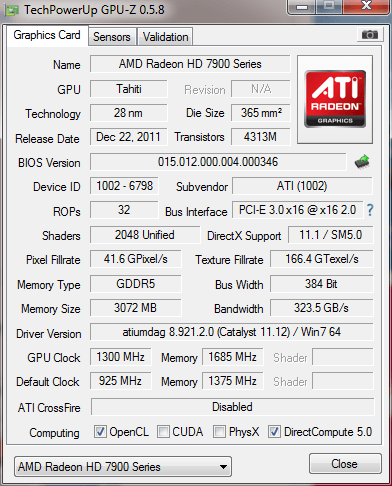 MSI Afterburner (1300/1685MHz @ 1.3v):  Benchmark at stock clock(925/1375): 3DMark Vantage (P32383): http://3dmark.com/3dmv/3832180  My BEST VANTAGE SCORE with single HD7970  HD7970 @ 1300MHz/1750MHz - P40058 Wow!! CPU 2600k @ 4.85GHz http://3dmark.com/3dmv/4035482 [attachmentid=3072410] 3DMark11 stock (925/1375) - P8003 http://3dmark.com/3dm11/2592460  3DMark11 - HD7970@ (1300/1685) - P10636 http://3dmark.com/3dm11/3239426 [attachmentid=3072412]  honestly, dare not to oc it if got one. too expensive for us. so better look at u guys how to show the oc results.  |
|
|
Jun 20 2013, 04:03 PM
|

Junior Member
215 posts Joined: Jun 2009
|
Hi Sifu,
I am planning to OC my GC HD 7870 XT with boost using Trixx software from sapphire. What I wanted to do is I would slide the core and mem clock by 100 Mhz and increase the fan speed by 10%. Is it okay to do like this? Im playing Crysis 3 now with Very high settings and has FPS of 30-- |
|
|
Jun 20 2013, 07:32 PM
|

Senior Member
849 posts Joined: May 2010 From: Penang Island 
|
QUOTE(ego3nity @ Jun 20 2013, 04:03 PM) Hi Sifu, Hi bro,I am planning to OC my GC HD 7870 XT with boost using Trixx software from sapphire. What I wanted to do is I would slide the core and mem clock by 100 Mhz and increase the fan speed by 10%. Is it okay to do like this? Im playing Crysis 3 now with Very high settings and has FPS of 30-- Yes try that first, 100MHz on Core and Mem should be okay at default voltage..however if your system is unstable after oc your 7870XT, try to drop back the core by 10MHz and rerun crysis3..if after couple of hours without issue then you're good to go. If games still crash or driver reset etc repeat the step again and again until your system is stable during gaming session. Happy overclocking! |
|
|
Jun 20 2013, 10:13 PM
|
|
Junior Member
215 posts Joined: Jun 2009
|
QUOTE(shepard @ Jun 20 2013, 07:32 PM) Hi bro, I have tried at and it is stable though.Yes try that first, 100MHz on Core and Mem should be okay at default voltage..however if your system is unstable after oc your 7870XT, try to drop back the core by 10MHz and rerun crysis3..if after couple of hours without issue then you're good to go. If games still crash or driver reset etc repeat the step again and again until your system is stable during gaming session. Happy overclocking! But on the AMD GPU Overdrive: the Core slider is current 1075 (Prev 975:default) and it has Max: 1425 the Mem slider is current 1600 (Prev 1500:default) and it has Max: 2000 I really want to max out these two lol.. wonder what would happen to my system. |
|
|
Jun 20 2013, 10:19 PM
|
|
Senior Member
849 posts Joined: May 2010 From: Penang Island
|
QUOTE(ego3nity @ Jun 20 2013, 10:13 PM) I have tried at and it is stable though. you cant max out..well you can but of course your system wont stable at that clock, normally for 7870XT iirc should be able to max up to 1100MHz core at stock voltage, Mem maybe 1650 is the max, anyhow you may try them and see..watch the temps though, control fan speed proportional to core clocks. But on the AMD GPU Overdrive: the Core slider is current 1075 (Prev 975:default) and it has Max: 1425 the Mem slider is current 1600 (Prev 1500:default) and it has Max: 2000 I really want to max out these two lol.. wonder what would happen to my system. If you want to OC higher than 1100MHz core, then it's time to overvolt your card but the risk is there once you overvolt it and I hold no responsibility  |
|
|
|
|
|
Jun 20 2013, 10:46 PM
|
|
Junior Member
215 posts Joined: Jun 2009
|
QUOTE(shepard @ Jun 20 2013, 10:19 PM) you cant max out..well you can but of course your system wont stable at that clock, normally for 7870XT iirc should be able to max up to 1100MHz core at stock voltage, Mem maybe 1650 is the max, anyhow you may try them and see..watch the temps though, control fan speed proportional to core clocks. i see.. in conclusion if i want to OC higher then I shud increase the voltage. Is it the VDDC section? If it becomes spoil or faulty the warranty will still be accepted right? lolIf you want to OC higher than 1100MHz core, then it's time to overvolt your card but the risk is there once you overvolt it and I hold no responsibility |
|
|
Jun 20 2013, 11:05 PM
|
|
Senior Member
849 posts Joined: May 2010 From: Penang Island
|
QUOTE(ego3nity @ Jun 20 2013, 10:46 PM) i see.. in conclusion if i want to OC higher then I shud increase the voltage. Is it the VDDC section? If it becomes spoil or faulty the warranty will still be accepted right? lol yeap bro the VDDC for core clock and MVDDC for mem clock but pls dont touch MVDDC if it's there in TriXx, not much of use anyway.. the result of too high overvoltage could be component burnts on PCB, normally they will accept the RMA but I cant guarantee that. It's up to them in the end, somemore would you want to wait for a month without a GC? hehe I wouldn't dare overvolt too much if I dont have a backup GC  |
|
|
Jun 21 2013, 12:02 AM
|
|
Junior Member
215 posts Joined: Jun 2009
|
QUOTE(shepard @ Jun 20 2013, 11:05 PM) yeap bro the VDDC for core clock and MVDDC for mem clock but pls dont touch MVDDC if it's there in TriXx, not much of use anyway.. the result of too high overvoltage could be component burnts on PCB, normally they will accept the RMA but I cant guarantee that. It's up to them in the end, somemore would you want to wait for a month without a GC? hehe I wouldn't dare overvolt too much if I dont have a backup GC hahhaaguest what... my system just hang lol after long hours of gaming hang at core 1075 and mem 1600 hahaha now i reset it back rofl |
|
|
Jun 21 2013, 12:09 AM
|
|
Senior Member
849 posts Joined: May 2010 From: Penang Island
|
QUOTE(ego3nity @ Jun 21 2013, 12:02 AM) hahhaa how about you keep your core clock at 1075MHz while only resetting your mem clock..later if got time can play again crysis 3 or any graphic intensive games/benchmarks to check for stability. It could also be due to the GPU temp, dont forget to monitor it using MSI AB's OSD during gaming..increasing or set a custom fan speed profile will help also.guest what... my system just hang lol after long hours of gaming hang at core 1075 and mem 1600 hahaha now i reset it back rofl |
|
|
Jun 22 2013, 09:20 PM
|
|
Junior Member
215 posts Joined: Jun 2009
|
QUOTE(shepard @ Jun 21 2013, 12:09 AM) how about you keep your core clock at 1075MHz while only resetting your mem clock..later if got time can play again crysis 3 or any graphic intensive games/benchmarks to check for stability. It could also be due to the GPU temp, dont forget to monitor it using MSI AB's OSD during gaming..increasing or set a custom fan speed profile will help also. right now, i increase at 985 MHz and no crash so far.. While playing the crysis 3, my GPU temp is at 70 degree celcius max. For the fan speed, i set it as auto. |
|
|
Jun 22 2013, 09:31 PM
|
|
Senior Member
1,049 posts Joined: Apr 2012
|
QUOTE(ego3nity @ Jun 22 2013, 09:20 PM) right now, i increase at 985 MHz and no crash so far.. While playing the crysis 3, my GPU temp is at 70 degree celcius max. For the fan speed, i set it as auto. usually testing stability for how long? one day, few days? |
|
|
Jun 22 2013, 10:41 PM
|
|
Senior Member
849 posts Joined: May 2010 From: Penang Island
|
QUOTE(ego3nity @ Jun 22 2013, 09:20 PM) right now, i increase at 985 MHz and no crash so far.. While playing the crysis 3, my GPU temp is at 70 degree celcius max. For the fan speed, i set it as auto. hmm that's quite low at default Vddc bro, anyhow why dont try 1050MHz and see..seems like a sweet spot to me..70deg is good already so maybe once you oc to 1050MHz, it'll go up to ~76-78deg and that's still fine though..QUOTE(ectt @ Jun 22 2013, 09:31 PM) usually testing stability for how long? one day, few days? depends on each user also, some people will satisfy with few hours gaming like Crysis 3 or other 3d benchmarks application(Unigine,3dmark etc), some people likes to run stress test apps like occt,kombustor,furmark etc for few hours or days..result of course differ bro, to me as long as my system stable for extreme gaming maybe 3-4hours non stop that would be good enough..but of course have to monitor max GPU temp as well...Once we've familiar ourself with overclocking everything will go smoothly but still have to monitor certain things especially the temp, voltage.. |
|
|
|
|
|
Jun 22 2013, 10:43 PM
|
|
Senior Member
1,049 posts Joined: Apr 2012
|
QUOTE(shepard @ Jun 22 2013, 10:41 PM) hmm that's quite low at default Vddc bro, anyhow why dont try 1050MHz and see..seems like a sweet spot to me..70deg is good already so maybe once you oc to 1050MHz, it'll go up to ~76-78deg and that's still fine though.. any stress test tools suggested?depends on each user also, some people will satisfy with few hours gaming like Crysis 3 or other 3d benchmarks application(Unigine,3dmark etc), some people likes to run stress test apps like occt,kombustor,furmark etc for few hours or days..result of course differ bro, to me as long as my system stable for extreme gaming maybe 3-4hours non stop that would be good enough..but of course have to monitor max GPU temp as well...Once we've familiar ourself with overclocking everything will go smoothly but still have to monitor certain things especially the temp, voltage.. |
|
|
Jun 22 2013, 10:59 PM
|
|
Senior Member
849 posts Joined: May 2010 From: Penang Island
|
QUOTE(ectt @ Jun 22 2013, 10:43 PM) any stress test tools suggested? Pls refer to the 1st post, the link is already there..just download, install and run it for few hours maybe to test your GPU OC stability |
|
|
Jun 22 2013, 11:02 PM
|
|
Senior Member
1,049 posts Joined: Apr 2012
|
QUOTE(shepard @ Jun 22 2013, 10:59 PM) Pls refer to the 1st post, the link is already there..just download, install and run it for few hours maybe to test your GPU OC stability tq |
|
|
Jun 22 2013, 11:16 PM
|
|
Junior Member
215 posts Joined: Jun 2009
|
QUOTE(ectt @ Jun 22 2013, 09:31 PM) usually testing stability for how long? one day, few days? i normally play for 2-3 hours only.. and if no crash i will increase bit by bit |
|
|
Jun 22 2013, 11:18 PM
|
|
Junior Member
215 posts Joined: Jun 2009
|
QUOTE(shepard @ Jun 22 2013, 10:41 PM) hmm that's quite low at default Vddc bro, anyhow why dont try 1050MHz and see..seems like a sweet spot to me..70deg is good already so maybe once you oc to 1050MHz, it'll go up to ~76-78deg and that's still fine though.. hahaha, now im increasing it little by little first to know where it crash, last time it crash at core 1075 and mem 1600. |
|
|
Jun 22 2013, 11:22 PM
|
|
Senior Member
1,049 posts Joined: Apr 2012
|
QUOTE(ego3nity @ Jun 22 2013, 11:18 PM) hahaha, now im increasing it little by little first to know where it crash, last time it crash at core 1075 and mem 1600. any means to know the crash is due to the gpu or the graphic card ram chips? |
|
|
Jun 22 2013, 11:29 PM
|
|
Junior Member
215 posts Joined: Jun 2009
|
QUOTE(ectt @ Jun 22 2013, 11:22 PM) any means to know the crash is due to the gpu or the graphic card ram chips? this one is still mystery for me, coz last time i put my core to 1075 and mem to 1600 it crash after 1 hour playing, so right now im doing it little by little |
|
Topic ClosedOptions
|
| Change to: |  0.0278sec 0.0278sec
 0.30 0.30
 6 queries 6 queries
 GZIP Disabled GZIP Disabled
Time is now: 2nd December 2025 - 12:45 PM |
 Quote
Quote