

Sapphire HD7850 OC 2GB
Attached thumbnail(s)

Overclocking AMD Radeon R9-200 & HD7xxx, Share your OC and bencmark Scores here
|
|
 Apr 11 2013, 08:00 PM Apr 11 2013, 08:00 PM
|
 
Senior Member
809 posts Joined: Dec 2008  
|
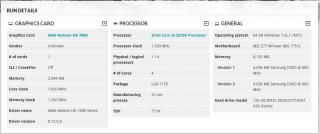
Here is my mild oc on the graphics card scoring.
Sapphire HD7850 OC 2GB Attached thumbnail(s)
|
|
|
|
|
|
Apr 13 2013, 01:40 AM
|

Junior Member
43 posts Joined: Mar 2013
|
can anyone help me with oc-ing my GPU? newbee here, know ntg bout OC.
1) I got msi after burner, so i just tweak the system there? 2) whats the best/stable core clock, memory clock to go with my current spec? 3) my Room got AC + fan blow it also can i5 3470 msi b75-p45 7870xt additional fan added in casing Seasonic S12 II 620W |
|
|
Apr 18 2013, 03:16 PM
|

Senior Member
1,301 posts Joined: Feb 2010 From: FSN9 CenTToll
|
» Click to show Spoiler - click again to hide... « it's a try and error process... increase the core/mem clock with small increment likesay 10Mhz each time then followed by stress test (gpu stress test like msi combustor and any others) keep on increasing core/mem clock untill u pass the test without any bsod,freeze,artifact... more on tat hoping sifu shepard will guide..also if i'm wrong,do correct me...tqvm |
|
|
Apr 20 2013, 07:43 PM
|
|
Senior Member
809 posts Joined: Dec 2008
|
QUOTE(huzzLEE_82 @ Apr 18 2013, 03:16 PM) » Click to show Spoiler - click again to hide... « it's a try and error process... increase the core/mem clock with small increment likesay 10Mhz each time then followed by stress test (gpu stress test like msi combustor and any others) keep on increasing core/mem clock untill u pass the test without any bsod,freeze,artifact... more on tat hoping sifu shepard will guide..also if i'm wrong,do correct me...tqvm  |
|
|
Apr 21 2013, 11:08 AM
|

Senior Member
1,256 posts Joined: Dec 2009 
|
QUOTE(Newgod @ Apr 13 2013, 01:40 AM) can anyone help me with oc-ing my GPU? newbee here, know ntg bout OC. Do like what others say. Don't forget to install and monitor with GPU-Z. Graphic is safe if you don't tweak voltage and temperature under 90C. But I ideal temperature is less than 80C.1) I got msi after burner, so i just tweak the system there? 2) whats the best/stable core clock, memory clock to go with my current spec? 3) my Room got AC + fan blow it also can i5 3470 msi b75-p45 7870xt additional fan added in casing Seasonic S12 II 620W |
|
|
Apr 22 2013, 08:51 PM
|
|
All Stars
14,673 posts Joined: Sep 2010
|
QUOTE(shepard @ Jan 10 2012, 07:39 PM) bro, when you play latest games with all eye candy sets to the maxed possible, you'll know that even the most powerful single GPU also struggling to maintain a playable fps especially when you play at 1080p or higher res. That's where GPU OC taking its part to produce more fps = smooth gameplay. You're right about the life span, but to me as long as we monitor the temps and control it wisely everything should be fine, believe me.. I may not an expert when it comes to overclocking CPU/GPU but from what I read and learnt from OC old timers all over the net, and with some experience in overclocking GTX8800s, HD5850s, 6970s before..i believe as long as we know what we did, the GC should be fine. Just to ask a bit, my PC blank screen when attempting to overclock my GPU using Trixx. Most importantly, we didn't use highest achieved OC for 24/7 but instead just for benching purpose and try to get a highest score possible. same goes with those who OC'ed their CPU using subzero/LN2 etc...they didn't do that for 24/7 usage but just for the score and to exceed the limit+ for fun...just my 10cents though  . .Added on January 10, 2012, 7:43 pm sorry bro, i dont have a decent camera so i didn't capture any photo. maybe tonight I'll capture some and upload it. This is a MUST HAVE card for all 'extreme pc gamers'  . .1. fan really silent 2. the design is superb 3. this card is really cold 4. easy to OC, can OC up to 300MHz+ on core and up to 250MHz on memory easily, just need a small bump on voltage. 5. very stable OC  870/1270 right now... but my monitor black screen. What should I do next? Increase power limit?  |
|
|
|
|
|
Apr 22 2013, 09:24 PM
|

Senior Member
849 posts Joined: May 2010 From: Penang Island
|
QUOTE(chocobo7779 @ Apr 22 2013, 08:51 PM) Just to ask a bit, my PC blank screen when attempting to overclock my GPU using Trixx. Hmm..I saw you're using HD7950 vapor-x where the default clock is 850/1250 right, so when you say black screen is it black screen at 870/1270 or higher clock? after the black screen what happen next, i expect it should be a driver reset right? what program you're using to test your OC and did you monitor your GPU/VRM temps during stress test?870/1270 right now... but my monitor black screen. What should I do next? Increase power limit? If you only do mild OC I dont think increasing power limit will help. maybe you can try to increase Vcore a little bit, try add 0.025V and oc one more time. I recommend you to OC your gpu clock first and dont increase your mem clock just yet. Once you obtained your max stable core clock, then you can work on mem oc. good luck bro |
|
|
Apr 27 2013, 09:12 AM
|
 
Elite
8,711 posts Joined: Nov 2007 From: Butterworth, PG / Machang, Kelantan
|
1320/1750 are the highest clocks I could get from 3x 7970 with 13.1 WHQL
 Power limit is set to 15%, higher than this will freeze the system. VRM temp max at 50C+. 13.4 WHQL and 13.5 Beta2 w/ or w/o 12.4 CAP1 will freeze the PC instantly. VRM is max at 105C.  |
|
|
Apr 27 2013, 10:06 AM
|
|
Elite
8,711 posts Joined: Nov 2007 From: Butterworth, PG / Machang, Kelantan
|
I dont know whats wrong with the VRM as all cards are watercooled LOL
|
|
|
Apr 29 2013, 08:51 PM
|
|
Senior Member
849 posts Joined: May 2010 From: Penang Island
|
QUOTE(owikh84 @ Apr 27 2013, 09:12 AM) 1320/1750 are the highest clocks I could get from 3x 7970 with 13.1 WHQL I tried 13.4 WHQL and now even on 1150/1600, my pc wont stable anymore. the driver keep crashing and restart without any reason. I just surf the net and sometime explore my pc also got driver reset suddenly. Something is not right with this driver.Power limit is set to 15%, higher than this will freeze the system. VRM temp max at 50C+. 13.4 WHQL and 13.5 Beta2 w/ or w/o 12.4 CAP1 will freeze the PC instantly. VRM is max at 105C. I'll try 1250/1650 later and monitor VRM temps to simulate what you're getting. |
|
|
Apr 29 2013, 10:54 PM
|
|
Elite
8,711 posts Joined: Nov 2007 From: Butterworth, PG / Machang, Kelantan
|
QUOTE(shepard @ Apr 29 2013, 08:51 PM) I tried 13.4 WHQL and now even on 1150/1600, my pc wont stable anymore. the driver keep crashing and restart without any reason. I just surf the net and sometime explore my pc also got driver reset suddenly. Something is not right with this driver. ok lets share here once you got the VRM readings.I'll try 1250/1650 later and monitor VRM temps to simulate what you're getting. |
|
|
Apr 29 2013, 11:30 PM
|

Elite
6,799 posts Joined: Jan 2003
|
i am still good at 1160/1650 on air. vrm readings all low.
|
|
|
Apr 29 2013, 11:49 PM
|
|
Senior Member
849 posts Joined: May 2010 From: Penang Island
|
QUOTE(cstkl1 @ Apr 29 2013, 11:30 PM) i am still good at 1160/1650 on air. vrm readings all low.  , you're on 13.4 WHQL as well? will update my findings here tonight.. , you're on 13.4 WHQL as well? will update my findings here tonight.. |
|
|
|
|
|
Apr 29 2013, 11:56 PM
|
|
Elite
6,799 posts Joined: Jan 2003
|
testing now the latest beta driver.
still seems good. same voltages ( its 1256 set now .. lol simcity ...) vram is at 1.562v this is comparison to the screenshot i did last time. hmm owikh did u read this http://support.amd.com/us/kbarticles/Pages...BetaDriver.aspx QUOTE NOTE! You must un-install AMD Catalyst 13.4 (if you have already installed AMD Catalyst 13.4) before installing AMD Catalyst 13.5 Beta This post has been edited by cstkl1: Apr 29 2013, 11:57 PM |
|
|
Apr 30 2013, 12:27 AM
|
|
Elite
8,711 posts Joined: Nov 2007 From: Butterworth, PG / Machang, Kelantan
|
QUOTE(cstkl1 @ Apr 29 2013, 11:56 PM) testing now the latest beta driver. ya bro I always vanish the old driver residues using ATIUninstallMan and DriverCleanerPro before installing new driver.still seems good. same voltages ( its 1256 set now .. lol simcity ...) vram is at 1.562v this is comparison to the screenshot i did last time. hmm owikh did u read this http://support.amd.com/us/kbarticles/Pages...BetaDriver.aspx |
|
|
May 1 2013, 06:46 PM
|
|
Elite
6,799 posts Joined: Jan 2003
|
Hmm so either tessalation n or driver frame been change to affect ure stabilities.
But curious how ure vrm hit 105 on water |
|
|
May 1 2013, 10:38 PM
|
|
Elite
8,711 posts Joined: Nov 2007 From: Butterworth, PG / Machang, Kelantan
|
QUOTE(cstkl1 @ May 1 2013, 06:46 PM) Hmm so either tessalation n or driver frame been change to affect ure stabilities. I also don't know why only the VRM temp overshoot that much for all 3 cards, core temp is fine though.But curious how ure vrm hit 105 on water I think i will need to check the GPU blocks and see what's wrong with the VRM areas the thermal pads could be worn out already but all the 3 cards hmm  |
|
|
May 2 2013, 12:07 AM
|
|
Senior Member
849 posts Joined: May 2010 From: Penang Island
|
Sorry guys I'm late, been busy modding my case's side panel. will try to update my findings by tonight
|
|
|
May 2 2013, 05:28 AM
|
|
Senior Member
849 posts Joined: May 2010 From: Penang Island
|
UPDATE:
My max VRM temps when running 3dmark13 at 1250/1650 was 55'C & 49'C, so I believe it could be your VRM thermal pad or something else that cause your VRM temps jump so high owikh84 |
|
|
May 2 2013, 01:59 PM
|
|
Elite
8,711 posts Joined: Nov 2007 From: Butterworth, PG / Machang, Kelantan
|
QUOTE(shepard @ May 2 2013, 05:28 AM) UPDATE: alright thanks for testing but I'm running 3DMark11.My max VRM temps when running 3dmark13 at 1250/1650 was 55'C & 49'C, so I believe it could be your VRM thermal pad or something else that cause your VRM temps jump so high owikh84 |
|
Topic ClosedOptions
|
| Change to: |  0.0443sec 0.0443sec
 0.52 0.52
 6 queries 6 queries
 GZIP Disabled GZIP Disabled
Time is now: 3rd December 2025 - 03:27 AM |
 Quote
Quote