Welcome Guest ( Log In | Register )

Bump Topic Topic Closed RSS Feed
40 Pages « < 16 17 18 19 20 > » Bottom

Outline · [ Standard ] · Linear+

 Overclocking AMD Radeon R9-200 & HD7xxx, Share your OC and bencmark Scores here

views
     
Qavs
post Jul 3 2012, 11:50 AM

Casual
***
Junior Member
355 posts

Joined: Dec 2011


QUOTE(sam sam @ Jul 3 2012, 08:24 AM)
That is really high.
At what speed are you running your card

Perharps it was not seated properly
Most full block temp is around temp under50c
If it is over60c it is worst than the ac triple fan
Should ask your seller why is it so high
What software do you stress your card with
*
MSI Kombusator.
Furmark.
Around > 1.25v
owikh84
post Jul 3 2012, 12:03 PM

i7 Clan
Group Icon
Elite
8,711 posts

Joined: Nov 2007
From: Butterworth, PG / Machang, Kelantan


Agree with sam that 80C is too high for water.
Becareful you might damage the O-ring with such temps.
Better check your loop whether it's fully bled, that's free of bubbles.
By rights should get about the same as full cover block (FC cools VRM as well). My 7970 FC OCed to 1250 @ 1.25v wont go above 60C on Furmark/OCCT.


Added on July 3, 2012, 12:12 pmAlso eyefinity tends to run hotter than single display, but wont be this high.
If ambient/room temp is hot like sauna you wont get a decent temp.
You might try to resit and reapply the TIM just in case if the GPU block is not seated properly smile.gif

This post has been edited by owikh84: Jul 3 2012, 12:12 PM
sam sam
post Jul 3 2012, 12:54 PM

Enthusiast
*****
Senior Member
814 posts

Joined: May 2011
QUOTE(Qavs @ Jul 3 2012, 11:50 AM)
MSI Kombusator.
Furmark.
Around > 1.25v
*
mine is 1.25Volts 47-48Cspeed at 1250
do note this is temp is for three cards of heat
room temp is 21C
if room temp is 30C card is around 54C

something is wrong
just tested this weekend after i flash my last card to asus bios
did not want to do the msi bios

using Furmark, kombusator is lower temps then furmark
gpu load is 99%

do note check you asic score. Its really important
the lowest asic score is a difference of 1-2C between highest card and lowest card for mine. HIghest is 84 and lowest is 81.3

This post has been edited by sam sam: Jul 3 2012, 12:55 PM
Qavs
post Jul 3 2012, 04:00 PM

Casual
***
Junior Member
355 posts

Joined: Dec 2011


QUOTE(sam sam @ Jul 3 2012, 12:54 PM)
mine is 1.25Volts 47-48Cspeed at 1250
do note this is temp is for three cards of heat
room temp is 21C
if room temp is 30C card is around 54C

something is wrong
just tested this weekend after i flash my last card to asus bios
did not want to do the msi bios

using Furmark, kombusator is lower temps then furmark
gpu load is 99%

do note check you asic score. Its really important
the lowest asic score is a difference of 1-2C between highest card and lowest card for mine. HIghest is 84 and lowest is 81.3
*
Mine are 64% IIRC, does that explain the heat? If not I think I'll resend it back to Cyntrix for diagnose / or just change to full block.
sam sam
post Jul 3 2012, 04:29 PM

Enthusiast
*****
Senior Member
814 posts

Joined: May 2011
QUOTE(Qavs @ Jul 3 2012, 04:00 PM)
Mine are 64% IIRC, does that explain the heat? If not I think I'll resend it back to Cyntrix for diagnose / or just change to full block.
*
not really on the asic socre
but its just way too high
full block is a bit better but that does not explain the 20C difference. ITs way too much
perhaps either the
1) the card is semi faulty
2) the block was not set properly

i think resend back is your best bet
Qavs
post Jul 3 2012, 06:04 PM

Casual
***
Junior Member
355 posts

Joined: Dec 2011


QUOTE(sam sam @ Jul 3 2012, 04:29 PM)
not really on the asic socre
but its just way too high
full block is a bit better but that does not explain the 20C difference. ITs way too much
perhaps either the
1) the card is semi faulty
2) the block was not set properly

i think resend back is your best bet
*
Okay. Thank you for the advice. Will plan.
sam sam
post Jul 3 2012, 07:12 PM

Enthusiast
*****
Senior Member
814 posts

Joined: May 2011
Before you do anything els
What is your idle temp at normal speeds and over lock speeds
Qavs
post Jul 3 2012, 08:44 PM

Casual
***
Junior Member
355 posts

Joined: Dec 2011


QUOTE(sam sam @ Jul 3 2012, 07:12 PM)
Before you do anything els
What is your idle temp at normal speeds and over lock speeds
*
stock speed idle temps is 41 load around 70 too. (load is gaming, not stress temp)
I'm suspecting the mount bracket is not fitting my block properly.

sam sam
post Jul 3 2012, 09:24 PM

Enthusiast
*****
Senior Member
814 posts

Joined: May 2011
QUOTE(Qavs @ Jul 3 2012, 08:44 PM)
stock speed idle temps is 41 load around 70 too.Ā  (load is gaming, not stress temp)
I'm suspecting the mount bracket is not fitting my block properly.
*
idle seems to be on the high side
i was told the raystorm does not fit the 7970 properly do more checking on this. If it does not fit properly then nothing much you can do except ask for a refund
but do check this out properly.

70C load is worst than artic cooler 7970 aftermod using fans

can you take apart your loop and check out your card?

did a check universal blocks needs a 0.5mm spacer so that contact is made, eventhough it is screwed tighthly. You should check whether the spacer is there.

This post has been edited by sam sam: Jul 3 2012, 09:48 PM
CyntrixTech
post Jul 3 2012, 10:43 PM

Distributor
*******
Senior Member
2,583 posts

Joined: Sep 2011
From: Kuala Lumpur
Raystorm GPU doesn't come with the copper shim. Buy it from APES and install it in between the core and the block as suggested. This is used in the Supreme HF unviersal block on the 7970.
sam sam
post Jul 3 2012, 10:56 PM

Enthusiast
*****
Senior Member
814 posts

Joined: May 2011
QUOTE(CyntrixTech @ Jul 3 2012, 10:43 PM)
Raystorm GPU doesn't come with the copper shim. Buy it from APES and install it in between the core and the block as suggested. This is used in the Supreme HF unviersal block on the 7970.
*
here is the webpage on how it looks
http://www.ekwaterblocks.com/shop/ek-vga-s...cu-adapter.html


Qavs
post Jul 3 2012, 11:33 PM

Casual
***
Junior Member
355 posts

Joined: Dec 2011


QUOTE(sam sam @ Jul 3 2012, 09:24 PM)
idle seems to be on the high side
i was told the raystorm does not fit the 7970 properly do more checking on this. If it does not fit properly then nothing much you can do except ask for a refund
but do check this out properly.

70C load is worst than artic cooler 7970 aftermod using fans

can you take apart your loop and check out your card?

did a check universal blocks needs a 0.5mm spacer so that contact is made, eventhough it is screwed tighthly. You should check whether the spacer is there.
*
So my case now is the contact is not properly made?
sam sam
post Jul 3 2012, 11:45 PM

Enthusiast
*****
Senior Member
814 posts

Joined: May 2011
QUOTE(Qavs @ Jul 3 2012, 11:33 PM)
So my case now is the contact is not properly made?
*
Yes you need to get the extra plate.
The installer of your unit should have done it for you. If it is not there that you need to do it

Qavs
post Jul 3 2012, 11:56 PM

Casual
***
Junior Member
355 posts

Joined: Dec 2011


QUOTE(sam sam @ Jul 3 2012, 11:45 PM)
Yes you need to get the extra plate.
The installer of your unit should have done it for you. If it is not there that you need to do it
*
Yup it's not there. I will get it when I got the time, but no rush la since GC can withstand more heat than that. Just feel bottleneck when wc can achieve much lower temps.
sam sam
post Jul 4 2012, 09:05 AM

Enthusiast
*****
Senior Member
814 posts

Joined: May 2011
QUOTE(Qavs @ Jul 3 2012, 11:56 PM)
Yup it's not there. I will get it when I got the time, but no rush la since GC can withstand more heat than that. Just feel bottleneck when wc can achieve much lower temps.
*
Actually if you don't have proper seating it is more adviseable to avoid using the gc for load
The card can go into thermal runaway or spoil itself. When the gpu is hot it would draw more power which in turn gives of more heat and the cycle continues
Qavs
post Jul 5 2012, 06:25 AM

Casual
***
Junior Member
355 posts

Joined: Dec 2011


QUOTE(sam sam @ Jul 4 2012, 09:05 AM)
Actually if you don't have proper seating it is more adviseable to avoid using the gc for load
The card can go into thermal runaway or spoil itself. When the gpu is hot it would draw more power which in turn gives of more heat and the cycle continues
*
Do you know anyone who sell the copper plate?
sam sam
post Jul 5 2012, 09:30 AM

Enthusiast
*****
Senior Member
814 posts

Joined: May 2011
QUOTE(Qavs @ Jul 5 2012, 06:25 AM)
Do you know anyone who sell the copper plate?
*
Look for Jibek or ezzy here in the forum
They should sell the plate.
availyboy
post Jul 8 2012, 01:46 AM

So Prettay!
*****
Senior Member
786 posts

Joined: Dec 2007
From: 192.168.1.1


Hi there guys,i know that ref cards are loud and also kinda hot too biggrin.gif thinking of aftermarket cooler.
Anyways lets get back to the overclocking part.
I was able to get 1100mhz core and 1575mhz memory OC stable
Coreclock : 925 to 1100mhz
Memoryclock : 1375 to 1575mhz
Voltage : 1.174(remains stock)

Card model : sapphire hd7970 reference cooler.

Okay,about this, tried bumping to 1125mhz which voltage still stays on 1.174v,seems to me that other cards were able to do this,so i thought voltage limited,tried to bump to 1.2v and raise to 1125mhz,still the kombuster just crashed that way.

Somehow,i let coreclock remain at 1100mhz,and bumped my memory clock to 1750mhz,it seems still stable,haven't tried higher though,voltage is on 1.174v still.
I was wondering,is it okay to play 24/7 with this memory clock @ 1750mhz? Or i should lower it..or isit okay to raise more.
Because i scare i fried the memory chips or something this will be a problem for me.

And about the coreclock,anyone have any idea i can reach higher? ...seems i'm stuck at 1100mhz,Heard some people told me to flash XFX Black Edition Bios.Kinda blur here,anyone mind to guide me with this too? haha Cheers!!....

Do let me know your setup if you have a 7970 ...voltage,coreclock memoryclock etc for 24/7

Btw...guys what's the 24/7 voltage can be maxed for 7970 ah?
Thanks! haheh

-----------
Added questions
-----------
Hey...btw guys,about the graphic card,i am about to run eyefinity with it though.
Planning to add one more card in the future,but then during this time,i wanted to ask
Why is my GPU load only about 30% or 40%?
But then in furmark and etc all 99% ...just wondering.
Or maybe it's my processor that haven't really overclock properly...maybe it's bottleneck?
Using i7 920 here whistling.gif

This post has been edited by availyboy: Jul 8 2012, 01:48 AM

jeff88rey
post Jul 8 2012, 05:34 PM

Getting Started
**
Junior Member
187 posts

Joined: Apr 2011
From: Kota Kinabalu


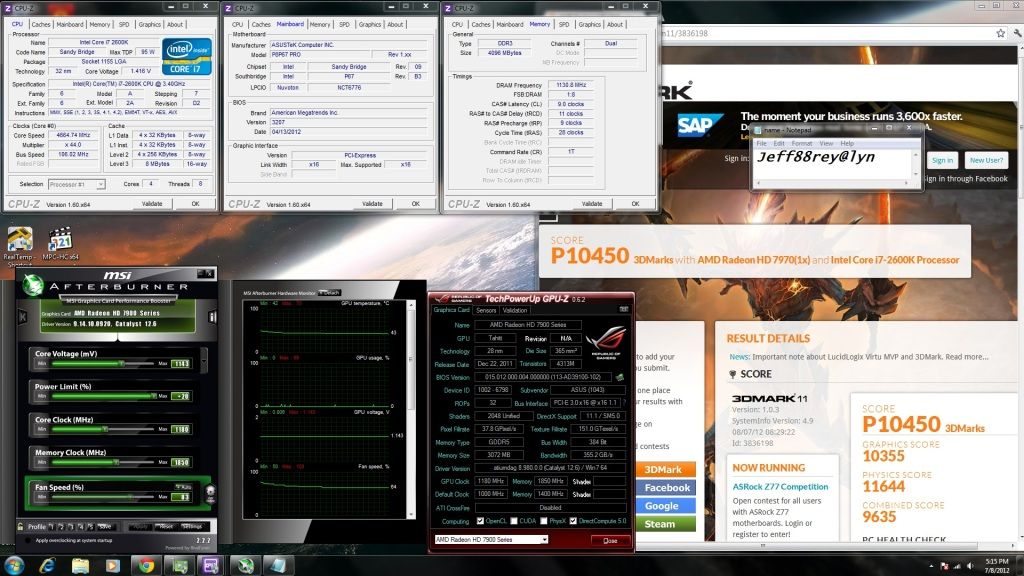
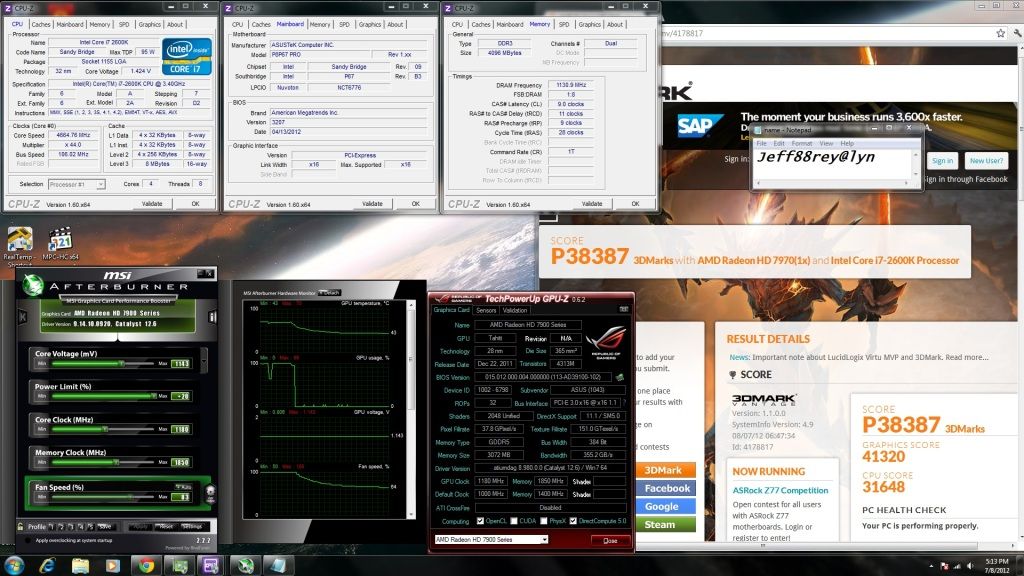
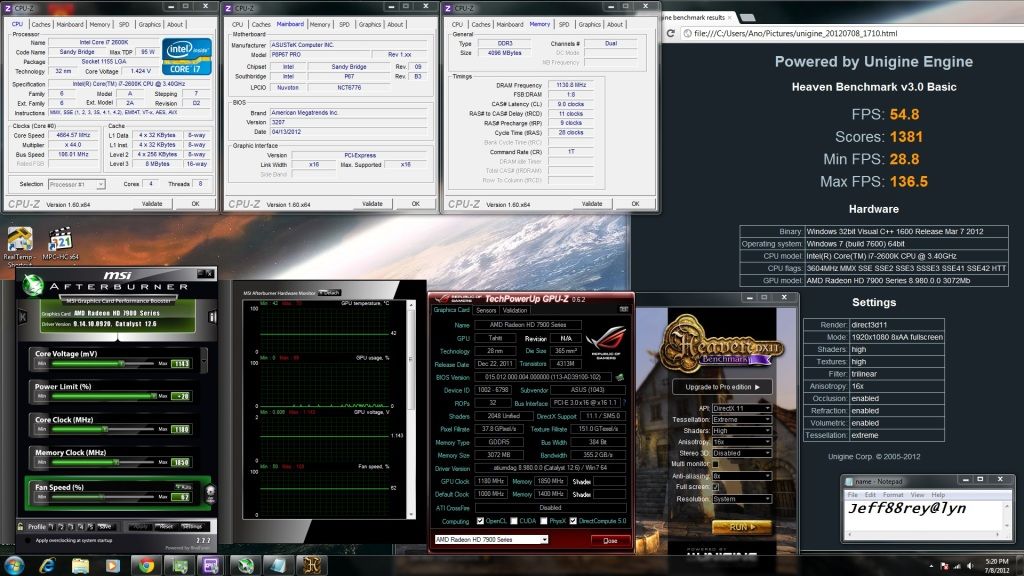
here's my 7970 result smile.gif

CPU @ 4.6Ghz HT on, 2260 9-11-9-28-1T
GPU @ 1180/1850, 1.143v

3DMark11
» Click to show Spoiler - click again to hide... «


3DMark Vantage
» Click to show Spoiler - click again to hide... «


Unigine Heaven (all maxed out)
» Click to show Spoiler - click again to hide... «


Added on July 8, 2012, 5:40 pm
QUOTE(availyboy @ Jul 8 2012, 01:46 AM)
Hi there guys,i know that ref cards are loud and also kinda hot too biggrin.gif thinking of aftermarket cooler.
Anyways lets get back to the overclocking part.
I was able to get 1100mhz core and 1575mhz memory OC stable
Coreclock : 925 to 1100mhz
Memoryclock : 1375 to 1575mhz
Voltage : 1.174(remains stock)

Card model : sapphire hd7970 reference cooler.

Okay,about this, tried bumping to 1125mhz which voltage still stays on 1.174v,seems to me that other cards were able to do this,so i thought voltage limited,tried to bump to 1.2v and raise to 1125mhz,still the kombuster just crashed that way.

Somehow,i let coreclock remain at 1100mhz,and bumped my memory clock to 1750mhz,it seems still stable,haven't tried higher though,voltage is on 1.174v still.
I was wondering,is it okay to play 24/7 with this memory clock @ 1750mhz? Or i should lower it..or isit okay to raise more.
Because i scare i fried the memory chips or something this will be a problem for me.

And about the coreclock,anyone have any idea i can reach higher? ...seems i'm stuck at 1100mhz,Heard some people told me to flash XFX Black Edition Bios.Kinda blur here,anyone mind to guide me with this too? haha Cheers!!....

Do let me know your setup if you have a 7970 ...voltage,coreclock memoryclock etc for 24/7

Btw...guys what's the 24/7 voltage can be maxed for 7970 ah?
Thanks! haheh

-----------
Added questions
-----------
Hey...btw guys,about the graphic card,i am about to run eyefinity with it though.
Planning to add one more card in the future,but then during this time,i wanted to ask
Why is my GPU load only about 30% or 40%?
But then in furmark and etc all 99% ...just wondering.
Or maybe it's my processor that haven't really overclock properly...maybe it's bottleneck?
Using i7 920 here whistling.gif
*
if the memory is at default voltage, juz keep an eye on the temp and i think you wont fry your memory so easy..

regarding the bios flashing, you can search around.. mayb you can try this:
http://forums.overclockers.co.uk/showthread.php?t=18417060

what do you mean by gpu load? is it gaming?

This post has been edited by jeff88rey: Jul 8 2012, 05:40 PM
availyboy
post Jul 9 2012, 12:31 AM

So Prettay!
*****
Senior Member
786 posts

Joined: Dec 2007
From: 192.168.1.1


QUOTE(jeff88rey @ Jul 8 2012, 05:34 PM)
here's my 7970 resultĀ  smile.gif

CPU @ 4.6Ghz HT on, 2260 9-11-9-28-1T
GPU @ 1180/1850, 1.143v

3DMark11
» Click to show Spoiler - click again to hide... «


3DMark Vantage
» Click to show Spoiler - click again to hide... «


Unigine Heaven (all maxed out)
» Click to show Spoiler - click again to hide... «


Added on July 8, 2012, 5:40 pm

if the memory is at default voltage, juz keep an eye on the temp and i think you wont fry your memory so easy..

regarding the bios flashing, you can search around.. mayb you can try this:
http://forums.overclockers.co.uk/showthread.php?t=18417060

what do you mean by gpu load? is it gaming?
*
Bro! YOUR RESULT IS AWESOME!...
I was wondering how come u can hit 1180 1850 so easily one even lower some more 1.143v >_<
I tried mine tho,and i am at default voltage 1100/1575 only,i tested 3DVantage earlier,GPU scored only 30k<,prolly my CPU bottleneck..planning on changing CPU to 950 or 960 lol better overclocking with D0 rather than C0 then >_<

About the GPU load,yes during gaming,i am on 1920x1080 it seems that the load never reach 99%,rather than only about 30%,some more during 3D Vantage only 80% more or less.Could it be CPU bottleneck?

I am trying to raise the memory even much higher though,but its on stock voltage for the memory too
Bro what brand are you using and cooler too? thumbup.gif

My 3DMARK VANTAGE
CODE
[attachmentid=2936481]

>_< 3.33ghz only,thinking of how to push to 4.0ghz now hmmmmm

This post has been edited by availyboy: Jul 9 2012, 01:09 AM


Attached thumbnail(s)
Attached Image

40 Pages « < 16 17 18 19 20 > » Top
Topic ClosedOptions
 

Change to:
| Lo-Fi Version
0.0294sec    0.72    6 queries    GZIP Disabled
Time is now: 9th December 2025 - 01:25 PM