Welcome Guest ( Log In | Register )

Bump Topic Topic Closed RSS Feed
11 Pages « < 7 8 9 10 11 >Bottom

Outline · [ Standard ] · Linear+

 Overclocking AMD Radeon R9-200 & HD7xxx, Share your OC and bencmark Scores here

views
     
TSshepard
post Feb 28 2013, 08:34 PM

We shall overcome
*****
Senior Member
849 posts

Joined: May 2010
From: Penang Island


Thanks Kevin,

Relative performance not looks good from CFx to TFx scaling..maybe I just wait for another round of driver release or wait until these 2 cards no longer able to maintain playable framerate on new games only then looking for upgrade, Thanks bro
TSshepard
post Mar 1 2013, 05:30 PM

We shall overcome
*****
Senior Member
849 posts

Joined: May 2010
From: Penang Island


Hmm..your score above lift my eyebrows. Looks to me Trifire not in action there coz I scored 107.5FPS same settings driver beta6. 7970s at 1315/1850 clocks.

I think there's something we need to do to enable trifire scaling in Valley benchmark not sure though what it is as I saw other guys at OCN with triple 7970s scored 130+ FPS.
TSshepard
post Mar 7 2013, 10:39 PM

We shall overcome
*****
Senior Member
849 posts

Joined: May 2010
From: Penang Island


QUOTE(owikh84 @ Mar 7 2013, 09:50 PM)
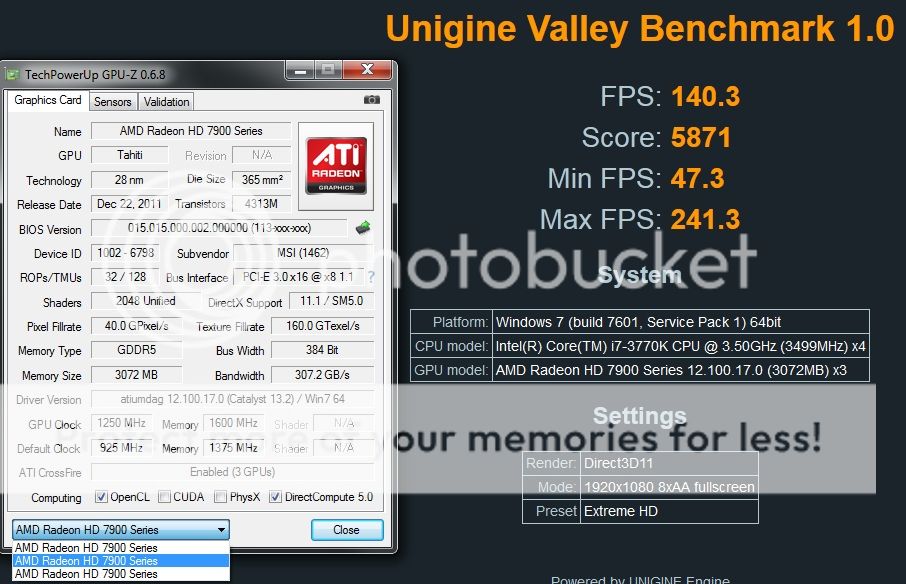
Found out the culprit. I have to create a profile in CCC and set CF mode to Optimize 1X1 so here's the updated results with 13.2 Beta7.

user posted image
*
thumbup.gif that's more like it bro..even faster than OC'ed Titan in SLI. nice job..if all the can clock upto 1300MHz the scre will be 14xFPS..nice2 smile.gif, this make me think of Trifire as well haha..
TSshepard
post Mar 8 2013, 09:44 AM

We shall overcome
*****
Senior Member
849 posts

Joined: May 2010
From: Penang Island


QUOTE(siles1991 @ Mar 8 2013, 04:42 AM)
Hey guys I oced my 7950 950mhz to 1100/1300 did fur mark benchmarking and every time it hits 82c it down clocks from 70fps to 50fps and it throttles in between those 2 values as it keeps changing from 80-82c how do I fix this
*
The only way to avoid that from happen is to manually set your GPU fan profile either using Trixx or MSI afterburner. You have to increase the fan speed and maybe try to reduce the voltage if possible in order to drop the temp during full load/furmark.

another way is open your sidepanel casing smile.gif. The best is to adjust fan speed of course.
TSshepard
post Mar 8 2013, 12:03 PM

We shall overcome
*****
Senior Member
849 posts

Joined: May 2010
From: Penang Island


QUOTE(siles1991 @ Mar 8 2013, 11:53 AM)
so its suppose to throttle at 82c?
*
Yeah I think so...your card throttle itself when reaching 82degC. tbh I personally dont recommend you to use furmark to check stability as it will ramp up your card's temp very quickly. I prefer you let your GPU stressed with 3dmark game test loop and Heaven 4.0/Valley 1.0 loop for couple of times.

Now that Crysis 3 out, I would suggest you to play crysis 3 for an hour or two while monitoring your cpu/gpu temps in the background. Make sure to log max temp on gpu/cpu and VRMs. May I know what 7950 brand/model you currently have?

edit: I saw you're using sapphire..is it Dual-X fan one?

This post has been edited by shepard: Mar 8 2013, 12:24 PM
TSshepard
post Mar 8 2013, 07:59 PM

We shall overcome
*****
Senior Member
849 posts

Joined: May 2010
From: Penang Island


QUOTE(Dreamworks @ Mar 8 2013, 12:23 AM)
Just realized there's an OC thread for Radeon 7800/7900 series rclxms.gif Here's mine:
user posted image

Sapphire Radeon 7870 XT 2GB
Core: 1135MHz
Memory: 1535MHz

This is the best clocks (apart from memory since going higher gave negligible improvements) I could get on stock voltage without artifacts after 1 hour run of Valley smile.gif Kinda lousy compared to all you big boys with 7970s in CF cry.gif
*
Hmm I thought an oc'ed 7870 XT can at least scored 40FPS+..is it bottlenecked by your cpu? I've never tried single 7970 with valley though, might wanna test it at stock to compare, btw which driver version you're using now? For valley benchmark you have to install 13.2 beta 6 or beta 7..
TSshepard
post Mar 9 2013, 03:39 AM

We shall overcome
*****
Senior Member
849 posts

Joined: May 2010
From: Penang Island


QUOTE(siles1991 @ Mar 9 2013, 02:57 AM)
if driver crash means overclock too high is it?
*
yes, what you can do is either reduce the core clock or raise Vcore...please monitor your temp closely though. Angain dont forget to monitor your GPU temp using MSI AB osd feature during benchmark/gaming/stress test.
TSshepard
post Mar 9 2013, 07:30 AM

We shall overcome
*****
Senior Member
849 posts

Joined: May 2010
From: Penang Island


QUOTE(siles1991 @ Mar 9 2013, 03:54 AM)
using trixx
currently 1090/1250 voltage(VDDC)-1050"used to be 1012" (so far no driver crash)

My max temp when letting unigine valley on highest setting(in 1440x900 reso monitor too small) is 76C with auto fan speed.

Sapphire 7950 OC edition 950mhz

new to overclocking so advice is really really appreciated xD
*
Hmm..I dont think you need to OC your 7950 too high if you're just gaming at 1440x900. You can throw any games at it without much issue, set everything at max and I believe 60fps+ is almost guaranteed. Anyway, you may bump the core/mem clocks a little bit and stay there for 24/7 gaming system.

most 7950 will do 1100/1400 with just a small bump on voltage so you can try these clocks, run valley/3dmark/heaven and if no crash or artifacts after couple of hours you shoule be good to go. Unless you wanna play with benchmark then 1200MHz core is achievable on most 7950 but of course with at least 1.2xV needed.
TSshepard
post Mar 9 2013, 01:44 PM

We shall overcome
*****
Senior Member
849 posts

Joined: May 2010
From: Penang Island


QUOTE(siles1991 @ Mar 9 2013, 11:49 AM)
how small of a bump to voltage?
*
ok since you said your default VDDC was 1.012V, then set it to 1075mV in Trixx and set core/mem to 1100/1400 respectively..you can perform stress test or benchmark loop for stability after that. If stable at 1075mV, try to reduce it to 1050mV and rerun the test, It's good to set "board power Li" to 15-20% in Trixx..check max temp during stress test. If 1050mV also stable then you're good. I suggest to play Crysis at Max setting to test those clocks as it's a good cpu and gpu stresser.
TSshepard
post Mar 9 2013, 01:59 PM

We shall overcome
*****
Senior Member
849 posts

Joined: May 2010
From: Penang Island


QUOTE(syafiq106 @ Mar 9 2013, 01:26 PM)
Is it Good or Bad?
7970 Ghz Edt 1150/1600, CCC 13.2 beta 7 with Heaven Benchmark 4.0

» Click to show Spoiler - click again to hide... «

*
Your score is good bro, mine with 2x7970 @ 1150/1600 scored as below. Your score is almost half of my score so it proved that your system is running just fine..the good thing is that Heaven 4.0 CFx scaling is amazing which is 100% improvement over single card thumbup.gif

user posted image
TSshepard
post Mar 9 2013, 11:39 PM

We shall overcome
*****
Senior Member
849 posts

Joined: May 2010
From: Penang Island


Tomb Raider Benchmark 2013

2x7970 @ 1325/1850
3770k @ 4.8GHz
1080p Ultimate setting + TressFX

user posted image
TSshepard
post Mar 14 2013, 05:01 PM

We shall overcome
*****
Senior Member
849 posts

Joined: May 2010
From: Penang Island


QUOTE(huzzLEE_82 @ Mar 13 2013, 11:20 PM)
just installed Crysis 3.. seems can't max out everything...
my FPS just 20++ during starting... any comment?
*
Yes looks like Crysis 3 developer Crytek stick to their promise to meltdown our PC with Crysis 3. The only way to play it at reasonable framerate and smooth gameplay is to reduce the setting to High/Med, FXAA, 1080p or lower res and OC our 7970 to the max stable clocks. Dont worry a lot of us struggling with this game even a highly oc'ed 2x7970s struggle at 1440p at "very high" setting and FXAA only..not to mention SSAA smile.gif.

Your 100% gpu usage issue solved already, care to share the reason why it happened? I would like to know also biggrin.gif

QUOTE(Dreamworks @ Mar 13 2013, 11:35 PM)
Just thought I'll post my overclocked/downclocked results here as well for 7870 XT in CrossFireX biggrin.gif
Core: 1100MHz
Memory: 1400MHz (downclocked)
user posted image
*
Any reason why you downclock memory? Is it due to heat or instability during benchmark run?


QUOTE(siles1991 @ Mar 14 2013, 04:32 AM)
ok guys now i have a new problem...im currently at 1100/1400 (1075mV & +15 PowerLi)on my sapphire 7950 OC 950mhz it was working fine these few days and than something happened. My screen went blank only 1 of them, I had to close my game through task manager and than after all my google chrome tabs were black and needed to be restarted cant be refreshed. In-game background sound playing only and black screen no sound made when pressing the movement or shooting buttons so i assume it hanged.

This happened after I turned the game on after a few hours of idle and happened within the first few minutes of the game.
*
the freeze happened during gaming..so mind to share with us what games causing you the freeze? Is it Crysis 3 hmm.gif , anyhow as wongtheboy said, reduce your core clock a bit and rerun again similar game that cause your PC crashed earlier.

TSshepard
post Mar 26 2013, 01:16 AM

We shall overcome
*****
Senior Member
849 posts

Joined: May 2010
From: Penang Island


QUOTE(lat_lonelyboyz @ Mar 25 2013, 12:43 AM)
Hye all..

Recently I played NFS Most Wanted and got bad laggy early game. I think my HD7870 GHz 2GB should be enough to play it all maxed out since my reso only 1600x1900 max. Currently using Catalyst 12.10 on Win7 Ulti 64 SP1.

Is that problem come from my oldie driver and need to be up-to-date one?

Can suggest a driver/catalyst version which stable to use?
*
Try catalyst 13.2 beta 7 and see, to me its the best driver so far. Yeah it's best and recommended to regularly update the driver, however if you dont have any issue with any games better stick with the old one. Just my 2 cents smile.gif
TSshepard
post Apr 9 2013, 10:15 PM

We shall overcome
*****
Senior Member
849 posts

Joined: May 2010
From: Penang Island


QUOTE(cstkl1 @ Apr 9 2013, 10:08 PM)
7970 Vapor-X 1160(1.243f/1725(1.6v) Max stable OC and probably max it can do.

» Click to show Spoiler - click again to hide... «

*
bro, iirc many 7970 vapor-x user cannot get past 1200MHz when oc'ing no matter how high they set their gpu voltage. so for your case, 1.243 is it gpu-z reading or you measured manually using multimeter? What is your max gpu/vrms temps at 1160MHz core? Just curious..
TSshepard
post Apr 22 2013, 09:24 PM

We shall overcome
*****
Senior Member
849 posts

Joined: May 2010
From: Penang Island


QUOTE(chocobo7779 @ Apr 22 2013, 08:51 PM)
Just to ask a bit, my PC blank screen when attempting to overclock my GPU using Trixx.  sweat.gif
870/1270 right now... but my monitor black screen. sweat.gif
What should I do next?  Increase power limit?  unsure.gif
*
Hmm..I saw you're using HD7950 vapor-x where the default clock is 850/1250 right, so when you say black screen is it black screen at 870/1270 or higher clock? after the black screen what happen next, i expect it should be a driver reset right? what program you're using to test your OC and did you monitor your GPU/VRM temps during stress test?

If you only do mild OC I dont think increasing power limit will help. maybe you can try to increase Vcore a little bit, try add 0.025V and oc one more time. I recommend you to OC your gpu clock first and dont increase your mem clock just yet. Once you obtained your max stable core clock, then you can work on mem oc. good luck bro biggrin.gif
TSshepard
post Apr 29 2013, 08:51 PM

We shall overcome
*****
Senior Member
849 posts

Joined: May 2010
From: Penang Island


QUOTE(owikh84 @ Apr 27 2013, 09:12 AM)
1320/1750 are the highest clocks I could get from 3x 7970 with 13.1 WHQL

user posted image

Power limit is set to 15%, higher than this will freeze the system. VRM temp max at 50C+.

13.4 WHQL and 13.5 Beta2 w/ or w/o 12.4 CAP1 will freeze the PC instantly. VRM is max at 105C.  doh.gif
*
I tried 13.4 WHQL and now even on 1150/1600, my pc wont stable anymore. the driver keep crashing and restart without any reason. I just surf the net and sometime explore my pc also got driver reset suddenly. Something is not right with this driver.

I'll try 1250/1650 later and monitor VRM temps to simulate what you're getting.
TSshepard
post Apr 29 2013, 11:49 PM

We shall overcome
*****
Senior Member
849 posts

Joined: May 2010
From: Penang Island


QUOTE(cstkl1 @ Apr 29 2013, 11:30 PM)
i am still good at 1160/1650 on air. vrm readings all low.
*
hmm.gif , you're on 13.4 WHQL as well? will update my findings here tonight..
TSshepard
post May 2 2013, 12:07 AM

We shall overcome
*****
Senior Member
849 posts

Joined: May 2010
From: Penang Island


Sorry guys I'm late, been busy modding my case's side panel. will try to update my findings by tonight sweat.gif
TSshepard
post May 2 2013, 05:28 AM

We shall overcome
*****
Senior Member
849 posts

Joined: May 2010
From: Penang Island


UPDATE:

My max VRM temps when running 3dmark13 at 1250/1650 was 55'C & 49'C, so I believe it could be your VRM thermal pad or something else that cause your VRM temps jump so high owikh84
TSshepard
post May 2 2013, 02:12 PM

We shall overcome
*****
Senior Member
849 posts

Joined: May 2010
From: Penang Island


QUOTE(owikh84 @ May 2 2013, 01:59 PM)
alright thanks for testing but I'm running 3DMark11.
*
yeah my bad, will test again with 3dmark11..sorry bout that sweat.gif

11 Pages « < 7 8 9 10 11 >Top
Topic ClosedOptions
 

Change to:
| Lo-Fi Version
0.0378sec    0.48    7 queries    GZIP Disabled
Time is now: 8th December 2025 - 07:04 AM