

I have updated 1st post with latest driver page and OC utilities download page...Feel free to explore and download but dont forget to share your OC results

Overclocking AMD Radeon R9-200 & HD7xxx, Share your OC and bencmark Scores here
|
|
 Sep 28 2012, 12:34 AM Sep 28 2012, 12:34 AM
Return to original view | Post
#101
|
 
Senior Member
849 posts Joined: May 2010 From: Penang Island   
|
Everyone,
I have updated 1st post with latest driver page and OC utilities download page...Feel free to explore and download but dont forget to share your OC results |
|
|
|
|
|
Sep 28 2012, 11:04 AM
Return to original view | Post
#102
|
|
Senior Member
849 posts Joined: May 2010 From: Penang Island
|
QUOTE(sam sam @ Sep 28 2012, 09:15 AM) Already using waterblocks for the tri cards Whoa..good for you bro, I dont have enough budget to build such a monster gaming rig like you or owikh Temps are 30c ambient and load 42c   . . btw, I read somewhere that 12.9 beta driver fixes trifire+eyefinity configuaration is it reliable source? |
|
|
Oct 2 2012, 01:38 AM
Return to original view | Post
#103
|
|
Senior Member
849 posts Joined: May 2010 From: Penang Island
|
QUOTE(rudolfjie @ Oct 2 2012, 01:29 AM) Received my Sapphire 7950 last Saturday, but unfortunately it's not a dual fan version as promise. Last time using HD7970 reference the noise also become a problem bro..but my current HD7850 using Dual-x dual fan even at 70% also the noise is still acceptable. And yeah its cooler too, good decision and choice from you I would say So I return the GC and now still waiting my Dual fan OC version to arrive. But anyhow, I think worth additional RM60 for a dual fan, cos I don't want heat issue to stop my overclocking result  |
|
|
Oct 2 2012, 09:49 PM
Return to original view | Post
#104
|
|
Senior Member
849 posts Joined: May 2010 From: Penang Island
|
QUOTE(rudolfjie @ Oct 2 2012, 08:27 PM) Got my Sapphire HD 7950 OC today, here's some benchmark compare to my previous HD6870 The performance was almost double up from your previous HD6870. Once you OC kaw kaw the HD7950, I believe it can perform even better than stock HD7970 (from left to right)1=6870ref, 2=6870@980mhz, 3=7950ref(900mhz), 4=7950ref(900mhz) Max setting  |
|
|
Oct 3 2012, 11:07 PM
Return to original view | Post
#105
|
|
Senior Member
849 posts Joined: May 2010 From: Penang Island
|
QUOTE(primaroti @ Oct 3 2012, 11:57 AM) kabaBOOMM!!!... Nice score bro...let me try benching my HD7850 OC and see the score |
|
|
Oct 4 2012, 05:59 PM
Return to original view | Post
#106
|
|
Senior Member
849 posts Joined: May 2010 From: Penang Island
|
Alright,
here's the score for HD7850 @ 1050MHz core: 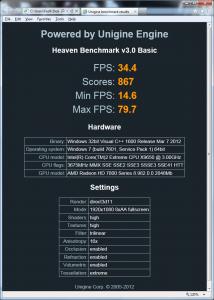
And this is the score for HD7970 at stock (1000mv): 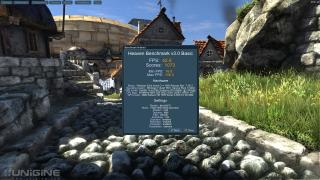
This post has been edited by shepard: Oct 4 2012, 06:04 PM |
|
|
|
|
|
Oct 4 2012, 11:41 PM
Return to original view | Post
#107
|
|
Senior Member
849 posts Joined: May 2010 From: Penang Island
|
QUOTE(rudolfjie @ Oct 4 2012, 07:37 PM) So fast received your 7970? how much you bought? Later will try 1000MHz/6000MHz but I guess 1093score for HD7950 is good already bro. Almost as fast as stock 7970  Added on October 4, 2012, 7:49 pm I can only achieve 1093 point with 1000mhz/6000mhz OC But temperature around 50c+, now have to push some limit  . Try to OC some more and see how high your card can be pushed to the limit. . Try to OC some more and see how high your card can be pushed to the limit. |
|
|
Oct 5 2012, 04:45 AM
Return to original view | Post
#108
|
|
Senior Member
849 posts Joined: May 2010 From: Penang Island
|
ok now going up to 1225MHz core & 1400MHz Mem..heaven 3.0 score is up to 1329 (52.8Fps)
 
|
|
|
Oct 5 2012, 08:17 PM
Return to original view | Post
#109
|
|
Senior Member
849 posts Joined: May 2010 From: Penang Island
|
QUOTE(jjliew95 @ Oct 5 2012, 12:23 AM) wow 1300. Isn't an easy job on air cooling !Keep up Yeah really...but 1300MHz is for sure not for gaming, artifacts appeared sometimes QUOTE(rudolfjie @ Oct 5 2012, 06:31 PM) Wow!! that's impressive !! Voltage in AB set to 1.2V, I will push it to 1.299v later and see how far this card can go..hopefully can reach 1300MHz How much voltage you increase? . Let's wait for your Max OC results then heheThis post has been edited by shepard: Oct 5 2012, 08:19 PM |
|
|
Oct 7 2012, 02:04 AM
Return to original view | Post
#110
|
|
Senior Member
849 posts Joined: May 2010 From: Penang Island
|
QUOTE(primaroti @ Oct 6 2012, 10:56 AM) already got hd 7970??? so fast..btw it is reference??? at 1225MHz, max temp was 79degC with Fan set at 60% loud as a vacuum cleaner. Later will share the temps comparison once AC accelero xtreme 7970 arrived and installed how about the temp???.. |
|
|
Oct 8 2012, 08:12 PM
Return to original view | Post
#111
|
|
Senior Member
849 posts Joined: May 2010 From: Penang Island
|
QUOTE(sam sam @ Oct 4 2012, 10:23 AM) i see shepard you are looking for a 7970 again. Sorry I missed your reply earlier..yeah from my personal exp...the graphic details, sharpness etc using AMD HD7xxx is much2 better than GTX 670/GTX680. Not to mention its overclockability, some more i dont have any issue with the driver as I'm gaming at single monitor and single GPU so yeah..HD7970 is the best choice for me how come want to jump back into the Red camp again? |
|
|
Oct 9 2012, 07:55 AM
Return to original view | Post
#112
|
|
Senior Member
849 posts Joined: May 2010 From: Penang Island
|
QUOTE(bayagong @ Oct 8 2012, 09:09 AM) hello guys 550W 80+ I think should be fine to OC your 7870. But at least let us know your PC full spec first, did you OC your CPU?want to ask something i have sapphire hd7870 OC i want to try oc my card it is 550watt 80+ bronze enough power to use? how safe if i want oc? and what is VDDC in Trixx tweak utility? can guide me  About Trixx from Sapphire, I believe Vddc should be your GPU Vcore as in the GPU-z. to OC, just increase your GPU core speed by 10-25MHz step depends on you. Then for each increment, try to run stress test/benchmark like Furmark or Heaven 3.0 extreme couple of times for stability test. If no hang/artifacts/driver reboot etc then you may increase the clock speed again..repeat the step but make sure you monitor your GPU temps and control your fan speed accordingly to balance out the temps/noise level. If you want higher OC, might need to increase the voltage as well..but do this only if you're familiar with OC. You can also OC your GPU Mem by using above method..do it slowly and steady to find the best stable perf from your GPU. It will take some time for sure.. QUOTE(owikh84 @ Oct 8 2012, 08:39 PM) +1, well said. I strongly agreed with the bold parts. Seriously I can clearly see the difference in terms of graphics quality between HD78xx/HD79xx compared to GTX670/GTX680..glad that its not just me p/s: I'm not AMD fanboy but I'll choose whicever is the best out there. That's why we need to test it out once new gen GC released  |
|
|
Oct 10 2012, 11:27 PM
Return to original view | Post
#113
|
|
Senior Member
849 posts Joined: May 2010 From: Penang Island
|
QUOTE(bayagong @ Oct 10 2012, 09:29 PM) this my current spec rig Yes, should be okay for you to OC your GC since you're running CPU at stock..anyhow you may try it first and if your PC remain stable after OC'ing your GC, then should be good to go for further OC. I believe your HD7870 OC comes with a dual fan cooler right? If so, no need to purchase a cooler anymore as its a good cooler already. i5 3450 asus P8Z77 VL-K 8gb ram CM 550wat 80+ bronze sapphire hd7870 256bit oc for CPU i still using stock cooler if i oc my card how to maintain temp? do i need custom cooler? You just have to increase your GPU fan speed & monitor you card's temp using either gpu-z, msi afterburner, trixx etc... |
|
|
|
|
|
Oct 15 2012, 12:29 AM
Return to original view | Post
#114
|
|
Senior Member
849 posts Joined: May 2010 From: Penang Island
|
QUOTE(FLampard @ Oct 14 2012, 05:09 AM) guys may i ask...only desktop can overclock graphic card right? how bout laptop? Hmm, I'm not sure about that but let me try on my laptop first and update you again. Maybe someone can advise here?Ok, here's the AC accelero extreme 7970 in action...will update the temps, fan noise experience with this later on . Installation wise...I would say DONT BUY this, in term of cooling performance » Click to show Spoiler - click again to hide... « This post has been edited by shepard: Oct 15 2012, 12:30 AM |
|
|
Oct 21 2012, 01:41 AM
Return to original view | Post
#115
|
|
Senior Member
849 posts Joined: May 2010 From: Penang Island
|
QUOTE(primaroti @ Oct 15 2012, 09:38 AM) whooohhhh nice shepard....how the temp??...can share it??? I would rate this Accelero Extreme 7970 a (9/10). I would give 10 but the lack of installation guide and support as well as very hassle is truly a downside for this great product. Below is some benchmark that I've run thru in order to assess its cooling performance versus noise level.ok 1 thing i want to highlight is that. We dont have to worry about the noise anymore once we use this product. at 100% fan speed, you can barely hear the sound from those 3 fans on AC cooler. This is indeed astounding and unbelievable..its like you're using water cooling and a low noise fans on Radiator. I'd say the noise comes from AC Accelero Xtreme 7970 at 100% speed was equal to Stock HSF on referance HD7970 set at 20% speed or even lower than that I believe. So here's the best part: Radeon HD7970 at Stock speed. Stock cooler set at 50% very loud indeed...accelero 7970 at 80% (virtually silent):  HD7970 Overclocked to 1125MHz core. Stock cooler at 65% (VERY VERY LOUD and ANNOYING), AC 7970 at 80% and 100% once the temps reach 50degC( from 80% to 100% , no change on the noise that I heard)  And I just tried quick OC at 1250MHz/1500MHz at 1.275v and here's the temps using Accelero Xtreme 7970. Stable for benches and gaming 24/7, no artifacts, corrupted graphics whatsoever  Seriously its a very nice product from Arctic Cooling, for those who dont have enough budget for WC or who dont want to play with WC you can opt to this cooler. A warning though that you'll need a solid 2hour+ to install this on your HD7970 as its not an easy job..really  This post has been edited by shepard: Oct 21 2012, 01:43 AM |
|
|
Oct 21 2012, 12:43 PM
Return to original view | Post
#116
|
|
Senior Member
849 posts Joined: May 2010 From: Penang Island
|
QUOTE(owikh84 @ Oct 21 2012, 07:59 AM) Nice feedback in the heart bro. Thanks Kevin The results seem promising although installation is pain in the ass. 2 hours+  Arctic does make awesome products for tight budget users. ..its taking a long time to finish the job because you have to mix up the thermal paste and glue(i guess)..kacau for couple of minutes like when you kacau telur bagi kembang , and wait another 15-20mins before we can use it on RAMs and VRMs to stick those tiny heatsinks one by one haha...tough job really and those tiny heatsinks always fall off from those chips so need to be careful and redo again and again...really a pain in the axx QUOTE(primaroti @ Oct 21 2012, 11:14 AM) need 1 more question.. that artic cooling is sell like sebijik mcm fan gpu cooler lain atau kena install part by part at gpu fan??? For GPU itself, the installation is easy peasy because it comes seketul like cpu cooler but you need to install RAMs and VRMs heatsinks one by one its really annoying and time consuming, but so far from my quick observation VRMs temperature never get past 90degC during extreme gaming or benching.Later will try to OC the RAM and see if it can reach 1700MHz or 1800MHz.. If you dont mind the hassle, Just buy it bro as its really silent and makes your HD7970 much2 cooler oh yea, the price is also reasonable at RM260 only. |
|
|
Oct 22 2012, 06:26 PM
Return to original view | Post
#117
|
|
Senior Member
849 posts Joined: May 2010 From: Penang Island
|
GOOD NEWS
...Just read the news, AMD is going to release its 12.11 Catalyst with performance improvement up to 20% in most of the latest games especially battlefield 3 and those recent titlessource : http://www.guru3d.com/articles_pages/amd_c...formance,1.html |
|
|
Oct 23 2012, 09:09 AM
Return to original view | Post
#118
|
|
Senior Member
849 posts Joined: May 2010 From: Penang Island
|
QUOTE(primaroti @ Oct 23 2012, 09:00 AM) shepard i don't understand... if we buy 7970 ghz edition will can get 3 games for free rite???? From what I understand, if we buy the HD79xx Tahiti GPU you will get 3 free downloadable games + 20% discount to purchase another games(medal of honor). Whether you purchase a HD7950, HD7970 or HD7970 GHz youy will still get those games..but I think need to wait until those bundles get into malaysia first. I dont think if we buy current HD79xx in the market now we'll entitle to download these games yet.We have to wait first and start survey the market. CFx HD7970 is what I dreamt of |
|
|
Oct 23 2012, 10:43 AM
Return to original view | Post
#119
|
|
Senior Member
849 posts Joined: May 2010 From: Penang Island
|
QUOTE(huzzLEE_82 @ Oct 23 2012, 06:42 AM) alamak terliurnyer Accelero Xtreme 7970..xdop pitih lagik..sedey haha, bro yang first tanya2 at last I'm the one who grab it first..try it u wont regret buying QUOTE(primaroti @ Oct 23 2012, 09:13 AM) ok we will until as soon it's arrived....thanks shepard.. hehe sure bro, no problem This post has been edited by shepard: Oct 23 2012, 10:44 AM |
|
|
Oct 23 2012, 08:43 PM
Return to original view | Post
#120
|
|
Senior Member
849 posts Joined: May 2010 From: Penang Island
|
QUOTE(owikh84 @ Oct 23 2012, 11:56 AM) Catalyst 12.9 Whoa » Click to show Spoiler - click again to hide... « Catalyst 12.11 » Click to show Spoiler - click again to hide... « , there's nothing to say anymore...Im gonna install and try it tonight..cant wait to see the result  |
|
Topic ClosedOptions
|
| Change to: |  0.0429sec 0.0429sec
 0.38 0.38
 7 queries 7 queries
 GZIP Disabled GZIP Disabled
Time is now: 3rd December 2025 - 10:27 PM |
 Quote
Quote


