


Just installed Battle Field 3 today, anyway, it can't run in fullscreen mode , window mode all the time and causing me can't see the display message at all...
Anyone know the solution for this? Thanks in advance ya!
HP Pavillion DV6-6XXX series Owners Lounge V5, >9000 owners. Like a boss.
|
|
 Jan 14 2012, 10:35 PM Jan 14 2012, 10:35 PM
Return to original view | Post
#1
|
 
Junior Member
20 posts Joined: Jan 2011 
|
Hohohoh, need help need help
Just installed Battle Field 3 today, anyway, it can't run in fullscreen mode , window mode all the time and causing me can't see the display message at all... Anyone know the solution for this? Thanks in advance ya! |
|
|
|
|
|
Jan 14 2012, 10:58 PM
Return to original view | Post
#2
|
|
Junior Member
20 posts Joined: Jan 2011
|
QUOTE(Acid_RuleZz @ Jan 14 2012, 10:55 PM) ^ are u on Dynamic switching? if yes, switch it to Fixed. I'm using fixed (High performance) graphic for it... Any other idea? I have to run in administrator mode also, otherwise would prompt me error like the screenshot: Any idea? Thanks! Attached thumbnail(s) 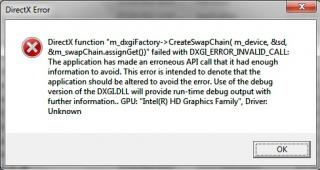
|
|
|
Jan 14 2012, 11:02 PM
Return to original view | Post
#3
|
|
Junior Member
20 posts Joined: Jan 2011
|
^ It keep prompt me in window mode if I set to windows XP SP3. So it ends up I can't see the instruction in game such as "press space" (heard from friend)...
|
|
|
Jan 14 2012, 11:18 PM
Return to original view | Post
#4
|
|
Junior Member
20 posts Joined: Jan 2011
|
^ oppss, just realized the "fixed" mode u meant is referring to bios setting... now it works in fullscreen already after I run in administrator mode. Thanks a lot Acid!
|
|
|
Jan 15 2012, 05:07 PM
Return to original view | Post
#5
|
|
Junior Member
20 posts Joined: Jan 2011
|
Finished the BF3... so dmn fast @__@
|
|
Topic ClosedOptions
|
| Change to: |  0.0599sec 0.0599sec
 0.60 0.60
 7 queries 7 queries
 GZIP Disabled GZIP Disabled
Time is now: 12th December 2025 - 01:19 AM |
 Quote
Quote