

Guys , why now when i load Gallery , it takes long time to load ... what happen ?
SAMSUNG GALAXY S II Official thread V 21, Be a SMART user - Pls read Page 1 first
SAMSUNG GALAXY S II Official thread V 21, Be a SMART user - Pls read Page 1 first
|
|
 Dec 17 2011, 03:10 PM Dec 17 2011, 03:10 PM
Return to original view | Post
#1
|
 
Senior Member
893 posts Joined: Jan 2011  
|
Guys , why now when i load Gallery , it takes long time to load ... what happen ?
|
|
|
|
|
|
Dec 19 2011, 11:21 AM
Return to original view | Post
#2
|
|
Senior Member
893 posts Joined: Jan 2011
|
guys why i cant copy this file to my SD card or Phone already ?
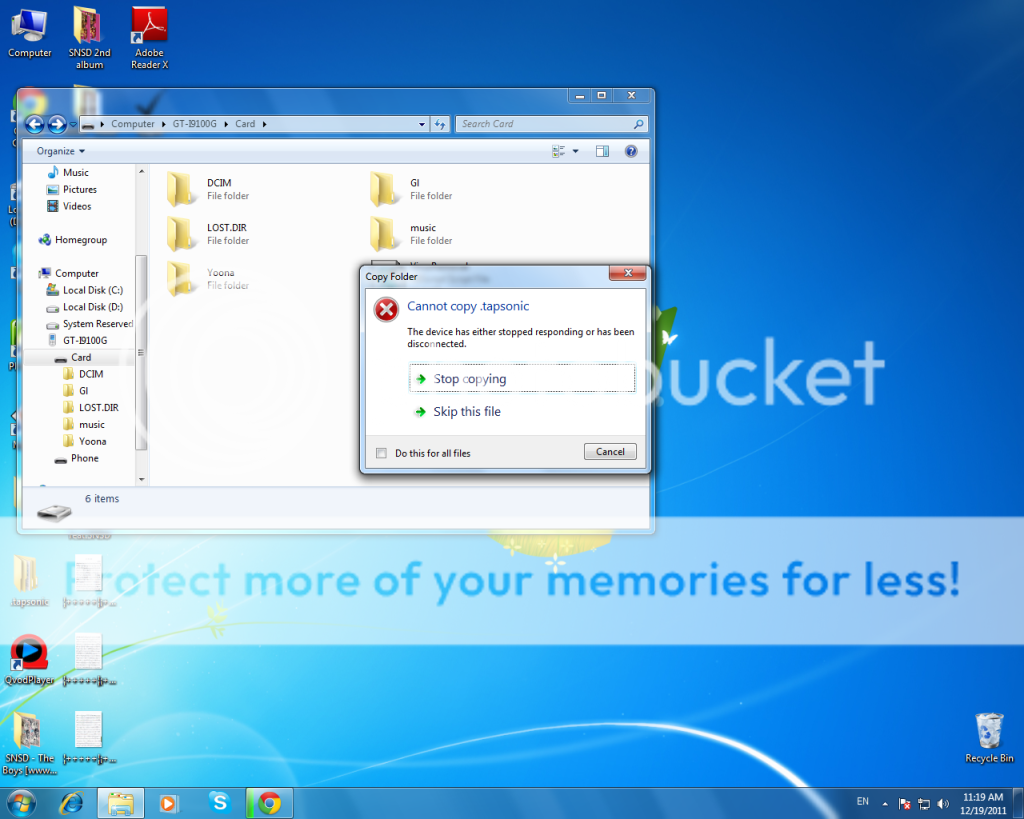 at first i can copy but when i plug out and plug in the file dissapear and i copy again it give me this error , how can i see the file ? |
|
|
Dec 19 2011, 11:26 AM
Return to original view | Post
#3
|
|
Senior Member
893 posts Joined: Jan 2011
|
QUOTE(Matrix @ Dec 19 2011, 11:24 AM) You have the same problem i faced previously: i cant find USB utilitiesEither: 1) Settings->USB Utilities->Connect phone-> Wait until see green Android robot-> Plug in cable to PC USB->Android Robot turned orange->OK. 2) Enable USB Debugging mode. This will ensure you can copy the files faster and correctly.  |
|
|
Dec 19 2011, 11:31 AM
Return to original view | Post
#4
|
|
Senior Member
893 posts Joined: Jan 2011
|
QUOTE(Matrix @ Dec 19 2011, 11:24 AM) You have the same problem i faced previously: i know why already , because the file is hiddenEither: 1) Settings->Wireless and Network->USB Utilities->Connect phone-> Wait until see green Android robot-> Plug in cable to PC USB->Android Robot turned orange->OK. 2) Enable USB Debugging mode. This will ensure you can copy the files faster and correctly. |
|
|
Dec 19 2011, 11:32 AM
Return to original view | Post
#5
|
|
Senior Member
893 posts Joined: Jan 2011
|
and guys now i load my gallery need takes long time already .. why ?
|
|
|
Dec 19 2011, 11:36 AM
Return to original view | Post
#6
|
|
Senior Member
893 posts Joined: Jan 2011
|
QUOTE(antt00 @ Dec 19 2011, 11:34 AM) No your right. I also dunno why they have to enable it there. What is that function anyway, i never used it before. it enable you to see hidden folder |
|
|
|
|
|
Dec 19 2011, 11:40 AM
Return to original view | Post
#7
|
|
Senior Member
893 posts Joined: Jan 2011
|
QUOTE(nomoredfox @ Dec 19 2011, 11:37 AM) ur gallery is growing ??? more files to be read i have YoonA 1799 pics , but before i copy the yoona pics inside the gallery already need takes long time to load |
|
|
Dec 19 2011, 11:43 AM
Return to original view | Post
#8
|
|
Senior Member
893 posts Joined: Jan 2011
|
QUOTE(antt00 @ Dec 19 2011, 11:40 AM) Did you use memory cleaner app or cleared your memory manually? Pic are stored as cache in memory during media scan which makes the gallery app load faster. Or something like that. i din use any app or things , so what can i do to make it load faster ? QUOTE(mengsuan @ Dec 19 2011, 11:40 AM) Did you flash custom kernel? Some custom kernel breaks MTP. Or use old school USB Mass Transfer mode as mentioned by others. i din flash any thingMaybe it's just being hidden. I haven't tried this. Papago is stopping MFM from doing so, not MFM declining to support Papago. |
|
|
Dec 19 2011, 11:52 AM
Return to original view | Post
#9
|
|
Senior Member
893 posts Joined: Jan 2011
|
QUOTE(antt00 @ Dec 19 2011, 11:45 AM) Really i thought they just want to move on to Papago X8.5 and wanted to stop support for older version. Thus asking MFM to do so as well. MFM is still making maps for X8.5. its always slow ..Added on December 19, 2011, 11:47 am Is it fast or slow immediately after reboot and after media scan? |
|
|
Dec 19 2011, 11:58 AM
Return to original view | Post
#10
|
|
Senior Member
893 posts Joined: Jan 2011
|
QUOTE(antt00 @ Dec 19 2011, 11:55 AM) Maybe you just have too much pics + your SD card class is low kua. What is your sd card class? Can you try quickpic from market and see if it is slow or fast? i tried quickpic before , its fast but i think no need to use another apps to load gallery ? i just use stock gallery nvmif there's a way to make it fast tell me k  This post has been edited by dannykhoo17: Dec 19 2011, 11:58 AM |
|
|
Dec 19 2011, 12:19 PM
Return to original view | Post
#11
|
|
Senior Member
893 posts Joined: Jan 2011
|
QUOTE(Matrix @ Dec 19 2011, 12:05 PM) erm...1799 photos...why need to store so many in the card??? Self styled Edison photos iszzit??? my fren show off me XD he have 600 something , then i say i want get 1k lolololol . .BTW, any recommendation for SGS2 leather flip case?? i need to cover front and back. |
|
Topic ClosedOptions
|
| Change to: |  0.0187sec 0.0187sec
 0.51 0.51
 7 queries 7 queries
 GZIP Disabled GZIP Disabled
Time is now: 4th December 2025 - 11:06 AM |
 Quote
Quote