Welcome Guest ( Log In | Register )

Bump Topic Topic Closed RSS Feed
129 Pages « < 114 115 116 117 118 > » Bottom

Outline · [ Standard ] · Linear+

 SAMSUNG GALAXY S II Official thread V 21, Be a SMART user - Pls read Page 1 first

views
     
LittleGhost
post Dec 19 2011, 11:23 AM

臭小鬼
*******
Senior Member
4,234 posts

Joined: Nov 2004


QUOTE(dannykhoo17 @ Dec 19 2011, 11:21 AM)
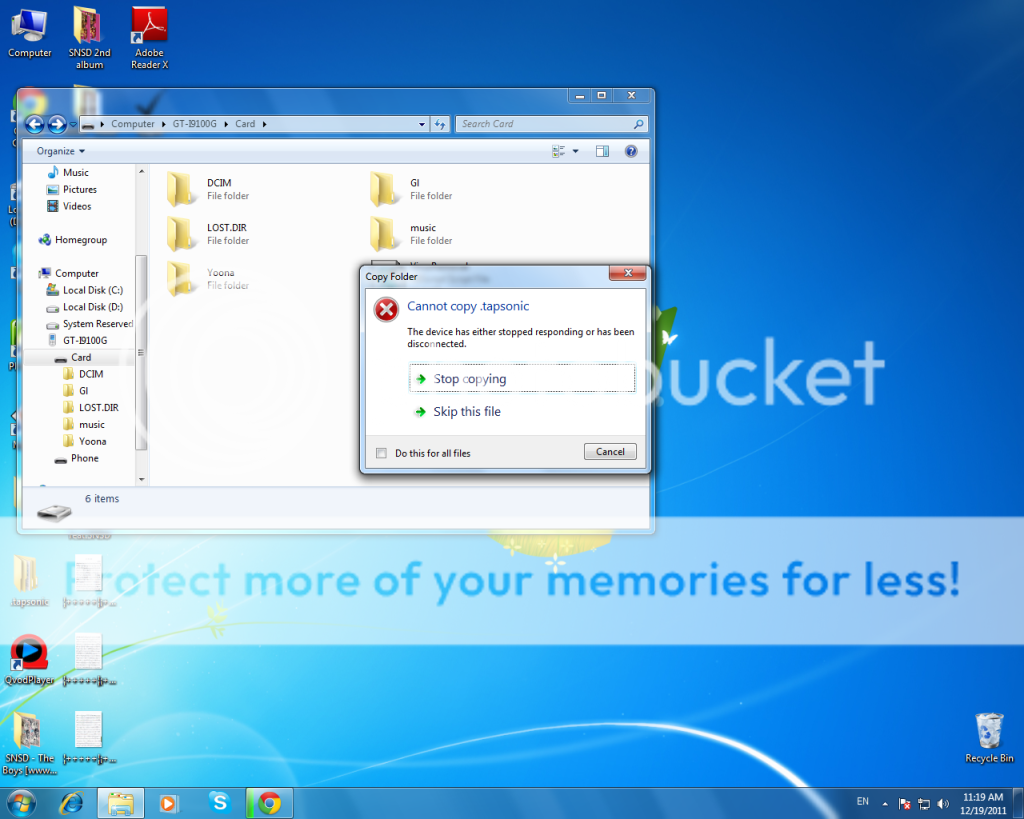
guys why i cant copy this file to my SD card or Phone already ?


at first i can copy but when i plug out and plug in the file dissapear and i copy again it give me this error , how can i see the file ?
*
you need to go into USB Utilities and enable USB transfer mode.

Dont' do it this way.

This post has been edited by LittleGhost: Dec 19 2011, 11:24 AM
SUSMatrix
post Dec 19 2011, 11:24 AM

King of Char Siew!
********
Senior Member
15,022 posts

Joined: Jan 2003
From: Damansara Jaya/Bandar Utama


QUOTE(dannykhoo17 @ Dec 19 2011, 11:21 AM)
guys why i cant copy this file to my SD card or Phone already ?
» Click to show Spoiler - click again to hide... «

at first i can copy but when i plug out and plug in the file dissapear and i copy again it give me this error , how can i see the file ?
*
You have the same problem i faced previously:

Either:
1) Settings->Wireless and Network->USB Utilities->Connect phone-> Wait until see green Android robot-> Plug in cable to PC USB->Android Robot turned orange->OK.

2) Enable USB Debugging mode.

This will ensure you can copy the files faster and correctly.

This post has been edited by Matrix: Dec 19 2011, 11:28 AM
dannykhoo17
post Dec 19 2011, 11:26 AM

DnC
*****
Senior Member
893 posts

Joined: Jan 2011


QUOTE(Matrix @ Dec 19 2011, 11:24 AM)
You have the same problem i faced previously:

Either:
1) Settings->USB Utilities->Connect phone-> Wait until see green Android robot-> Plug in cable to PC USB->Android Robot turned orange->OK.

2) Enable USB Debugging mode.

This will ensure you can copy the files faster and correctly.
*
i cant find USB utilities
LittleGhost
post Dec 19 2011, 11:26 AM

臭小鬼
*******
Senior Member
4,234 posts

Joined: Nov 2004


QUOTE(dannykhoo17 @ Dec 19 2011, 11:26 AM)
i cant find USB utilities
*
under wireless settings.
SUSMatrix
post Dec 19 2011, 11:29 AM

King of Char Siew!
********
Senior Member
15,022 posts

Joined: Jan 2003
From: Damansara Jaya/Bandar Utama


QUOTE(dannykhoo17 @ Dec 19 2011, 11:26 AM)
i cant find USB utilities
*
See my amendments in the post above, under wireless settings..(which IMO, kinda stupid...who would guess USB connection under WIRELESS?? ...LOL )>
dannykhoo17
post Dec 19 2011, 11:31 AM

DnC
*****
Senior Member
893 posts

Joined: Jan 2011


QUOTE(Matrix @ Dec 19 2011, 11:24 AM)
You have the same problem i faced previously:

Either:
1) Settings->Wireless and Network->USB Utilities->Connect phone-> Wait until see green Android robot-> Plug in cable to PC USB->Android Robot turned orange->OK.

2) Enable USB Debugging mode.

This will ensure you can copy the files faster and correctly.
*
i know why already , because the file is hidden
Fallenangelz
post Dec 19 2011, 11:31 AM

24 Hours a day just isn't enough.
*******
Senior Member
3,221 posts

Joined: Sep 2008
From: KL


QUOTE(Matrix @ Dec 19 2011, 11:29 AM)
See my amendments in the post above, under wireless settings..(which IMO, kinda stupid...who would guess USB connection under WIRELESS?? ...LOL )>
*
i tot after plug in the phone, drag down the notification bar and u'll c it? or its only applicable to custom rom? hmm.gif stock memories is fading doh.gif
dannykhoo17
post Dec 19 2011, 11:32 AM

DnC
*****
Senior Member
893 posts

Joined: Jan 2011


and guys now i load my gallery need takes long time already .. why ?
antt00
post Dec 19 2011, 11:34 AM

RescuE
********
All Stars
10,873 posts

Joined: Apr 2009
QUOTE(Fallenangelz @ Dec 19 2011, 11:31 AM)
i tot after plug in the phone, drag down the notification bar and u'll c it? or its only applicable to custom rom? hmm.gif  stock memories is fading  doh.gif
*
No your right. I also dunno why they have to enable it there. What is that function anyway, i never used it before. tongue.gif
dannykhoo17
post Dec 19 2011, 11:36 AM

DnC
*****
Senior Member
893 posts

Joined: Jan 2011


QUOTE(antt00 @ Dec 19 2011, 11:34 AM)
No your right. I also dunno why they have to enable it there. What is that function anyway, i never used it before.  tongue.gif
*
it enable you to see hidden folder
nomoredfox
post Dec 19 2011, 11:37 AM

Casual
***
Junior Member
324 posts

Joined: Sep 2007
From: Currently Penang
QUOTE(dannykhoo17 @ Dec 19 2011, 11:32 AM)
and guys now i load my gallery need takes long time already .. why ?
*
ur gallery is growing ??? more files to be read
antt00
post Dec 19 2011, 11:38 AM

RescuE
********
All Stars
10,873 posts

Joined: Apr 2009
QUOTE(dannykhoo17 @ Dec 19 2011, 11:36 AM)
it enable you to see hidden folder
*
I never touch that function before and i can see hidden folder just fine. Isn't the ability to see hidden folder set on the PC side cos your connecting your phone like a flash drive.
dannykhoo17
post Dec 19 2011, 11:40 AM

DnC
*****
Senior Member
893 posts

Joined: Jan 2011


QUOTE(nomoredfox @ Dec 19 2011, 11:37 AM)
ur gallery is growing ??? more files to be read
*
i have YoonA 1799 pics , but before i copy the yoona pics inside the gallery already need takes long time to load
antt00
post Dec 19 2011, 11:40 AM

RescuE
********
All Stars
10,873 posts

Joined: Apr 2009
QUOTE(dannykhoo17 @ Dec 19 2011, 11:32 AM)
and guys now i load my gallery need takes long time already .. why ?
*
Did you use memory cleaner app or cleared your memory manually? Pic are stored as cache in memory during media scan which makes the gallery app load faster. Or something like that.
mengsuan
post Dec 19 2011, 11:40 AM

9W2NNS
Group Icon
Staff
10,459 posts

Joined: Sep 2005
From: Puchong

QUOTE(dannykhoo17 @ Dec 19 2011, 11:21 AM)
guys why i cant copy this file to my SD card or Phone already ?

» Click to show Spoiler - click again to hide... «
at first i can copy but when i plug out and plug in the file dissapear and i copy again it give me this error , how can i see the file ?
*
Did you flash custom kernel? Some custom kernel breaks MTP. Or use old school USB Mass Transfer mode as mentioned by others.

Maybe it's just being hidden. I haven't tried this.

QUOTE(Matrix @ Dec 19 2011, 11:21 AM)
Why MFM dun wanna support Papago??? shocking.gif....Yeah, i hope you are right about Garmin coming to Android...it'll be stupid to ignore the Android market...they can make much more money selling to the hundreds of millions users rather than waiting for people to buy their Garmin GPS.

Actually, Garmin already have the software on Android in the old ASUS Android phone....no news was heard after that last phone.
*
Papago is stopping MFM from doing so, not MFM declining to support Papago.

This post has been edited by mengsuan: Dec 19 2011, 11:41 AM
dannykhoo17
post Dec 19 2011, 11:43 AM

DnC
*****
Senior Member
893 posts

Joined: Jan 2011


QUOTE(antt00 @ Dec 19 2011, 11:40 AM)
Did you use memory cleaner app or cleared your memory manually? Pic are stored as cache in memory during media scan which makes the gallery app load faster. Or something like that.
*
i din use any app or things , so what can i do to make it load faster ?


QUOTE(mengsuan @ Dec 19 2011, 11:40 AM)
Did you flash custom kernel? Some custom kernel breaks MTP. Or use old school USB Mass Transfer mode as mentioned by others.

Maybe it's just being hidden. I haven't tried this.
Papago is stopping MFM from doing so, not MFM declining to support Papago.
*
i din flash any thing
antt00
post Dec 19 2011, 11:45 AM

RescuE
********
All Stars
10,873 posts

Joined: Apr 2009
QUOTE(mengsuan @ Dec 19 2011, 11:40 AM)
Papago is stopping MFM from doing so, not MFM declining to support Papago.
*
Really i thought they just want to move on to Papago X8.5 and wanted to stop support for older version. Thus asking MFM to do so as well. MFM is still making maps for X8.5.


Added on December 19, 2011, 11:47 am
QUOTE(dannykhoo17 @ Dec 19 2011, 11:43 AM)
i din use any app or things , so what can i do to make it load faster ?
i din flash any thing
*
Is it fast or slow immediately after reboot and after media scan?

This post has been edited by antt00: Dec 19 2011, 11:47 AM
dannykhoo17
post Dec 19 2011, 11:52 AM

DnC
*****
Senior Member
893 posts

Joined: Jan 2011


QUOTE(antt00 @ Dec 19 2011, 11:45 AM)
Really i thought they just want to move on to Papago X8.5 and wanted to stop support for older version. Thus asking MFM to do so as well. MFM is still making maps for X8.5.


Added on December 19, 2011, 11:47 am
Is it fast or slow immediately after reboot and after media scan?
*
its always slow ..
nomoredfox
post Dec 19 2011, 11:55 AM

Casual
***
Junior Member
324 posts

Joined: Sep 2007
From: Currently Penang
QUOTE(dannykhoo17 @ Dec 19 2011, 11:52 AM)
its always slow ..
*
should be normal to load 1799 pictures.... blush.gif

or try some pic management apps...no harm trying...

antt00
post Dec 19 2011, 11:55 AM

RescuE
********
All Stars
10,873 posts

Joined: Apr 2009
QUOTE(dannykhoo17 @ Dec 19 2011, 11:52 AM)
its always slow ..
*
Maybe you just have too much pics + your SD card class is low kua. What is your sd card class? Can you try quickpic from market and see if it is slow or fast?

129 Pages « < 114 115 116 117 118 > » Top
Topic ClosedOptions
 

Change to:
| Lo-Fi Version
0.0283sec    0.57    6 queries    GZIP Disabled
Time is now: 2nd December 2025 - 11:59 PM