

QUOTE(mengsuan @ Dec 15 2011, 11:04 AM)
Use your phone casually until the battery drains out. Then recharge again.
Try it.

i try it tonite..Try it.
see how for tomorrow morning..

SAMSUNG GALAXY S II Official thread V 21, Be a SMART user - Pls read Page 1 first
|
|
 Dec 15 2011, 10:48 PM Dec 15 2011, 10:48 PM
Return to original view | Post
#21
|
 
Junior Member
118 posts Joined: Nov 2011  
|
QUOTE(mengsuan @ Dec 15 2011, 11:04 AM) Use your phone casually until the battery drains out. Then recharge again. i try it tonite..Try it. see how for tomorrow morning.. |
|
|
|
|
|
Dec 16 2011, 01:17 PM
Return to original view | Post
#22
|
|
Junior Member
118 posts Joined: Nov 2011
|
QUOTE(Matrix @ Dec 16 2011, 01:03 PM) Yes. i9100G 2.3.6.  urs look amazing urs look amazingrooted? using stock rom? |
|
|
Dec 16 2011, 02:21 PM
Return to original view | Post
#23
|
|
Junior Member
118 posts Joined: Nov 2011
|
QUOTE(Matrix @ Dec 16 2011, 02:05 PM) Not rooted, stock rom. Dunno how to root anyway!!!   wat u do!!? wat u do!!?mine also G version i go check antutu 1008 nia mine cant play asphalt 6 too |
|
|
Dec 16 2011, 02:43 PM
Return to original view | Post
#24
|
|
Junior Member
118 posts Joined: Nov 2011
|
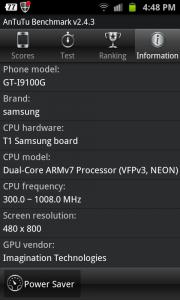
QUOTE(Matrix @ Dec 16 2011, 02:27 PM) Ok, here's the screen shot i took just now. Just to ends all the rumours once and for all. u mean setting>power saving mode?[attachmentid=2588660] See? 5476. This is my i9100G! This is the website comparing G and Non-G http://10division.com/samsung-galaxy-s2-gt...u-need-to-know/ i9100G (LEFT) vs i9100 non-G (RIGHT)  The test above, G scores 4984 (shows 1008Mhz), non-G scores 5662. My G scores 5476 and shows 1200Mhz.  What did i do?? Simple...DISABLE THE AUTO POWER SAVING(usually set to on when battery falls below 50%)!!! If you want power, cannot save juice, simple as that! If power-saving is on, it'll revert to 1008Mhz....  So your choice...save juice or power!!! i thought G version using cortex A9 processor? at antutu there write ARMv7  This post has been edited by bgr41n: Dec 16 2011, 02:52 PM |
|
|
Dec 16 2011, 03:37 PM
Return to original view | Post
#25
|
|
Junior Member
118 posts Joined: Nov 2011
|
LOL sorry i don noe tat
 @Matrix, so how do i need to off the auto power saving thingy..? |
|
|
Dec 16 2011, 04:03 PM
Return to original view | Post
#26
|
|
Junior Member
118 posts Joined: Nov 2011
|
QUOTE(Matrix @ Dec 16 2011, 03:47 PM) Settings->Power Saving Mode. haha.. i on it, my CPU go 1200 MHzsometimes 1008 MHz sometimes 1200 MHz but i wanted to play asphalt 6  This post has been edited by bgr41n: Dec 16 2011, 04:08 PM |
|
|
|
|
|
Dec 16 2011, 05:15 PM
Return to original view | Post
#27
|
|
Junior Member
118 posts Joined: Nov 2011
|
@1wildcat1, what kind of battery apps are u using?? it seem so cool
|
|
|
Dec 16 2011, 05:27 PM
Return to original view | Post
#28
|
|
Junior Member
118 posts Joined: Nov 2011
|
QUOTE(Matrix @ Dec 16 2011, 04:34 PM) This is normal. Intelligent power throttling...even your Intel CPU also like that what...where got run at 4Ghz all the time when doing Word and Excel!!! sometime this sometime that tested out also bcome like that :-o Added on December 16, 2011, 5:30 pm QUOTE(1wildcat1 @ Dec 16 2011, 05:27 PM) haha its not an app, its built in the os, no no.. i mean the right top battery inside got numberSettings > applications > battery usage > click the graph on top there Secret gem by Samsung how u do that or any apps? This post has been edited by bgr41n: Dec 16 2011, 05:30 PM Attached thumbnail(s) 


|
|
|
Dec 17 2011, 08:46 PM
Return to original view | Post
#29
|
|
Junior Member
118 posts Joined: Nov 2011
|
QUOTE(Amal @ Dec 17 2011, 08:38 PM) I love Garmin more... but i don't think they have it on Android... ya lor.. Android support Garmin?? @Matrix, urs G version right?? do u have any problem with the sound thingy?? This post has been edited by bgr41n: Dec 17 2011, 08:50 PM |
|
|
Dec 18 2011, 12:10 AM
Return to original view | Post
#30
|
|
Junior Member
118 posts Joined: Nov 2011
|
QUOTE(Shizuru @ Dec 18 2011, 12:05 AM) go to settings. scroll to the bottom, build version. how could i auto update the android market?download the apk file and install it on your phone http://www.androidpolice.com/2011/12/14/do...d-market-3-4-4/ feel frustrating downloading |
|
|
Dec 18 2011, 12:29 AM
Return to original view | Post
#31
|
|
Junior Member
118 posts Joined: Nov 2011
|
QUOTE(waveweaver @ Dec 18 2011, 12:28 AM) Not all user will get auto updates for market. Only those who enable auto update will get auto otherwise have to update it manually. how to tick (enable) it?where is the setting |
|
|
Dec 18 2011, 12:52 AM
Return to original view | Post
#32
|
|
Junior Member
118 posts Joined: Nov 2011
|
QUOTE(antt00 @ Dec 18 2011, 12:38 AM) Market app update is not up to you. You cannot control it. Why is it so bad to install an apk? problem is.. my modem wifi have a bit problem so normally use wireis easy to install but hard to download straight to my phone |
|
|
Dec 18 2011, 01:06 AM
Return to original view | Post
#33
|
|
Junior Member
118 posts Joined: Nov 2011
|
QUOTE(antt00 @ Dec 18 2011, 12:58 AM)  I dun really understand you but if market were to auto update itself OR if you were to download the apk yourself the amount of data to download is about the same cos its the same apk. I dun really understand you but if market were to auto update itself OR if you were to download the apk yourself the amount of data to download is about the same cos its the same apk. few place in penang got free wifi |
|
|
Dec 18 2011, 10:21 PM
Return to original view | Post
#34
|
|
Junior Member
118 posts Joined: Nov 2011
|
it is hard to lock my current location is other method to make it fast? hope it works on external receiver This post has been edited by bgr41n: Dec 18 2011, 10:22 PM |
|
Topic ClosedOptions
|
| Change to: |  0.0532sec 0.0532sec
 0.07 0.07
 7 queries 7 queries
 GZIP Disabled GZIP Disabled
Time is now: 3rd December 2025 - 02:50 AM |
 Quote
Quote