

QUOTE(pennykia @ Dec 18 2011, 12:24 AM)
if gene come out b4 feb, i will grab it 
when welcome me to the club
meantime, only drooling

by that time i'm going to leave for Ivy already bro... when welcome me to the club
meantime, only drooling

Sandy Bridge-E Overclocking & Tweaking, LGA2011, X79
|
|
 Dec 18 2011, 12:28 AM Dec 18 2011, 12:28 AM
|
 
Elite
8,711 posts Joined: Nov 2007 From: Butterworth, PG / Machang, Kelantan   
|
QUOTE(pennykia @ Dec 18 2011, 12:24 AM) if gene come out b4 feb, i will grab it by that time i'm going to leave for Ivy already bro... when welcome me to the club meantime, only drooling |
|
|
|
|
|
Dec 18 2011, 12:34 AM
|
 
Junior Member
438 posts Joined: Mar 2008 From: Klang 
|
time to buy ur proc
|
|
|
Dec 18 2011, 12:37 AM
|

Senior Member
3,795 posts Joined: Nov 2008 From: Varies....
|
wrong post
This post has been edited by kuntawakaw: Dec 18 2011, 12:41 AM |
|
|
Dec 18 2011, 12:54 AM
|

Senior Member
689 posts Joined: Jun 2008 From: Sri Gombak
|
QUOTE(owikh84 @ Dec 18 2011, 12:09 AM) request granted That is beautiful. Can't wait to finish mine.  » Click to show Spoiler - click again to hide... « * ignore the gay pink, need to add more blood  |
|
|
Dec 18 2011, 10:50 AM
|
|
Elite
8,711 posts Joined: Nov 2007 From: Butterworth, PG / Machang, Kelantan
|
testing (de)compression ability of
i7 3930K @ 5.0GHz 6T/12T G.Skill 2400C9 4X4GB @ 2400MHz 9-11-10-28 compressing a file size 4GB in ~ 8 minutes decompressing in ~ 30 seconds 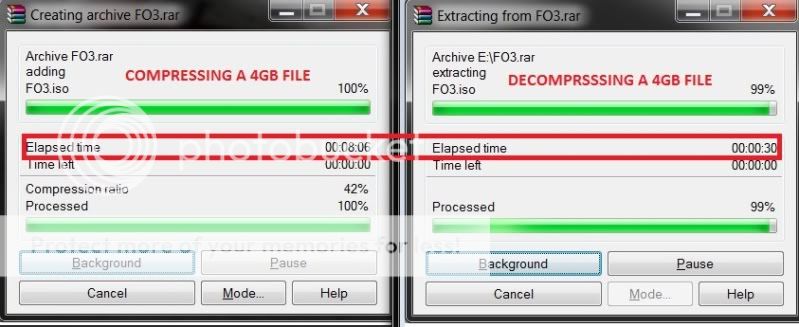 This post has been edited by owikh84: Dec 25 2011, 09:42 AM |
|
|
Dec 25 2011, 09:41 AM
|
|
Elite
8,711 posts Joined: Nov 2007 From: Butterworth, PG / Machang, Kelantan
|
Something wrong with the raid controller I got slower 512k & 4k writes with Crucial M4 raid0 on RIVE...
raid0 on MIVE-Z / 2600K @ 5.0GHz 2133 7-9-7-20  raid0 on RIVE / 3930K @ 5.0GHz 2400 9-11-10-28 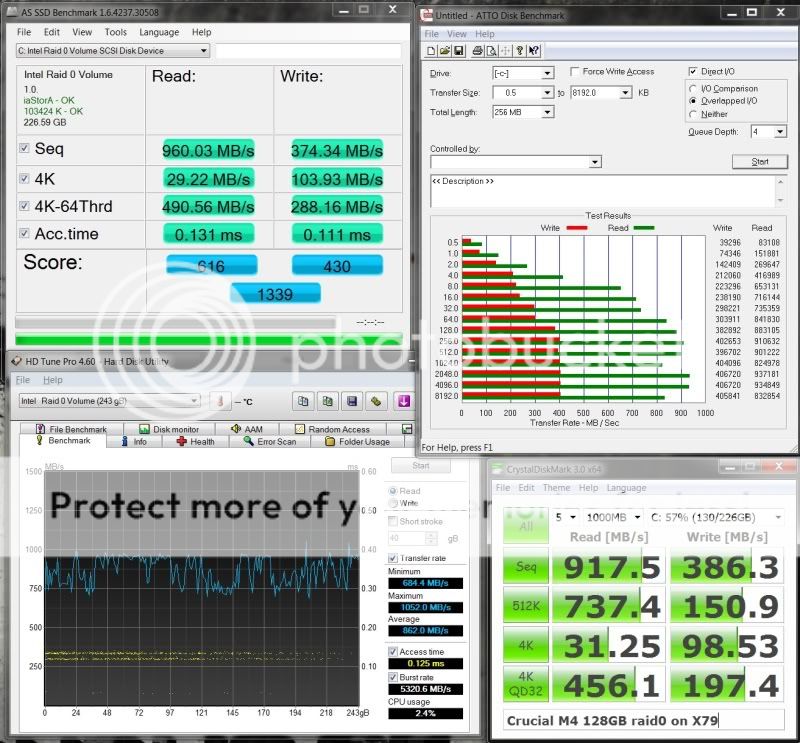 I think it is the Intel driver problem. This post has been edited by owikh84: Dec 25 2011, 09:43 AM |
|
|
|
|
|
Dec 25 2011, 08:23 PM
|

Junior Member
434 posts Joined: Jul 2010 From: ^Newbie^
|
Woo lah.. 2600mhz 10-12-11-32-2T
 |
|
|
Dec 26 2011, 04:00 PM
|

Senior Member
1,134 posts Joined: Apr 2008
|
Mine running 4.5ghz............. forgot to take screenshot when it completed 20 runs linx

|
|
|
Dec 26 2011, 04:33 PM
|
|
Elite
8,711 posts Joined: Nov 2007 From: Butterworth, PG / Machang, Kelantan
|
QUOTE(louislkw @ Dec 25 2011, 08:23 PM) [b]Woo lah.. 2600mhz 10-12-11-32-2T Awesome clocks on 2400C11 kit!vdimm? VCCSA? VTT? which mem profile are u using? Im still struggling to get my 2400C9 sticks clocked at 2600, no post with whatever voltage. Vdimm 1.85v, VCCSA 1.4v, VTT 1.4v, loaded RAW profile. QUOTE(kevink82 @ Dec 26 2011, 04:00 PM) Mine running 4.5ghz............. forgot to take screenshot when it completed 20 runs linx Wow i thought u would skip SBE and wait for IB. Need more detailed snappies, but what a nice try though. |
|
|
Dec 26 2011, 05:41 PM
|
|
Junior Member
434 posts Joined: Jul 2010 From: ^Newbie^
|
load normal oc profile to save all the hassle to disable all the options..
- use latest BIOS - set bclk to 122 and memory to one step lower from 2600mhz.. - go into DRAM option, set to mode 2 and further, set main to 10-12-11-32-2t - reboot and go into BIOS again to bring one step memory up to 2600mhz - reboot and woolah pass code 62 and 96 then u are there - voltages fine tune urself - Good luck to ur hands! dun need such a high voltages.. 1.3vtt 1.65-1.7vdimm vccsa 1.2v should be enough. But mine was special kit. This post has been edited by louislkw: Dec 26 2011, 05:42 PM |
|
|
Dec 26 2011, 06:22 PM
|
|
Elite
8,711 posts Joined: Nov 2007 From: Butterworth, PG / Machang, Kelantan
|
QUOTE(louislkw @ Dec 26 2011, 05:41 PM) load normal oc profile to save all the hassle to disable all the options.. +1 - use latest BIOS - set bclk to 122 and memory to one step lower from 2600mhz.. - go into DRAM option, set to mode 2 and further, set main to 10-12-11-32-2t - reboot and go into BIOS again to bring one step memory up to 2600mhz - reboot and woolah pass code 62 and 96 then u are there - voltages fine tune urself - Good luck to ur hands! dun need such a high voltages.. 1.3vtt 1.65-1.7vdimm vccsa 1.2v should be enough. But mine was special kit.  thanks sir louis, now i demand for 3k |
|
|
Dec 27 2011, 07:24 PM
|
|
Senior Member
1,134 posts Joined: Apr 2008
|
F7 bios for some gigabyte board out that Improve protection mechanism to prevent overhating and destroying the vrms.
Other thing i noticed llc is back to 60% for max just like the initial bios, but overclocking is improved on my ud3 using offset instead. |
|
|
Dec 28 2011, 06:37 AM
|
|
Elite
8,711 posts Joined: Nov 2007 From: Butterworth, PG / Machang, Kelantan
|
QUOTE(kevink82 @ Dec 27 2011, 07:24 PM) F7 bios for some gigabyte board out that Improve protection mechanism to prevent overhating and destroying the vrms. Gigabyte Recalling X79 UD3, UD5, G1.Assassin 2 MotherboardsOther thing i noticed llc is back to 60% for max just like the initial bios, but overclocking is improved on my ud3 using offset instead. QUOTE Gigabyte, in its latest press release on its Chinese website, noted the issue. Apparently it received several such complaints from overclockers where even moderate voltage-assisted CPU OC fried its VRM. The issue was found to be widespread, among three of its main socket LGA2011 products, the GA-X79-UD3, GA-X79-UD5, and G1.Assassin 2. Apparently, the issue is caused by a cocktail of bad firmware to complement the board's PWM circuitry, and bad quality PWM components. As an immediate remedy, Gigabyte issued a BIOS update for the affected products. This BIOS, however, will cripple the board's overclocking abilities. The new BIOS will throttle CPU when subjected to extreme stress, to save the VRM. EDIT: Other sources confirm the recall vr-zone MaximusPC haiz Gigabyte!  |
|
|
|
|
|
Dec 28 2011, 10:07 AM
|
|
Senior Member
1,134 posts Joined: Apr 2008
|
Its not a recall the original article from gigabyte didnt say recall i think they mis translation.
http://www.gigabyte.tw/press-center/news-page.aspx?nid=1077 The press release simply says update the bios over the internet or call support line for help, but if anyone doubt the reliability of the boards listed they can refund it with no question ask. There is not a single word about recall like the p67 revision. |
|
|
Dec 28 2011, 10:51 AM
|

Senior Member
1,857 posts Joined: Sep 2004 From: ocdrift.com
|
技嘉科技全面於各銷售通路召回特定版本之X79主機板進行韌體(BIOS)更新,或由消費者自行進行韌體更新,以確保消費者最大權益。
recalling back just for BIOS update |
|
|
Dec 28 2011, 03:15 PM
|

Senior Member
2,583 posts Joined: Sep 2011 From: Kuala Lumpur
|
Gigabyte did it again. First their boards get plagued with unusual boot loop issue, next they BS about pcie3 (gen3), and now messed up bios on their new board
|
|
|
Dec 28 2011, 04:46 PM
|
|
Senior Member
1,134 posts Joined: Apr 2008
|
Strangely a few boards atm in question, a few site reported even with overclocking asrock board will throttle itself when under load and there is no option to change that.
http://www.xfastest.com/viewthread.php?tid...4&fromuid=38227 a gathering today discussing and testing the issue , the famous Hi-cookie is attending too. |
|
|
Dec 28 2011, 05:39 PM
|
|
Elite
8,711 posts Joined: Nov 2007 From: Butterworth, PG / Machang, Kelantan
|
QUOTE(kevink82 @ Dec 28 2011, 04:46 PM) Strangely a few boards atm in question, a few site reported even with overclocking asrock board will throttle itself when under load and there is no option to change that. i believe throttling is due to PCH/VRM overheat.http://www.xfastest.com/viewthread.php?tid...4&fromuid=38227 a gathering today discussing and testing the issue , the famous Hi-cookie is attending too. Most important thing is don't try anything we don't know to the mobo without active cooling. Even an Asus board also can get burnt without OCP (OC protection) option enabled. |
|
|
Dec 28 2011, 05:41 PM
|
|
Senior Member
2,583 posts Joined: Sep 2011 From: Kuala Lumpur
|
One of my customers' RIVE went kaput in less than a week. Try not to push them too hard at this point
|
|
|
Dec 29 2011, 06:48 PM
|
|
Junior Member
136 posts Joined: Dec 2011
|
Since the new introduction, new boards always got problem *facepalm*
|
| Change to: |  0.2290sec 0.2290sec
 0.52 0.52
 6 queries 6 queries
 GZIP Disabled GZIP Disabled
Time is now: 3rd December 2025 - 07:47 AM |
 Quote
Quote
