Welcome Guest ( Log In | Register )

Bump Topic Topic Closed RSS Feed

Outline · [ Standard ] · Linear+

 SAMSUNG GALAXY NOTE™ | V4, RRP RM2299

views
     
exshige
post Dec 5 2011, 01:59 PM

Getting Started
**
Junior Member
186 posts

Joined: Jan 2003
Did you guys notice that when watching movies on Note, those black area will have very noticeable blinking glossy black box flashing? like during the old days when watching low quality VCD.. and the overall color of the movies is kinda "washed"..

i'm comparing to my s2 also which doesn't have this problem...

tested on both Mx player and default player, both HW or SW rendering.. multiple movies.. tv series and even HDrip..

This post has been edited by exshige: Dec 5 2011, 02:01 PM
exshige
post Dec 5 2011, 03:17 PM

Getting Started
**
Junior Member
186 posts

Joined: Jan 2003
QUOTE(stringfellow @ Dec 5 2011, 02:51 PM)
With the flip cover it's a tight fit but doable. With a case it's not possible.
Signs of a low bitrate movie. It might not be noticeable on your S2 because the resolution is qHD, but on the 1280x800 Note, you're upscaling the movie without improving the image quality with higher bitrate source. Hence the apparent macro blocking.
of cuz i ensure video bitrate is not the issue when i compare.. i even tested on 720p 4GB HDrip..

it will be very noticeable if u watch in dark room..

It has something to do with Gamma cut off of the Note... manage to find some info here..
http://forum.xda-developers.com/showpost.p...1&postcount=103

it seems to be a software setting.. hopefully samsung can tweak again..
exshige
post Dec 5 2011, 03:48 PM

Getting Started
**
Junior Member
186 posts

Joined: Jan 2003
QUOTE(stringfellow @ Dec 5 2011, 03:27 PM)
I seriously don't see anything wrong with mine, and I'm a stickler for details like these.

I'm more inclined to put the reason behind it as this post in the same discussion thread on XDAdev: Display hardware 24bit, video source 16bit or lower.
*
but there are many ppl in the thread further down all also reporting the same problem.. whether is for the good or bad, is irrelevant when the final result is less than ideal and ppl hate it..

and after reading in 1 post that the problem is less apparent in a well lid room.. i immediately open all my room lights and retest... and it improves.. but then we watch video in dark room...
exshige
post Dec 5 2011, 04:08 PM

Getting Started
**
Junior Member
186 posts

Joined: Jan 2003
QUOTE(stringfellow @ Dec 5 2011, 03:59 PM)
Honest to God, I don't see it on mine. It's on 2.3.6 if that helps, on full brightness, and "Dynamic" Screen mode, which should have made it worse, but it hasn't.

Or maybe I don't watch lots of movies with dark scenes in them, or they don't look off-putting  or distracting enough to notice. I dunno.....
*
is ur Note rooted? coz the latest updates i can get is 2.3.5 KJ3 when i check the update from the phone..

there is someone in the thread saynig that KJ4 somehow fix it.. dunno is true or not..

i can say the effect is really distracting.. i have both S2 and Note tested the same file side by side.. S2 don't have this problem at all.. i'm supposedly S2 also a 24 bit screen?
exshige
post Dec 5 2011, 10:35 PM

Getting Started
**
Junior Member
186 posts

Joined: Jan 2003
QUOTE(stringfellow @ Dec 5 2011, 04:21 PM)
I'm rooted. 2.3.6 KK5, Sheep ROM KKA.

Is this what you're seeing?
Nope not this.

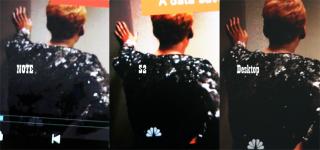
Look at the attachment.. I use camera to capture comparing Note, S2 and my Desktop. Granted this is not a HDrip which is more obvious.

On the Note, it looks like it try to retain more details by overall "brighten" the entire video creating slightly washed colors.. but this is still ok.

the problem is the total sharp black cutoff which resulted in patches of black zone.. and these patches are not still.. they constantly move, shift sizes and blink when the object moves or the dark area change intensity..

on the s2, while u can say mostly all the details are killed by the darkness.. but overall is a more linear gradual from bright to dark. you won't feel there is a "problem"..

This post has been edited by exshige: Dec 5 2011, 10:41 PM


Attached thumbnail(s)
Attached Image
exshige
post Dec 5 2011, 10:51 PM

Getting Started
**
Junior Member
186 posts

Joined: Jan 2003
QUOTE(zad78 @ Dec 5 2011, 10:46 PM)
Hmm come to think of it....i too hv artifacts like that even with a probably ripped 720p toy story 3...the strange thing is that i do not see the artifacts during the end credits which was totally black...
*
yes.. even 720p MKV also has it.. lesser but sure noticeable..

the reason u don't see it at the credit is because the background is like u said.. total blackness..

i think the problems is when u have a few level of blackness on the screen.
exshige
post Dec 6 2011, 03:28 PM

Getting Started
**
Junior Member
186 posts

Joined: Jan 2003
QUOTE(stringfellow @ Dec 5 2011, 11:34 PM)
So which would you rather have? A smaller sized screen but lower resolution giving you a more "forgiving" picture because flaws aren't readily apparent, or a larger sized screen but higher resolution, showing you more of the flaws because it's more apparent due to the limited bitrate to fit into the 4GB file size?
Isn't that better? I don't want to hunt around for patches of black macro blocks or color banding while watching my movies, so HW acceleration by GPU is more desirable.
this is nothing to do with resolution of the screen.. if it is.. then the same movie clip will be even more worst on my desktop which is significantly higher resolution than the note. my desktop is running 1920x1080. from the picture, both s2 and desktop do not have this. and nothing to do with bitrate.. the xda has ppl tested on 1080p MKV clip.

i think is something to do with how note convert those last few level of intensity before complete black to pure black. so u can see a sharp drop from before almost black to pure black.

anyway i tried your way of watching by changing to dynamic mode and increase the brightness to maximum.. the black patches visibility reduce quite a fair bit. I guess i have to stuck at watching movies in max brightness for a while now which will drain on the battery..

can u try changing to Movie Mode and reduce the brightness to the minimum.. and watch some dark scene movie see whether you see it. is either that or your 2.3.6 firmware some how don't have this problem...



Topic ClosedOptions
 

Change to:
| Lo-Fi Version
0.0214sec    0.56    7 queries    GZIP Disabled
Time is now: 8th December 2025 - 01:03 PM