

ohhh... nice to know there is app that can do apk backup easily... definitely better than doing it manually...
SΛMSUNG Galaxy W (I8150) Official Thread V2, A Wonder, A Galaxy S+ in disguise
SΛMSUNG Galaxy W (I8150) Official Thread V2, A Wonder, A Galaxy S+ in disguise
|
|
 Dec 5 2011, 06:29 PM Dec 5 2011, 06:29 PM
Return to original view | Post
#41
|
 
Senior Member
2,248 posts Joined: Sep 2010 
|
ohhh... nice to know there is app that can do apk backup easily... definitely better than doing it manually...
|
|
|
|
|
|
Dec 5 2011, 08:29 PM
Return to original view | Post
#42
|
|
Senior Member
2,248 posts Joined: Sep 2010
|
QUOTE(RayKazansky @ Dec 5 2011, 06:31 PM) Have you guys ran the Antutu thingy? Is this score acceptable for SGW? It's from my unit. My score is 3749, so, your score is acceptable. |
|
|
Dec 5 2011, 10:41 PM
Return to original view | Post
#43
|
|
Senior Member
2,248 posts Joined: Sep 2010
|
QUOTE(leymahn @ Dec 5 2011, 08:43 PM) guys, my mom is using galaxy w, and having some problem with her phone. apparently, she didn't hear the caller voice and the caller can't hear her too. i am in my uni so i can't go check what causing the problem. any help from you guys is highly appreciated Restart phone |
|
|
Dec 5 2011, 10:48 PM
Return to original view | Post
#44
|
|
Senior Member
2,248 posts Joined: Sep 2010
|
QUOTE(INBOOK30 @ Dec 5 2011, 10:20 PM) New user here.. need help. I downloaded some application from Market. But cant view it on the Application area.. Where to find those downloaded application and use it. If market, your app should be there, try check in setting, manage app. If not there, app not install correctly. Installer can be found on /data/app |
|
|
Dec 6 2011, 09:00 AM
Return to original view | Post
#45
|
|
Senior Member
2,248 posts Joined: Sep 2010
|
QUOTE(and.inc @ Dec 5 2011, 11:30 PM) This bug sometimes occur with all Android version...after sometime w/o reboot will appear but rather annoying May be i was lucky, never experience this problem with my previous Ace. But with SGW, twice already... this is where i think damn nokia can do a better job for basic phone functinality... |
|
|
Dec 6 2011, 09:08 AM
Return to original view | Post
#46
|
|
Senior Member
2,248 posts Joined: Sep 2010
|
QUOTE(AlexLai @ Dec 6 2011, 06:33 AM) Nope, don't see any difference. +1Want simple? DooMLoRD's Easy Rooting Toolkit for zergRush is the easiest way to do it. http://forum.xda-developers.com/showthread.php?t=1321582 |
|
|
|
|
|
Dec 6 2011, 11:28 AM
Return to original view | Post
#47
|
|
Senior Member
2,248 posts Joined: Sep 2010
|
QUOTE(ngkhanmein @ Dec 6 2011, 09:09 AM) @cow so early?? u got reboot twice or more?? Not reboot, after owning SGW for almost a month, got 2 times where I can't hear anything after answering a call. Need to reboot to fix this.Added on December 6, 2011, 9:14 am there is 2 different market but now i dunno cos AP set is out jor. made in japan & finish at korea should be real SME set if no mistake. urs confirm AP. i getting doubt those shop who offered SDC warranty. |
|
|
Dec 6 2011, 07:01 PM
Return to original view | Post
#48
|
|
Senior Member
2,248 posts Joined: Sep 2010
|
i brought 32gb Class 10 Micro SD from PC Fair @ RM180. no time to play with it yet...
|
|
|
Dec 7 2011, 08:59 PM
Return to original view | Post
#49
|
|
Senior Member
2,248 posts Joined: Sep 2010
|
QUOTE(annoymous1234 @ Dec 7 2011, 11:18 AM) its nothing. however u should notice those app tat "actomatically start at boot" like glu games. games automatically start at boot? not a good idea. i blacklisted all glu games i hate app that do that too. but i still like to play that game. so, i remove that permission from the game. it's a lengthy process... but i decided to document it here, may be someone will benefit from it:1. Decode the APK CODE java -jar apktool.jar decode com.glu.gladiator-2.apk 2. Edit gladiator/AndroidManifest.xml - Find and remove CODE <uses-permission android:name="android.permission.RECEIVE_BOOT_COMPLETED" /> 3. Rebuild APK CODE java -jar apktool.jar build gladiator 4. Sign APK (*important to use jdk1.6 and not 1.7) CODE "\jdk1.6.0_29\bin\jarsigner" -verbose -keystore your_keystore gladiator\dist\com.glu.gladiator-2.apk your_key_alias 5. Realign byte CODE \android-sdk\tools\zipalign -v 4 com.glu.gladiator-2.apk g.apk 6. Reinstall APK CODE adb install -r g.apk This post has been edited by cowithgun: Dec 7 2011, 09:00 PM |
|
|
Dec 8 2011, 01:59 AM
Return to original view | Post
#50
|
|
Senior Member
2,248 posts Joined: Sep 2010
|
QUOTE(howszat @ Dec 7 2011, 09:43 PM) Ah... looks like you know quite a bit about Java. You are a developer, by any chance? i write some stuff for fun, but i didn't really get paid for doing that, so, guess i m not a developer by profession...   |
|
|
Dec 8 2011, 12:02 PM
Return to original view | Post
#51
|
|
Senior Member
2,248 posts Joined: Sep 2010
|
QUOTE(shiki_arc @ Dec 7 2011, 07:35 PM) Looking forward to CM9! =D for now just playing with GO launcher. Anyway, some1 mentioned a list of useless android apps that could be deleted/freezed. Mind giving a shortlist of it here? And 1 more thing, how do i install papago to external sd? It gives me an error notification. It works if i install in the internal sd but i dun wanna waste the space. I recommend you root the phone, then you can use mount bind or swap sd card to install the NaviSEA to external sd.But for what-ever-reason you dont want to root (root is totally reversible!), you can patch Papago. Using similar trick to Remove Permission from APK, you can change the path for Papago to look for map into /sdcard/external_sd/ 1. Decode the APK CODE java -jar apktool.jar decode PAPAGO_X5SEA.apk 2. Edit PAPAGO_X5SEA\smali\com\mactiontech\Papago.smali - Find and change (2 instances) CODE NaviSEA -> external_sd\NaviSEA 3. Rebuild APK CODE java -jar apktool.jar build PAPAGO_X5SEA 4. Sign APK (*important to use jdk1.6 and not 1.7) CODE "\jdk1.6.0_29\bin\jarsigner" -verbose -keystore your_keystore PAPAGO_X5SEA\dist\PAPAGO_X5SEA.apk your_key_alias 5. Realign byte CODE \android-sdk\tools\zipalign -v 4 PAPAGO_X5SEA.apk papago.apk 6. Uninstall Papago CODE adb uninstall com.mactiontech.X5SEA 7. Install the new Papago CODE adb install papago.apk 8. You can now move the /sdcard/NaviSEA into /sdcard/external_sd/NaviSEA * Most app only give you license to use the app, changing the behaviour of the app may break your license. ** Nothing stopping you to reinstall the original as if nothing happen  *** I m not allow to distribute 'modified' software (i respect hard work of developers, i only modify to suit my own need), you have to buy it yourself and do it yourself. This post has been edited by cowithgun: Dec 8 2011, 12:15 PM |
|
|
Dec 8 2011, 03:49 PM
Return to original view | Post
#52
|
|
Senior Member
2,248 posts Joined: Sep 2010
|
same way to move the map in papago to sd card:
http://forum.lowyat.net/topic/2125489/+1380#entry47302782 if u dont wanna modify it yourself, find patch in google that will do it for u |
|
|
Dec 9 2011, 11:20 AM
Return to original view | Post
#53
|
|
Senior Member
2,248 posts Joined: Sep 2010
|
QUOTE(eekhai @ Dec 9 2011, 10:08 AM) any bros here know how to stop apps like maps and other junk from running background for goods???? i stopped it in application/running services....I even try the ATK(advance task killer) some of the apps keep coming back, consuming my ram......any ideas? Again, dont worry too much about not much free memory since OS will take care of it for us. But if you still would like to free up more RAM, here is a tips on how to free more memory:No danger 1) Go to setting, Running services - Here is list of stuff that always running in background - You will have widget and stuff - Identify widget that you dont use, remove it from your Home screen. Not for novice user 2) In the same Running list, you may see Map, etc which you know you will not use, to really kill it, do this: - Use a Terminal Emulator or ADB shell - List all packages CODE pm list packages - Disable package you dont like, for example Google Map (always running in background duh!) CODE pm disable com.google.android.apps.maps This will permanently disable the App, you cant even see it anymore, no more using your precious RAM, until you enable it back: CODE pm enable com.google.android.apps.maps Personally, I like having those widget in my home screen. I didn't disable any of them. What's the point of having a powerful handphone if you cannot use some fancy stuff?  This post has been edited by cowithgun: Dec 9 2011, 11:24 AM |
|
|
|
|
|
Dec 9 2011, 11:55 AM
Return to original view | Post
#54
|
|
Senior Member
2,248 posts Joined: Sep 2010
|
If you ever use Flipboard before, you will know how awesome it's that app, problem is, that is only for iOS. Google has something similar just launched - Google Currents
Not as fun to use as Flipboard, but it's still better than browser. Here is Google Current in my SGW (*proud) Attached thumbnail(s) 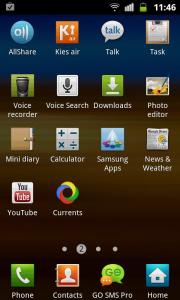
|
|
|
Dec 9 2011, 10:28 PM
Return to original view | Post
#55
|
|
Senior Member
2,248 posts Joined: Sep 2010
|
QUOTE(RayKazansky @ Dec 9 2011, 04:46 PM) Why does Sammy puts SG-related rubbish apks into mah fone?!!! Relax,   No wonder some claimed that Built-In storage not enough.  This post has been edited by cowithgun: Dec 9 2011, 10:33 PM |
|
|
Dec 10 2011, 11:11 AM
Return to original view | Post
#56
|
|
Senior Member
2,248 posts Joined: Sep 2010
|
SGW is not kancil.... just my opinion...
|
|
|
Dec 10 2011, 11:26 AM
Return to original view | Post
#57
|
|
Senior Member
2,248 posts Joined: Sep 2010
|
no no, SGW is at least City / Vios...
SGS+ is MMC City / Vios SGY is probably Civic / Altis SGS2 is Accord / Camry ps: SGY is MyVi pss: Galaxy Mini is Kancil... ya... This post has been edited by cowithgun: Dec 10 2011, 11:31 AM |
|
|
Dec 10 2011, 11:01 PM
Return to original view | Post
#58
|
|
Senior Member
2,248 posts Joined: Sep 2010
|
QUOTE(bluehaven @ Dec 10 2011, 10:40 PM) hi guys, Just in case, check to make sure its not ntfs file system....anyone here using galaxy w with 16gb micro sd card? mine have problem detecting samsung brand 16gb micro sd card..wondering is it just me or others also having same problem with 16gb..or is it the brand? regret not testing out with the phone when buying..haiz.. the card can detect just fine in windows..but when insert into phone and check under storage > sd storage says unavailable...aka not detected at all... btw u can add me into userlist..using black galaxy w for almost a month now.. =) |
|
|
Dec 12 2011, 09:50 AM
Return to original view | Post
#59
|
|
Senior Member
2,248 posts Joined: Sep 2010
|
QUOTE(zaku90 @ Dec 11 2011, 11:36 PM)  anybody got any tips or guide?? bassically i already root and swap my iternal with external... any other good things i can do?? still noob, 1st android.. anybody got any tips or guide?? bassically i already root and swap my iternal with external... any other good things i can do?? still noob, 1st android.. |
|
|
Dec 12 2011, 09:59 AM
Return to original view | Post
#60
|
|
Senior Member
2,248 posts Joined: Sep 2010
|
QUOTE(wyh @ Dec 11 2011, 11:41 PM) damn my phone will turn a bit laggy even cleared those memory especially when going back to menu and going to apps page. widnet also i din use ... its common to lag a bit after you kill all task but just for a short while.this is happening because the OS will reload all component its required. Sometimes that could load up to 50 megabytes of stuff. Your class 2 sd only has speed of 2mb / second, you will see slow down in heavy loading.might be my 8gb class 2 coz too much apps directory in sd card ? Especially if those components is in your sd card. I suspect that is the problem. Once done loading, things should be sooth again. |
|
Topic ClosedOptions
|
| Change to: |  0.0449sec 0.0449sec
 0.75 0.75
 7 queries 7 queries
 GZIP Disabled GZIP Disabled
Time is now: 8th December 2025 - 07:45 AM |
 Quote
Quote